Hide Commands in Menu
 bomian981k downloads
Allows you to hide any command to different menu.
- Overview
- Scorecard
- Updates10
This plugin allows you to hide any commands, including those from community plugins.
Prerequisite
Before using this plugin, ensure you have disabled "Native menus" in Obsidian's Appearance settings!
Features
- Hide different commands across various menus in Obsidian.
- Automatically remove redundant dividers when commands are hidden.
- Inject different CSS classes for menu styling control.
- Use regex pattern matching for advanced rule configurations.
Menu Types
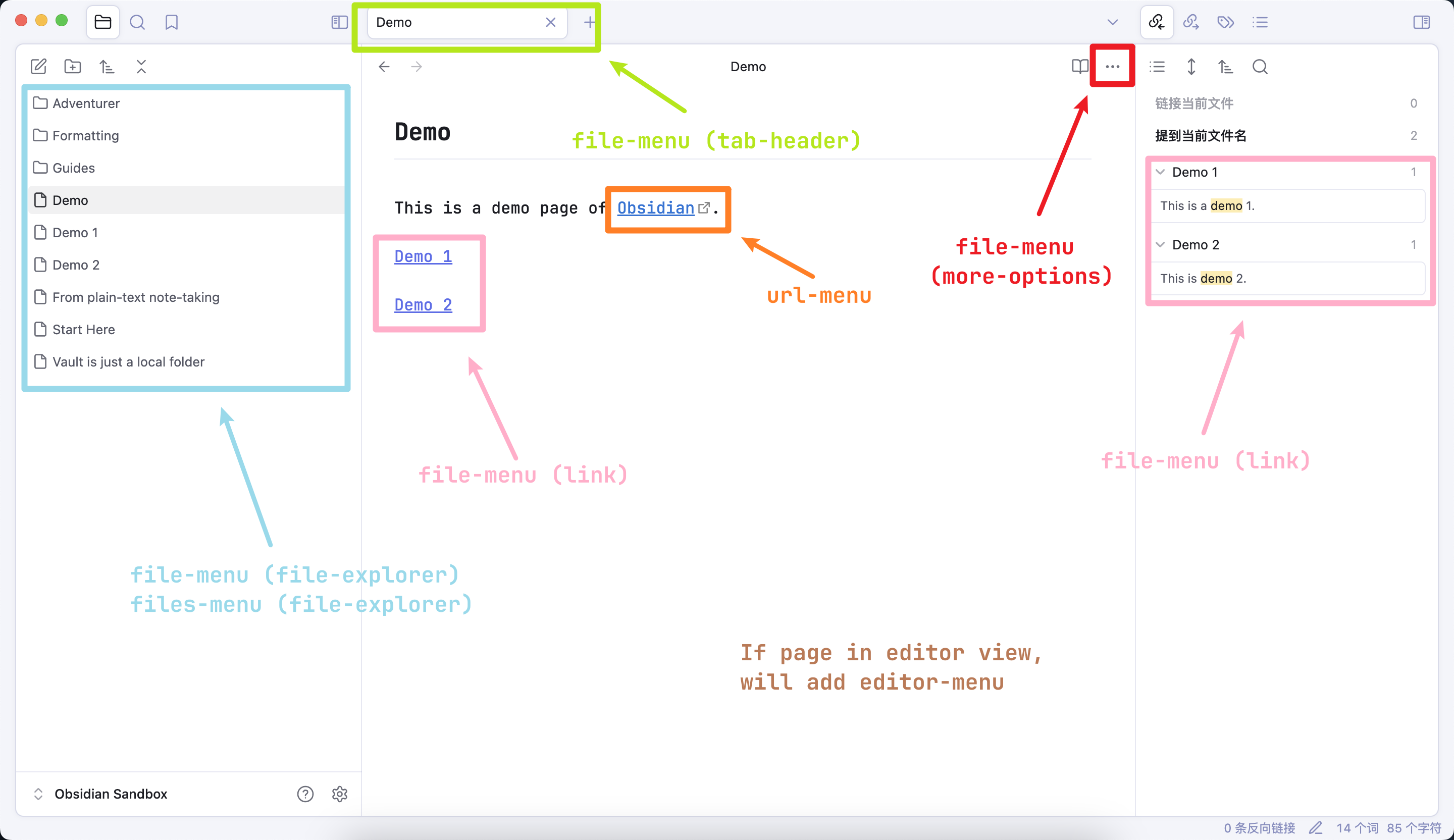
| Menu Type | Trigger Location |
|---|---|
| file-menu (tab-header) | Right-click file tab |
| file-menu (more-options) | Click workspace ··· button |
| file-menu (file-explorer) | Right-click file/folder in explorer |
| file-menu (link) | Right-click internal link |
| files-menu (file-explorer) | Right-click multiple explorer items |
| editor-menu | Right-click in editor view |
| url-menu | Right-click external link |
| other-menu | Any other menu |
Note: When in the editor view, right-clicking a link will also trigger either the
url-menuorfile-menu (link).
To examine the displayed menu, utilize Obsidian's Developer Tools to inspect the menu's HTML class.
Usage
Check the "Menu Types" section for the location of the menu you want to hide commands in.
Then in the plugin settings, choose the menu type and enter the commands you want to hide.
For "plain text format", you can enter the whole command name or part of it.
For "regex format", you can use regex pattern matching.
As this plugin modifies the menu item after it has been displayed, a certain delay time is required to ensure that the menu is fully rendered.
The default delay time is set to 1 millisecond. If hiding does not work as intended, you can adjust this value in the plugin settings.
If hiding does not work when the delay time exceeds 1 second, please report it as an issue on the GitHub repository.
Customize Styles
- Select hide-commands:
div.custom-menu-hide-item - Select hide-separators:
div.custom-menu-hide-separator - Select different menus:
| Menu Type | CSS Selector |
|---|---|
| file-menu (tab-header) | .file-menu-tab-header |
| file-menu (more-options) | .file-menu-more-options |
| file-menu (file-explorer) | .file-menu-file-explorer-context-menu |
| file-menu (link) | .file-menu-link-context-menu |
| files-menu (file-explorer) | .files-menu-file-explorer-context-menu |
| editor-menu | .editor-menu |
| url-menu | .url-menu |
| other-menu | [class="menu"] |
Development Roadmap
- Develop hide commands across multiple menus.
- Hide redundant separators when all enclosed commands are hidden.
- Regex support.
- Multi-language support.
Contributing
The settingTab UI of this plugin is not good. It would be my pleasure if someone can give suggestions for improvement.
Suggestions for other issues of this plugin are also welcome!
License
This project is licensed under the MIT License. See the LICENSE file for details.
Thanks
This plugin was initially a fork of kzhovn's excellent obsidian-customizable-menu.
Enjoy a cleaner Obsidian experience! 🚀