Search...Search plugins and themes...
⌘K
Sign in
  • Get started
  • Download
  • Pricing
  • Enterprise
  • Account
  • Obsidian
  • Overview
  • Sync
  • Publish
  • Canvas
  • Mobile
  • Web Clipper
  • CLI
  • Learn
  • Help
  • Developers
  • Changelog
  • About
  • Roadmap
  • Blog
  • Resources
  • System status
  • License overview
  • Terms of service
  • Privacy policy
  • Security
  • Community
  • Plugins
  • Themes
  • Discord
  • Forum / 中文论坛
  • Merch store
  • Brand guidelines
Follow us
DiscordTwitterBlueskyThreadsMastodonYouTubeGitHub
© 2026 Obsidian

Headings Indicator

willwangwillwang132 downloads

Display heading level markers before headings in Live Preview and Reading view.

Add to Obsidian
  • Overview
  • Scorecard
  • Updates1

An Obsidian plugin that displays heading level markers before headings, matching the heading depth:
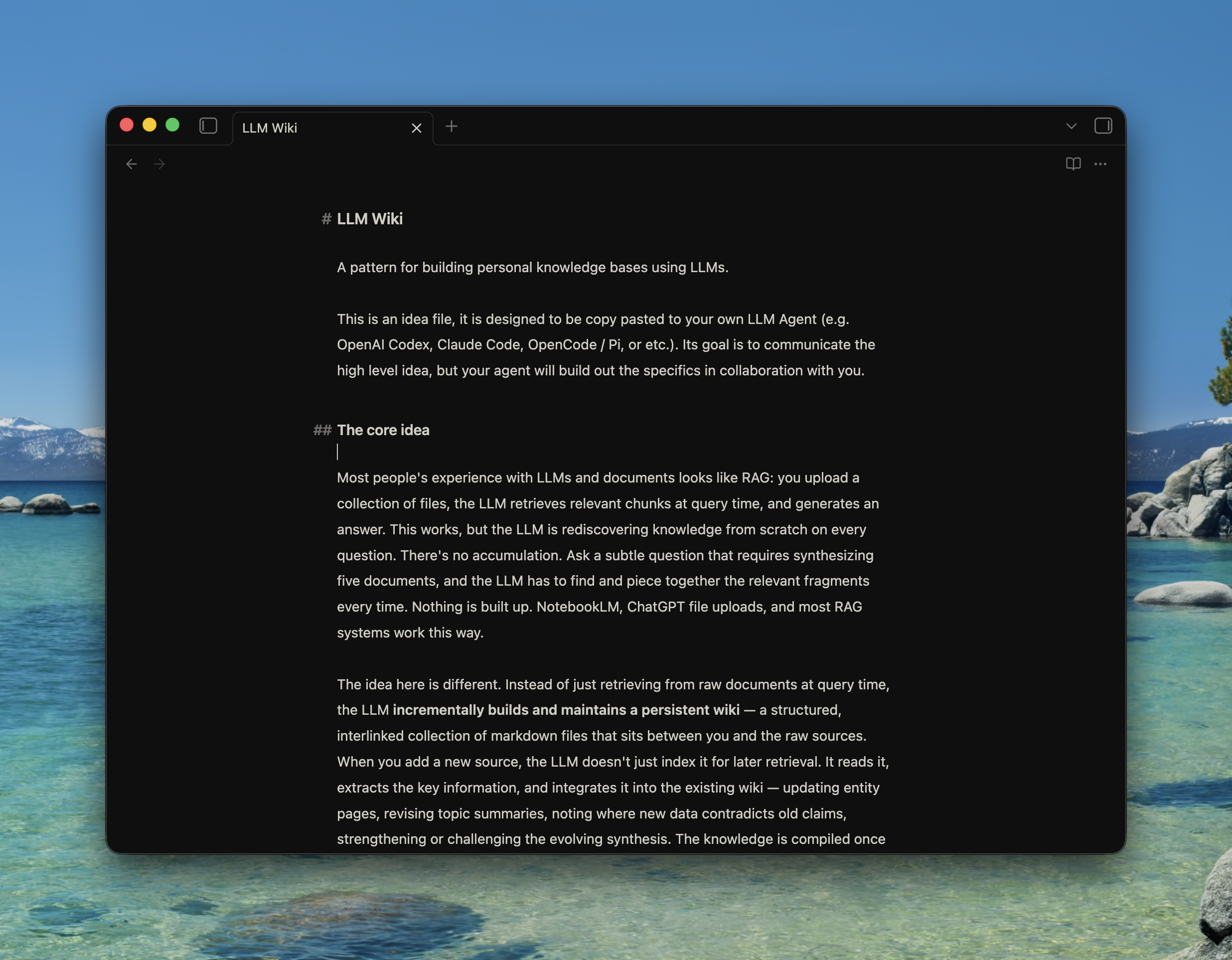
Headings Indicator demo

  • # before H1
  • ## before H2
  • ### before H3
  • up to H6

The indicator appears in Live Preview and Reading view.

Manual Install

  1. Download main.js, manifest.json, and styles.css from the latest GitHub Release.
  2. Create this folder in your Obsidian vault:
<vault>/.obsidian/plugins/headings-indicator/
  1. Put the downloaded files into that folder:
<vault>/.obsidian/plugins/headings-indicator/
  main.js
  manifest.json
  styles.css
  1. Restart Obsidian or reload community plugins.
  2. Enable Headings Indicator in Obsidian community plugins.

Build

npm install
npm run build
HealthExcellent
ReviewSatisfactory
About
Display heading level markers before headings — # for H1, ## for H2, ### for H3 up to H6. Show the indicators in Live Preview and Reading view to visualize document structure while editing and reading.
AppearanceCSS
Details
Current version
0.1.0
Last updated
2 months ago
Created
2 months ago
Updates
1 release
Downloads
132
Compatible with
Obsidian 1.5.0+
Platforms
Desktop, Mobile
License
MIT
Report bugRequest featureReport plugin
Author
willwangwillwangwillsho
GitHubwillsho
  1. Community
  2. Plugins
  3. Appearance
  4. Headings Indicator

Related plugins

Style Settings

Adjust theme, plugin, and snippet CSS variables.

Lapel

Show the heading levels in the gutter of the editor.

Snippetor

Create and tweak common snippets.

Show Whitespace

CSS styles and CM6 extensions to highlight whitespace in Source and Live Preview modes.

Fontsource

Load custom fonts from Fontsource into your notes.

Animated Cursor

Simple yet smooth animated cursor.

Contextual Typography

Add a data-tag-name attribute to all top-level divs in preview mode containing the child's tag name, allowing contextual typography styling.

Better Bullets

Improves readability of bulleted notes.

Focus Mode

Add a toggle to hide interface elements so you can focus on your note.

Enchanted Animations

Animates everything. Experience a completely fluid and responsive interface.