Grimoire
 Michael Makarov5k downloads
Run Claude Code, Codex, Grok, AntiGravity, Qwen Code, and OpenCode as local AI agents in your vault, with chat, inline editing, and tools.
- Overview
- Scorecard
- Updates51

Local-first AI agents for your Obsidian vault.
English · 简体中文 · 繁體中文 · 日本語 · 한국어 · Deutsch · Français · Español · Português · Русский
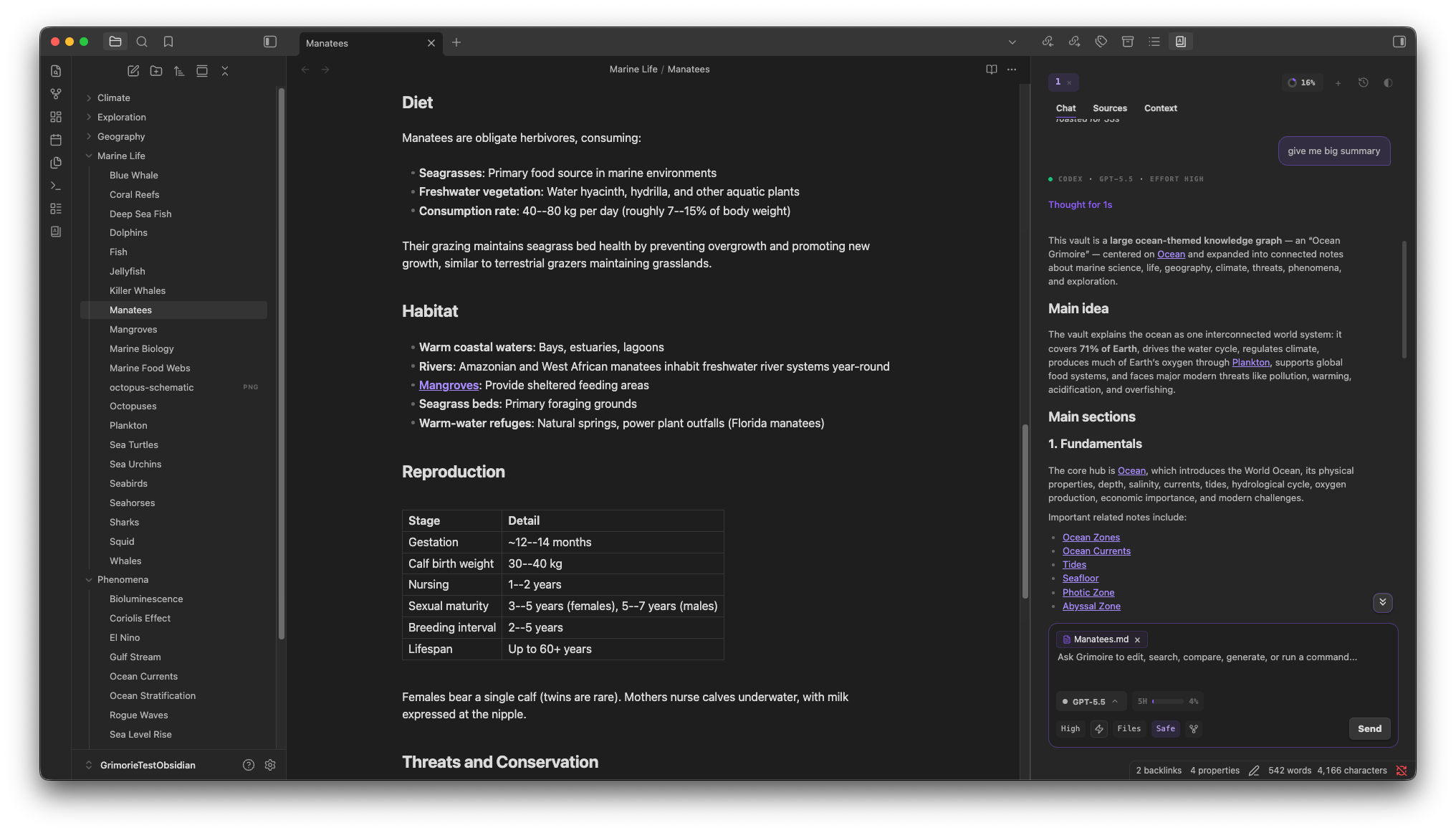
A real vault note and a conversation grounded in its links.
Grimoire brings agentic CLI assistants into Obsidian. Codex, Claude Code, Antigravity CLI, Gemini CLI (Legacy), OpenCode, MiMoCode, Kimi Code, Grok Build, Qwen Code, Devin, Reasonix, and Command Code all live in one side panel, where they read your notes, edit files, run commands, call tools, and keep session history against your real vault. Nothing routes through a Grimoire server. There's no telemetry, no hosted backend, and no proxy sitting in the middle.
It's built for people who already work in Obsidian and want AI help that behaves like part of the vault: local context, local files, a provider you pick on purpose, and usage you can actually see.
Why Grimoire
- Use the CLI agents you already trust, right inside your notes.
- Switch providers from the composer. Codex, Claude Code, Antigravity CLI, legacy Gemini CLI, OpenCode, MiMoCode, Kimi Code, Grok Build, Qwen Code, Devin, Reasonix, and Command Code share one model picker.
- Ground every turn in your vault. Mention notes, folders, and MCP tools instead of pasting paths by hand.
- See cost and limits next to the model selector, where you're making the decision anyway.
- Stay local-first. Grimoire doesn't collect telemetry, proxy prompts, or run a backend.
What each provider can do
| Capability | Codex | Claude Code | OpenCode | Grok Build | MiMoCode | Kimi Code | Antigravity CLI | Gemini CLI (Legacy) | Qwen Code | Devin | Reasonix | Command Code |
|---|---|---|---|---|---|---|---|---|---|---|---|---|
| Local persistent runtime | Yes | Yes | Yes | Yes | Yes | Yes | No | Yes | Yes | Yes | Yes | No |
| Native history hydration | Yes | Yes | Yes | Yes | Yes | Yes | No | Yes | No | No | No | No |
| Plan mode | Yes | Yes | Yes | Yes | Yes | Yes | No | Yes | Yes | Yes | Yes | No |
| Image attachments | Yes | Yes | Yes | No | Yes | Yes | Files | Yes | Yes | Yes | No | Files (opt-in) |
| Instruction mode | Yes | Yes | Yes | Yes | Yes | Yes | No | Yes | Yes | Yes | Yes | No |
| Reasoning effort controls | Yes | Yes | Yes | Yes | Yes | Yes | Yes | Yes | Yes | No | Yes | Yes (model-specific) |
| Rewind | No | Yes | No | Yes | No | No | No | No | No | No | No | No |
| Fork | Yes | Yes | No | Yes | No | No | No | No | No | No | No | No |
| Provider slash commands | No | Yes | Yes | Yes | Yes | Yes | No | Yes | Yes | Yes | Yes | No |
| Grimoire-managed MCP UI | No | Yes | Yes | Yes | Yes | Yes | No | Yes | Yes | Yes | Yes | No |
Installation
Grimoire is a desktop plugin. It drives your provider CLIs locally, so there's no mobile build.
From Community plugins (recommended)
Install Grimoire from the Obsidian community plugin directory:
- Open Settings, go to Community plugins, and turn off Restricted mode if it's on.
- Click Browse, search for Grimoire, and install it.
- Enable Grimoire, then open its panel from the ribbon or the command palette.
From GitHub Releases
Install the current release manually if you can't use Community plugins:
- Download
main.js,manifest.json, andstyles.cssfrom the latest Grimoire release. - Create
/path/to/your/vault/.obsidian/plugins/grimoire. - Put all three files in that folder.
- Enable Grimoire from Settings, Community plugins.
With BRAT
BRAT can install Grimoire from GitHub Releases if you want to track tagged builds outside the community directory:
- Install the "Obsidian42 - BRAT" plugin.
- In BRAT, add a beta plugin from
sandsaber/Grimoire. - Enable Grimoire.
From source (developers)
Build the release bundle and drop it into your vault:
npm install
npm run build:release

mkdir -p /path/to/your/vault/.obsidian/plugins/grimoire
cp dist/grimoire/main.js dist/grimoire/manifest.json dist/grimoire/styles.css \
  /path/to/your/vault/.obsidian/plugins/grimoire/
Then enable Grimoire from Settings, Community plugins.
Whichever path you pick, install at least one CLI provider before you start. Grimoire wraps the provider CLIs. It doesn't replace their account setup, model access, quotas, or terms.
Set up a provider
Enable the providers you want under Settings, Grimoire, Providers, and they'll appear in the model selector. Codex is enabled on first launch; the rest are opt-in.
Recommended providers
For the best Grimoire experience, start with Codex, Claude Code, OpenCode, MiMoCode, Kimi Code, Grok Build, or Qwen Code. These providers currently expose the strongest runtime surfaces for vault-native work: persistent sessions, plan-oriented workflows, tool activity, and rich model controls.
Antigravity CLI and Gemini CLI (Legacy) remain available for Google accounts and compatibility cases, but they are not recommended as primary Grimoire providers today. Grimoire supports them on a best-effort basis, and we have implemented the fallbacks their current CLIs make possible, but their ACP and runtime surfaces are technically limited: sessions, approvals, streaming, tool/edit metadata, model discovery, and usage reporting are incomplete or unreliable compared with the recommended providers.
Codex
Codex is the default provider on first launch. Pick it for OpenAI Codex in a local CLI, signed in with your ChatGPT plan or an API key.
curl -fsSL https://chatgpt.com/codex/install.sh | sh
codex
Run it once, sign in, then enable it in Grimoire. The standalone installer is the primary install path now; use the official Codex CLI docs for Windows, Homebrew, and fallback package-manager options.
Inside Grimoire, Codex runs on its app-server protocol with native history, fork, plan mode, image input, and reasoning effort controls. Plan usage shows up when Codex reports rate-limit metadata.
Claude Code
Pick Claude Code when you want its native project memory, slash commands, MCP configuration, plans, and rewind/fork, backed by your Claude subscription or API key.
curl -fsSL https://claude.ai/install.sh | bash
claude
Authenticate through Claude Code, then enable it in Grimoire. The old npm package is deprecated; use the native installer above, Homebrew (brew install --cask claude-code), WinGet, or the other options in the official quickstart.
Inside Grimoire, Claude Code reads and preserves your .claude/ files, runs on the Claude Code SDK, and supports slash commands, MCP settings, agents, skills, plans, rewind, and fork. When Claude reports both, you'll see quota windows and API spend side by side.
Respect Claude Code settings is enabled by default. Grimoire reads Claude Code user settings (~/.claude/settings.json) and vault settings (.claude/settings.json) for model and env, then uses those values in the Claude model selector and runtime environment. This lets Claude Code custom models work in Grimoire too, including Anthropic-compatible gateways such as MiniMax, Z.ai, and others. Project settings override user settings, and explicit Grimoire environment settings override both.
If the effective Claude environment includes ANTHROPIC_API_KEY, Grimoire can refresh Anthropic's model catalog and merge discovered models into the picker. Without an API key, or if the refresh fails, the picker keeps working from Claude Code aliases such as Best, Fable 5, Opus Plan, and 1M variants, plus your .claude and custom Grimoire models.
{
  "env": {
    "ANTHROPIC_BASE_URL": "https://api.z.ai/api/anthropic",
    "ANTHROPIC_MODEL": "glm-5.2[1m]",
    "ANTHROPIC_DEFAULT_HAIKU_MODEL": "glm-4.7-flash"
  }
}
Antigravity CLI
Antigravity CLI is Google's replacement for consumer Gemini CLI use, and it can access Gemini, Claude, GPT-OSS, and other model families available to your Antigravity account. Inside Grimoire, treat it as a compatibility provider rather than the recommended default.
agy
Install the official Antigravity CLI from Google, authenticate it locally, then enable Antigravity in Grimoire. Grimoire auto-detects agy from PATH, or you can set a custom CLI path in provider settings.
Inside Grimoire, Antigravity runs through agy --print with optional model selection from agy models, and Grimoire folds the active note plus editor, browser, canvas, vault-search, and project-workspace context into that print prompt. Images are supplied as temporary files for the model to read; attach them again for follow-up turns. This is a best-effort integration because agy does not currently expose a strong ACP-compatible runtime to Grimoire. Persistent sessions, native history, plan mode, streaming, approval-safe file edits, reliable usage reporting, and auxiliary workflows stay disabled or limited until Antigravity exposes stable runtime surfaces for them.
Known Windows limitation: current Windows agy builds can finish successfully while returning empty stdout for agy models and agy --print. Grimoire uses best-effort recovery from Antigravity logs, transcripts, settings, and a seeded Pro AI model list, but Windows Antigravity support may be less reliable than macOS or Linux until the upstream CLI exposes stable output. If your account shows additional models in Antigravity, add their exact labels under Antigravity settings > Custom models.
agy --print does not expose Grimoire file-edit approval hooks. For safety, Antigravity's shared Safe/normal mode is blocked in Grimoire; switch the Antigravity toolbar toggle to Auto-approve only when you are comfortable with AGY editing files without Grimoire prompts.
Gemini CLI (Legacy)
Gemini CLI remains available as a legacy compatibility provider for Gemini Code Assist Standard, Enterprise, Google Cloud, and paid API-key users where Google continues serving Gemini CLI requests. It is not recommended for new Grimoire setups because its ACP support is weak and several Grimoire workflows cannot be implemented reliably on top of it. Consumer Google AI Pro, Ultra, and free-tier accounts should use Antigravity instead after Google's June 18, 2026 transition, with the Antigravity limitations above in mind.
gemini
Enable Gemini CLI only if your account tier is still supported and you specifically need that legacy Google path. Grimoire runs it through gemini --acp, folds the active note plus editor, browser, canvas, vault-search, and project-workspace context into the ACP prompt, keeps its model and mode discovery provider-owned, and labels it as legacy so it does not look like a recommended provider. Prefer Codex, Claude Code, OpenCode, MiMoCode, Kimi Code, Grok Build, or Qwen Code when possible.
Qwen Code
Qwen Code is an opt-in ACP provider. It keeps provider-native persistent sessions, resume, and model context; discovers models and modes from the live ACP session; streams messages, tool activity, and plans; and supports image input, provider commands, and file approvals. Grimoire does not hydrate provider-native message history.
Image input requires a vision-capable model and access to it on your account. For a custom vision model, verify that Qwen's model entry declares generationConfig.modalities.image: true when its automatic detection does not recognize the model. Otherwise Qwen can replace image input with text placeholders before calling the model. See Qwen model configuration.
# Linux and macOS (recommended standalone install)
curl -fsSL https://qwen-code-assets.oss-cn-hangzhou.aliyuncs.com/installation/install-qwen-standalone.sh | bash

# Windows PowerShell
irm https://qwen-code-assets.oss-cn-hangzhou.aliyuncs.com/installation/install-qwen-standalone.ps1 | iex

# Alternative installs
brew install qwen-code
npm install -g @qwen-code/qwen-code@latest # Node.js 22+

qwen --version
qwen
In the interactive CLI, use /auth and choose Alibaba ModelStudio, Third-party Providers, or Custom Provider. Qwen OAuth has been discontinued. Then enable Qwen Code in Grimoire; it launches qwen --acp. Safe, Auto-approve, and Plan map to Qwen's default, yolo, and plan modes. Other Qwen automatic modes are shown conservatively as Safe in the shared toolbar.
If Qwen does not start or no models appear, run /doctor inside Qwen Code, complete /auth, verify qwen --version, and check the Qwen CLI path in Grimoire settings.
Choose Low, Medium, High, XHigh, or Max reasoning effort (High by default). Before a normal turn, Grimoire applies Qwen's real /effort <tier> command and caches it for that session; the effective tier still depends on the selected model and provider. Qwen's structured AskUserQuestion requests arrive through ACP permission metadata and use Grimoire's shared inline question UI, including single-select, multi-select, and freeform answers.
Qwen owns its credentials and native configuration in ~/.qwen/settings.json; prefer the CLI or Qwen-owned .env and environment variables for those settings. Grimoire manages an isolated project MCP list in .grimoire/mcp/qwen.json and injects it into ACP sessions without rewriting Qwen's native configuration. Usage appears only when Qwen emits ACP token or cost metadata. Qwen does not currently support Grimoire fork or rewind controls.
Devin
Devin CLI (Cognition) is an opt-in ACP provider. Grimoire launches devin acp, discovers the models and modes your account offers from the live session, streams messages, thinking, and tool activity, asks before shell commands and file writes, and resumes sessions natively. The model list depends on the account you are signed in with; that is Devin's, not Grimoire's.
# macOS, Linux, WSL
curl -fsSL https://cli.devin.ai/install.sh | bash

# Homebrew
brew install --cask devin-cli

devin auth login
devin --version
Sign in with devin auth login (a browser flow), then enable Devin in Grimoire. Safe, Auto-approve, and Plan map to Devin's accept-edits, bypass, and plan modes; Devin's smart and ask are shown as Safe in the shared toolbar.
One thing to know about Safe mode: Devin decides for itself which shell commands are read-only and runs those without asking, and echo counts as read-only even when it redirects into a file. Grimoire approves every file write Devin makes through the protocol, but a write the agent routes through its own shell can slip past that. For a session that must not write, use Plan.
Devin owns its credentials in ~/.local/share/devin/. Vault skills are read from .devin/skills and .agents/skills, and a skill is Devin's slash command. Grimoire manages an isolated project MCP list in .grimoire/mcp/devin.json and injects it into ACP sessions. Usage appears when Devin reports it; there is no reasoning effort control, because the effort is part of the model id. Devin does not support Grimoire fork or rewind controls.
Reasonix
Reasonix is an open-source, multi-model coding agent, and an opt-in ACP provider here. Grimoire launches reasonix acp, reads the models and modes from the live session, streams messages, thinking, tool activity, and plans, asks before permission-gated tools and file writes, and resumes sessions natively. Which models a session offers depends on the provider blocks in your Reasonix configuration; that is Reasonix's, not Grimoire's.
# npm
npm i -g reasonix

# Homebrew
brew install esengine/reasonix/reasonix

reasonix setup
reasonix --version
Run reasonix setup to configure a model provider and its credentials, then enable Reasonix in Grimoire. Reasonix keeps two settings where other providers keep one: the session mode (normal, plan, goal) and a separate tool-approval posture (ask, auto, yolo). Grimoire's toolbar drives both. Safe is normal asking, Plan is plan asking, and Auto-approve is normal on yolo; goal is Reasonix's own and reads as Safe. Because the posture is the only thing separating Safe from Auto-approve, a turn that cannot set it is refused rather than run quietly in the looser one.
Reasonix also asks questions, not only permissions: its ask tool arrives on the same channel and is drawn as a card whose description is the question and whose numbered options are the answers. Pick one by its number; Enter does nothing on a card with several answers, so a habitual keypress cannot choose for you.
Reasoning effort is a picker fed by the session, not a fixed list. Which levels a model takes is decided by the provider block that serves it: one declaring supported_efforts offers Disabled, Low, High and Max, one without gets its kind's built-in set. Grimoire reads whatever the open session offers and puts Auto at the head, which leaves the choice to Reasonix. A level the session never offered is never sent, because the CLI refuses it against the model.
One thing to know about Safe mode: ask gates the tools Reasonix classifies as permission-gated, not every tool, so a shell command it judges read-only can run without a prompt. Grimoire approves every file write Reasonix makes through the protocol, which is what keeps the vault behind a question. For a session that must not write, use Plan.
Reasonix owns its configuration in ~/.reasonix/config.toml and reads API keys from the environment under the names that file gives. Vault skills are read from .reasonix/skills and .agents/skills. Grimoire manages an isolated project MCP list in .grimoire/mcp/reasonix.json and injects it into ACP sessions. Usage comes from Reasonix's own status notifications, and a cost appears only when your model provider has a price. Image attachments, fork, and rewind are not supported.
Command Code
Command Code is opt-in in the unreleased 2.0 build. Install and authenticate in a terminal, then enable it under Settings → Grimoire → Providers:
npm i -g command-code
command-code login
Reasoning effort is discovered for the selected model from the installed CLI. The picker offers only that model's supported levels and a CLI default option; models without adjustable effort have no picker. Explicit selections apply to the current run through the native session mod API without changing global CLI settings. CLI default preserves native behavior, including an effort already stored in a resumed session.
Grimoire streams answers and tool activity from the CLI's headless JSON output, discovers models with --list-models, and saves the native session ID for explicit resume after reload. Authentication, native configuration, skills, MCP and transcripts stay with Command Code. Context usage uses reported input tokens against an estimated or user-supplied context limit; account quotas and prices are not inferred.
Under Models → Visible models, search the live CLI catalog and select the models to show in chat. Refresh models updates the catalog while preserving your selection; Show all models restores the full catalog. Saved selections that disappear from discovery remain listed so you can remove them.
Enable Image attachments as files to send pasted or dropped images through the CLI's file-reading tool. Choose a model that supports images: the catalog does not report this capability. Grimoire keeps the image in .grimoire/attachments/ and appends its path to the prompt; reading it requires an extra tool call. Missing or unwritable attachments fail the turn instead of being silently omitted.
Safe pauses edits, commands and other non-read tools for a one-time approval in Grimoire. Denying, cancelling or losing the approval connection prevents execution. Safe currently requires the verified Command Code 1.53.0 npm installation and disables native subagents, whose separate loops cannot use this approval bridge. Auto-approve runs without Grimoire prompts; native deny and ask rules still apply in both modes. This integration does not expose interactive questions, plan controls, slash commands, managed MCP/skills/agents, auxiliary tasks, fork, rewind, or native history import.
OpenCode
Pick OpenCode for a model-agnostic agent that brings its own provider configuration.
curl -fsSL https://opencode.ai/install | bash
opencode
Homebrew, npm, bun, and package-manager installs work too. Configure your provider credentials in OpenCode, then enable it in Grimoire.
Inside Grimoire, OpenCode runs over ACP with Grimoire-managed launch artifacts, plus persistent runtime, native history, plan mode, image input, provider commands, and reasoning effort. It reports monthly spend when cost metadata is available.
MiMoCode
MiMoCode (Xiaomi) is a fork of OpenCode with persistent memory, intelligent context management, and subagent orchestration.
curl -fsSL https://mimo.xiaomi.com/install | bash
mimo
Kimi Code
Kimi Code CLI (MoonshotAI) is a multi-provider terminal agent supporting Kimi, OpenAI, Anthropic, Gemini, and Vertex AI models.
curl -fsSL https://code.kimi.com/kimi-code/install.sh | bash
kimi
Grok Build
Pick Grok Build for xAI's agentic CLI in Obsidian. Sign in with Grok OAuth or use an xAI API key.
grok
Install the Grok CLI from xAI, authenticate with grok.com OAuth or configure API keys, then enable Grok Build in Grimoire.
Grok 4.5 is currently the default model powering Grok Build. Grimoire discovers the available model catalog from the authenticated Grok CLI account instead of maintaining a static list, so availability can vary by account and CLI version and update automatically.
Inside Grimoire, Grok Build runs over ACP via grok agent stdio with Grimoire-managed launch artifacts under .grimoire/grok/, persistent runtime, native JSONL history hydration, plan mode, image input, provider commands, reasoning effort on native models, rewind, and fork. With OAuth, Grimoire shows the shared weekly Grok usage allowance, reset time, and Extra Usage Credits when available; API spend aggregates from session cost metadata when reported.
Your first chat
- Pick a provider and model in the composer.
- Set reasoning effort and choose Safe, Auto-approve, or Plan in the permission control.
- Mention any notes, folders, or context you want in scope.
- Send the turn.
- Watch tool calls, usage, and output land in the panel.
Features
Chat workspace
A focused side panel with multiple tabs. Each tab keeps its own draft, provider, model, context, and runtime. Close and reopen Obsidian and your sessions come back, with the provider, model, and reasoning effort preserved on every response. Rewind and fork appear when the active provider supports them. Auto-scroll backs off the moment you scroll away to read something. After 10 seconds without visible output, a shared wait indicator shows the active provider and elapsed time; it pauses while a question or permission is waiting.
Tab, history, and navigation controls
Open the tab actions menu or right-click a tab to rename, duplicate, or close tabs. Middle-click closes a tab, and Undo restores its draft and position. Search past chats in the history popover and reopen a conversation in a new tab. History marks manually named and auto-generated titles. The transcript toolbar provides jump controls and a thread outline; completed answers show their completion time.
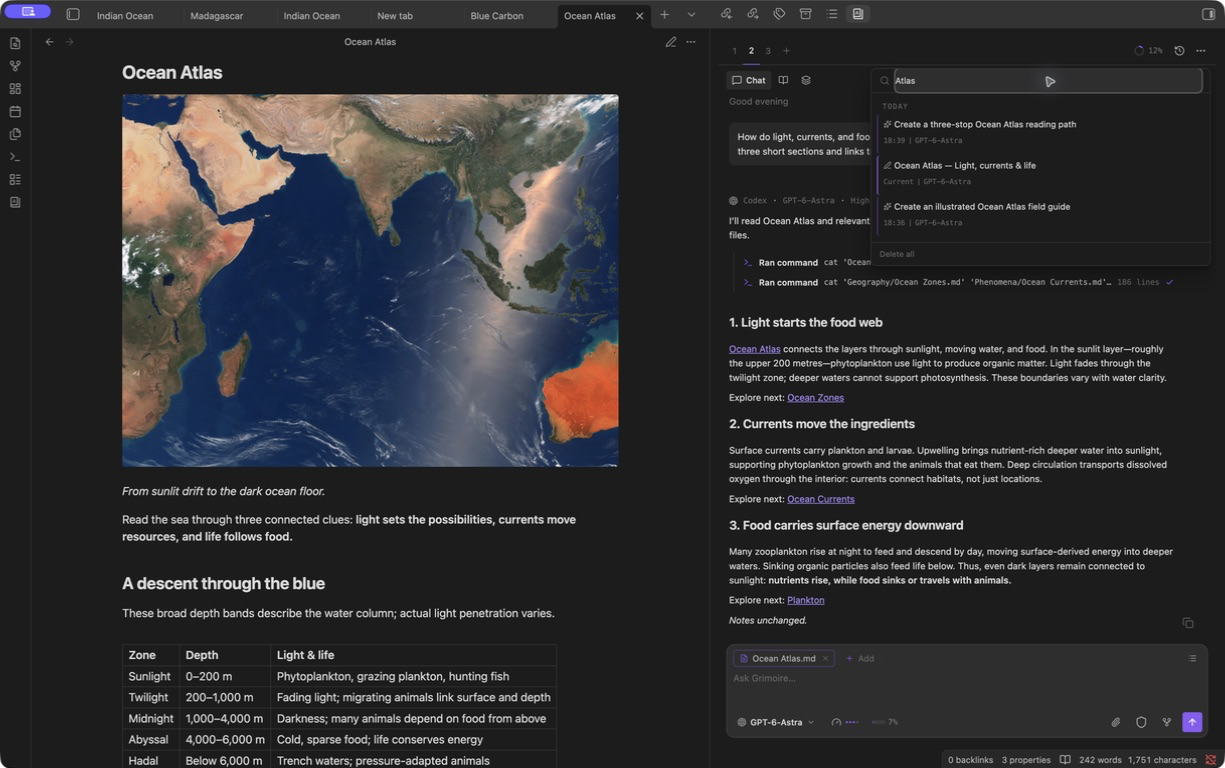
Parallel workers, settings, and composer
The Parallel workers approval card shows the inherited model and lets you select only the proposed tasks to launch. Settings use Obsidian's native search and retain a permanent What's New entry. Provider settings and the composer use one consistent surface across providers, while keeping provider-owned controls and configuration where they belong.
Keyboard shortcuts
| Shortcut | Action |
|---|---|
Enter |
Send the current turn. Disabled when Send only with button is enabled. |
Shift+Enter |
Insert a new line in the composer. |
Shift+Tab |
Cycle permission modes: Safe -> Auto-approve -> Plan -> Safe. Providers without Plan mode cycle between Safe and Auto-approve. |
Escape |
Stop the active response, or close the open history popover. |
Model selector
One picker, grouped by provider and sorted by label: Antigravity, Claude Code, Codex, Command Code, Devin, Gemini CLI (Legacy), Grok Build, Kimi Code, MiMoCode, OpenCode, Qwen Code, and Reasonix. Search runs across labels, descriptions, groups, and model IDs without resizing the menu while you filter. Catalogs load lazily and remember which groups you collapsed. Add custom aliases and context-window overrides in settings. Claude's 1M variants are extra options, not replacements for the base models.
OpenCode, MiMoCode, Kimi Code, Grok Build, and Command Code use the same model selection in settings: selected rows with aliases, a searchable catalog, and Refresh all models. Refresh preserves your configured selection and aliases. Provider filtering is shown when the CLI supplies vendor labels.
Usage and cost
A badge next to the model selector keeps the active provider's usage in view, with fuller readouts inside the model menu: quota windows where a provider exposes them, spend where only cost is available. Stale numbers stay put while a refresh is in flight or fails, so the meter never blanks out. Turn the whole thing off in settings if you want a quieter UI.
| Provider | Where usage comes from |
|---|---|
| Codex | Account rate-limit notifications and account/rateLimits/read when available |
| Claude Code | SDK rate-limit events, optional .grimoire/claude/statusline-usage.json, and SDK result cost metadata |
| Antigravity CLI | Not reliably available from agy --print yet |
| Gemini CLI (Legacy) | ACP cost metadata when Gemini CLI reports it; legacy provider only |
| Qwen Code | ACP token and cost metadata when Qwen Code reports it |
| Devin | Session credit total reported over ACP, as monthly spend |
| Reasonix | Per-turn cost from its own status notifications, when the configured model provider has a price |
| OpenCode | Monthly spend aggregated from ACP and session cost metadata |
| MiMoCode | Monthly spend aggregated from ACP and session cost metadata |
| Kimi Code | Monthly spend aggregated from ACP and session cost metadata |
| Grok Build | Shared weekly Grok usage, reset time, and Extra Usage Credits through OAuth; monthly API spend from session cost metadata |
Plan mode
When the active provider supports Plan mode, you can turn it on in either of two ways:
- Click the permission control in the composer until it cycles to Plan:
Safe -> Auto-approve -> Plan. - Press
Shift+Tabto cycle the full sequence:Safe -> Auto-approve -> Plan -> Safe.
Plan mode asks the provider to plan before it starts making changes. In the composer it uses the same permission control as Safe and Auto-approve, so the active mode stays visible while you work.
When a provider finishes planning, Grimoire shows a collapsible Plan complete card with the rendered plan, requested permissions, and keyboard-friendly rows. Approving continues in the same session; entering feedback keeps Plan mode active so the provider can revise the plan.
Context and mentions
Mention vault notes and folders straight from the composer, pull in the current or linked note, and add persistent external context paths in settings. Paste or drop images when the provider takes image input. Mention MCP servers where the provider integration supports it. The Context tab shows the bound note, model, permission mode, pinned files, launch artifacts such as .grimoire/grok/system.md, and files the agent loaded during the session.
Inline editing
Run "Grimoire: Inline edit" on a selection. A prompt opens next to the text, the edit comes back as a diff you accept or reject, and it routes through the provider-backed inline edit service. It handles both replacing a selection and inserting new text.
Clarifying questions
When a provider asks for structured user input, Grimoire pauses the turn and renders the question over the composer. Claude Code exposes this as AskUserQuestion; Codex app-server exposes an experimental request_user_input / requestUserInput surface; Qwen Code delivers AskUserQuestion through ACP permission metadata. Grimoire normalizes those provider-specific mechanisms into the same inline question UI. Single-select, multi-select, and freeform answers resolve back into the provider run, so the agent can continue without a separate chat message.
If the question covers chat text you need to reread, use the chevron in the question header to collapse it into a compact bar. Your selected and freeform answers stay in place until you expand or submit the question.
Commands
Built-in commands cover Grimoire workflows like image generation and resume. Providers that expose their own commands, such as Claude Code slash commands and OpenCode, Grok Build, or Qwen Code runtime commands, surface them through provider-owned catalogs. Hide the ones you don't use from the dropdown in settings.
Image generation
Paste or drop images to attach them. The built-in /image [prompt] command doesn't call any image API itself. It hands a normal turn to the active provider with instructions to use whatever image generation you've configured: provider-native tooling, MCP tools, or a local command. The agent saves the result in your vault and returns an embed like ![[path/to/image.png]]. If nothing is set up for image generation, you get a plain answer explaining what's missing.
Safety and permissions
Permission modes belong to the provider, so Grimoire surfaces them through shared composer controls instead of reinventing them. The permission control and Shift+Tab both cycle through Safe, Auto-approve, and Plan when the active provider supports plan mode. Safe mode and permission prompts stay visible while you work. Bang-bash mode only shows up when an enabled provider offers it. Treat configured MCP servers, shell access, and API keys as sensitive, because they are.
Debug logging
Off by default. Turn it on and Grimoire writes sanitized JSONL to .grimoire/logs/YYYY-MM-DD.jsonl, with prompts, answers, note contents, paths, environment values, and secrets redacted. It's for diagnosing provider and runtime issues, not for keeping a transcript.
Settings
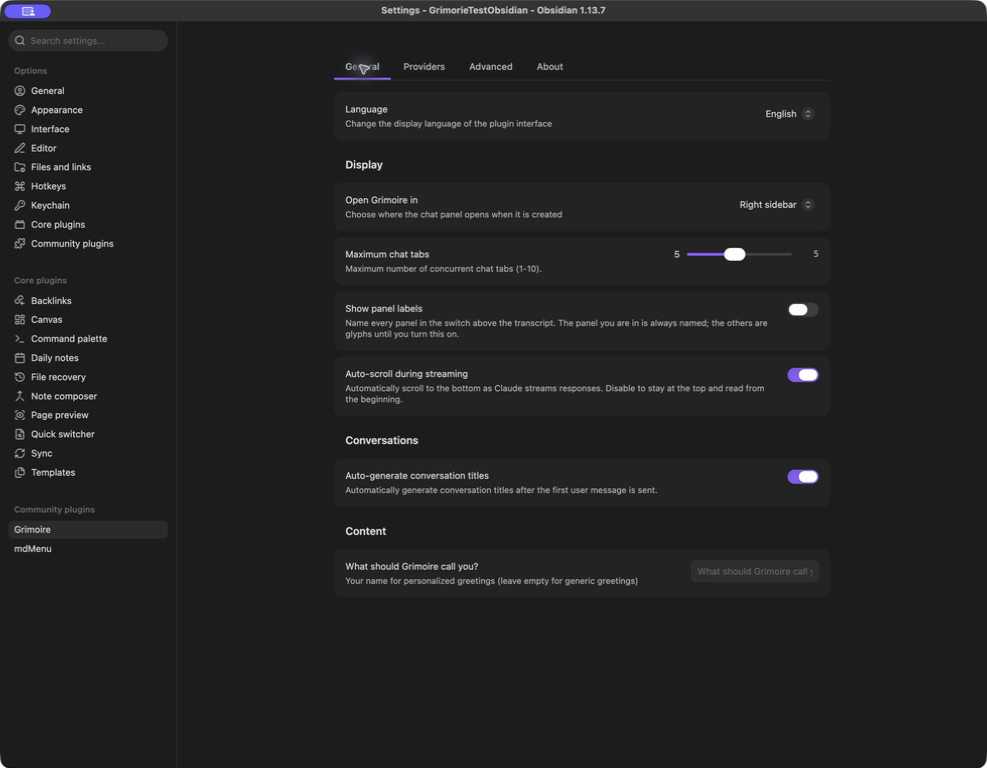
Four tabs keep configuration organized: General for language, chat placement, tabs, and display; Providers for enabling CLIs and configuring their models; Advanced for context, conversations, tools, and diagnostics; and About for version information and What's New. Settings participate in Obsidian's native search.
The provider overview shows CLI detection and enable switches, with the selected provider's settings below.
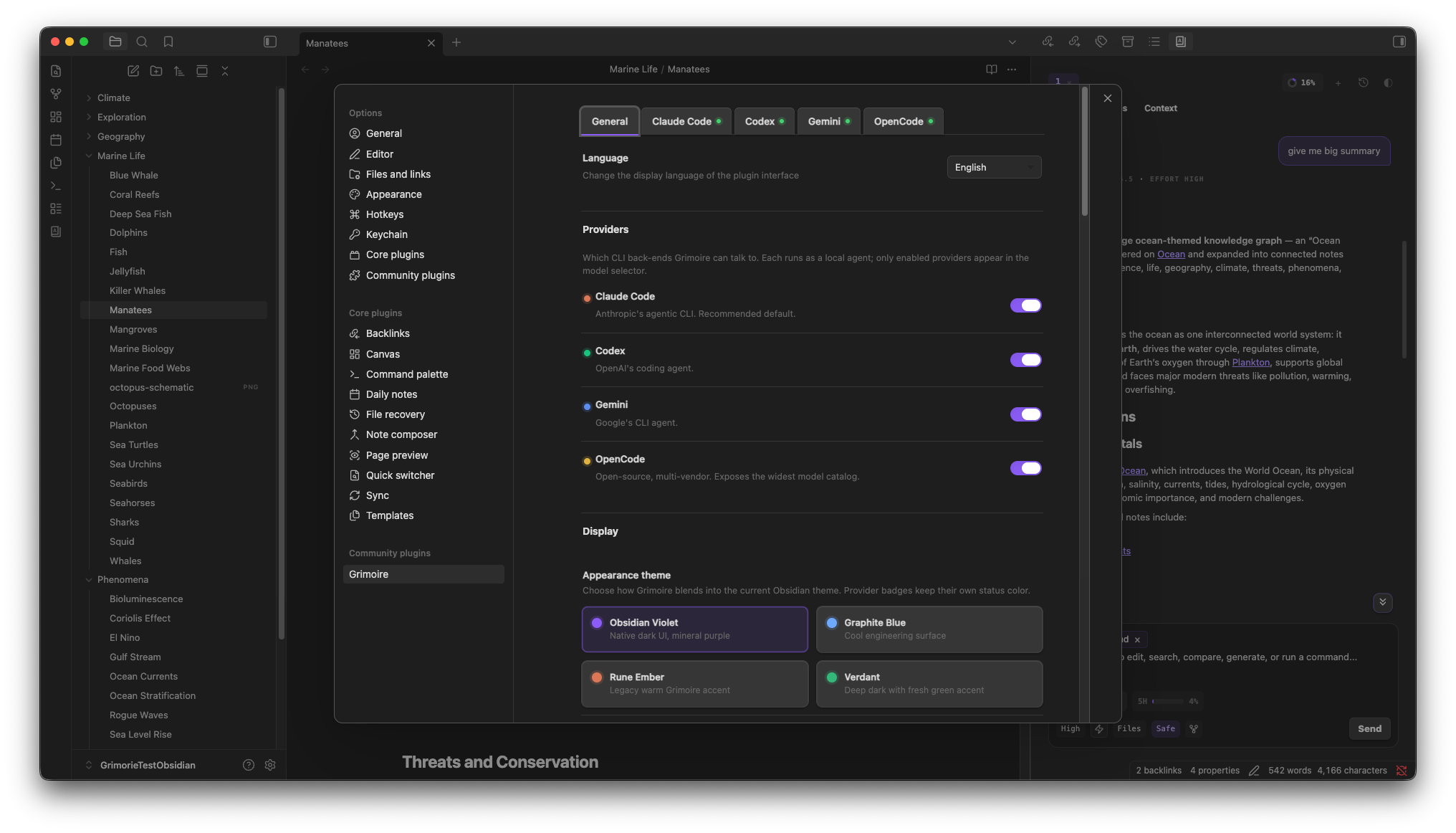
General settings
Where Grimoire keeps your data
| Path | What's there |
|---|---|
.grimoire/grimoire-settings.json |
App settings plus provider configuration |
.grimoire/sessions/*.meta.json |
Session metadata |
.grimoire/logs/YYYY-MM-DD.jsonl |
Opt-in sanitized debug logs |
.grimoire/claude/statusline-usage.json |
Claude usage snapshot for the plan meter |
.grimoire/grok/ |
Grok Build launch artifacts, managed config, and session pointers |
Provider-native files under .claude/, .codex/, .opencode/, and .grimoire/grok/ are read and written in place, so your provider setup stays portable outside Grimoire.
Privacy
Grimoire runs inside Obsidian, on your machine. It has no backend, adds no telemetry, and never uploads your prompts, answers, notes, files, tool output, API keys, or usage logs to any Grimoire service. The only logs it writes are the optional, sanitized debug logs above, and those stay in your vault.
What it can't hide is the provider itself. Whichever CLI you enable receives the prompt, the context you selected, and the files, images, tool output, and commands a request needs. That CLI may then talk to Anthropic, OpenAI, Google, your configured OpenCode vendors, MCP servers, or anything else it's set up to reach. Terms, retention, billing, rate limits, and privacy policies are the provider's, not Grimoire's. Grimoire's job is to make that boundary visible and keep it under your control inside Obsidian.
For an Obsidian policy-oriented summary of network use, account requirements, external file access, logging, and telemetry, see DISCLOSURES.md.
Development
Contributions are welcome. Read CONTRIBUTING.md before opening a pull request; it covers provider ownership, security boundaries, testing, generated artifacts, and the repository's review expectations.
npm install
npm run dev
npm run typecheck
npm run lint
npm run test
npm run build
npm run build:release
Before publishing or pushing meaningful UI or provider changes, run the full local gate:
npm run test -- --selectProjects unit
npm run typecheck
npm run lint
npm run build:release
npm run build:release refreshes the generated main.js, the root styles.css, and dist/grimoire.
npm is the canonical package manager for development, CI, and releases. Keep package-lock.json current when dependencies change; secondary package-manager lockfiles are intentionally not committed.
Releases
Grimoire releases are published from semver tags such as 1.0.0. The release workflow runs the local gate, builds the Obsidian bundle, verifies that the tag matches package.json and manifest.json, then attaches main.js, manifest.json, and styles.css to the GitHub Release.
Obsidian Community plugins are the recommended user install path. GitHub Releases still carry the bundle assets for manual installs and BRAT. Use main for releasable development, then publish by tagging the version that matches the manifest.
Roadmap
The current source integrates Codex, Claude Code, Antigravity CLI, Gemini CLI (Legacy), OpenCode, MiMoCode, Kimi Code, Grok Build, Qwen Code, Devin, Reasonix, and Command Code.
Next on the list: GitHub Copilot CLI, other ACP-compatible providers, and local model CLIs once their runtime is stable enough to embed in Obsidian. Implementation notes live in docs/provider-roadmap.md.
License
MIT. See LICENSE.