Google Selection Translate
 JunweiHu0455 downloads
Select text in any note and instantly see its Google translation in a side panel.
- Overview
- Scorecard
- Updates3
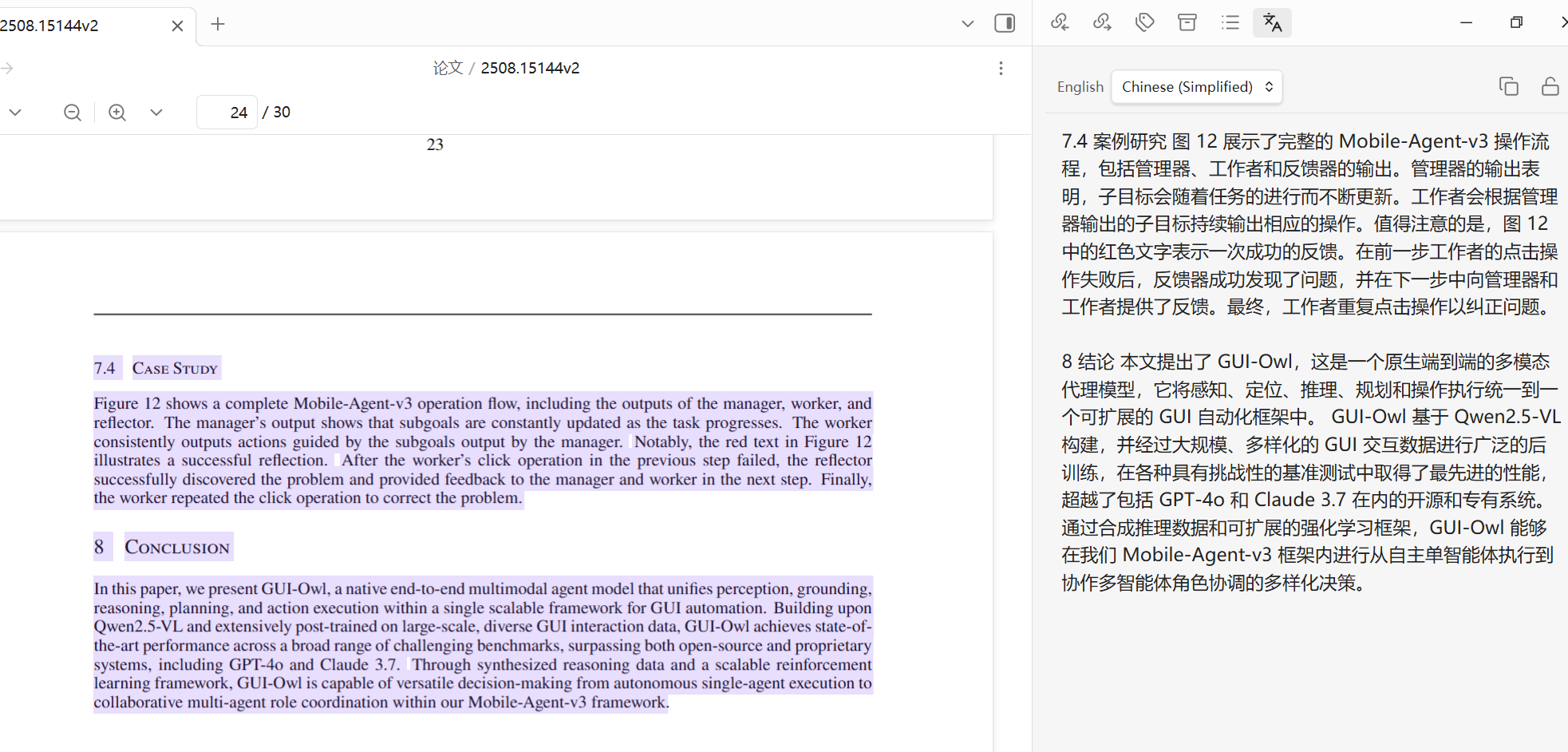
Select text in any note and instantly read its Google translation in a side panel — no buttons, no copy-paste.
在笔记中选中文本,右侧栏即时显示 Google 翻译 —— 无需按钮,无需复制粘贴。
Demo / 演示
If the video above does not play inline, click here to watch it · 若上方视频无法直接播放,点此查看
English
Why this plugin
Most translation plugins make you open a panel, paste text into an input box, and click a button — then the result appears below the input. But the original text is already in your note. This plugin removes all of that friction:
Select text → the translation appears in the side panel. That's it.
The original text stays where it belongs (in your note on the left), and the panel shows only the translation.
Features
- Select-to-translate — selecting text in any note automatically triggers translation (debounced to save API quota).
- Read-only side panel — shows only the translation; detected source language and target language are displayed in a compact header.
- Smart line-break merging — fixes the broken line breaks that PDFs and academic papers leave behind, so a paragraph is translated as one block instead of many fragments. Genuine paragraph breaks are preserved.
- Lock button — freeze the current translation so a new selection won't overwrite it while you read or copy.
- One-click copy of the translation.
- Translation cache — repeat selections and target-language switches are served from a local cache instead of re-spending API quota. Optionally persisted across restarts.
- API key tester — verify your Google API key connectivity from the settings tab without spending translation quota.
- Works in edit, live-preview, and reading modes.
Installation
Manual install (from a release)
- Download
main.js,manifest.json, andstyles.cssfrom the Releases page. - Create a folder
google-selection-translateinside your vault's.obsidian/plugins/directory. - Copy the three files into that folder.
- Reload Obsidian, then enable Google Selection Translate in Settings → Community plugins.
Build from source
git clone https://github.com/JunweiHu0/obsidian-google-translate.git
cd obsidian-google-translate
npm install
npm run build      # produces main.js
Then copy main.js, manifest.json, and styles.css into your vault plugin folder as above.
Setup
- Get a Google Cloud Translation API key (Google Cloud Console → enable the Cloud Translation API → create an API key).
- Open Settings → Google Selection Translate and paste the key.
- Click Test to verify the connection.
- Choose your source language (or leave it on Detect language) and target language.
Configure with Claude (optional)
This repo ships a Claude Code skill, configure-google-translate.
In a Claude Code session at the repo root, run /configure-google-translate and answer the prompts —
it collects your API key and language preferences, optionally validates the key, and writes the
plugin's data.json into your vault for you.
Settings
| Setting | Description |
|---|---|
| Google API key | Your Cloud Translation API key. A Test button checks connectivity without consuming translation quota. |
| Source language | Language of the text you select. Detect language lets Google decide. |
| Target language | Language the translation is shown in. |
| Translate on selection | Automatically translate as soon as you select text. Turn off to translate only via the command/hotkey. |
| Merge hard line breaks | Join the line breaks that wrap paragraphs in PDFs/papers so a paragraph is translated as one block. |
| Selection delay (ms) | How long to wait after a selection settles before translating. |
| Cache translations | Reuse previously translated text/language pairs instead of calling the API again. |
| Persist cache across restarts | Keep the cache in the vault's plugin data so it survives reloading Obsidian (off by default). A Clear button empties it. |
How line-break merging works
Text copied from papers separates both wrapped lines and paragraphs with a single newline, so a newline is ambiguous. The plugin classifies each one heuristically: a newline becomes a paragraph break when the previous line ends a sentence and is noticeably shorter than the column width (or the next line starts a list/heading); otherwise it is treated as a soft wrap and joined. Hyphenated wraps (transla-\ntion) are stitched back together.
Acknowledgements
The Google Cloud Translation request logic and the HTTP error-code messages are adapted from obsidian-translate by Fevol, licensed under MIT. This project is a minimal, focused reimagining of the select-to-translate workflow.
License
中文
为什么做这个插件
大多数翻译插件的流程是:打开面板 → 把文本粘进输入框 → 点击翻译按钮 → 在下方看到结果。可原文明明就在你的笔记里。这个插件去掉了所有多余步骤:
选中文本 → 译文直接出现在右侧栏。就这么简单。
原文留在它该在的地方(左侧笔记里),右侧面板只显示译文。
功能特性
- 选中即翻译 —— 在任意笔记中选中文本会自动触发翻译(带去抖,节省 API 配额)。
- 只读侧边面板 —— 只显示译文;顶部紧凑栏展示检测到的源语言与目标语言。
- 智能合并硬换行 —— 修复 PDF 和学术论文里残留的错误换行,让一个段落作为整体翻译,而不是被拆成很多碎片;真正的段落分隔会被保留。
- 锁定按钮 —— 冻结当前译文,阅读或复制时不会被新的选区覆盖。
- 一键复制译文。
- 翻译缓存 —— 重复选中相同文本、或来回切换目标语言时,直接命中本地缓存,不再消耗 API 配额;可选在重启后仍然保留。
- API Key 连通性测试 —— 在设置页验证 Google API Key 是否可用,且不消耗翻译配额。
- 支持编辑、实时预览、阅读三种模式。
安装
手动安装(从 Release)
- 从 Releases 页面下载
main.js、manifest.json、styles.css。 - 在你的 vault 的
.obsidian/plugins/目录下新建文件夹google-selection-translate。 - 把这三个文件拷进该文件夹。
- 重新加载 Obsidian,在 设置 → 第三方插件 中启用 Google Selection Translate。
从源码构建
git clone https://github.com/JunweiHu0/obsidian-google-translate.git
cd obsidian-google-translate
npm install
npm run build      # 生成 main.js
然后按上面的方式把 main.js、manifest.json、styles.css 拷到 vault 插件目录。
配置
- 获取 Google Cloud Translation API Key(Google Cloud 控制台 → 启用 Cloud Translation API → 创建 API 密钥)。
- 打开 设置 → Google Selection Translate,粘贴密钥。
- 点击 Test 验证连接。
- 选择源语言(或保持自动检测)和目标语言。
用 Claude 一键配置(可选)
本仓库内置了一个 Claude Code 技能 configure-google-translate。
在仓库根目录的 Claude Code 会话里运行 /configure-google-translate,按提示回答即可 —— 它会收集你的
API Key 与语言偏好,(可选)校验密钥,并把插件的 data.json 直接写入你的 vault。
设置项
| 设置 | 说明 |
|---|---|
| Google API key | 你的 Cloud Translation API 密钥。Test 按钮可检测连通性,且不消耗翻译配额。 |
| Source language | 你选中文本的语言。Detect language 让 Google 自动判断。 |
| Target language | 译文显示的语言。 |
| Translate on selection | 选中文本即自动翻译。关闭后仅通过命令/快捷键触发。 |
| Merge hard line breaks | 合并 PDF/论文里折行的换行,让一个段落作为整体翻译。 |
| Selection delay (ms) | 选区稳定后等待多久再翻译。 |
| Cache translations | 复用已翻译过的文本/语言组合,不再重复调用 API。 |
| Persist cache across restarts | 把缓存写进 vault 的插件数据,重启 Obsidian 后仍然保留(默认关闭)。设置里有 Clear 按钮可清空。 |
合并换行的原理
从论文复制的文本里,折行和段落分隔都用单个换行符,因此换行存在歧义。插件用启发式逐个判定:当前一行以句末标点结尾且明显短于列宽(或下一行是列表/标题开头)时,该换行视为段落分隔;否则视为折行并合并。连字符断词(transla-\ntion)会被还原拼接。
致谢
Google Cloud Translation 的请求逻辑与 HTTP 错误码提示改编自 Fevol 的 obsidian-translate(MIT 许可)。本项目是对"选中即翻译"工作流的一次极简、专注的重新实现。