GlanceVeil
 Mickael DLR61 downloads
Veil note text with familiar alternate scripts without changing the Markdown source.
- Overview
- Scorecard
- Updates2

GlanceVeil is a shoulder-surfing filter for webpages, Obsidian notes, and tmux panes: readable to you, slower to parse at a glance. It renders familiar Latin text through Greek, Cyrillic, Hebrew- and Arabic-script glyphs, Katakana, Hiragana, or experimental Gregg Simplified-style outlines so that content remains readable to you but becomes harder to parse at a glance.
It is a casual visual-obscurity layer, not encryption.
GlanceVeil has no developer-operated service or telemetry. Its local data handling is described in the privacy policy.
What is implemented
- Greek, Cyrillic, Hebrew-glyph, Arabic-glyph, experimental Katakana and Hiragana packs, and an experimental Gregg Simplified connected-stroke pack
- Familiar, Fluent, and Dense profiles
- A configurable 0–50% cadence of fully visible word anchors
- Three rendering strategies:
- Visual overlay keeps underlying page text available to copying, search, accessibility tools, page scripts, and inspection.
- Unicode text produces actual script characters while active and restores captured page text when disabled.
- Connected strokes keeps source words in the DOM and draws a Gregg SVG outline over each veiled word.
- Global, per-site, and per-tab activation
- Tab-lifetime overrides
- Five-second selected-text peek and press-and-hold localized peek
- Non-mutating input and chat-editor mirroring: a word veils when space commits it, while the word at the caret remains readable
- Page diagnostics that do not record page text or URLs
- Custom declarative JSON packs with validation and complexity limits
- Dynamic-page and open Shadow DOM handling
- Conservative exclusions for forms, editors, code, SVG, MathML, and arbitrary canvas, plus a dedicated Google Docs document-canvas adapter
- A shared-core Obsidian plugin for Markdown editor and Reading views
- An interactive tmux view and ANSI-safe command-line filter using the shared core
Hebrew and Arabic-script packs use a forced left-to-right visual overlay so strong right-to-left Unicode characters do not reorder an English page. These packs are glyph substitutions, not Hebrew or Arabic translation or transliteration. Katakana and Hiragana use a local word-level pipeline: established common words take conventional loanword spellings, while unknown words pass through English sound rules and Japanese consonant–vowel shaping. They remain experimental because spelling alone cannot resolve every English pronunciation. Gregg is also experimental: its independently implemented phonetic normalizer and stroke grammar produce Simplified-style approximations, not dictionary-authoritative outlines. It does not bundle scans, a textbook dictionary, or third-party shorthand artwork.
Install in Chrome, Brave, Edge, or Arc
- Open the browser's extension page:
- Chrome/Arc:
chrome://extensions - Brave:
brave://extensions - Edge:
edge://extensions
- Chrome/Arc:
- Enable Developer mode.
- Choose Load unpacked and select the
browser-extensiondirectory. - Reload tabs that were already open.
If you change the extension source locally, run npm run build:extension
before reloading it in the browser. This regenerates the atomic content-script
bundles used by Chrome.
On a fresh install, GlanceVeil automatically opens a focused one-minute local setup. It previews scripts, chooses a reading strength and activation scope, and lets you rehearse the peek key before the veil starts. Existing users are not interrupted, and Run setup again remains available in Settings. The veil otherwise starts enabled with the Greek Dense profile using Unicode text. Unicode is preferred whenever a pack supports it because it avoids the extra DOM wrappers used by visual overlay mode, especially on long pages.
Everyday controls
- Open the extension popup to select a script, strength, and renderer. Choose Gregg Simplified · experimental to try connected outlines. Changing an appearance control also turns GlanceVeil on for the current tab.
- Adjust Keep some words visible to leave evenly distributed whole-word anchors. The default is 0%; 20% is a useful balanced starting point.
- Use Always veil or Never veil to save a site rule.
- Select some page text, then choose Peek selected text to reveal its block for five seconds.
- Hold Alt/Option to reveal only the block under the pointer while the key is down. If text is selected, its block is revealed instead.
- Press Command/Ctrl–Shift–G to toggle the current tab.
- Veil completed words while typing applies to ordinary text fields and supported contenteditable chat composers. It is on by default.
Google Docs
Google Docs draws document pages onto canvas instead of exposing their text as ordinary DOM text nodes. GlanceVeil intercepts only the text-drawing calls for the Docs document canvas and applies the active pack at paint time. The document model, selection, search, copying, input events, and measured layout text remain unchanged.
Load or reload the document after installing or updating GlanceVeil. At startup, the adapter briefly holds document-text draws until the extension's local settings arrive, then replays them through the selected renderer. It restores clear text after a bounded timeout rather than leaving a blank canvas. If that timeout is reached, or if you change scripts or profiles after the page has painted, the status pill says RELOAD DOCS. Reloading lets Docs repaint every visible tile with one consistent setting. Unicode and visual-overlay selections both use the canvas-safe glyph renderer; connected strokes remain clear because the SVG stroke renderer cannot be inserted into the Docs canvas. This integration is best-effort because it depends on Docs' private canvas surface. Actions taken from the GlanceVeil popup reload a Google Docs document automatically.
The settings page manages defaults, saved sites, custom packs, status-indicator behavior, import/export, calibration, and complete reset. Alternate sensitive-text scripts are limited to packs compatible with the selected renderer so the setting never silently requests an impossible combination.
Install in Obsidian
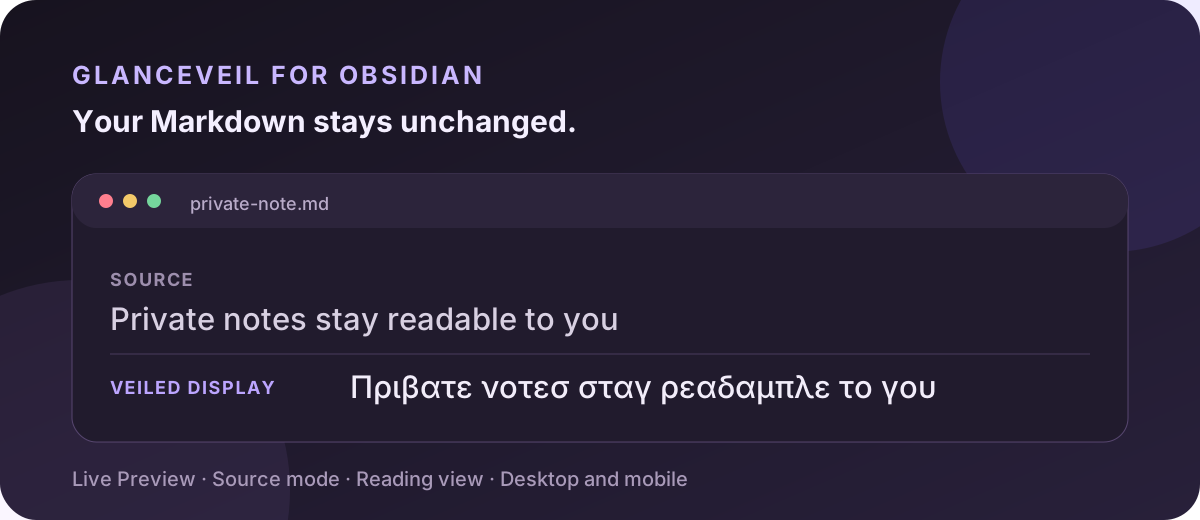
The Obsidian plugin shares the exact transformation and Gregg engines used by the browser extension. It veils both the Markdown editor and Reading view without changing the Markdown stored in the vault.
- Run
npm ciandnpm run package:obsidianfrom this repository. - Create
.obsidian/plugins/glanceveilinside a test vault. - Copy
main.js,manifest.json, andstyles.cssfromdist/obsidianinto that directory. - Reload Obsidian and enable GlanceVeil under Community plugins.
The plugin provides commands to toggle the veil, cycle scripts, and peek at selected Reading-view text. In the editor, selected text and the word containing the caret remain visible automatically. Its first release does not veil file names, search results, backlinks, properties, Canvas, or UI created by unrelated plugins.
On mobile, sync the complete .obsidian/plugins/glanceveil directory with the
vault, restart Obsidian, and enable GlanceVeil under Community plugins. The
ribbon provides the mobile toggle because Obsidian does not expose its desktop
status bar on mobile.
Install in tmux
GlanceVeil for tmux opens the current pane through the shared Unicode transformer
in a temporary interactive window. The source pane continues running untouched,
while keyboard input is forwarded byte-for-byte to it. Press Ctrl-G twice to
close the GlanceVeil view and return. Ordinary text, Enter, Escape, arrows, function
keys, control shortcuts, and application mouse events remain available to the
source application.
With Tmux Plugin Manager, add GlanceVeil to
.tmux.conf before the TPM initialization line:
set -g @plugin 'mickadlr/glanceveil'
Then press prefix followed by I. For a direct checkout, add the root loader using the absolute path to this repository:
run-shell "/absolute/path/to/glanceveil/glanceveil.tmux"
Run tmux source-file ~/.tmux.conf, then press prefix followed by K. On first
use, a terminal setup wizard chooses the script, reading strength, clear-word
cadence, and refresh interval. It saves a dedicated local config and applies it
immediately. Press prefix followed by Ctrl-k to revisit settings; GlanceVeil does
not replace that shortcut if it is already in use. Manual tmux options and the
standalone setup command are documented in
tmux-plugin/README.md.
tmux has no DOM-like overlay layer. GlanceVeil therefore captures the source pane's visible screen into memory and displays a transformed copy instead of rewriting the interactive PTY stream. It does not send source text to disk or the network. The Unicode-capable Greek, Cyrillic, Katakana, and Hiragana packs are supported. Arabic, Hebrew, and Gregg require visual renderers that terminals cannot safely provide.
Privacy boundary
GlanceVeil is designed to slow down quick visual reading by another person. Words intentionally left visible are completely readable to that person. Common email, URL, currency, and long-number patterns are excluded from clear-word selection, but this detection is best-effort and can miss sensitive content. It does not protect against:
- DOM inspection, accessibility APIs, page scripts, or other extensions
- Copying, screenshots, photography, or determined manual recovery
- Text inside images, video, arbitrary canvas, PDFs, browser chrome, or native interfaces (Google Docs document canvas has the dedicated best-effort adapter described above)
- A website that reconstructs or replaces its own content in unusual ways
The extension never changes password fields, typed form values, submitted data,
editable regions, or code blocks. Supported contenteditable chat composers use
the same non-mutating mirror as ordinary text fields: it makes the editor
glyphs transparent and positions an accessibility-hidden visual mirror
over them. The actual value remains unchanged for validation, copying,
selection, and submission. Password inputs are always excluded. It stores
settings, site origins, and tab state locally. It does not store page text,
transformed text, browsing history, or usage telemetry.
The Obsidian plugin does not call vault write APIs. Its Unicode and visual renderers operate on CodeMirror decorations or disposable Reading-view HTML, never on the Markdown source.
The tmux plugin captures only the source pane's visible screen and keeps it in the local viewer process long enough to render the current frame. It never writes captured text to a tmux buffer or a file. Keyboard bytes are relayed locally to the selected source pane; GlanceVeil never records them.
Visual overlay mode preserves source text but wraps eligible text nodes into small spans. This is less semantically destructive than replacing text, but an unusually fragile page can still react to the added elements. Use Unicode mode or disable the extension for that site if necessary.
The Gregg connected-stroke renderer has the same source-text and wrapping tradeoffs as visual overlay. Its output is intended for familiarity-driven veiling and learning experiments, not transcription, teaching, or archival shorthand.
Custom pack format
Custom packs are JSON data, never executable code. The options page validates them before installation. A minimal pack looks like:
{
  "schemaVersion": 1,
  "id": "triangle-demo",
  "name": "Triangle demo",
  "maturity": "experimental",
  "renderers": ["overlay"],
  "defaultRenderer": "overlay",
  "defaultProfile": "familiar",
  "profiles": {
    "familiar": {
      "name": "Familiar",
      "mapping": {
        "a": "∆",
        "e": "⋿"
      }
    }
  }
}
Pack IDs cannot replace built-ins. Packs are limited to 200 KB, 10 profiles, 500 rules per mapping/token table, 16 characters per input token, and 32 characters per output.
Safari
Safari web extensions are packaged through Xcode:
xcrun safari-web-extension-converter "/full/path/to/glanceveil/browser-extension"
Open the generated project, run the macOS app target, then enable GlanceVeil in Safari Settings → Extensions. Browser API differences may require additional packaging validation before distribution.
Optional native display font
font-builder/build-glanceveil-font.py creates a personal display font from a
local font that already contains Greek glyphs:
fontforge -script font-builder/build-glanceveil-font.py \
  "/path/to/source-font.ttf" \
  "$HOME/Desktop/GlanceVeil-Regular.ttf"
Use only a source font whose license permits modification. The generated font can be selected in native applications that expose font controls; macOS does not support forcing it across every system interface.
Development and verification
The project has no runtime dependencies.
npm run check
npm test
npm run package:release
Release packages are written under dist: a Chrome Web Store ZIP with its
manifest at the archive root, the three Obsidian release attachments, and a
standalone tmux .tar.gz. Chrome Web Store listing copy, privacy disclosures,
and artwork live in store/chrome.
The browser smoke test replays the content renderer in branded Chrome and checks eligible-text coverage, source restoration, open Shadow DOM, ChatGPT-, Lexical-, and ProseMirror-style editors, IME composition, large chats, repeated SPA route replacement, renderer switching, and bounded overlay tracking. To exercise the complete extension context, point it at Chromium or Chrome for Testing because modern branded Chrome builds do not accept command-line loading of unpacked extensions:
npm run test:extension
GREEK_VEIL_CHROME_PATH="/path/to/chrome-for-testing" npm run test:extension
All fixtures are local and synthetic; diagnostics and failure output avoid real
page content. See ARCHITECTURE.md for implementation boundaries and
invariants. Before publishing, complete the
release checklist, including its physical Android
and iOS device matrix.
Support and security
Use GitHub Issues for reproducible bugs and feature requests. Never attach private note text or browsing data; use synthetic text in reproductions. Follow SECURITY.md for vulnerability reports.
If GlanceVeil is useful to you, you can optionally support its maintenance on Ko-fi. Support does not unlock features or grant commercial-use rights. See SUPPORT.md for details.
License
GlanceVeil is proprietary source-available software, not open source. Unmodified official releases may be used only for personal, non-commercial purposes. Modification, compilation of the published source, redistribution, derivative works, sublicensing, and commercial or organizational use require prior written permission. See LICENSE for the controlling terms.