GistWise
Search that is easy for people and frugal for AI. Word forms, typos and the wrong keyboard layout, results by note, section or block, and a reason for every match.
- Overview
- Scorecard
- Updates4
Easy for humans. Frugal for AI. Best-in-class search.
GistWise is a search plugin for Obsidian with ranked results and deep settings.
What it does
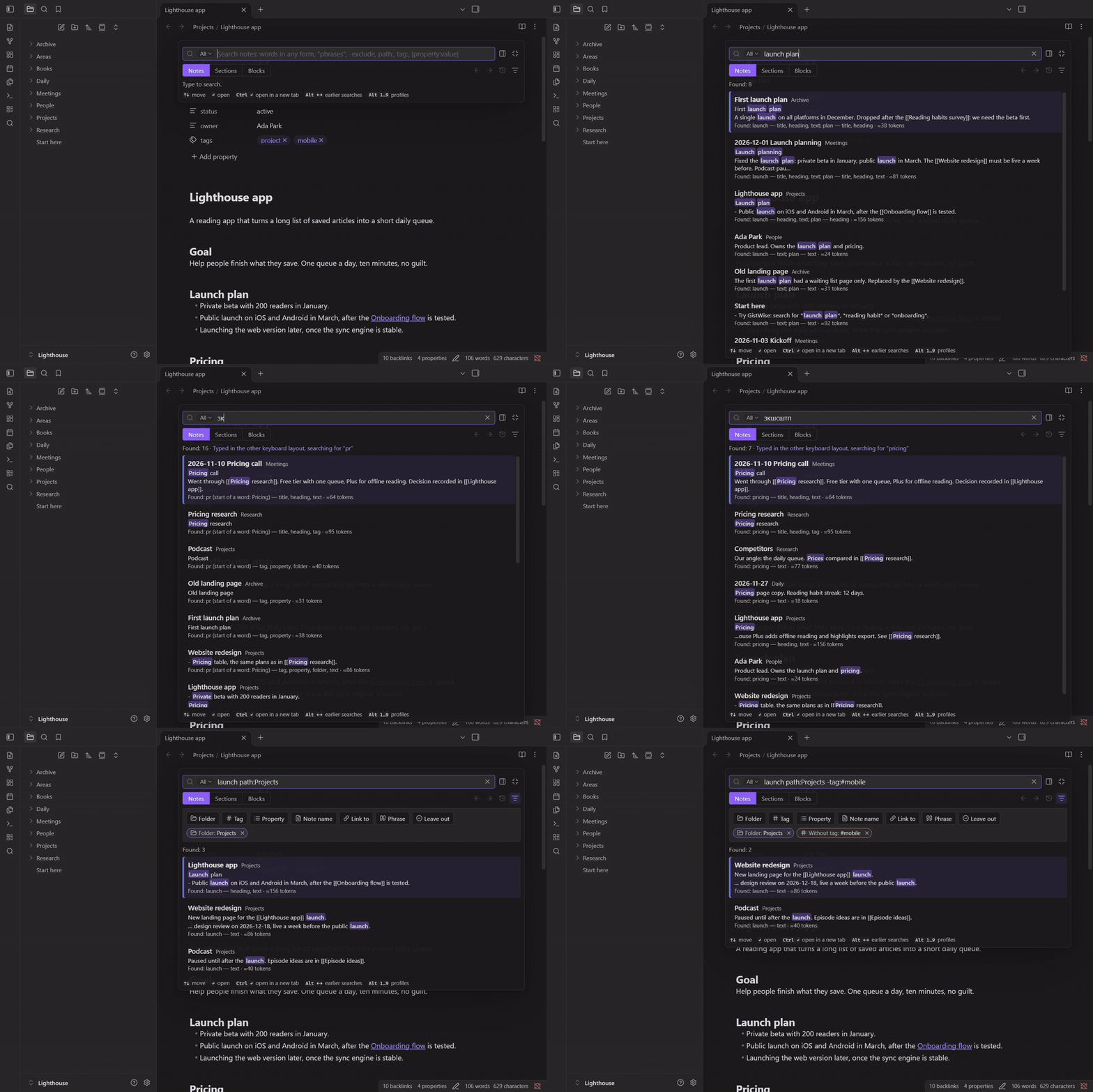
- Ranks results by relevance (BM25F) with adjustable weights for title, aliases, headings, tags, properties, path and text.
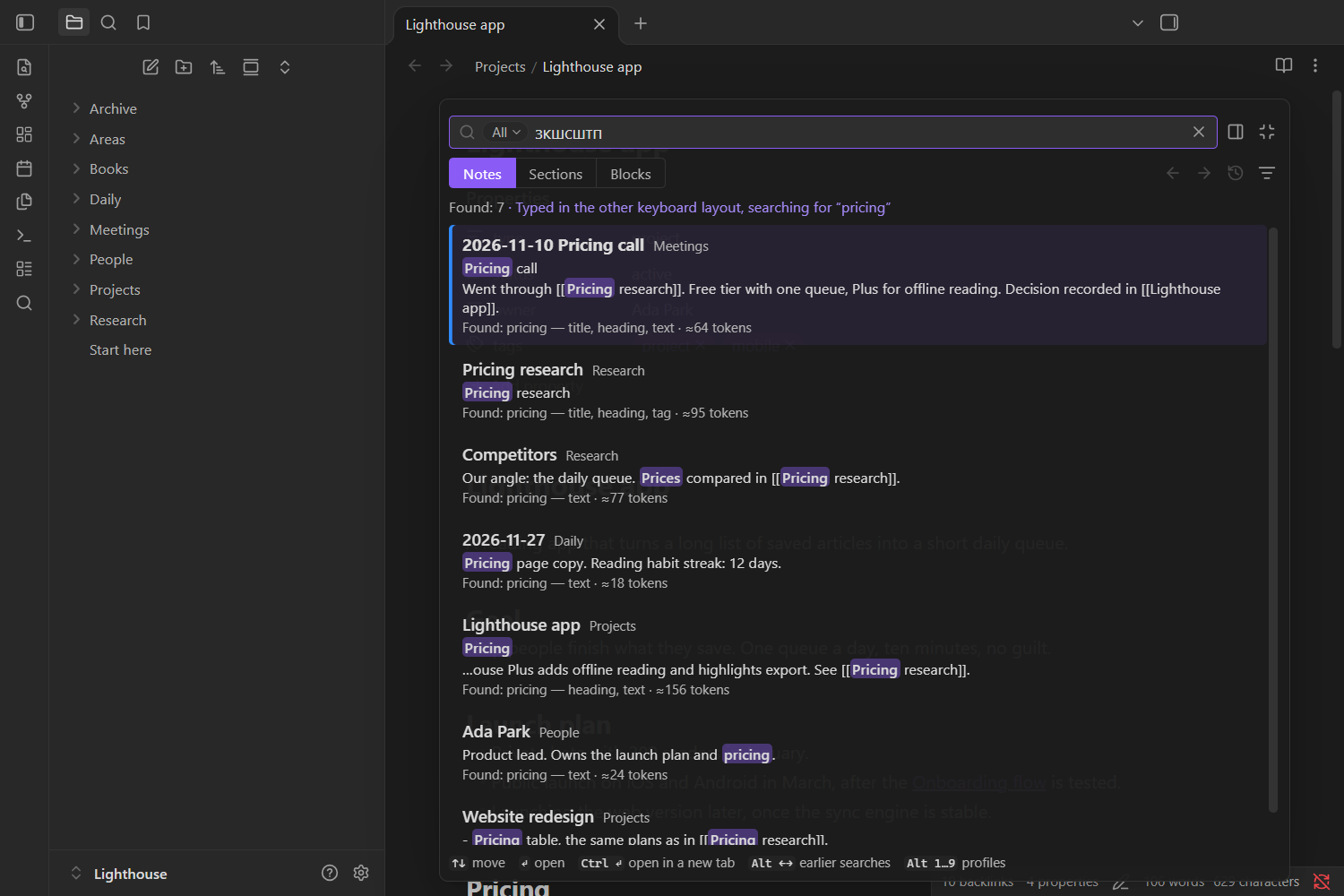
- Shows results as whole notes, sections or single blocks.
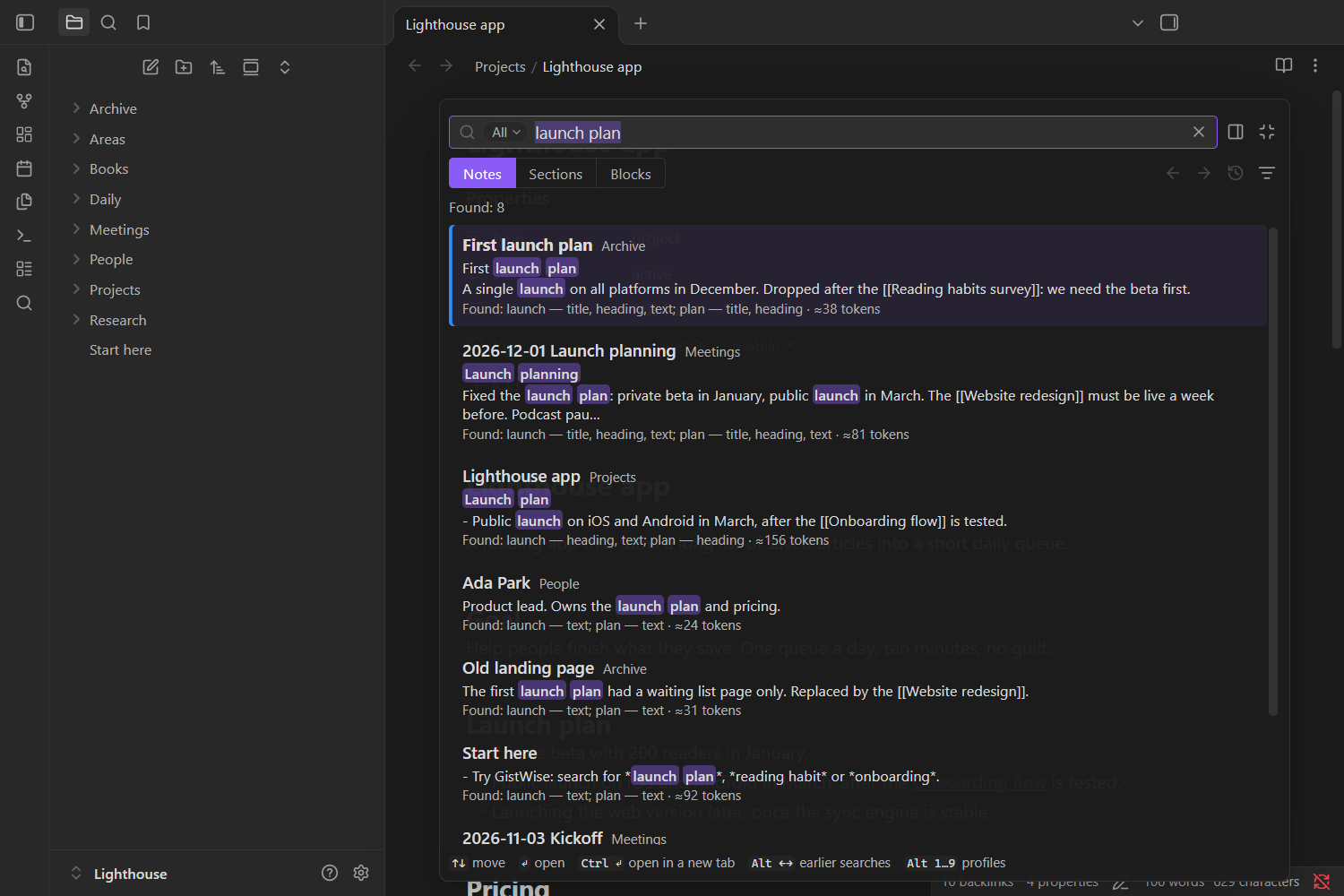
- Understands word forms in English and Russian, and treats ё and е as the same letter.
- Forgives typos and fixes text typed in the wrong keyboard layout.
- Explains why each result was found and estimates its size in tokens.
- Optional search by meaning: finds notes that say the same in other words, with how close each one is in percent. The model runs on your device.
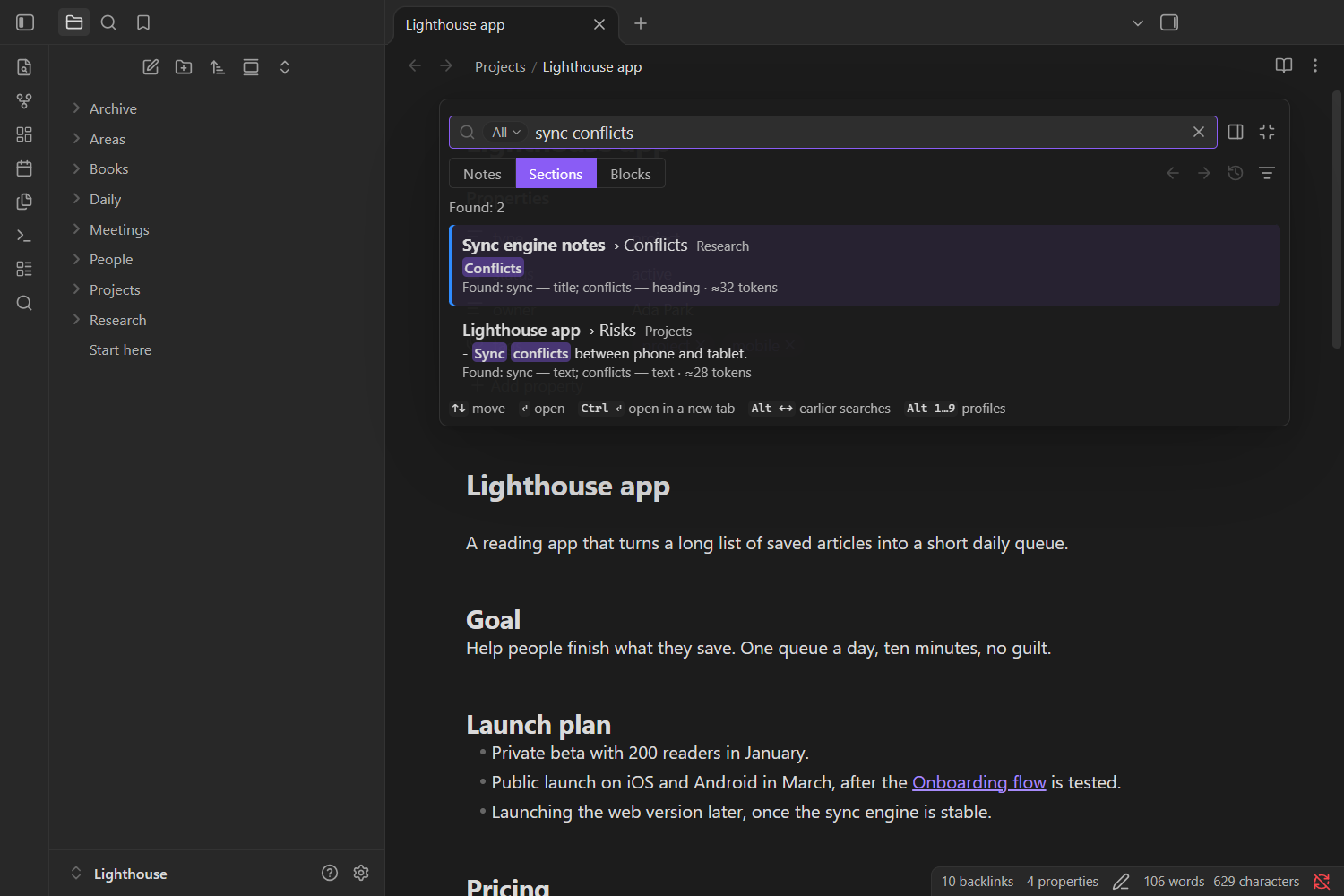
- Supports "phrases", -exclusions,
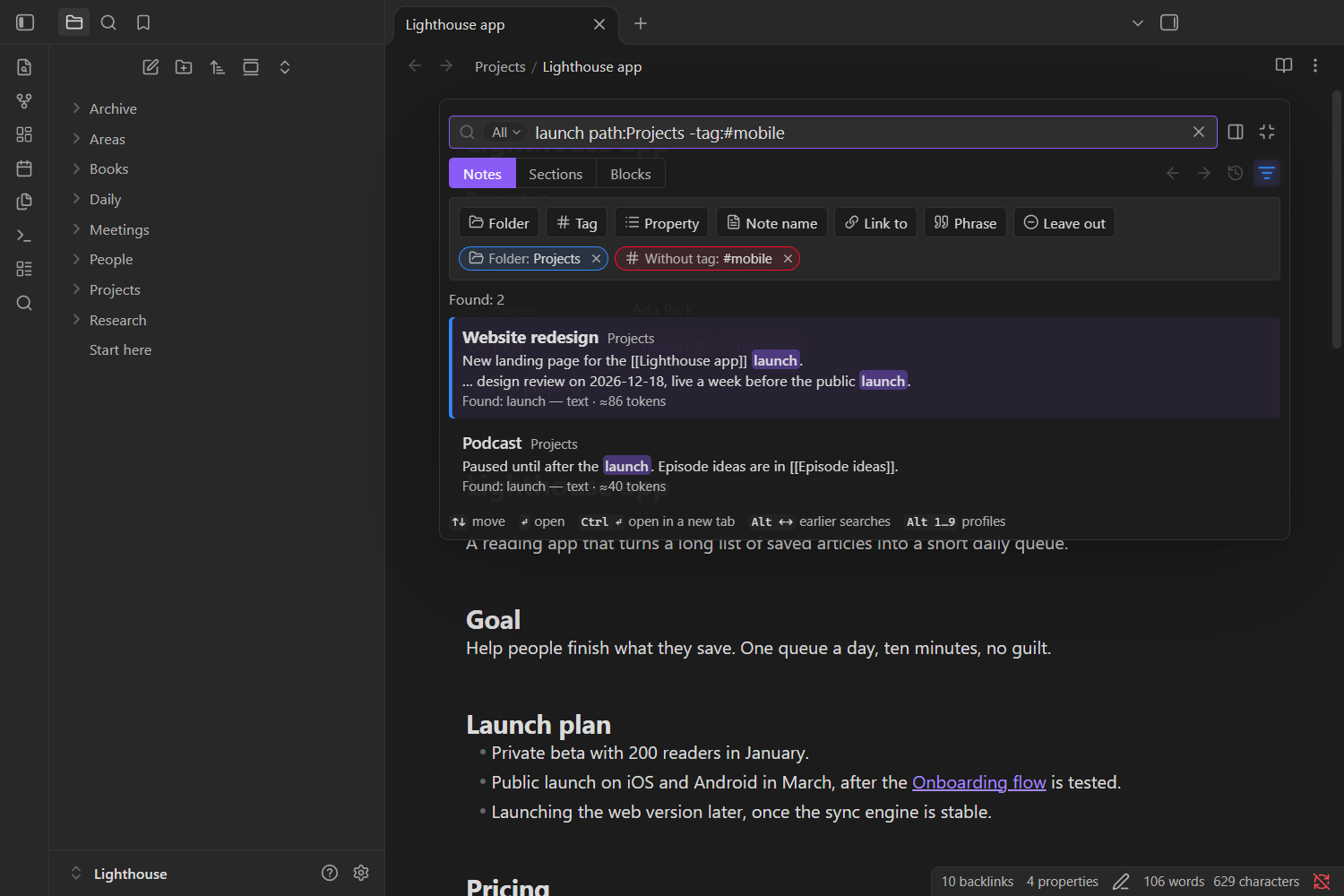
path:,file:,tag:,link:(notes that link to a note),[property]and[property:value]; a minus turns a condition around (-path:Archive,-tag:#old), quotes allow spaces (path:"My projects");ORand brackets join alternatives ((collar OR tracker) -path:Archive). - Query builder: buttons add a folder, tag, property, note name, a note they link to, a phrase or a word to leave out, picked from lists of what the vault holds; the conditions show as chips, one click turns one around, the cross takes it out.
- Remembers recent searches on this device only, with back and forward like in a browser.
- Keeps the found words marked in the opened note, in any form, until Esc or a new search; F3 and Shift+F3 step through them.
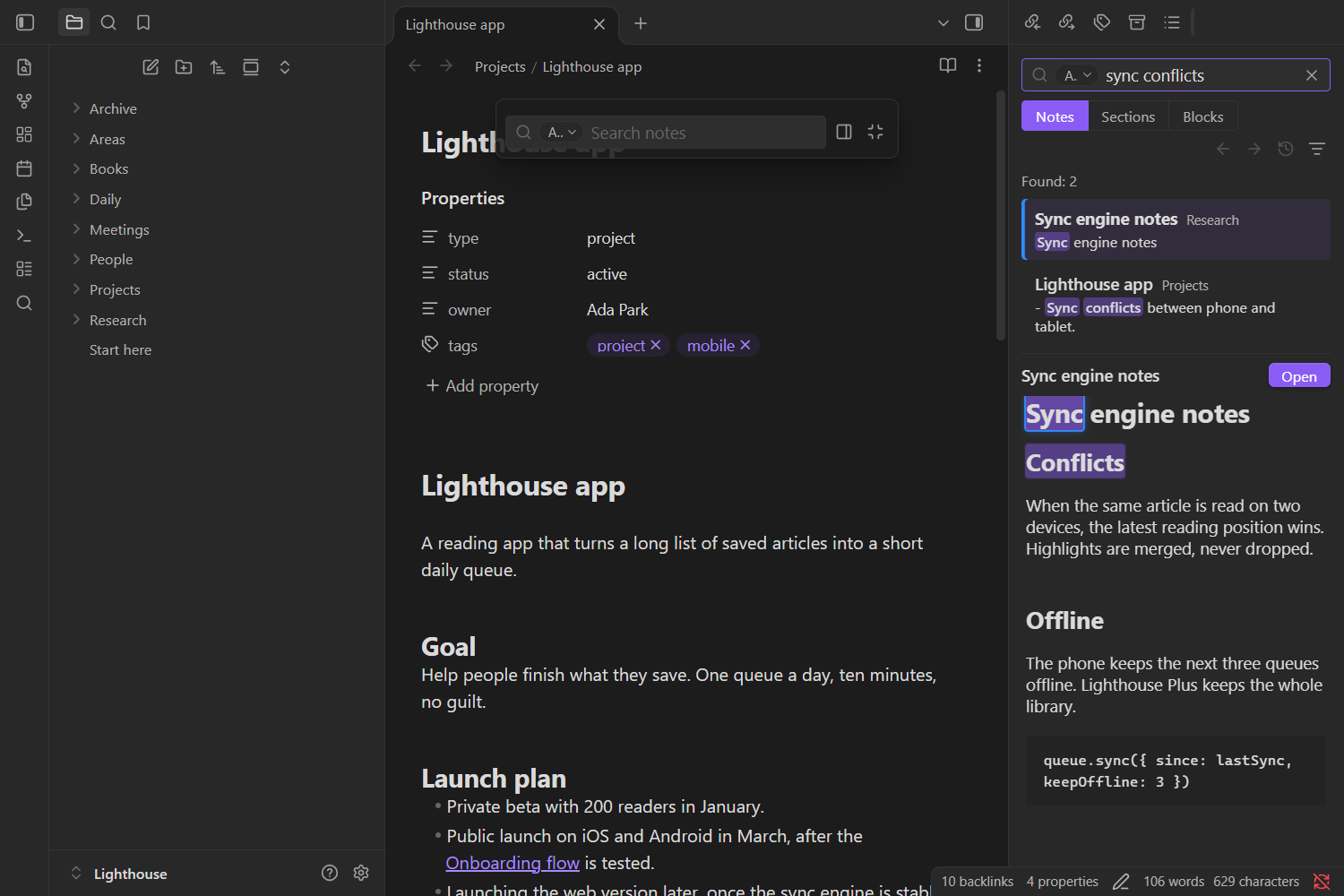
- A side panel for going through results: the list stays while notes open, and the chosen result is shown below it as in reading view, with the words marked. Ctrl+hover over a result shows Obsidian's page preview.
- Search profiles: saved ways of searching under a name, each with its own folders, tags, view, typo setting, weights and number of results.
Install
In Obsidian, open Settings → Community plugins → Browse, search for GistWise, then install and enable it.
To install by hand, download main.js, manifest.json and styles.css from the latest release into <vault>/.obsidian/plugins/gistwise/, then enable GistWise in Settings → Community plugins.
Use
On a computer the search panel is always at hand: a small field at the top center of the window. Start typing and the results open below it. Drag the panel by the strip above the field to put it anywhere; double-click the strip to bring it back. The button on the right folds the panel into a small round button with a magnifier; click it to unfold.
Use ↑ and ↓ to move, Enter to open, Ctrl/Cmd+Enter to open in a new tab, Alt+← and Alt+→ for earlier searches, Esc to fold the results. The command GistWise: Open search (set any hotkey for it) and the ribbon icon put the cursor in the field. On phones, and with the panel switched off in the settings, the search opens in a window.
For a longer look, the button with a panel icon next to the field (or the command GistWise: Open search in the side panel) moves the search to the right side panel. There a click chooses a result and shows it below the list; a second click or Enter opens the note.
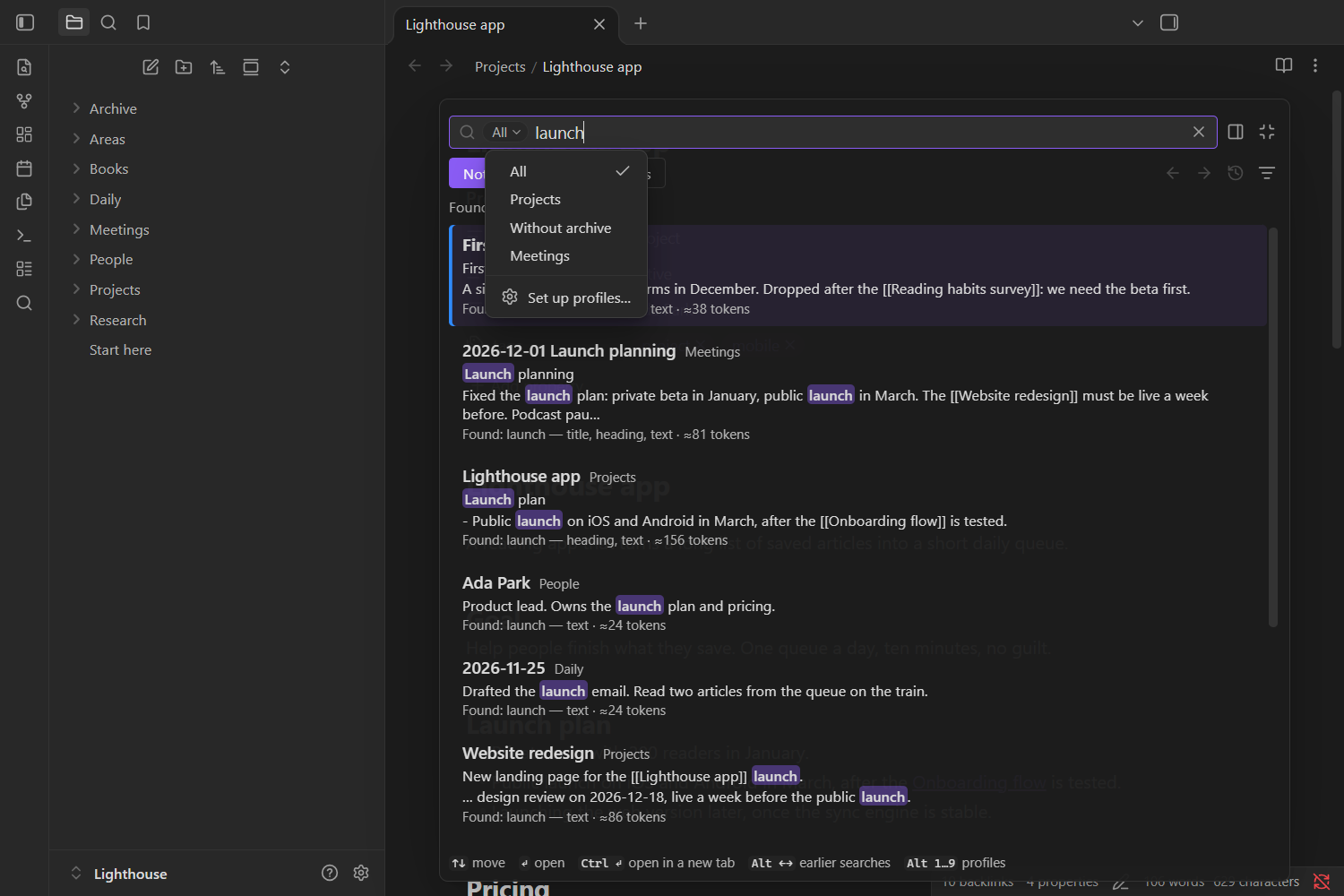
Profiles are made in the settings under Search profiles. Once there is one, a chip with the profile's name shows at the start of the field: click it to pick another, or press Alt+1…9 (Alt+1 is All, the whole vault). Each profile also has a command, so it can get its own hotkey. When a profile hides results the whole vault would give, the count line says how many more there are, and one click searches everywhere. The chosen profile is remembered on each device; the profiles themselves are kept in the plugin's settings in the vault.
Query syntax
Type the conditions by hand, or open the query builder (the funnel button above the results) and add them with a click.
| Write | Finds |
|---|---|
collar gps |
Notes with both words, in any form |
"smart collar" |
The words side by side, in this order |
-cat |
Leaves out results with this word |
path:Projects or path:"My projects" |
Only notes in a folder |
file:plan |
Only notes whose name has the word |
tag:#idea |
Only notes with the tag (nested tags count) |
link:Roadmap |
Only notes that link to the note "Roadmap" |
[status] or [status:done] |
Only notes with the property, or with this value |
-path:Archive, -tag:#old, -[status:done], -link:Roadmap |
The same conditions turned around |
collar OR tracker |
Notes with either word; a note with both stands higher |
(path:Work OR path:Science) plan |
Brackets keep conditions together: "plan" in either folder |
-(old plan) |
Leaves out results that have the whole group |
A condition alone is a search too: tag:#idea -path:Archive lists every note with the tag outside the archive.
Words side by side must all be there, and they bind before OR, as in Obsidian's own search: smart collar OR tracker is "smart collar" or "tracker". OR is written in capitals; a lower-case "or" is a plain word. The query builder has buttons for both, shows each alternative as a chip and draws a frame around a group.
Search by meaning
Search by words finds the words you typed, in any form. Search by meaning also finds notes that say the same thing in other words: "my dog is sad" finds a note about a pet that misses its owner, and a query in English finds a note in Russian.
It needs a small language model, which is not part of the plugin. Press By meaning next to the result views: a window says what the model is and how big, with a Download button (the same is in Settings → GistWise → Search by meaning). The plugin downloads it once from Hugging Face (111 MB), checks it byte for byte, and keeps a file of about 28 MB, meaning.bin, in its own folder. From then on By meaning switches the search: on, results are ranked by meaning, and each shows how close it is in percent. A result that has every word of the query stays near the top. Conditions such as path:, tag: and -word work as usual. Remove the model in the same place deletes the file.
The model is static-similarity-mrl-multilingual-v1 by Sentence Transformers (Apache-2.0), pinned to one version. It runs on your device, on computers and phones, and your notes are never sent anywhere. A newer plugin version may come with a better model; the settings then offer Update the model.
For AI agents
GistWise also lets AI agents search your vault the way you do, reading only the part of a note they need instead of whole notes. Nothing to download and no internet needed: the tool comes inside the plugin.
- Open Settings → GistWise → AI agents and choose Connect an AI agent. The plugin puts a small file,
gistwise.mjs, into its own folder in the vault. It is updated together with the plugin. It needs Node.js 20.16 or newer on the computer. - Choose Add to CLAUDE.md (Claude Code) or Add to AGENTS.md (Codex, Cursor and other agents). The plugin writes a short GistWise section at the top of the vault telling the agent how to search; the rest of the file stays as it is, and choosing it again updates the section.
- For other agents and for apps that connect tools over MCP (Claude Desktop, Cursor), Show the instructions and the MCP connection opens both texts in a window, ready to copy into the app's settings.
These rows show only in the desktop app, where agents run. The tool reads your notes and never changes them. Once the model for search by meaning is downloaded, agents can search by meaning too (--meaning). Details are in cli.
Data and privacy
- No accounts, no telemetry, no access to the clipboard. The code is open, so anyone can check this.
- One network connection, and only when you ask for it: Download the model (or Update the model) for search by meaning fetches two files of the model from huggingface.co. Nothing about you or your notes is sent. Without it, the plugin makes no network connections.
- The search index is kept in memory while Obsidian runs and is built again at start.
- Settings and search profiles are saved in the plugin's
data.jsonin the vault. Recent searches, the chosen profile and the panel's place are kept on this device only, inside Obsidian, never in the vault's files. - The plugin writes files only when you ask: in AI agents,
gistwise.mjsin its own folder and the GistWise section inCLAUDE.mdorAGENTS.mdat the top of the vault; in Search by meaning,meaning.binin its own folder. The model's reading of your notes is kept in memory only. - The tool for agents runs outside Obsidian, only when an agent starts it. It reads the notes of the vault and keeps its index outside the vault, in the computer's cache folder (
%LOCALAPPDATA%\gistwiseon Windows,~/.cache/gistwiseelsewhere).
License
MIT, © 2026 4 Humans.