Google Calendar Sync
 Murat Can Uste433 downloads
Sync Google Calendar events declared in vault notes.
- Overview
- Scorecard
- Updates9
Google Calendar Sync for Obsidian
Write an event in a note. It appears on your Google Calendar.
How it works
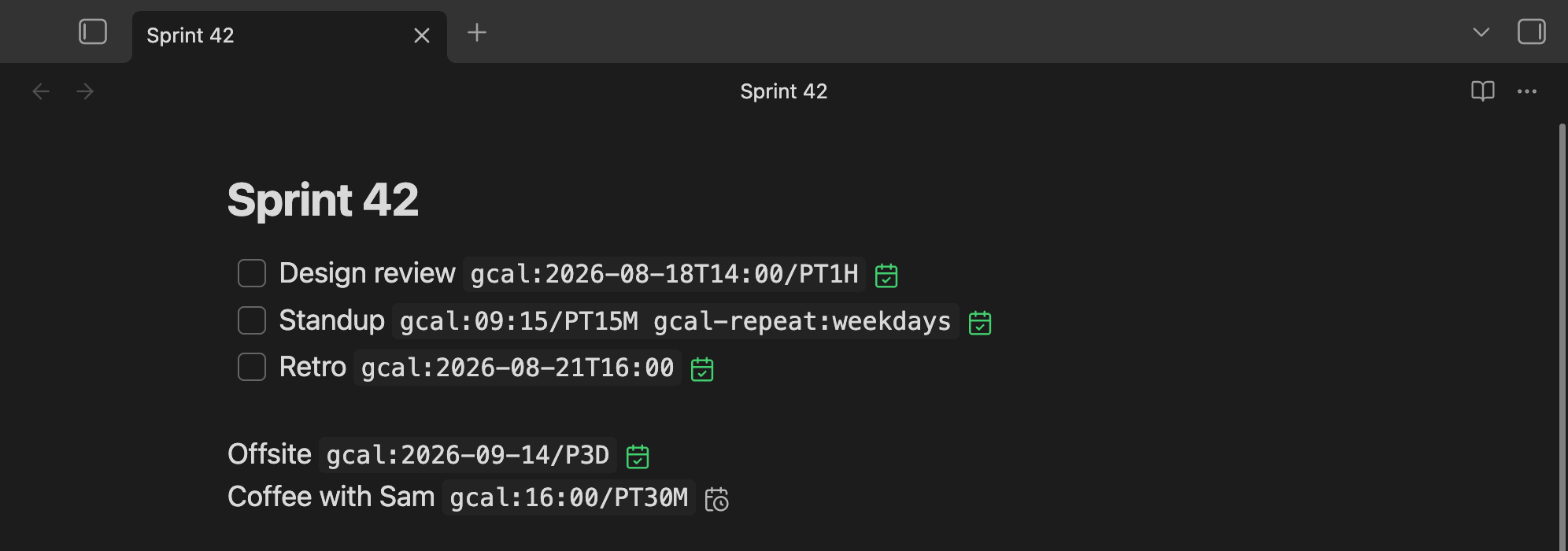
Write gcal: in a code span on any line. The text before it becomes the event title.
- [ ] Design review `gcal:2026-08-18T14:00/PT1H gcal-repeat:weekdays`
      ^^^^^^^^^^^^^       ^^^^^^^^^^^^^^^^ ^^^^             ^^^^^^^^
      title               start            duration         repeat
Save the note, and the plugin makes your calendar match it:
your notes ──> plugin compares ──> Google Calendar
                                   ├─ event missing    -> create
                                   ├─ event different  -> update
                                   └─ line gone        -> delete
- Sync goes one way. Nothing but the picker below ever writes to a note, and only the one declaration you opened.
- It runs about a second after you save, every 15 minutes, when Obsidian starts, and when you run Sync now.
- It only touches events it created, so your other Google Calendar events are safe, even on the same calendar.
A declaration you are not editing becomes a chip with the date, the time, and the repeat in words, led by an icon: a green tick means the event reached Google, a grey clock means not yet, a red cross means something is wrong.
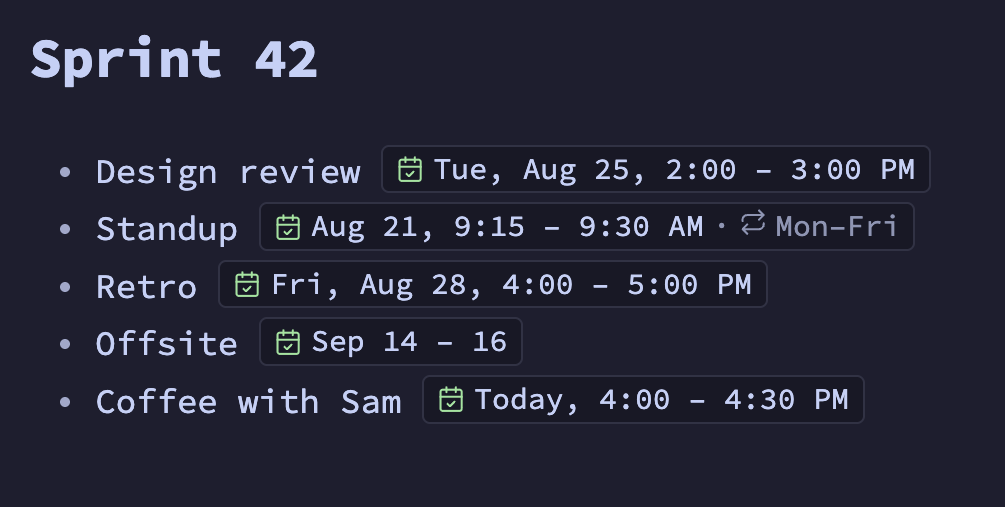
Click a chip to get the text back and edit it, or click its icon and pick instead of typing:
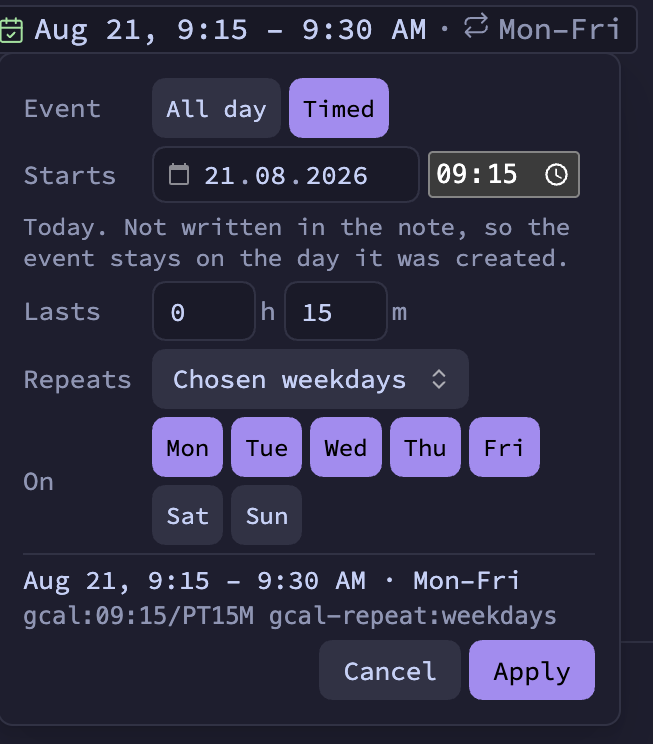
Apply rewrites that one declaration in your note and nothing else. The panel shows what it will write, in words and as the text, so you can also use it to learn the syntax. Picking a date has the details, and how a declaration is shown covers the chips.
Syntax
There are two directives: gcal: for the event and gcal-repeat: to repeat it. Both go inside
backticks.
Start and duration, written as gcal:<start>[/<duration>]:
| You write | You get |
|---|---|
gcal:2026-08-18 |
All-day event on that date |
gcal:2026-09-14/P3D |
All-day event over three days |
gcal:2026-08-18T14:00 |
14:00, one hour |
gcal:2026-08-18T14:00/PT90M |
14:00, 90 minutes |
gcal:16:00/PT30M |
16:00 today, 30 minutes, and it stays on that day |
gcal:2026-08-18T14:00-04:00 |
An exact moment, whatever your time zone |
Times use your own time zone unless you add Z or an offset such as -04:00. Durations use PnD
for all-day events and P#DT#H#M for timed ones.
Repeat, written as gcal-repeat:<rule> after the event it belongs to:
| Kind | Rules |
|---|---|
| Periods | daily, weekly, fortnightly, monthly, quarterly, yearly |
| Weekdays | weekdays, monday, mon,wed,fri, monday-thursday |
| Intervals | every-2-weeks, every-10-days, every-3-months |
| Raw RRULE | FREQ=MONTHLY;BYMONTHDAY=1 |
gcal-repeat: also works on its own. Take medication `gcal-repeat:daily` is an all-day event
that repeats from today.
In note properties, for when the note itself is the event. The note name is the title unless you set one:
---
gcal:
  - when: 2026-08-18T09:15/PT15M
    title: Standup
    repeat: weekdays
  - when: 2026-08-20/P1D
---
A code span only counts when it holds nothing but directives, so a note can write about gcal:
without creating an event. Everything you can write is in Event syntax.
Setup
You need Obsidian 1.13.0 or newer on desktop, a Google account, and your own Google Cloud OAuth client. The plugin ships no credentials of its own, so you create that client once, which takes a few minutes. Desktop only, because signing in needs a local callback server.
- Create an OAuth client of type Desktop app and turn on the Google Calendar API. Setup has the steps.
- In Settings → Google Calendar Sync, put the client ID in an Obsidian secret and click Authorize.
- Under Calendar, click Create calendar, so synced events stay separate from your other events.
- Add
`gcal:2026-08-18T14:00/PT1H`to a note and save.
Guard rails
Any note in a synced folder can add or delete events, so large changes stop and ask first.
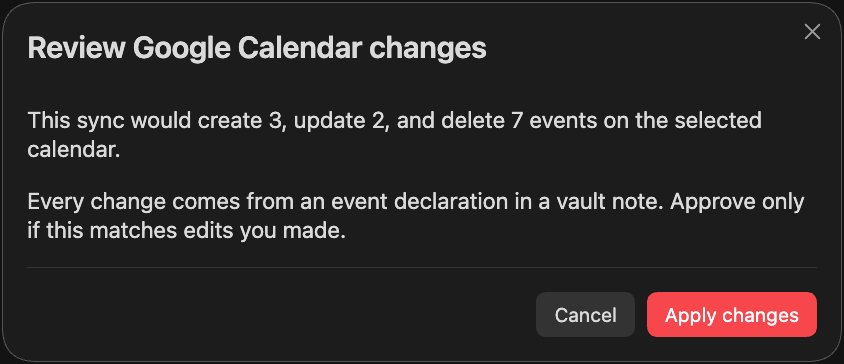
- Deleting 5 or more events, or changing 25 or more, waits for your approval.
- More than 200 changes in one sync is refused.
- If a note has a bad line, the whole note is skipped and its events are kept.
- Synced folders limits which folders may declare events.
More in How sync works and Security and privacy.
Network use
The plugin contacts Google and nothing else. There is no telemetry and no third-party server.
| Host | Why |
|---|---|
accounts.google.com |
Sign-in during authorization. |
oauth2.googleapis.com |
Exchange, refresh, and revoke your token. |
www.googleapis.com |
Read and write events on the Google Calendar API. |
Titles, times, and repeat rules are sent to Google. Note paths and folder names are hashed first, and nothing else from your notes leaves your device.
Documentation
- Setup
- Event syntax
- Settings
- How sync works
- Security and privacy
- Troubleshooting
- Development and release
- Changelog