Game and Visual Novel Metadata
 emdcatalyst34 downloads
Fetch video game and visual novel metadata, artwork, and personal stats into notes with Banner and Dataview integration.
- Overview
- Scorecard
- Updates3

A comprehensive plugin to search video game and visual novel databases (RAWG, Steam, VNDB, and HowLongToBeat), retrieve rich metadata, cover & banner artwork, completion durations, ratings, and descriptions, for multiple platforms, and embed them into your vault with Banners, Dataview, and Configurable Subfolder Hierarchy support.
Features
- Video Games (RAWG & Steam): Search over 500,000+ games across PC, PlayStation, Xbox, Nintendo, Mobile, and retro platforms.
- Visual Novels (VNDB Kana API): Dedicated integration with the Visual Novel Database (VNDB) for visual novels, including Japanese titles, developer studios and duration estimates.
- Highly Customizable: Comprehensive list of settings and customizations to suit all your needs.
- Personal Gameplay Stats & Modal: Edit your personal rating, status, platform, playtime, start/finish dates, version/patch, notes, review, and custom links at any time.
- Refresh Remote Metadata: Update existing notes with newly added remote metadata properties while preserving 100% of your personal playthrough stats and custom frontmatter properties.
- Custom Manual Entries: Built-in modal creators to manually catalog unlisted, indie, or custom games and visual novels.
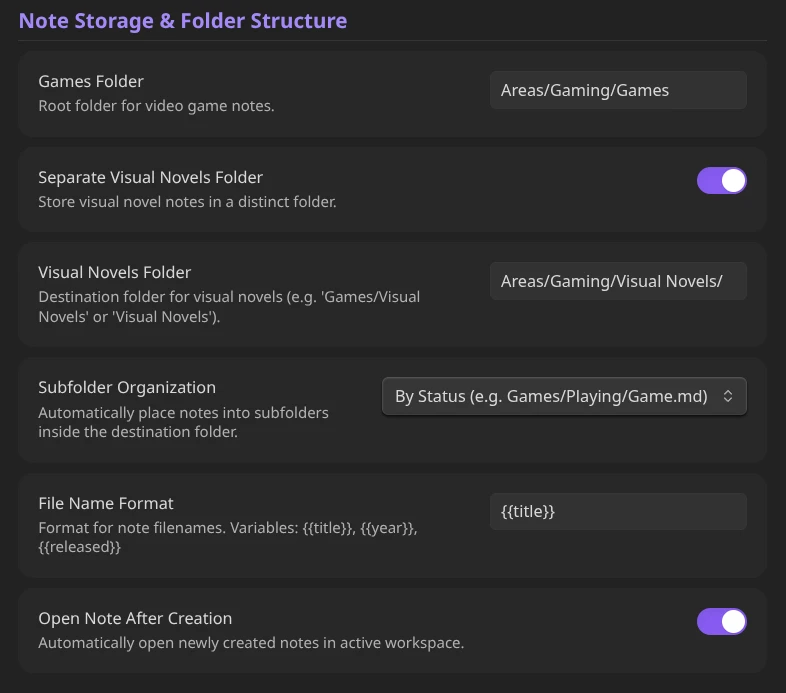
- Subfolder Organization: Automatically place new notes into organized subdirectories:
- By Status (e.g.
Games/Playing/Elden Ring.md,Games/Backlog/Game.md) - By Developer (e.g.
Games/FromSoftware/Elden Ring.md,Visual Novels/MAGES./Steins;Gate.md) - By Primary Genre (e.g.
Games/RPG/Game.md) - Custom Pattern (e.g.
{{status}}/{{developer}})
- By Status (e.g.
- Folder Separation: Separate storage folders for Video Games (e.g.
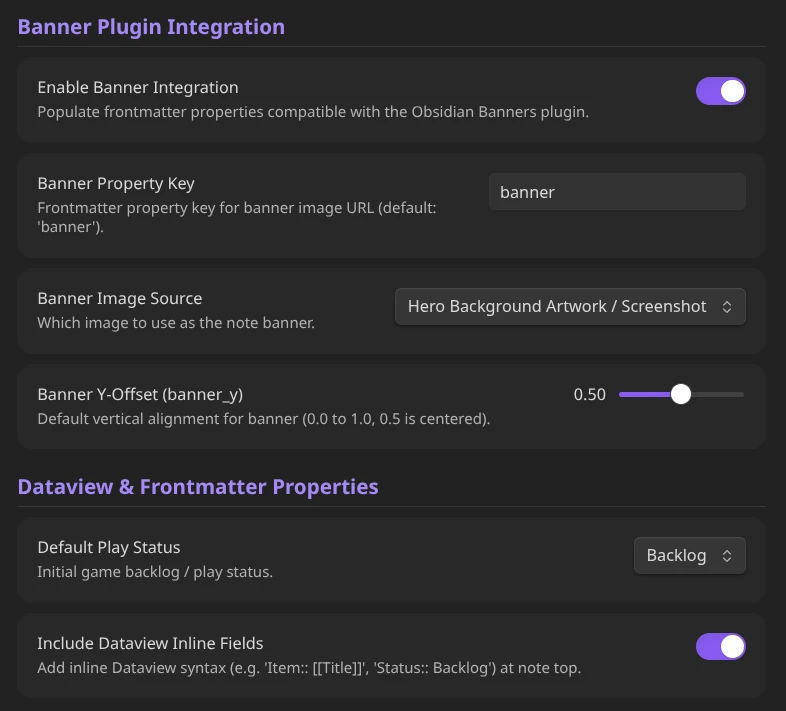
Games/) and Visual Novels (e.g.Games/Visual Novels/). - Banners Integration: Auto-populates
banner: "url"andbanner_y: 0.5frontmatter properties. - Dataview & Properties Ready: 100% standard YAML frontmatter serialization for Dataview use.
- No External Dependencies: Zero external runtime packages.
Installation
Community Plugins (Recommended)
- Open Settings > Community plugins.
- Turn off Restricted mode and select Browse.
- Search for Game & Visual Novel Metadata.
- Click Install, then Enable.
Beta Testing via BRAT
- Install the Obsidian42 - BRAT plugin.
- Open the Command Palette and run
BRAT: Add a beta plugin for testing. - Paste the GitHub repository URL.
Manual Installation
- Download
main.js,manifest.json, andstyles.cssfrom the latest release. - Create a folder named
game-metadatain your vault's.obsidian/plugins/directory. - Move the downloaded files into
.obsidian/plugins/game-metadata/. - In Obsidian, go to Settings > Community plugins and enable Game & Visual Novel Metadata.
Usage & Commands
Ribbon Icons
- Gamepad Icon: Search Video Game (RAWG / Steam)
- Book Icon: Search Visual Novel (VNDB)
Command Palette
Game and Visual Novel Metadata: Search Video Game (RAWG / Steam): Search and create a new video game note.Game and Visual Novel Metadata: Search Visual Novel (VNDB): Search and create a new visual novel note.Game and Visual Novel Metadata: Refresh remote metadata for active note: Refreshes API data (artwork, description, HLTB hours, genres, developers) while preserving all personal stats and custom frontmatter keys.Game and Visual Novel Metadata: Edit personal stats & review for active note: Open the personal stats modal to edit status, rating, dates, playtime, review, or custom links and re-render the note body from your active template.Game and Visual Novel Metadata: Create custom Game note manually: Manual creator for unlisted or indie games.Game and Visual Novel Metadata: Create custom Visual Novel note manually: Manual creator for unlisted or indie visual novels.
Customization
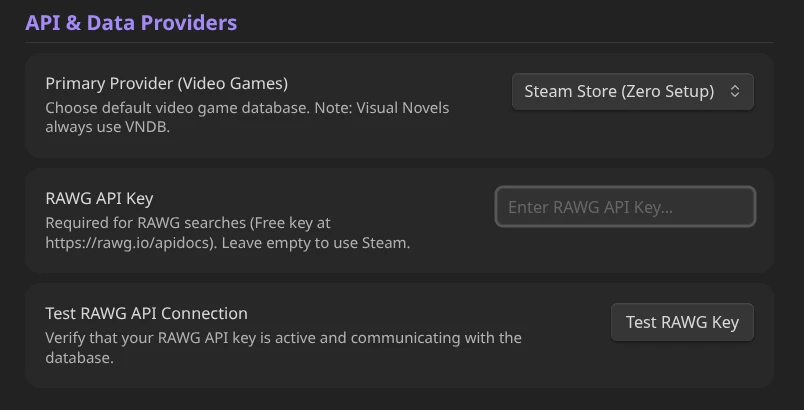
You can freely switch between different data providers (RAWG & Steam). I recommend RAWG because it has games from all platforms, but it needs an API key. You can get yours for free here. RAWG offers a very generous free tier so don't worry about hiting the limits.
You can manage everything related to the note's creation and placement. That includes the folder, Visual Novel folder seperation, subfolder organization (including a custom pattern) and file name.
You can also manage the integration with Banners and Dataview as you see fit.
Finally, you can write your own template for the created note, or stick with the default one, with support of a massive list of variables to choose from.
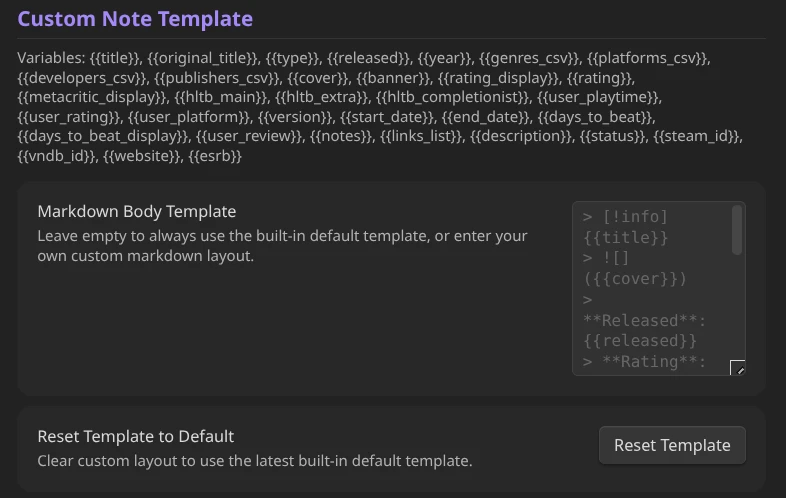
Dataview Examples
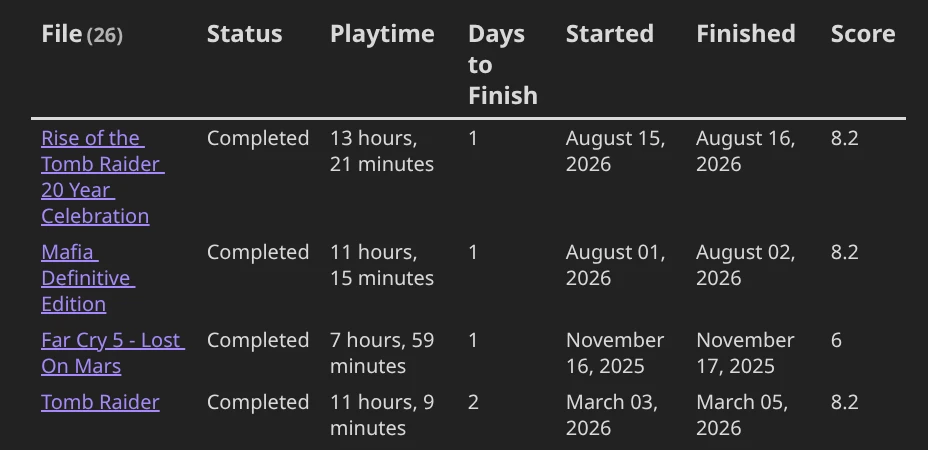
1. Completed Games with Days to Beat & Playtime
```dataview
TABLE
  status as Status,
  user_playtime as "Playtime",
  days_to_beat as "Days to Finish",
  date_started as "Started",
  date_finished as "Finished",
  user_rating as "Score"
FROM #game
WHERE status = "Completed"
SORT days_to_beat ASC
```
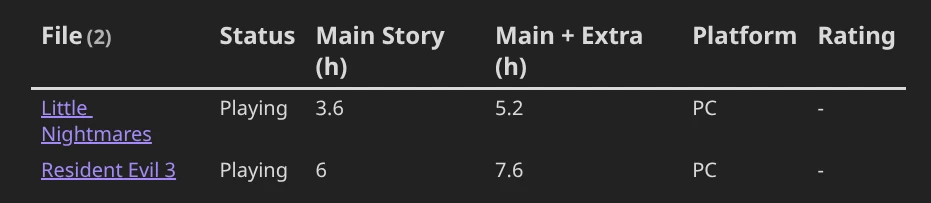
2. Backlog & In-Progress Games with HLTB Durations
```dataview
TABLE
  status as Status,
  hltb_main as "Main Story (h)",
  hltb_extra as "Main + Extra (h)",
  user_platform as "Platform",
  user_rating as "Rating"
FROM #game
WHERE status = "Playing" OR status = "Backlog"
SORT hltb_main ASC
```
Example Frontmatter Structure
---
banner: "https://shared.akamai.steamstatic.com/store_item_assets/steam/apps/292030/f7f564ecedd09b3e503b071a637aeefdedbeedd8/ss_f7f564ecedd09b3e503b071a637aeefdedbeedd8.1920x1080.jpg?t=1790693338"
banner_y: 0.5
id: "292030"
title: "The Witcher 3: Wild Hunt — Remastered"
type: game
released: 18 May, 2015
year: "2015"
genres:
  - RPG
platforms:
  - PC (Windows)
developers:
  - CD PROJEKT RED
publishers:
  - CD PROJEKT RED
metacritic: 93
status: Backlog
hltb_main: 56.8
hltb_extra: 123.7
hltb_completionist: 188.9
links:
  - https://store.steampowered.com/app/292030
  - https://www.thewitcher.com/witcher3
cover: https://shared.akamai.steamstatic.com/store_item_assets/steam/apps/292030/e8afc4252e3fee8ed2525ab2fd7675cca39aa38d/header_alt_assets_1.jpg?t=1790693338
description: "The Witcher 3: Wild Hunt — Remastered modernizes the acclaimed role-playing game with a range of upgrades and enhancements. Become monster slayer for hire Geralt of Rivia and journey across a dark fantasy open world in an epic quest to find your adopted daughter Ciri."
short_description: "The Witcher 3: Wild Hunt — Remastered modernizes the acclaimed role-playing game with a range of upgrades and enhancements. Become monster slayer for hire Geralt of Rivia and journey across a dark fantasy open world in an epic quest to find your adopted daughter Ciri."
website: https://www.thewitcher.com/witcher3
steam_id: "292030"
tags:
  - game
user_playtime: 120 hrs
user_rating: 10/10
user_platform: PC
version: "v4.0 Next-Gen"
date_started: "2026-08-01"
date_finished: "2026-09-20"
days_to_beat: 50
---
Template Placeholders
| Variable | Description | Example |
|---|---|---|
{{title}} |
English/Main Title | Steins;Gate / Elden Ring |
{{original_title}} |
Native/Original Title (e.g. Japanese) | STEINS;GATE 比翼恋理のだーりん |
{{type}} |
Media type | game or visual_novel |
{{released}} |
Release Date | 2009-10-15 |
{{year}} |
Release Year | 2009 |
{{rating_display}} |
Formatted rating | 4.65/5 or 8.8/10 |
{{metacritic_display}} |
Metacritic score with parens | (Metacritic: 92) |
{{genres_csv}} |
Comma-separated genres | RPG, Action, Adventure |
{{platforms_csv}} |
Comma-separated platforms | PC, Switch, PS5 |
{{developers_csv}} |
Comma-separated developer studios | FromSoftware, MAGES. |
{{publishers_csv}} |
Comma-separated publishers | Bandai Namco |
{{hltb_main}} |
HowLongToBeat Main Story hours | 51.5 hrs |
{{hltb_extra}} |
HowLongToBeat Main + Extra hours | 103 hrs |
{{hltb_completionist}} |
HowLongToBeat 100% Completion hours | 173 hrs |
{{user_playtime}} |
Entered playtime string | 45 hrs / 45h 30m |
{{start_date}} |
Date Started | 2026-09-10 |
{{end_date}} |
Date Finished | 2026-09-20 |
{{days_to_beat}} |
Formatted days calculation | 10 days / 0 days (same day) |
{{days_to_beat_display}} |
Days suffix | (took 10 days) |
{{user_rating}} |
Personal score | 9.5/10 |
{{user_platform}} |
Device played on | Steam Deck / PC |
{{version}} |
Version, patch, or edition | v1.0, Remaster, Fan TL |
{{notes}} / {{user_notes}} |
Personal markdown notes | Guide links, checklist |
{{links_list}} |
Formatted bullet list of markdown links | - VNDB |
{{user_review}} |
Personal review text | Masterpiece storyline. |
{{description}} |
Game summary/synopsis | Story overview... |
{{cover}} |
Cover Image URL | https://... |
{{banner}} |
Banner Artwork URL | https://... |
{{status}} |
Current play status | Completed |
{{steam_id}} |
Steam App ID | 1086940 |
{{vndb_id}} |
VNDB ID | v17 |
{{website}} |
Official game website | https://... |
License
MIT License