Game Master Interactive Screen
 Marek Meissner64 downloads
A system-agnostic GM screen: tabbed screens with pinned notes, maps and live party stats, a dice tray, combat bar, session notes, sticky notes, checklists, soundboard, clocks and timers, and random tables with loot hand-out.
- Overview
- Scorecard
- Updates3
A GM screen for Obsidian. Build tabbed screens out of tiles you place anywhere, such as notes, maps, your party's live stats, a dice tray, session notes, sticky notes, a soundboard, clocks and random tables, and run your game from one tab.
- System-agnostic. It works with any game. With One DnD Character Sheet and Roll for Initiative it also knows your party's HP, AC, spell slots and the running fight.
- Everything stays in your vault. Notes are shown, not copied. Sticky notes, checklists, soundboard buttons and clock tiles live only on the screen.
Showcase
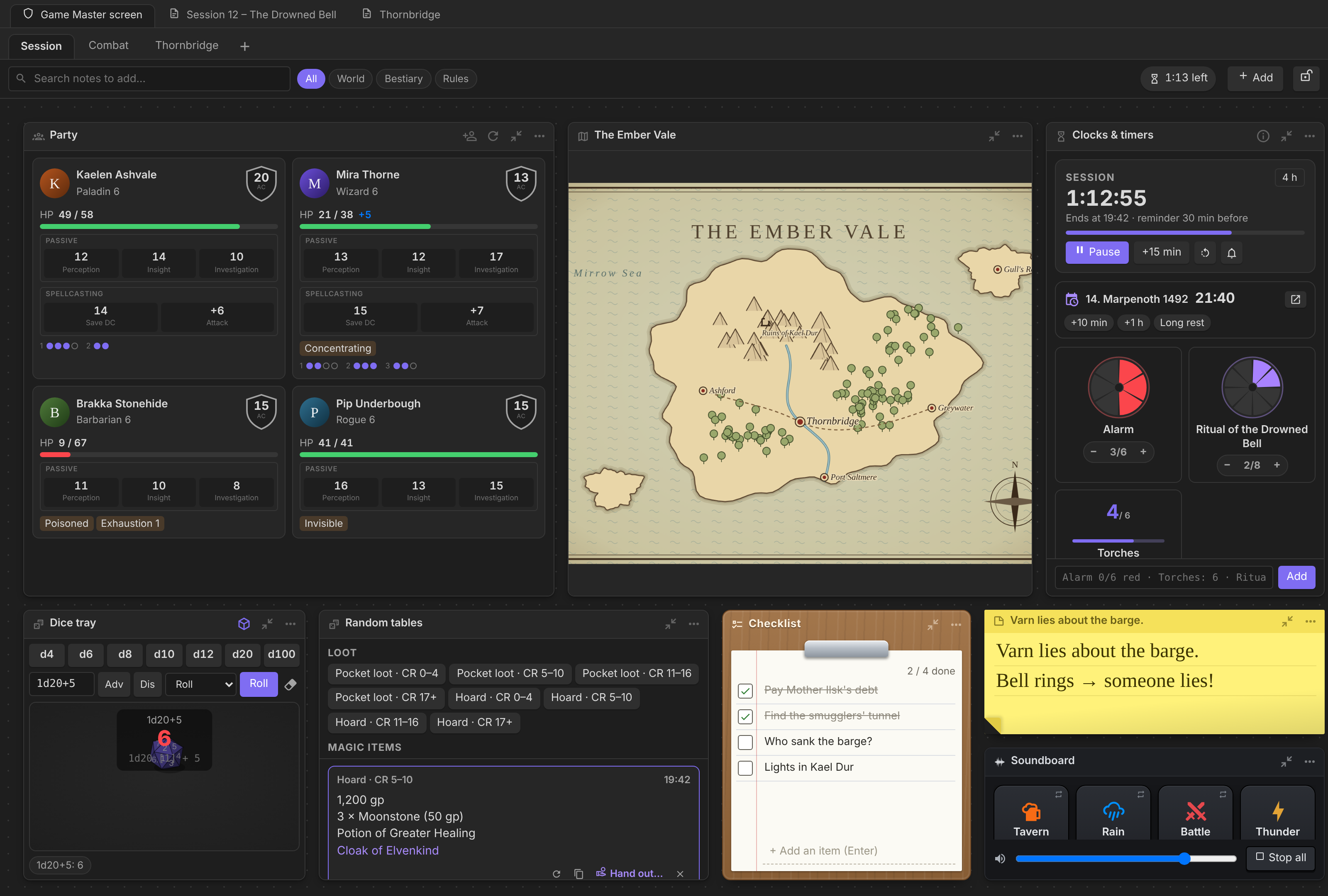
A screen for every part of the night
Keep one tab for the session, one for the fight and one for the town the party is in. Every tile can be moved, resized and shrunk to its title, and the layout can be locked so nothing moves during play.
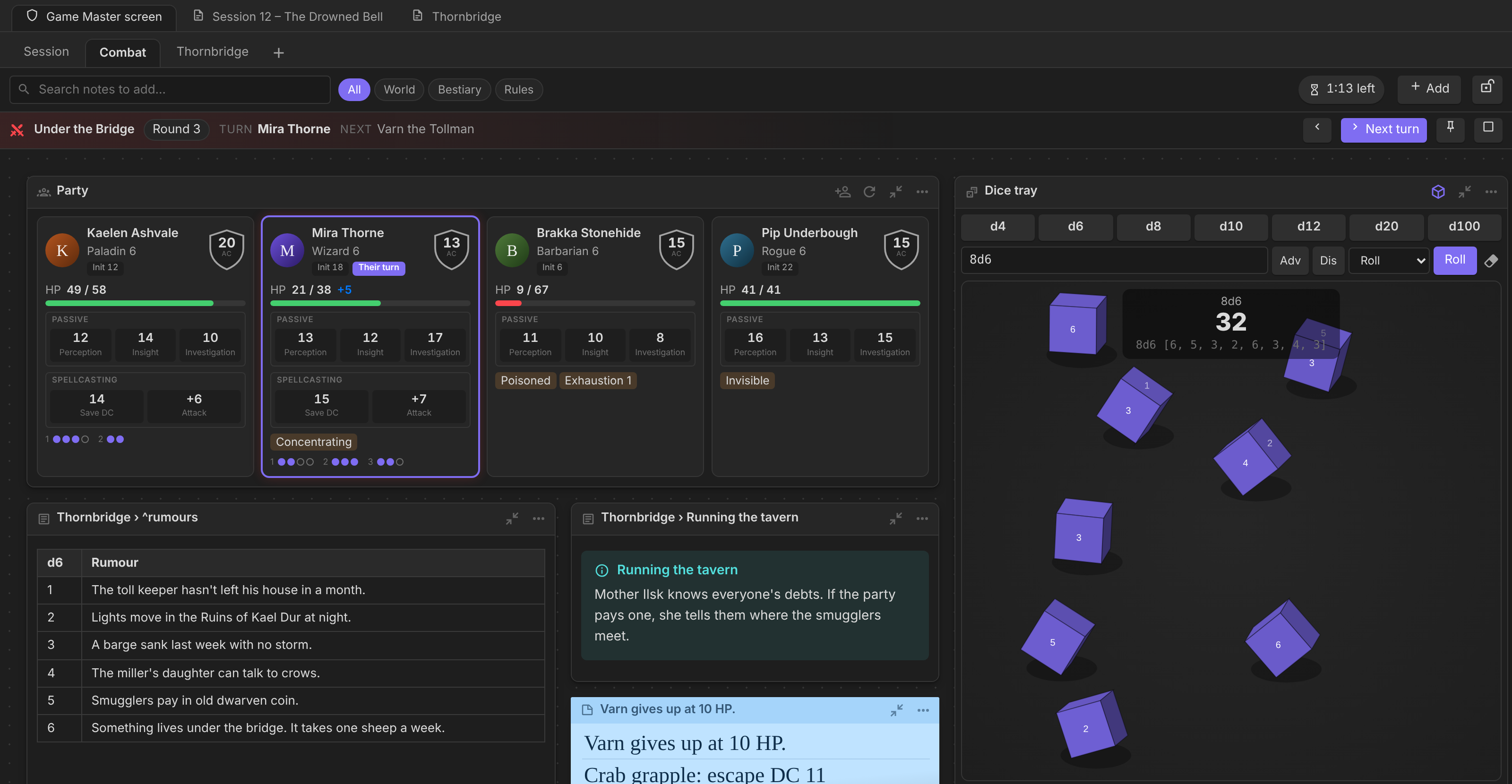
Run the fight
With Roll for Initiative, a combat bar shows the round, whose turn it is and who's next, with Next turn right there. Party cards light up for the active character and show everyone's initiative. Rolls from the dice tray show animated 3D dice and land as a result card. With Dice Roller installed, its dice are used instead.
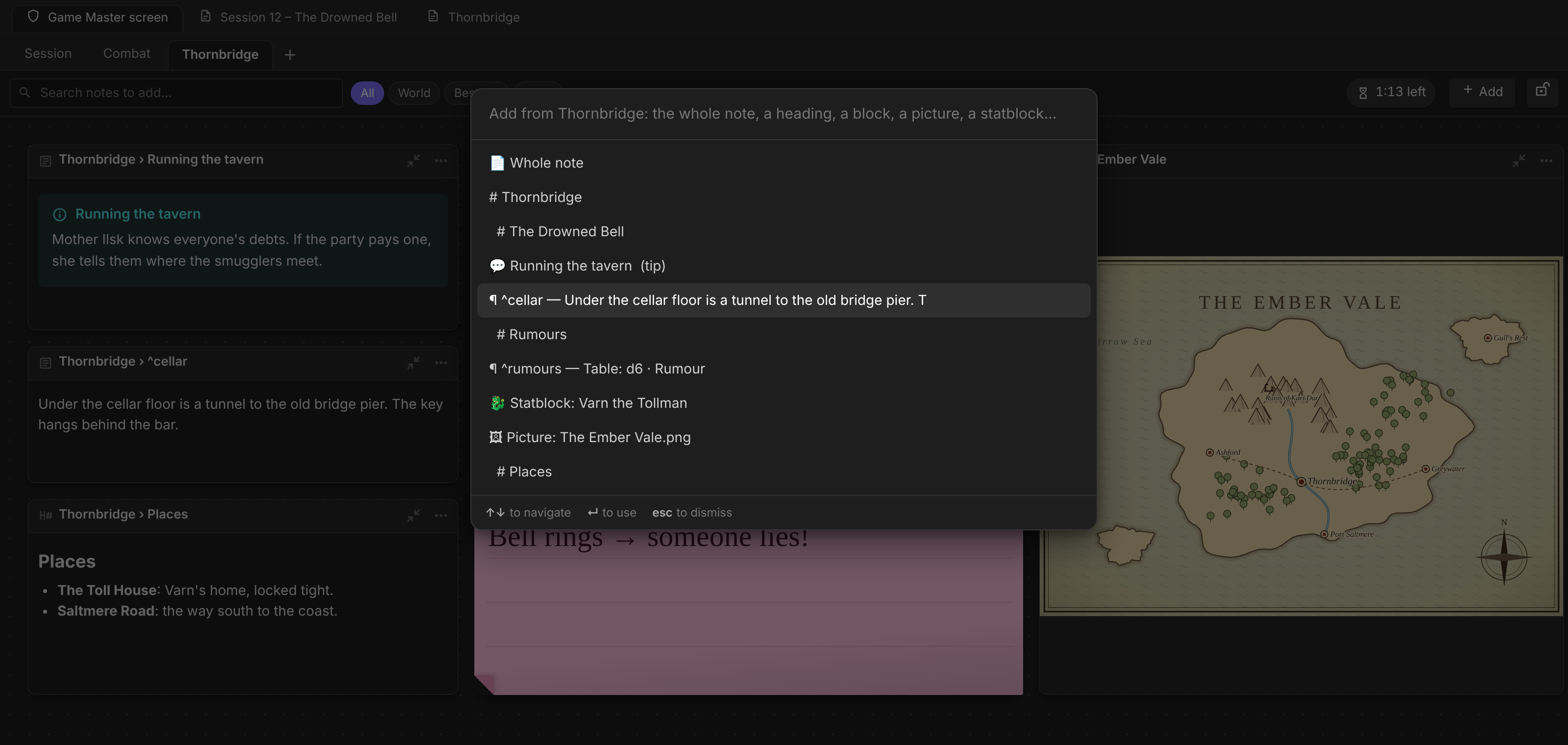
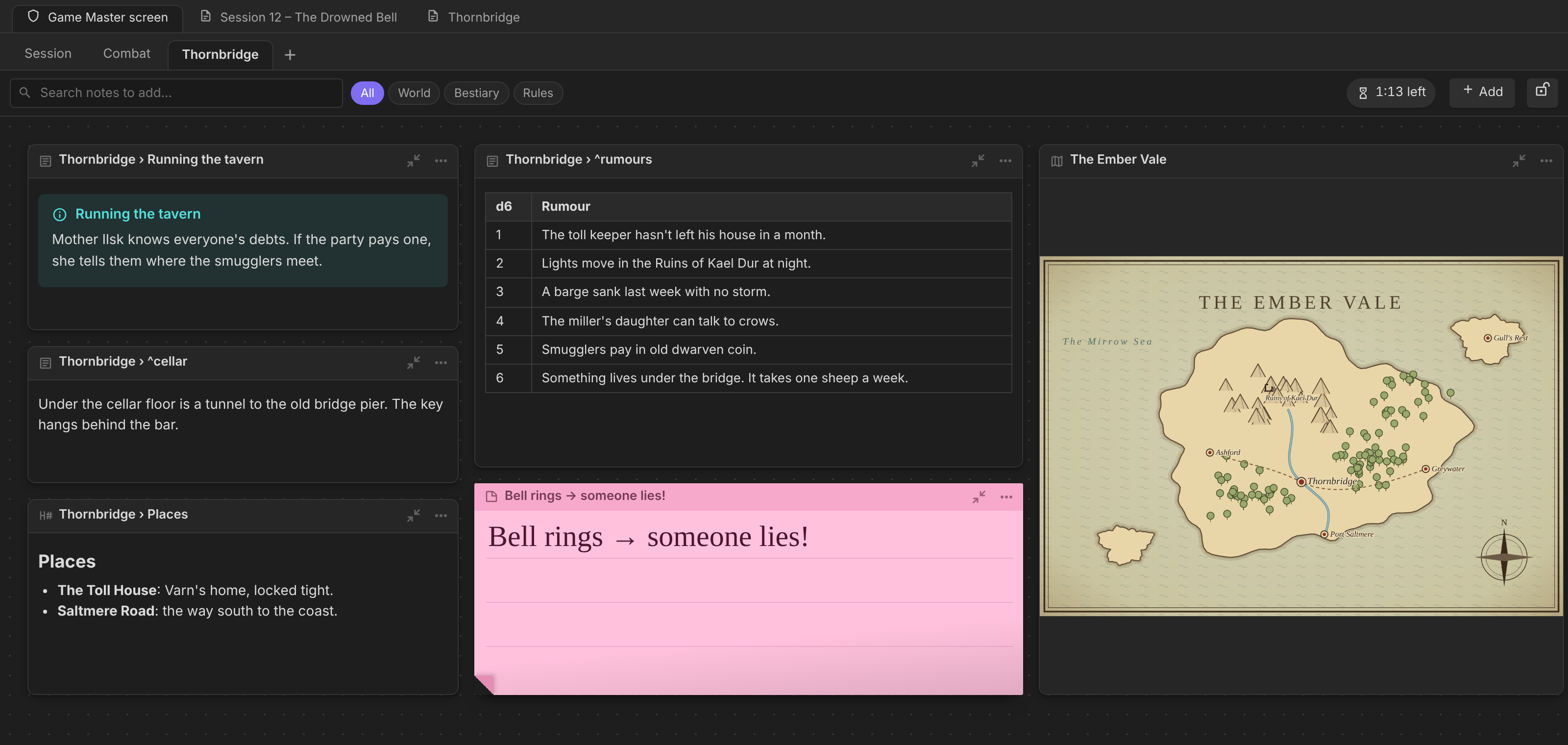
Put just the part of a note you need
Add a whole note, or pick one part of it like an Obsidian embed: a heading, a ^block (paragraph, list item or a whole table), a callout, a statblock, a picture or a map. The tile follows the note, so edits show up straight away.
Roll loot and hand it out
Roll on the starter loot tables (or your own Randomness / Atlas VTT tables), then Hand out…: choose the party, decide who takes each item, and split the coins between the members you tick. Everything is written straight into the One DnD Character Sheet inventories.
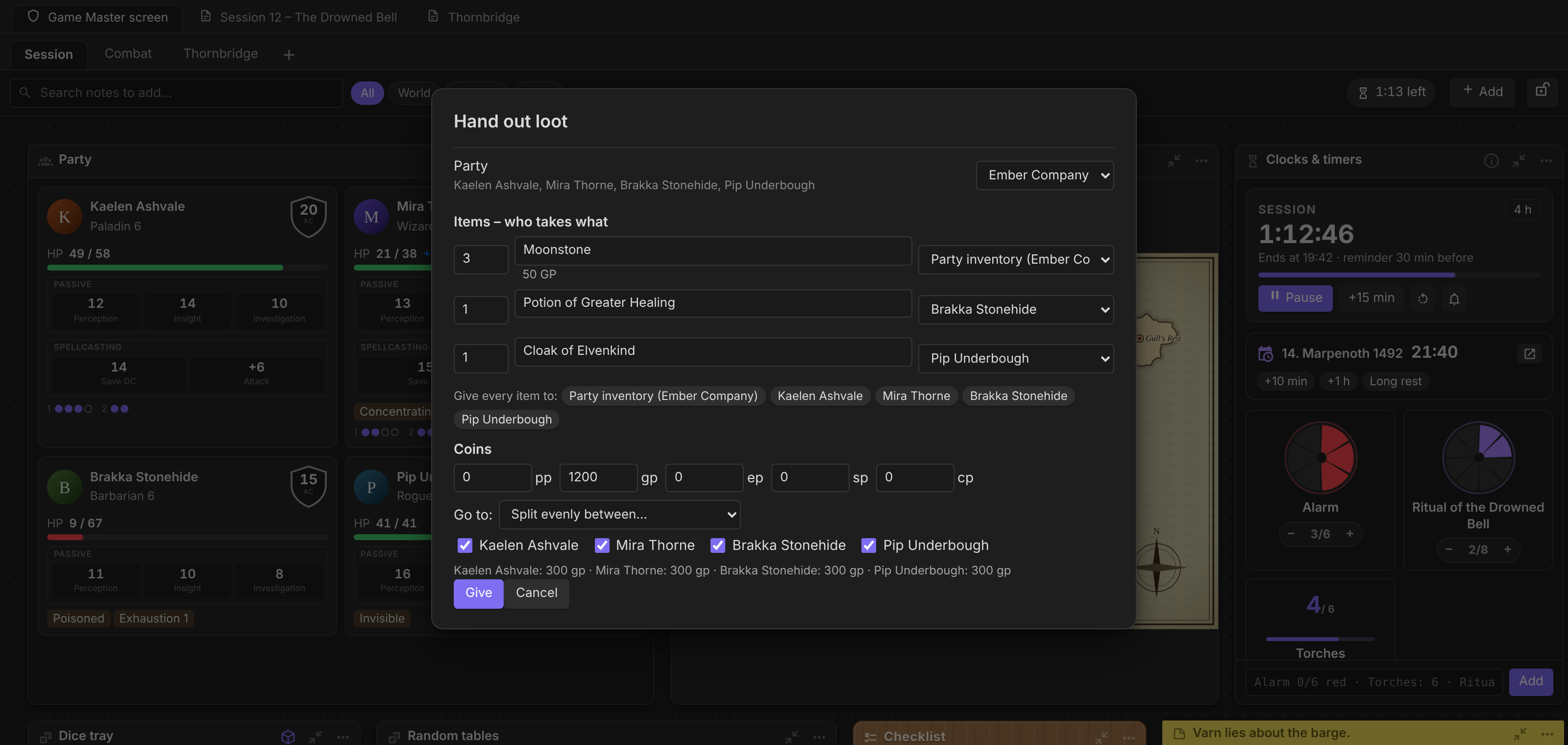
Screenshots use a made-up demo campaign; the characters, places and map are invented.
Features
Screens and tiles
- Tabs: each tab is a screen. Right-click a tab to rename, duplicate, move, lock, save it as a template, export it or delete it.
- Tiles: drag by the title bar, resize from the corner and shrink to just the name. Tiles snap to their neighbours when you move and when you resize them.
- Lock layout: freeze a screen so nothing moves by accident during play.
- Templates, export and import: save a screen as a template and start new screens from it. Export a screen as JSON (copy it, or save a
.gmscreen.jsonfile) and import it in another vault. - Search: the search bar finds notes, headings and maps in your vault. Pin a whole note or just a part of it, like an Obsidian embed: a section (
## Heading), a^block, a callout, a statblock, a picture or a map.
Pinned notes, sections and maps
- A pinned note shows its name. Click it to open a movable popup with the note rendered as in reading view, with its own CSS classes.
- Narrow popups switch notes to their phone layout (the note's own
@mediarules apply to the popup's width). - Maps from TTRPG Tools – Maps fill their tile and keep working (zoom, markers).
Party
- One card per character: portrait, HP bar, AC shield, passives, spell save DC and attack, conditions and spell-slot pips, all read live.
- Pick the party from One DnD Character Sheet party groups, a folder or a tag, or choose characters by hand. Each party tile can have its own members.
- During a fight, cards show the character's initiative and mark their turn and on deck.
- Without the character sheet plugin, cards read any properties you choose (fields are configurable in Settings).
Dice tray
- Type a formula or click a die. Dice Roller's 3D dice land inside the tray.
- Result cards (bottom right) show who rolled, the total, the dice and what it was for, e.g. Edd von Grundfell · 7 · 1d8 [6] + 1 · Damage: Bludgeoning, Warhammer.
- Rolls clicked on character sheets and statblocks get the same cards. A heal spell is recognised as healing.
- Damage and healing cards offer Apply damage… / Heal someone… (with Roll for Initiative).
Combat (with Roll for Initiative)
- Add → Combat opens Roll for Initiative's own wizard and pins the fight to the screen.
- A combat bar shows the round, whose turn it is and who's next, with Previous / Next turn, Pin the fight, Show on player screen and End combat.
- Initiative and HP rolls are thrown in the dice tray, as one handful.
Session notes
- A writing pad for the session. Done creates the session note from your template (e.g. Session 42 - The long road), with the date and your notes in it.
Sticky notes and checklists
- Sticky notes: paper look in five colours, handwriting font, ruled lines, text that scales with the note.
- Checklist: a clipboard on a wood board, so it's easy to find. Press Enter to add an item, tick it off, and see the done count. Tile menu: Untick everything, Remove ticked items.
Soundboard
- Stream Deck-style buttons, each playing one audio file, a whole folder (in order or shuffled) or a direct web link.
- Three kinds:
- Music plays one at a time and fades into the next.
- Ambience loops and layers (rain plus tavern).
- Sound effect plays once.
- A lit key with a progress bar shows what's playing. Use the master volume, Stop all with a fade, or the Soundboard: stop all sounds command.
- Drag an audio file or folder from the file explorer onto the board to add a button.
Clocks & timers
- Session timer: set how long the session should last. It counts down, shows when the session will end, and reminds you 30 minutes before the end (configurable) with a notice, a card and a soft chime. A toolbar chip shows the time left on every screen.
- In-game time from TTRPG Tools – Time: today's date and hour, with the calendar's own time buttons (+10 min, +1 h, +1 d…).
- Clocks in the Tabletop Clocks text format:
Alarm 0/6 red,Escape 0/6 vs Guards 0/6,Torches: 6 of 10,Ritual: 0:00 of 10:00(a countdown),# Heading.- Keep them on the screen, or link the tile to a
```clocks ```block in a note and tick it from the screen. - The ⓘ button in the tile's title bar shows a cheat sheet.
- Keep them on the screen, or link the tile to a
Random tables (with Randomness)
- Pin any Randomness table as a button and click to roll. Results stay in a list with Roll again, Copy and Hand out….
- Starter tables (optional, written into your Randomness folder when you click Install starter tables):
- Loot: pocket loot and treasure hoards by challenge rating, magic items by rarity, gems, art objects, trinkets, and What's in their pockets?;
- At the table: tavern names, NPC quirks, rumours, complications, weather.
- Hand out loot (with One DnD Character Sheet):
- Pick the party.
- Choose who takes each item (a character or the party's shared inventory).
- Split the coins evenly between the members you tick, or give them to one person.
- Items and coins are written straight into the sheets' inventories; items that have an item note in your vault are linked to it.
Installation
Game Master Interactive Screen is not in the Community plugins list yet.
Option A: BRAT (recommended; installs and updates inside Obsidian)
- Settings → Community plugins: turn off Restricted mode if it's on.
- Browse, search for BRAT (Obsidian42 - BRAT), then Install and Enable it.
- Settings → BRAT → Add Beta plugin, paste
https://github.com/YOUR-GITHUB-USERNAME/game-master-screenand click Add Plugin. - Settings → Community plugins: switch on Game Master Interactive Screen.
Option B: by hand
- Download
main.js,manifest.jsonandstyles.cssfrom the latest release. - Put them in
<your vault>/.obsidian/plugins/game-master-screen/. The.obsidianfolder is hidden, so turn on hidden files in your file manager. - Reload Obsidian and switch the plugin on under Settings → Community plugins.
Works with (all optional)
| Plugin | Adds |
|---|---|
| One DnD Character Sheet | Live party cards, loot hand-out into inventories |
| Roll for Initiative | Combat tiles, combat bar, initiative in the dice tray, applying damage and healing |
| Dice Roller | 3D dice in the tray, result cards for rolls on sheets and statblocks |
| Fantasy Statblocks | Statblocks in pinned notes and popups |
| TTRPG Tools – Maps | Maps as tiles |
| TTRPG Tools – Time | In-game date and time on the Clocks & timers tile |
| Tabletop Clocks | Same clock format: clocks move freely between notes and the screen |
| Randomness | Random tables and the starter loot tables |
Getting started
- Click the shield icon in the left ribbon (or run Open Game Master Interactive Screen).
- Use + Add in the toolbar to add tiles: Party, Session notes, Combat, Dice tray, Note, Map, Sticky note, Checklist, Soundboard, Clocks & timers, Random tables.
- Search for a note and click the pin to put it on the screen, or right-click a note in the file explorer → Add to Game Master screen. In the editor, right-click a heading or a map → Add … to Game Master screen.
- Right-click a tab for screen options; the ⋯ on a tile for tile options.
Settings (overview)
| Section | What you set |
|---|---|
| Game system | A preset of party fields (D&D 2024 or generic) |
| Party | Where the party comes from, the name / portrait / subtitle properties, and which fields the cards show |
| Search | Categories (by folder or tag), full-text search |
| Session diary | Folder, naming pattern (Session {{number}} - {{title}}), date format, template |
| Dice | 3D dice, showing rolls from Dice Roller, initiative in the tray |
| Session timer | Default length, reminder minutes, chime |
| Soundboard | Fade time |
| Combat | Combat bar |
| Screen templates | Export or delete saved templates |
For other plugins
// Roll on the GM screen (tray animation if a tray is open + result card)
app.plugins.plugins["game-master-screen"]?.api.roll("2d6+3", "Fire Bolt");
app.workspace.trigger("game-master-screen:roll", "1d20+5", "Stealth");

// After every roll the GM screen tells who rolled what:
plugin.registerEvent(app.workspace.on("game-master-screen:rolled", (r) => {
  // { total, formula, label, source, who, whoPath, action,
  //   kind: "attack" | "damage" | "healing" | "roll" | "initiative" | null,
  //   damageType, crit: "crit" | "fumble" | null, dice: [{ sides, values, kept }] }
}));
Credits
Thanks to the authors of the plugins this screen works with: Jeremy Valentine (Dice Roller, Fantasy Statblocks), Jareika (TTRPG Tools – Maps, Time and Player Screen), Bananafest Destiny (Tabletop Clocks) and Josh (Randomness). None of their code is bundled. See CREDITS.md.
Disclaimer
This is an unofficial fan project. Dungeons & Dragons is a trademark of Wizards of the Coast. No rules text ships with this plugin.
License
MIT © 2026 Majsnic