Search...Search plugins and themes...
⌘K
Sign in
  • Get started
  • Download
  • Pricing
  • Enterprise
  • Account
  • Obsidian
  • Overview
  • Sync
  • Publish
  • Canvas
  • Mobile
  • Web Clipper
  • CLI
  • Learn
  • Help
  • Developers
  • Changelog
  • About
  • Roadmap
  • Blog
  • Resources
  • System status
  • License overview
  • Terms of service
  • Privacy policy
  • Security
  • Community
  • Plugins
  • Themes
  • Discord
  • Forum / 中文论坛
  • Merch store
  • Brand guidelines
Follow us
DiscordTwitterBlueskyThreadsMastodonYouTubeGitHub
© 2026 Obsidian

Folder Sort

Tomas GutierrezTomas Gutierrez390 downloads

Sort folders A-Z or Z-A

Add to Obsidian
Folder Sort screenshot
  • Overview
  • Scorecard
  • Updates8

Folder Sort is an Obsidian plugin that adds folder sorting to the native File explorer sort menu.

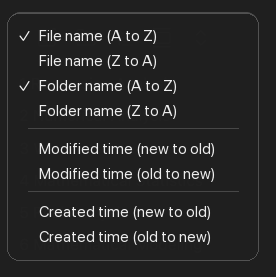
It adds two options directly under Obsidian's file-name sort options:

  • Folder name (A to Z)
  • Folder name (Z to A)

Folder Sort only reorders folders. Files use Obsidian's built-in file sorting behavior, and the existing folder/file placement is preserved.

Features

  • Sort folders A-Z or Z-A at every File explorer tree level.
  • Keep Obsidian's file sorting untouched.
  • Use natural, case-insensitive sorting, so 2 Folder sorts before 10 Folder.
  • Persist the folder sort direction per vault.
  • Configure Folder placement as Existing order, Folders first, or Folders last.
  • Pin folders above other folders with a purple pin marker, or hide folders from the File explorer.
  • Use the existing File explorer sort menu and command palette commands for sorting.
  • Load on desktop and mobile.

Folder Sort options in the File explorer sort menu

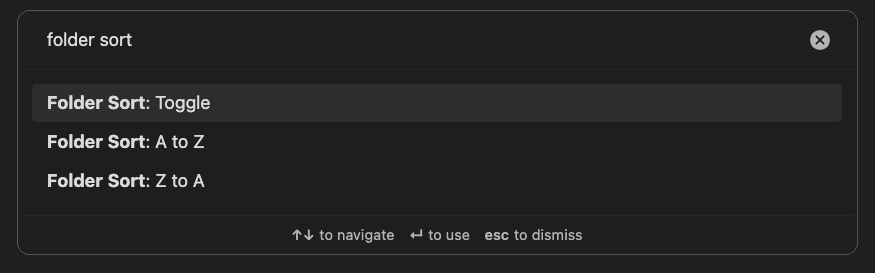
Folder Sort commands in the command palette

Usage

Open the File explorer sort menu and choose either Folder name (A to Z) or Folder name (Z to A).

You can also run these commands from the command palette:

  • Folder Sort: A to Z
  • Folder Sort: Z to A
  • Folder Sort: Toggle

The default direction is A-Z.

Use Settings > Community plugins > Folder Sort to choose the Folder placement mode:

  • Existing order: sort folders only within their existing folder positions.
  • Folders first: move sorted folders above files.
  • Folders last: move sorted folders below files.

Right-click a folder in the File explorer and use Pin folder or Hide folder below Move folder to.... Pinned folders stay above other folders and show a purple pin marker on the right. Hidden folders can be restored with the Folder Sort: Show hidden folders command.

HealthExcellent
ReviewPassed
About
Sort folders A–Z or Z–A in the file explorer and keep Obsidian's file sorting unchanged. Use natural, case-insensitive ordering at every tree level, persist direction per vault, and choose folder placement (existing order, folders first, or folders last).
FoldersSidebar
Details
Current version
0.1.7
Last updated
4 weeks ago
Created
2 months ago
Updates
8 releases
Downloads
390
Compatible with
Obsidian 1.5.0+
Platforms
Desktop, Mobile
License
MIT
Report bugRequest featureReport plugin
Author
Tomas GutierrezTomas Gutierrezt0masgutierrez
GitHubt0masgutierrez
  1. Community
  2. Plugins
  3. Folders
  4. Folder Sort

Related plugins

Hide Folders

Quickly toggle the visibility of specific folders in the file navigator based on configured names. Useful for hiding attachment folders.

Custom File Explorer sorting

Manual or automatic config-driven reordering and sorting of files and folders in File Explorer.

Flexplorer

Enhance the file explorer with custom sorting, pinning, and hiding.

Portals

Pin folders and tags as customizable tabs with icons, colors, and folder notes for easier navigation.

File Explorer Note Count

See the number of notes in each folder within the file explorer.

File Tree Alternative

An alternative file tree view with separate folder and file panes.

Trash Explorer

Restore and delete files from the Obsidian .trash folder.

File Explorer++

Hide and pin files and folders in the file explorer using custom filters.

Settings Sidebar Organizer

Groups Community Plugins into folders, allows renaming, reordering, and compacting the sidebar.

Colorful Folders

Automatically adds color-code folders, tags, and your Graph View with premium palettes, and auto-assign smart icons to visualize your structures instantly