Search...Search plugins and themes...
⌘K
Sign in
  • Get started
  • Download
  • Pricing
  • Enterprise
  • Account
  • Obsidian
  • Overview
  • Sync
  • Publish
  • Canvas
  • Mobile
  • Web Clipper
  • CLI
  • Learn
  • Help
  • Developers
  • Changelog
  • About
  • Roadmap
  • Blog
  • Resources
  • System status
  • License overview
  • Terms of service
  • Privacy policy
  • Security
  • Community
  • Plugins
  • Themes
  • Discord
  • Forum / 中文论坛
  • Merch store
  • Brand guidelines
Follow us
DiscordTwitterBlueskyThreadsMastodonYouTubeGitHub
© 2026 Obsidian

Folder Pin

42milesz42milesz70 downloads

Pin folders as tabs in the default file explorer.

Add to Obsidian
  • Overview
  • Scorecard
  • Updates5

English

在 Obsidian 文件资源管理器中将文件夹钉为标签页,一键切换项目上下文,告别反复展开、折叠和滚动。

为什么做这个插件

同一个 vault 里管理多个大型项目时,每次切换都要展开、折叠、滚动文件树。Folder Pin 让你把文件夹钉为资源管理器标签页的根目录,每个项目拥有独立的聚焦视图,切换只需一次点击。

功能特性

  • 文件夹钉为标签页 — 每个标签页以钉选文件夹为根,隐藏其余内容。
  • 多资源管理器视图 — 通过命令面板执行 Open another Folder Pin explorer 可开启多个独立视图。
  • 标签页独立状态 — 展开状态、滚动位置、选中文件均按标签页记忆。
  • 布局切换 — 标签栏支持网格等多种布局方式。
  • 可选「返回上级」按钮 — 快速从钉选子目录跳回父文件夹。

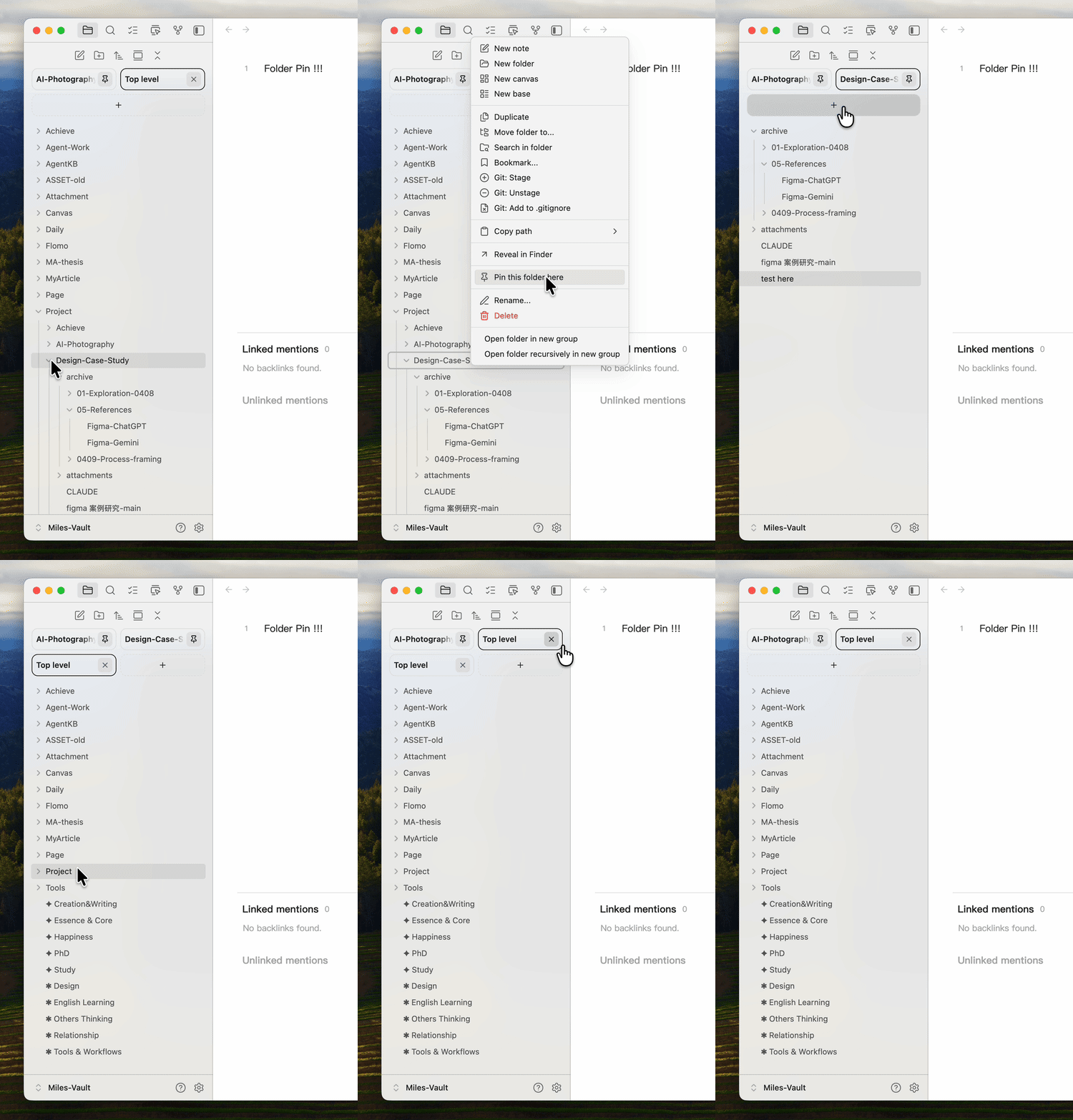
演示

demo

安装

从社区插件市场安装(上架后可用)

  1. 打开 Obsidian → 设置 → 第三方插件。
  2. 搜索 Folder Pin。
  3. 安装并启用。

手动安装(审核期间的推荐方式)

  1. 从 GitHub Releases 下载最新版本的 main.js、manifest.json 和 styles.css。
  2. 将三个文件放入 <你的 vault>/.obsidian/plugins/folder-pin/。
  3. 重新加载 Obsidian → 在设置 → 第三方插件中启用 Folder Pin。

使用方法

  1. 从侧边栏图标打开 Folder Pin 资源管理器视图,或在命令面板中执行 Open another Folder Pin explorer。
  2. 在资源管理器中右键点击任意文件夹 → Pin as tab,该文件夹即变为新标签页。
  3. 点击标签页切换上下文,每个标签页独立保留展开状态和滚动位置。

设置项

设置项 说明
Show "Go up" button 在每个标签页顶部显示返回父文件夹按钮
Tab layout 标签栏布局模式:grid、vertical 或 horizontal

兼容性

  • 最低 Obsidian 版本: 1.6.2
  • 仅桌面端 — 使用了移动端不可用的 Node API。

开发

npm install
npm run dev      # esbuild 监听模式
npm run build    # 一次性生产构建 → main.js

测试时将构建产物和 manifest.json / styles.css 软链接或复制到 .obsidian/plugins/folder-pin/ 即可。

许可证

MIT © 2026 Chu HanYu

79%
HealthExcellent
ReviewSatisfactory
About
Pin folders as Explorer tabs to switch project contexts with one click and hide the rest of the vault. Open multiple independent Folder Pin views, keep each tab's expand state, scroll position and selection, choose tab layouts (grid/vertical/horizontal), and use an optional Go up button.
FoldersSidebarNavigation
Details
Current version
0.2.4
Last updated
Last week
Created
3 weeks ago
Updates
5 releases
Downloads
70
Compatible with
Obsidian 1.7.2+
Platforms
Desktop only
License
MIT
Report bugRequest featureReport plugin
Author
42milesz42milesz
GitHub42milesz
  1. Community
  2. Plugins
  3. Folders
  4. Folder Pin

Related plugins

Portals

Pin folders and tags as customizable tabs with icons, colors, and folder notes for easier navigation.

Notebook Navigator

A better file browser and calendar inspired by Apple Notes, Bear, Evernote and Day One.

Recent Files

Display a list of recently opened files.

Flexplorer

Enhance the file explorer with custom sorting, pinning, and hiding.

TagFolder

Show tags as folder.

Custom File Explorer sorting

Manual or automatic config-driven reordering and sorting of files and folders in File Explorer.

Folder notes

Create notes within folders that can be accessed without collapsing the folder, similar to the functionality offered in Notion.

Reveal Active File Button

Add a button to the top of the File Explorer, to reveal the active file.

File Explorer Note Count

See the number of notes in each folder within the file explorer.

File Tree Alternative

An alternative file tree view with separate folder and file panes.