Search...Search plugins and themes...
⌘K
Sign in
  • Get started
  • Download
  • Pricing
  • Enterprise
  • Account
  • Obsidian
  • Overview
  • Sync
  • Publish
  • Canvas
  • Mobile
  • Web Clipper
  • CLI
  • Learn
  • Help
  • Developers
  • Changelog
  • About
  • Roadmap
  • Blog
  • Resources
  • System status
  • License overview
  • Terms of service
  • Privacy policy
  • Security
  • Community
  • Plugins
  • Themes
  • Discord
  • Forum / 中文论坛
  • Merch store
  • Brand guidelines
Follow us
DiscordTwitterBlueskyThreadsMastodonYouTubeGitHub
© 2026 Obsidian

Fluxygram

fluxygram28 downloads

Animated diagrams that explain themselves: write the JSON in a fluxygram code block and watch it play step by step.

Add to Obsidian
  • Overview
  • Scorecard
  • Updates2

Animated diagrams that explain themselves, right in your notes. Write the diagram JSON in a fluxygram code block and it plays step by step: blocks appear, particles travel along each connection and the camera follows the story.
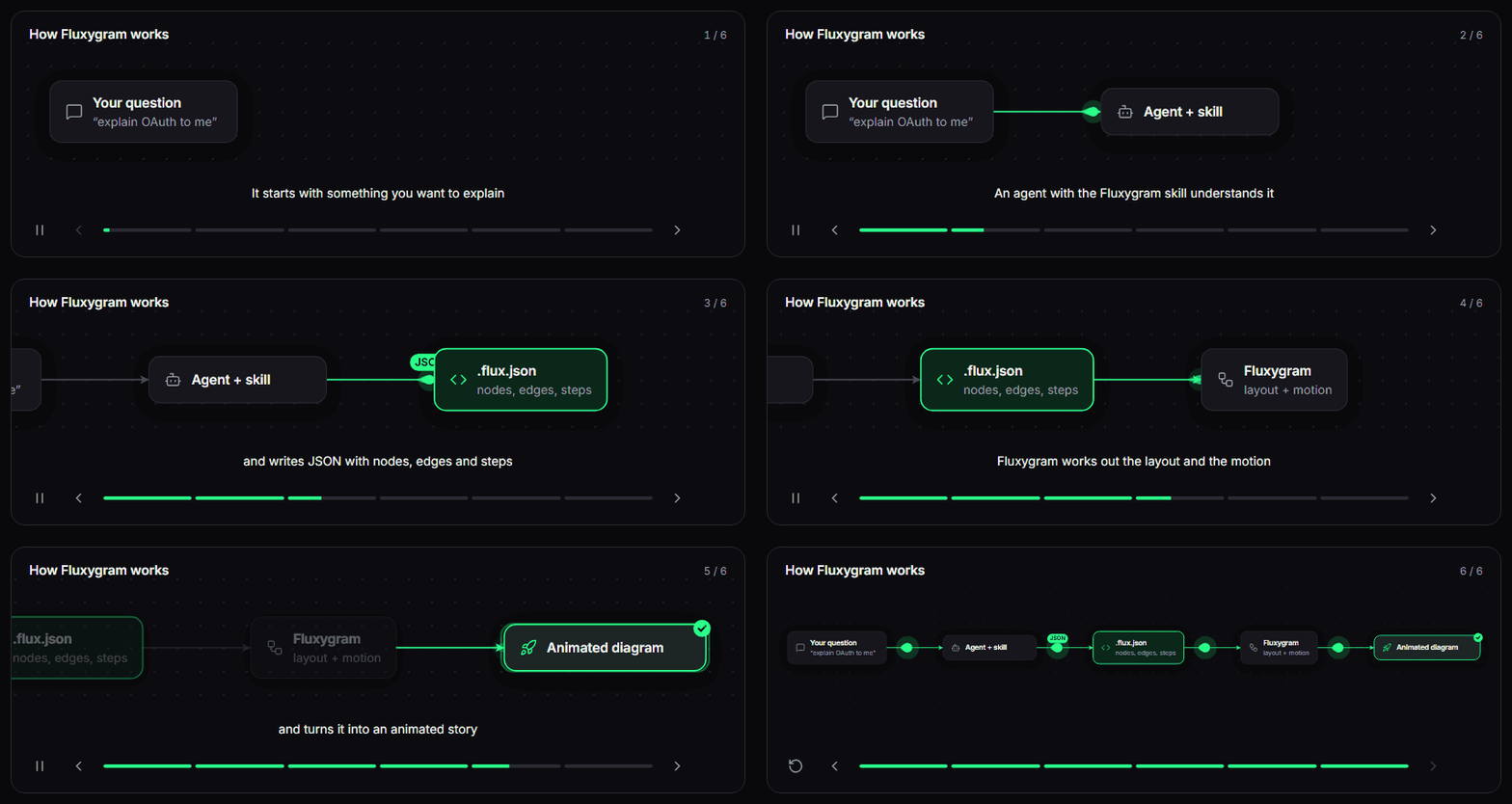
A Fluxygram diagram telling a process step by step: blocks appear, a particle travels along each connection and the camera follows the story.

Usage

```fluxygram
{
  "type": "flow",
  "title": "Password reset",
  "nodes": [
    { "id": "ask", "label": "Forgot password", "icon": "user" },
    { "id": "mail", "label": "Email with link", "icon": "mail" },
    { "id": "new", "label": "New password", "icon": "lock" }
  ],
  "edges": [
    { "id": "ask-mail", "from": "ask", "to": "mail" },
    { "id": "mail-new", "from": "mail", "to": "new" }
  ],
  "steps": [
    { "show": ["ask"], "caption": "Someone forgets their password" },
    { "show": ["mail"], "flow": ["ask-mail"], "caption": "We email them a one-time link" },
    { "show": ["new"], "flow": ["mail-new"], "caption": "They pick a new one" }
  ]
}
```

The diagram works in reading view and live preview, and follows Obsidian's light or dark theme. If the JSON has a mistake, the block shows a short message saying what to fix.

  • Build diagrams visually in the editor at fluxygram.app/play, then copy the JSON into your note.
  • The format, diagram types and storytelling tips are in the docs.
  • Ask an AI to write one: the format is plain JSON, so any assistant can produce it.

Everything runs locally. The plugin makes no network requests.

Install

From Obsidian: Settings → Community plugins → Browse, search for "Fluxygram".

Manually: download main.js and manifest.json from the latest release into <vault>/.obsidian/plugins/fluxygram/, then enable it under Community plugins.

Development

npm install
npm run build   # writes main.js

The diagram engine is @fluxygram/element, bundled into main.js.

License

MIT

HealthExcellent
ReviewPassed
About
Create animated, step-by-step diagrams by embedding Fluxygram JSON in a code block. Play node appearances, particle flows and camera pans in reading view or live preview, show clear error messages for invalid JSON, and run entirely locally while matching Obsidian's light/dark theme.
VisualizationJSONCanvas
Details
Current version
0.3.1
Last updated
4 days ago
Created
5 days ago
Updates
2 releases
Downloads
28
Compatible with
Obsidian 1.4.0+
Platforms
Desktop, Mobile
License
MIT
Report bugRequest featureReport plugin
Author
fluxygram
  1. Community
  2. Plugins
  3. Visualization
  4. Fluxygram

Related plugins

Advanced Canvas

Supercharge your canvas experience. Create presentations, flowcharts and more.

Visual Notes

A visual workspace built on Obsidian's Canvas format: nestable freeform boards, icon tile grids, kanban boards, sticky notes, checklists, columns, drawing with pen, labels, reactions, and more..

Canvas Connect

Dynamically update connection anchors in Canvas view with smart routing.

Excalidraw

Visual PKM powerhouse. Create and edit Excalidraw drawings.

ExcaliBrain

An interactive, structured mind-map of your Obsidian vault.

Breadcrumbs

Visualise the hierarchy of your vault using a breadcrumb trail or matrix view.

Mermaid Tools

Improved Mermaid.js experience: visual toolbar with common elements and more.

Maps

Adds a map layout to bases so you can display notes as an interactive map view.

Hearth

A beautiful, heavily customizable home screen — dashboard, launchpad, mission control, homescreen, search - all in one. As simple or complex as you need.

Itinerary

Make planning your trip or event easier by rendering a calendar from event information found in your notes.