Flomo ZIP Import
 Blink12 downloads
Import Flomo ZIP exports locally, preview Markdown and attachments, and save them to your vault or a ZIP.
- Overview
- Scorecard
- Updates6
简体中文 · English
将 Flomo 导出的笔记转换为 Obsidian Markdown,支持 Windows、macOS 和 Linux 桌面端
🔒 100% 本地离线解析 · 数据不离开你的设备
功能特性
- 全桌面端支持:基于 Obsidian 桌面插件实现(需 Obsidian 1.5.7 及以上版本),原生支持 Windows、macOS 与 Linux,同时兼容 Flomo 免费账号导出的 ZIP 压缩包。
- 100% 本地离线处理:在本地直接解压与解析 Flomo HTML 导出文件,不加载外部资源、不发起任何网络请求,也不收集任何笔记或使用数据。
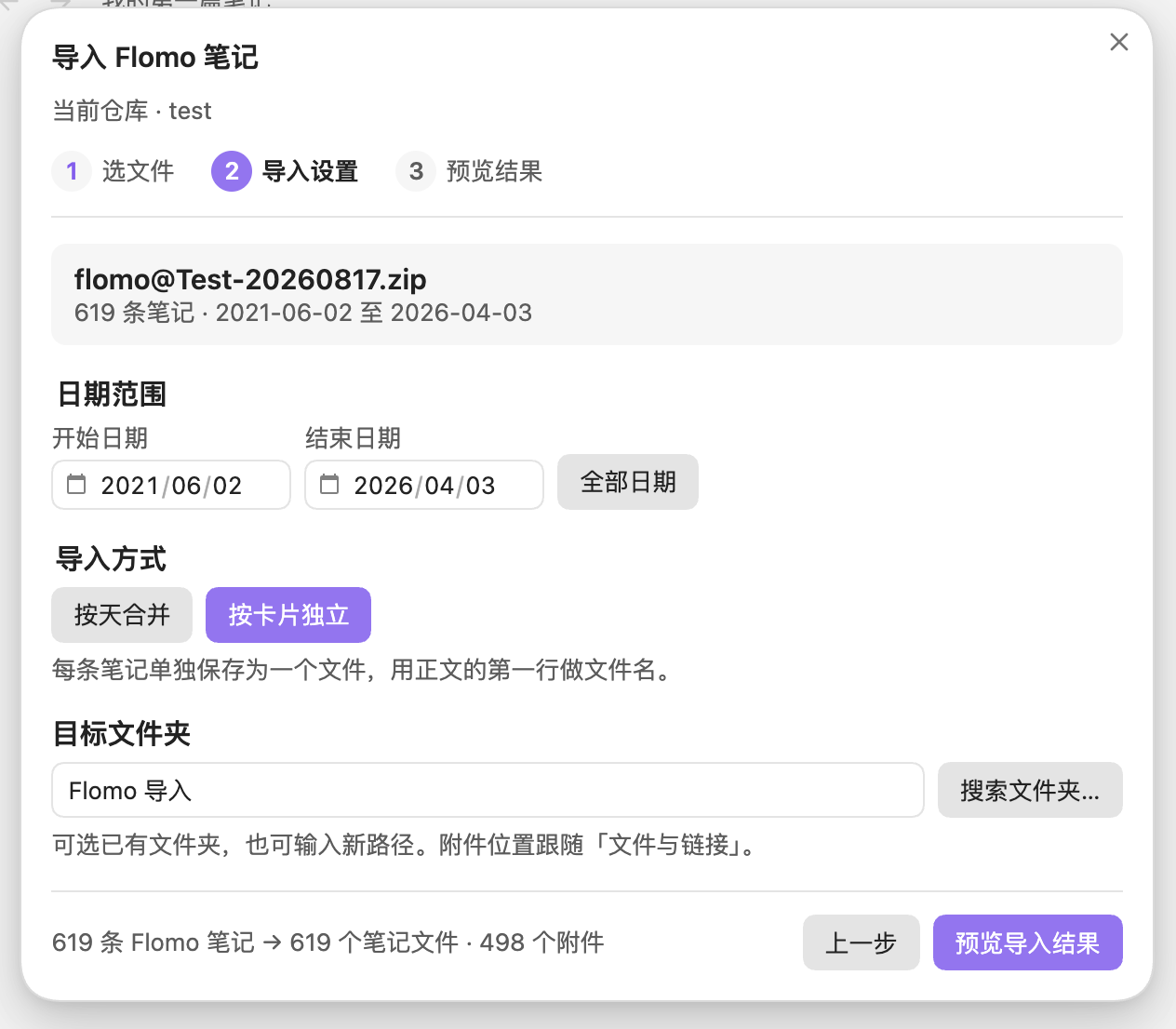
- 灵活的日期筛选与导入模式:支持按起止日期筛选笔记,提供「按天合并」与「按卡片独立」两种组织方式,并可在插件设置中配置默认导入方式与目标文件夹。
- 完整保留元数据与附件:自动生成
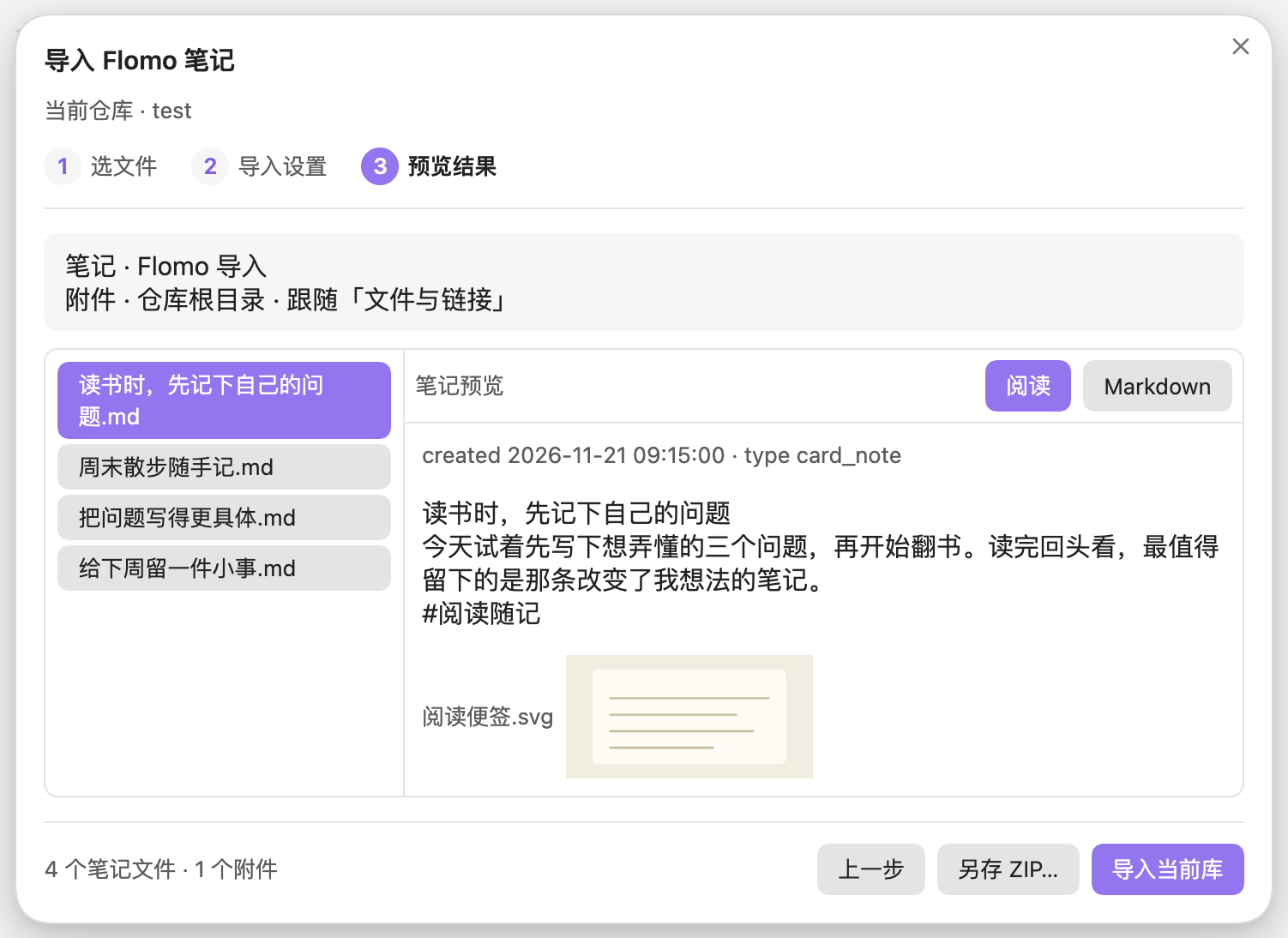
created和typeFrontmatter;导入图片与音频附件(如 PNG、JPG、WebP、M4A、MP3 等),附件存放位置遵循 Obsidian「文件与链接」设置,语音笔记以折叠 Callout 展示音频播放器及 Flomo 原生语音转文字内容。 - 导入前实时预览:支持「阅读」与「Markdown 源码」双视图切换,可按需预览图片和播放音频,并在导入前查看重命名、缺失附件等提示。
- 安全写入与断点续传:绝不覆盖仓库中已有的同名文件(自动追加
-2、-3编号并同步更新嵌入链接);若导入中途中断,再次导入同一批次时会自动续传,避免重复生成。 - 支持直接入库或导出 ZIP:可直接写入当前 Obsidian 仓库指定文件夹,也可将转换结果(含 Markdown 与附件)另存为新的 ZIP 文件。
安装插件
适用于桌面版 Obsidian 1.5.7 及以上版本(Windows、macOS、Linux),支持 Flomo 免费账号导出的 ZIP 文件。
- 打开要导入笔记的 Obsidian 仓库,进入「设置 → 第三方插件」。如果尚未开启社区插件,请先按提示启用。
- 点击「浏览」,搜索 Flomo ZIP Import。
- 打开插件详情页,点击「安装」,然后点击「启用」。
手动安装或从源码构建
- 手动安装:从 Releases 下载
main.js、manifest.json和styles.css,放入<你的仓库>/.obsidian/plugins/flomo-zip-import/目录,然后在 Obsidian 中刷新并启用插件。 - 从源码构建:在项目根目录执行:
构建产物为根目录下的npm install && npm run buildmain.js,配合manifest.json与styles.css即可加载。
开始导入
- 在 Flomo 中导出笔记:按照 Flomo 官方导出说明 导出你的笔记 ZIP 压缩包。
- 打开导入窗口:在 Obsidian 左侧功能区点击插件图标
 ,拖拽或点击「选择 ZIP…」加载导出文件。
- 设置、预览并导入:选择日期范围、导入方式(「按天合并」或「按卡片独立」)以及目标文件夹,点击「预览导入结果」确认内容后,点击「导入当前库」或「另存 ZIP…」。
提示:如果左侧功能区被隐藏,可以按快捷键打开命令面板(Windows / Linux 为
Ctrl + P,macOS 为Command + P),搜索并运行「导入 Flomo 笔记」;也可以在「设置 → 第三方插件 → Flomo ZIP Import」中点击「开始导入…」。
查看导入预览截图
笔记格式
按天合并
同一天的所有笔记合并为一个 Markdown 文件,以日期命名(YYYY-MM-DD.md)。
---
created: 2026-03-03
type: daily
---
# 笔记首行内容
笔记首行内容
笔记完整内容……
> [!tip]+ 语音
> 
> 语音转文字文本内容(若有)……

---
# 另一条笔记标题
另一条笔记标题
另一条笔记完整内容……
- 每条笔记的第一行作为一级标题(自动去掉标题中的
#标签符号);超过 20 个字符时自动截断并加上…,若首行为空则使用无标题 YYYY-MM-DD HHMMSS。 - 一级标题下方保留完整的笔记正文(包含首行)。
- 同一天的多条笔记按时间顺序排列,彼此之间用
---分隔。
按卡片独立
每条 Flomo 笔记单独保存为一个 .md 文件,使用正文第一行作为文件名。
---
created: 2026-03-03 14:30:00
type: card_note
---
笔记首行内容
笔记完整内容……
> [!tip]+ 语音
> 
> 语音转文字文本内容(若有)……

- 文件名截取前 20 个字符,自动清理系统非法字符并兼容 Windows 保留文件名,遇到重名文件时自动添加
-2、-3编号。 - Frontmatter 中的
created时间精确到秒(YYYY-MM-DD HH:mm:ss)。
通用规则
- 附件位置:示例中的附件存放在
Attachments子文件夹下,实际写入位置完全由当前仓库「设置 → 文件与链接」中的附件存放规则决定,并在正文中使用相对路径嵌入。 - 语音笔记:以 Obsidian 展开的 Callout(
> [!tip]+ 语音)格式呈现,内嵌音频播放链接并保留 Flomo 的语音转文字原文(无转文字时仅保留音频链接)。 - 正文细节:保留原有的有序列表、无序列表、嵌套列表、
#标签以及 Flomo 原卡片链接(点击可跳转查看原卡片)。
隐私与安全
- 零网络请求与零遥测:ZIP 解压(
@zip.js/zip.js)、HTML 解析(parse5)和 Markdown 转换全部在你的电脑本地内存中完成,完全断网也能正常使用。 - 安全解析:在解析 Flomo HTML 时不创建浏览器 DOM,不执行脚本,也不会加载任何外部资源;禁止写入
.obsidian配置目录,且永不覆盖仓库现有文件。 - 代码开源透明:所有源码均在本仓库公开,欢迎随时审计和检查。
macOS 独立版
如果你使用 macOS 13.0 (Ventura) 及以上版本,且更希望使用独立原生桌面应用而不安装 Obsidian 插件,可以继续下载之前的 macOS 独立版(v1.3.0)。
下载 macOS 独立版 1.3.0 · 查看独立版使用说明
反馈与贡献
欢迎提交 Issue 和 Pull Request!
提交问题反馈时,建议附上操作系统版本、Obsidian 版本、插件版本以及复现步骤。如涉及笔记导出内容,请先做脱敏处理。前往提交 Issue
开源协议
本项目基于 MIT 协议 开源。感谢 Flomo 和 Obsidian,让碎片记录与长期知识整理顺畅衔接。
Crafted with ❤️ by iBlinkQ
将闪念转化为持久的知识