Fingertip Translation
 amos1k downloads
Translate selected text into your language. Supports Bing Dictionary, Youdao, and MyMemory with built-in pronunciation.
- Overview
- Scorecard
- Updates2
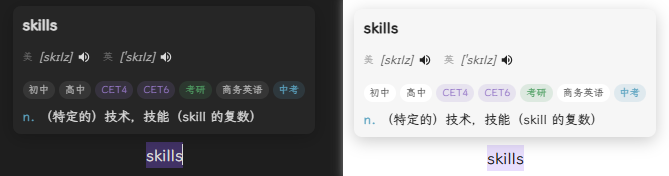
A simple and efficient text translation plugin for Obsidian that supports multiple translation services, trigger modes, and automatic pronunciation.
Features
- Selection Translation - Hold Ctrl and select text to translate, or use direct selection
- Multiple Translation Services - Supports Bing Dictionary, Youdao (automatic Plus/Webpage switching), MyMemory
- Dictionary Format - Bing/Youdao display part of speech and exam categories (CET-4, CET-6, etc.)
- Auto Pronunciation - Automatically plays pronunciation after successful translation (toggleable)
- Multiple Accents - Supports US English and UK English
- Lightweight - No API Key required, works out of the box
- Optional Weave integration - When the Weave memory plugin is enabled, the popover shows 加入复习 to save the looked-up word as a vocabulary card (no audio attachments). If Weave is not installed, the UI is unchanged.
- Official lookup API - Other plugins can call
getOfficialAPI().lookup(term)for dictionary results without opening the popover (used by Weave study UI to expand::fingertip::word::markers).
Installation
Method 1: Development Setup
git clone <repo-url>
cd obsidian-fingertip-translation
npm install
npm run dev
Method 2: Manual Installation
- Download or clone this repository
- Run
npm run buildto compile - Copy
main.js,styles.css, andmanifest.jsonto your vault plugin folder:VaultFolder/.obsidian/plugins/fingertip-translation/ - Enable the plugin in Obsidian settings
Usage
- Select the text you want to translate in a note
- A popover will display the translation result (including phonetic symbols, part of speech, definitions)
- Click the speaker button to manually play pronunciation
- With "Auto Pronunciation" enabled, pronunciation plays automatically after successful translation
- Drag the popover to adjust its position
- Press ESC or click outside to close the popover
Settings
| Option | Description | Default |
|---|---|---|
| Translation Service | Bing Dictionary / Youdao / MyMemory | Youdao |
| Trigger Mode | Ctrl+Select / Direct Select | Ctrl+Select |
| Pronunciation Source | Youdao Audio / Browser TTS | Youdao Audio |
| Auto Pronunciation | Auto play after translation | Off |
| Pronunciation Accent | US English / UK English | US English |
| Show Phonetic | Display phonetic symbols | On |
| Phonetic Mode | Single accent / Both US and UK | Both |
| Show Category | Display CET-4, CET-6, etc. | On |
Tech Stack
- Language: TypeScript
- Bundler: esbuild
- API: Obsidian
requestUrl()(bypasses CORS)
Project Structure
src/
├── main.ts                       # Plugin main entry
├── settings.ts                   # Settings interface
├── tts.ts                        # Pronunciation (Web Speech API)
├── translator-mymemory.ts        # MyMemory Translation API
├── translator-bing.ts            # Bing Dictionary
└── translator-youdao-integrated.ts # Youdao Dictionary (Integrated Plus + Webpage)

styles.css                        # Popover styles
manifest.json                     # Plugin manifest
Translation Services
| Service | Free Quota | API Key | Dictionary Format | Notes |
|---|---|---|---|---|
| Bing Dictionary | Unlimited | Not needed | Part of speech | Recommended |
| Youdao Dictionary | Unlimited | Not needed | Collins/Exam/Category | Auto fallback |
| MyMemory | 1000/day | Not needed | None | - |
Youdao Features:
- Prefers Plus API for richer data
- Auto switches to webpage version when Plus API returns no match
- Displays exam category tags (CET-4, CET-6, Gaokao, IELTS, TOEFL, etc.)
- Shows US/UK accent labels for phonetics
Developer Guide
# Install dependencies
npm install

# Development mode (watch for changes and auto-compile)
npm run dev

# Production build
npm run build
License
BSD-0
References
HealthExcellent
ReviewPassed
About
Translate selected text instantly using Bing, Youdao or MyMemory and display phonetics, parts of speech and exam-category tags. Play pronunciations automatically or on demand with US/UK accents, move the translation popup and dismiss it to keep notes uncluttered.Details
Current version
1.1.0
Last updated
2 months ago
Created
5 months ago
Updates
2 releases
Downloads
1k
Compatible with
Obsidian 1.12.7+
Platforms
Desktop, Mobile
License
0BSD
Author