File Metadata
 August736 downloads
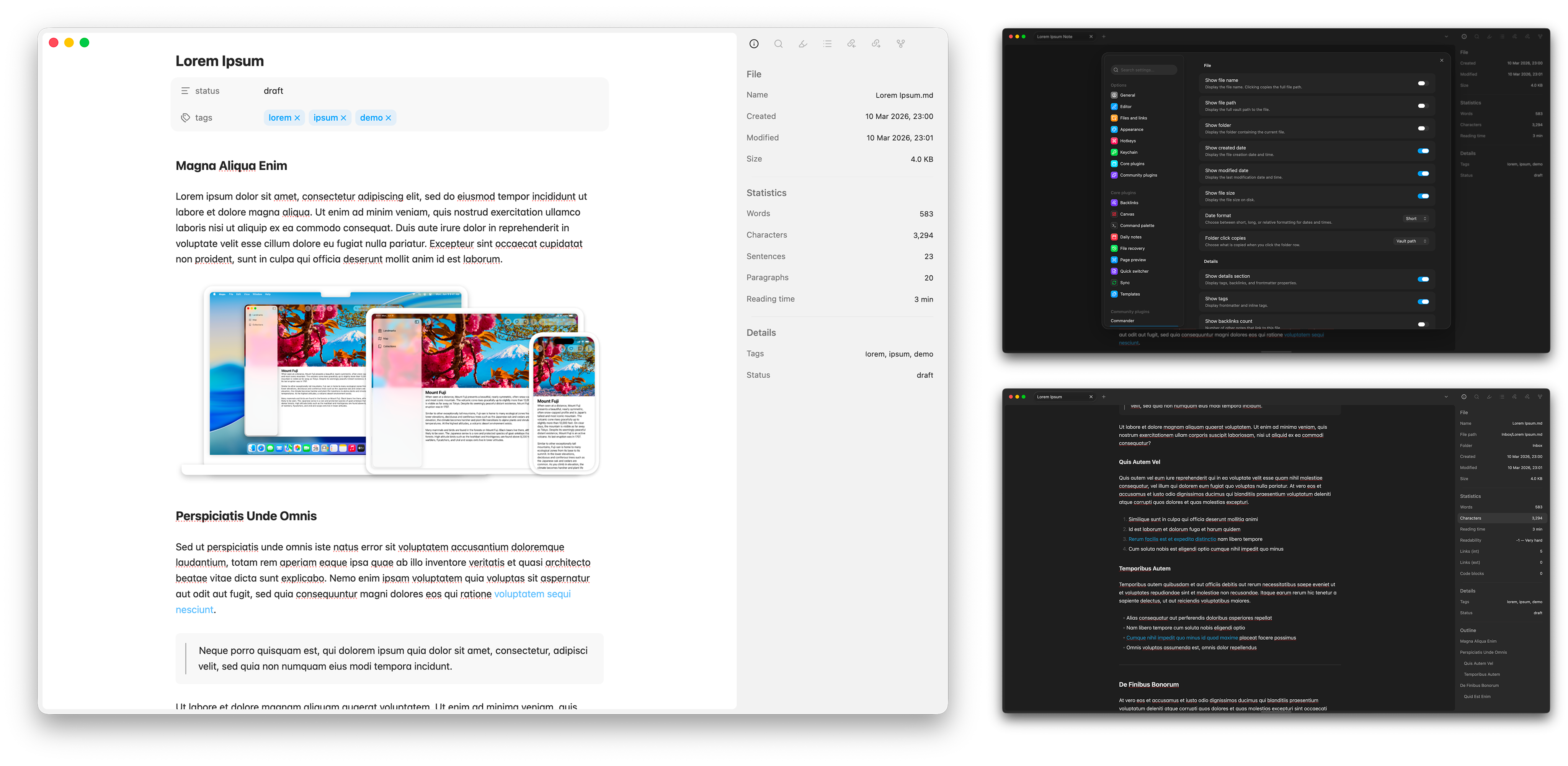
Shows file metadata, text statistics, and document outline in the sidebar.
- Overview
- Scorecard
- Updates4
A sidebar panel for Obsidian that shows file info, text statistics, and a document outline — without touching your frontmatter.
Features
- File info — name, full path, folder, created/modified dates, size
- Details — frontmatter tags, backlinks count, and all frontmatter properties
- Text statistics — words, characters, sentences, paragraphs, estimated pages, reading time, readability score
- Link & code counts — internal/external links, fenced code blocks
- Document outline — clickable headings indented by level
- Image metadata — dimensions, colour space, camera (EXIF via exifr)
- Collapsible sections — click any section header to collapse or expand it
- Click to copy — click any row to copy its value; right-click for more options
- Date format — choose between short, long, or relative date display
- Style Settings support — customise colours, spacing, and layout via the Style Settings plugin
- Configurable — toggle individual fields and sections on or off in Settings
Installation
Community plugins
- Settings → Community plugins → Browse → search File Metadata
- Install → Enable
Manual
- Grab
main.js,manifest.json, andstyles.cssfrom the latest release - Drop them into
.obsidian/plugins/file-metadata/inside your vault - Settings → Community plugins → enable File Metadata
Usage
Click the ⓘ icon in the left ribbon, or run File Metadata: Open File Metadata panel from the command palette.
The panel lives in the right sidebar and updates as you switch files or edit.
Collapsible sections
Click any section header (File, Statistics, Outline) to collapse or expand it. The collapsed state is remembered for the duration of the session.
Context menu
Right-click any row to copy just the value, or copy the full "Label: Value" pair.
Settings
Settings → File Metadata
File
| Setting | Default | Description |
|---|---|---|
| Show file name | On | Display the file name (click copies full path) |
| Show file path | Off | Display the full vault path |
| Show folder | On | Display the parent folder |
| Show created date | On | Creation date and time |
| Show modified date | On | Last modified date and time |
| Show file size | On | Size on disk |
| Date format | Short | Choose Short (5 Mar 2026, 14:30), Long (Wed, 5 March 2026, 14:30), or Relative (3h ago) |
| Folder click copies | Vault path | Choose Vault path or Obsidian URI (obsidian://open?vault=…) |
Details
| Setting | Default | Description |
|---|---|---|
| Show Details section | On | Toggle the entire section |
| Show tags | On | Frontmatter and inline tags |
| Show backlinks count | On | Number of notes linking to this file |
| Show properties | On | All frontmatter key-value pairs |
Statistics
| Setting | Default | Description |
|---|---|---|
| Show Statistics section | On | Toggle the entire section |
| Show sentences | On | Sentence count |
| Show paragraphs | On | Paragraph count |
| Show estimated pages | On | Estimated page count |
| Words per page | 300 | Used for the page estimate |
| Show reading time | On | Estimated reading time based on word count |
| Reading speed (wpm) | 200 | Words per minute for the reading time estimate |
| Show readability score | Off | Flesch reading ease (0–100); higher = easier to read |
| Show link counts | Off | Internal ([[wikilinks]]) and external link counts |
| Show code block count | Off | Number of fenced code blocks |
Outline
| Setting | Default | Description |
|---|---|---|
| Show Outline section | On | Toggle the heading outline |
Behaviour
| Setting | Default | Description |
|---|---|---|
| Click to copy | On | Click any row to copy its value |
Style Settings
If you have the Style Settings plugin installed, File Metadata exposes the following customisation options under Style Settings → File Metadata:
| Option | Type | Default |
|---|---|---|
| Section header colour | Themed colour | Text normal |
| Row label colour | Themed colour | Text muted |
| Row value colour | Themed colour | Text normal |
| Outline item colour | Themed colour | Text muted |
| Section divider opacity | Slider (0–1) | 0.5 |
| Spacing above divider | Number (px) | 12 |
| Label column width | Slider (20–60%) | 40% |
Without Style Settings installed, the plugin uses sensible defaults and looks identical.
Future improvements
- Reveal file/folder in system file explorer (Finder/Explorer)
- Configurable section ordering in settings
Attribution
Sidebar styling draws on the approach used by Simple File Info (Lukas Capkovic), which uses Obsidian's built-in tree-item components. EXIF parsing is handled by exifr (Mike Kovařík).