Search...Search plugins and themes...
⌘K
Sign in
  • Get started
  • Download
  • Pricing
  • Enterprise
  • Account
  • Obsidian
  • Overview
  • Sync
  • Publish
  • Canvas
  • Mobile
  • Web Clipper
  • CLI
  • Learn
  • Help
  • Developers
  • Changelog
  • About
  • Roadmap
  • Blog
  • Resources
  • System status
  • License overview
  • Terms of service
  • Privacy policy
  • Security
  • Community
  • Plugins
  • Themes
  • Discord
  • Forum / 中文论坛
  • Merch store
  • Brand guidelines
Follow us
DiscordTwitterBlueskyThreadsMastodonYouTubeGitHub
© 2026 Obsidian

File indicators

jakobmickjakobmick4k downloads

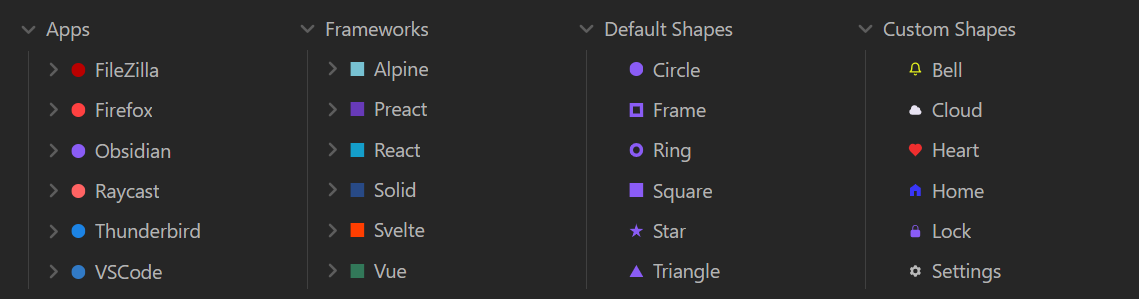
Add custom indicators to the file explorer.
Add to Obsidian
  • Overview
  • Scorecard
  • Updates2

Add custom indicators to the file explorer.

This plugin lets you add indicators in custom shapes and colors to all your files and folders.

How to use

Right click on any file or folder and select Add indicator.

Or

Use the Add indicator or Add indicator to active file commands.

Or

Go to the File indicators plugin settings and select Add new indicator.

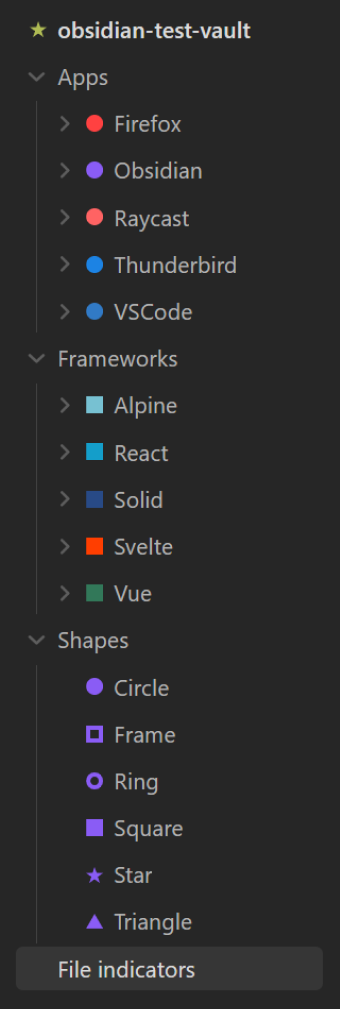
This way you can even set an indicator at root level:
Custom shapes

Custom shapes must be provided as SVGs. The shapes will only be displayed in the selected color. All colors from the SVG will be ignored.

Not all SVGs will work. Some SVGs might be correctly displayed in the settings, but will not work as indicators. Or the other way around.

To add custom shapes, go to the File indicators plugin settings and select Add new shape.

Deleting a custom shape will also delete all indicators using the shape. If the deleted shape was used as the default shape, the default Circle shape will be set as the new default.

Custom CSS

Because this plugin uses CSS to display the indicators it might conflict with existing CSS snippets or other plugins regarding the file explorer.

If you want to override the CSS of the File indicators plugin, be warned that it is subject to change and will probably get some breaking changes in the future. Stable CSS variables are planned for the next major version (2.0.0).

How to install

  1. Select Settings.
  2. Select Community plugins.
  3. Make sure Restricted mode is turned off.
  4. Select Browse under Community plugins.
  5. Search for and select the File indicators plugin.
  6. Select install.
52%
HealthFair
ReviewRisks
About
Add custom colored indicators to files and folders in the file explorer to visually mark items at file, folder, or root level. Use built-in shapes or provide SVG shapes that render in the chosen color, and apply indicators via right-click, commands, or settings.
IconsFilesSidebar
Details
Current version
1.1.0
Last updated
2 years ago
Created
3 years ago
Updates
2 releases
Downloads
4k
Compatible with
Obsidian 0.15.0+
Platforms
Desktop, Mobile
License
MIT
Report bugRequest featureReport plugin
Author
jakobmickjakobmick
GitHubjakobmick
  1. Community
  2. Plugins
  3. Icons
  4. File indicators

Related plugins

Notebook Navigator

A better file browser and calendar inspired by Apple Notes, Bear, Evernote and Day One.

Recent Files

Display a list of recently opened files.

Flexplorer

Enhance the file explorer with custom sorting, pinning, and hiding.

Custom File Explorer sorting

Manual or automatic config-driven reordering and sorting of files and folders in File Explorer.

Novel word count

Display a word count, page count, creation date, or other statistics for each file, folder and vault in the File Explorer pane.

Reveal Active File Button

Add a button to the top of the File Explorer, to reveal the active file.

File Explorer Note Count

See the number of notes in each folder within the file explorer.

File Tree Alternative

An alternative file tree view with separate folder and file panes.

Trash Explorer

Restore and delete files from the Obsidian .trash folder.

File Explorer++

Hide and pin files and folders in the file explorer using custom filters.