Search...Search plugins and themes...
⌘K
Sign in
  • Get started
  • Download
  • Pricing
  • Enterprise
  • Account
  • Obsidian
  • Overview
  • Sync
  • Publish
  • Canvas
  • Mobile
  • Web Clipper
  • CLI
  • Learn
  • Help
  • Developers
  • Changelog
  • About
  • Roadmap
  • Blog
  • Resources
  • System status
  • License overview
  • Terms of service
  • Privacy policy
  • Security
  • Community
  • Plugins
  • Themes
  • Discord
  • Forum / 中文论坛
  • Merch store
  • Brand guidelines
Follow us
DiscordTwitterBlueskyThreadsMastodonYouTubeGitHub
© 2026 Obsidian

File Include

tillahoffmanntillahoffmann5k downloads

Include or embed files in Obsidian Markdown.

Add to Obsidian
  • Overview
  • Scorecard
  • Updates6

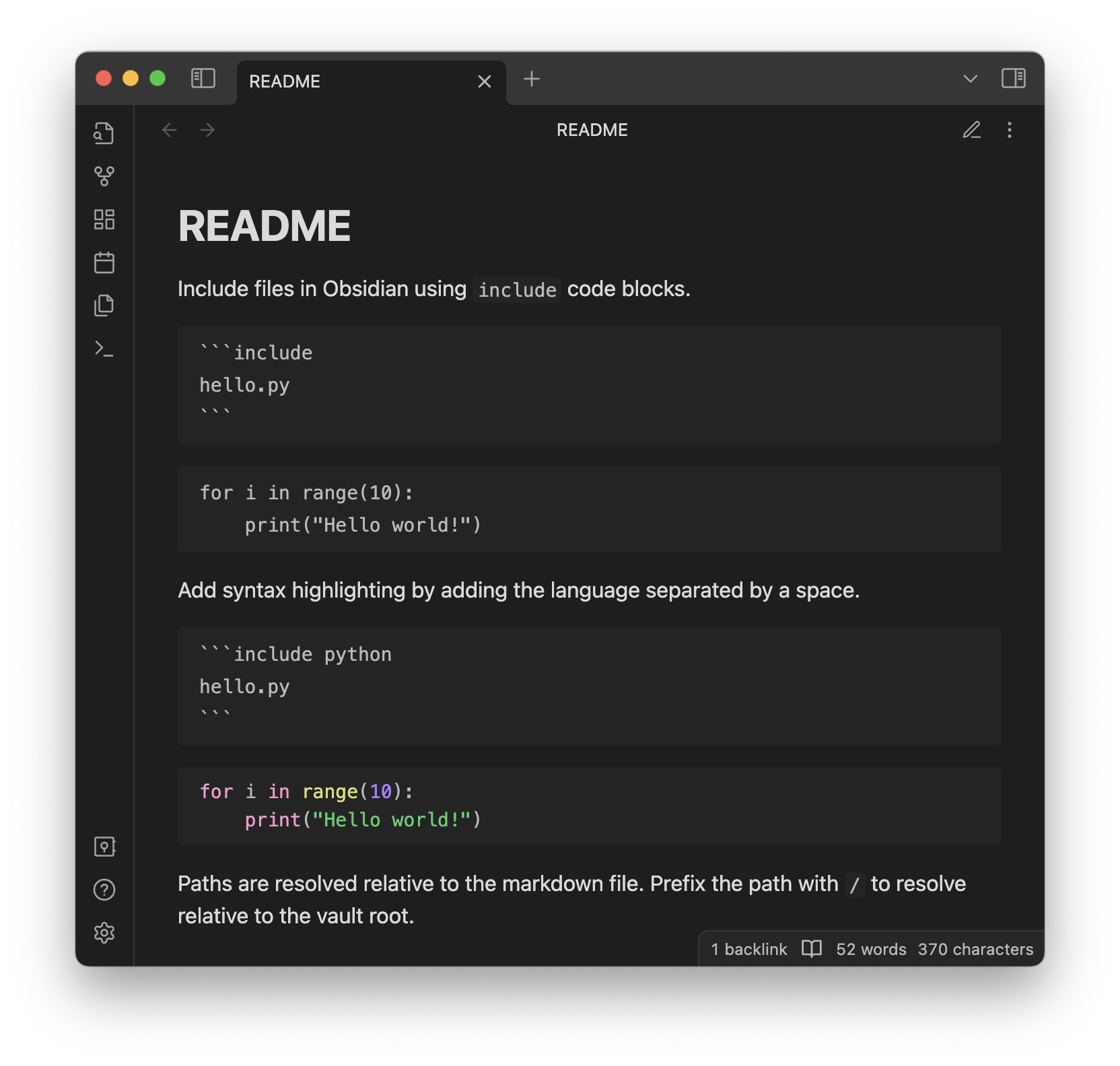
Include files in Obsidian using include code blocks.

```include
hello.py
```
hello.py

Add syntax highlighting by adding the language separated by a space.

```include python
hello.py
```
hello.py

Paths are resolved relative to the markdown file. Prefix the path with @/ to resolve relative to the vault root.

71%
HealthFair
ReviewSatisfactory
About
Include files in notes using include code blocks to embed external files directly into Markdown. Add syntax highlighting by specifying the language before the path (for example: include python hello.py). Resolve paths relative to the note or prefix with @/ to reference the vault root.
FilesCodeImport
Details
Current version
1.1.1
Last updated
3 years ago
Created
3 years ago
Updates
6 releases
Downloads
5k
Compatible with
Obsidian 0.15.0+
Platforms
Desktop, Mobile
License
MIT
Report bugRequest featureReport plugin
Author
tillahoffmanntillahoffmann
tillahoffmann.github.io
GitHubtillahoffmann
  1. Community
  2. Plugins
  3. Files
  4. File Include

Related plugins

Code Space

Professional code file management with visual dashboard, syntax highlighting editor, and Markdown embedding.

Telegram Sync

Transfer messages and files from Telegram to Obsidian.

Notebook Navigator

A better file browser and calendar inspired by Apple Notes, Bear, Evernote and Day One.

Local REST API & MCP Server

Unlock your automation needs by interacting with your notes over a secure REST API.

QuickAdd

Quickly add new notes or content to your vault.

Templater

Create and use dynamic templates.

Recent Files

Display a list of recently opened files.

Importer

Import data from Notion, Evernote, Apple Notes, Microsoft OneNote, Google Keep, Bear, Roam, and HTML files.

Omnisearch

Intelligent search for your notes, PDFs, and OCR for images.

Claudian

Embeds Claude Code/Codex as an AI collaborator in your vault. Your vault becomes agent's working directory, giving it full agentic capabilities: file read/write, search, bash commands, and multi-step workflows.