Search...Search plugins and themes...
⌘K
Sign in
  • Get started
  • Download
  • Pricing
  • Enterprise
  • Account
  • Obsidian
  • Overview
  • Sync
  • Publish
  • Canvas
  • Mobile
  • Web Clipper
  • CLI
  • Learn
  • Help
  • Developers
  • Changelog
  • About
  • Roadmap
  • Blog
  • Resources
  • System status
  • License overview
  • Terms of service
  • Privacy policy
  • Security
  • Community
  • Plugins
  • Themes
  • Discord
  • Forum / 中文论坛
  • Merch store
  • Brand guidelines
Follow us
DiscordTwitterBlueskyThreadsMastodonYouTubeGitHub
© 2026 Obsidian

Favorite Note

mahmudzmahmudz6k downloads

Mark your note as favorite.

Add to Obsidian
  • Overview
  • Scorecard
  • Updates10

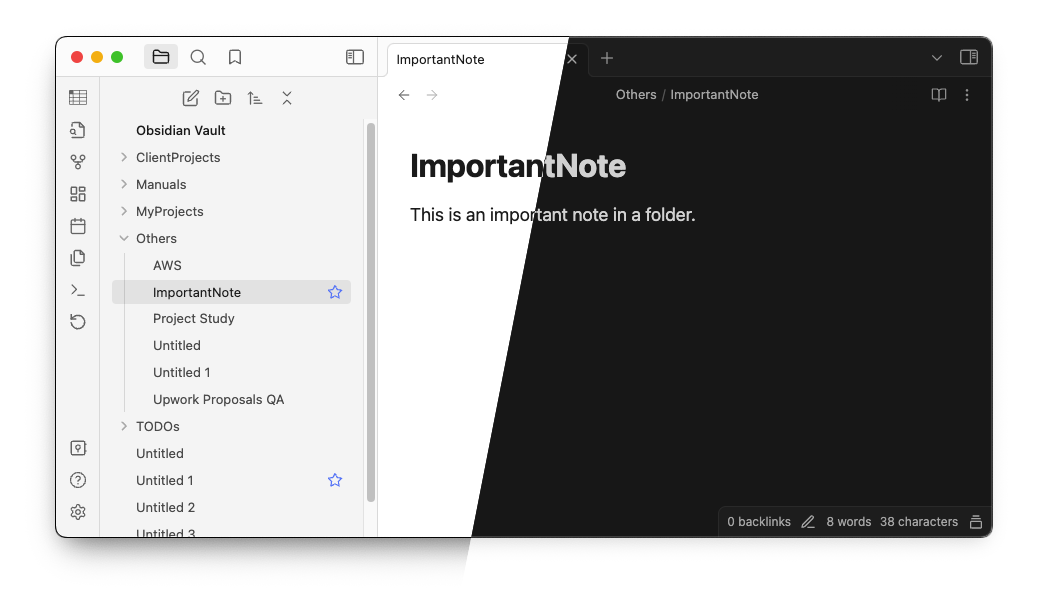
The missing Obsidian plugin to mark your note as favorite.

What sets this plugin appart from the core Bookmarks plugin?

This plugin introduces the ability to mark individual notes as favorites directly within the note list, offering a more convenient and visual way to manage and access preferred notes. Unlike the core Bookmarks feature, which focuses on general document navigation and linking, this plugin is tailored for users who want a streamlined method to highlight and access specific notes of importance.

How to Install

You can activate this plugin within Obsidian by doing the following:

Manually

  • Download the latest release zip file
  • Extract and put the three files (main.js, manifest.json, styles.css) to folder {{ YOUR VAULT}}/.obsidian/plugins/favorite-note
  • Open Settings > Community plugins
  • Make sure Restricted mode is off
  • Activate the plugin

From Obsidian

  • Open Settings > Community plugins
  • Make sure Restricted mode is off
  • Click Browse community plugins
  • Search for "Favorite Note"
  • Click Install
  • Once installed, close the community plugins window and activate the "Favorite Note" plugin
  • Now you will see a heart icon if you hover to a note from the list
70%
HealthGood
ReviewSatisfactory
About
Mark notes as favorites directly from the note list. Show a heart icon when hovering over notes to quickly highlight and access preferred items.
FilesSidebarNavigation
Details
Current version
2.0.3
Last updated
2 years ago
Created
3 years ago
Updates
10 releases
Downloads
6k
Compatible with
Obsidian 0.15.0+
Platforms
Desktop, Mobile
License
MIT
Report bugRequest featureReport plugin
Sponsor
Buy Me a Coffee
Author
mahmudzmahmudz
github.com/mahmudz
GitHubmahmudz
  1. Community
  2. Plugins
  3. Files
  4. Favorite Note

Related plugins

Notebook Navigator

A better file browser and calendar inspired by Apple Notes, Bear, Evernote and Day One.

Recent Files

Display a list of recently opened files.

Reveal Active File Button

Add a button to the top of the File Explorer, to reveal the active file.

Flexplorer

Enhance the file explorer with custom sorting, pinning, and hiding.

Open Tab Settings

Adds options to customize how tabs are opened, including open in new tab by default, preventing duplicate tabs, and more.

Remember cursor position

Remember cursor and scroll position for each note.

TagFolder

Show tags as folder.

Custom File Explorer sorting

Manual or automatic config-driven reordering and sorting of files and folders in File Explorer.

Novel word count

Display a word count, page count, creation date, or other statistics for each file, folder and vault in the File Explorer pane.

Home tab

A browser-like search tab for your local files.