ExMemo Assistant
 exmemo-ai1k downloads
Using LLMs to manage files and generating metadata such as tags and summaries.
- Overview
- Scorecard
- Updates2
English | 中文简体
Introduction
ExMemo Assistant provides intelligent document management features. Leveraging the capabilities of large language models (LLM), it generates and updates file metadata automatically, thereby achieving efficient information management and document editing.
Generate and update file metadata, including tags, descriptions, titles, edit times, etc.
Important Note: The plugin obsidian-exmemo-tools now covers all the features supported by this project and adds more functionality. Future development and updates will focus on exmemo-tools, so we recommend migrating to that tool.
Tool Usage Video Tutorial
Usage
Setup
Before using the tool, ensure the following setup is completed:
- First, configure options related to LLM, including the API key, base URL, and model name.
- If using the auto-generate tags feature, it is recommended to pre-fill the tag list or automatically extract existing tags from the current repository to ensure generated tags align with the user's style.
- To modify the method for generating descriptions, adjust the prompt words for generating descriptions in the settings.
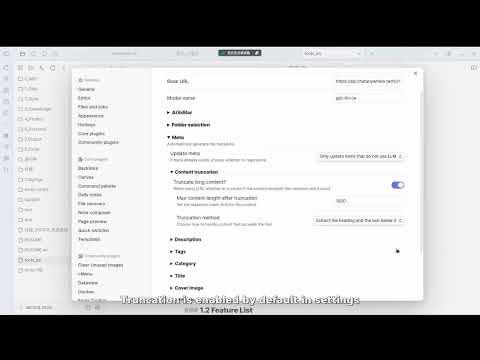
- For generating metadata for longer articles, the model call may incur higher costs. It is recommended to control costs using the "content truncation" feature in the settings.
Generating Metadata
Press Ctrl+P and select: ExMemo Assistant: Generate Metadata.
Generating tags and descriptions can often be a daunting task. We frequently end up creating tags with the same meaning but different formulations, impacting subsequent processing. To solve this problem, we have implemented an automatic tag generation feature that can automatically create three tags each time. Users can define the range of tags in the settings or extract options from tags that appear more than twice in the current repository. For generating short descriptions of documents, the tool provides default prompt words, which users can edit in the settings to define their own style.
During the process of generating tags and descriptions, the document content must be provided to LLM. For lengthy documents, this might lead to higher costs. Therefore, the tool offers a truncation feature in the settings, allowing only the head, tail, or mid-title of a document to be sent to the model. For documents containing tags and descriptions, users can opt not to regenerate this information in the settings to effectively control costs.
Additionally, generating titles, creation dates, and editing dates, although common, can be tedious tasks. Our tool offers one-click generation for these metadata elements, greatly simplifying daily workflows.
License
This project is licensed under the GNU Lesser General Public License v3.0. For more details, please refer to the LICENSE file.