Emoji Autocomplete
 kraxen7214k downloads
Smart suggestions when typing emoji shortcodes & more! :star:
- Overview
- Scorecard
- Updates13
Easily insert emoji by their shortcodes
✨ This plugin was featured on Obsidian Addict, in several articles - Thank you!
Features
- Get autocomplete/typeahead suggestions for emoji
- Highlight matched part of suggestion (optional)
- Consider emoji history in suggestions (optional)
- Supports searching by emoji tags (optional)
- typing
shufflewill find 🔀 (twisted_rightwards_arrow) - Show original shortcode inline when an emoji is found by tag (optional)
- typing
- Hide OS unsupported emoji (optional)
- Immediately replace emoji / keep as shortcode & show in preview mode
- Remove diacritics when searching for an emoji (optional)
- Replace flag emoji with nicer font (optional)
- Improved performance over Emoji Shortcodes - more information
- Uses the gemoji library to always have an up-to-date list of emoji
- Uses the uFuzzy library and a custom sorting algorithm for better fuzzy search suggestions
Example
:joy:will become 😂:heart:will become ❤
Disclaimers
- This plugin is incompatible with Emoji Shortcodes (this is a full replacement) and Icon Shortcodes
How to install
- Go to Community Plugins in your Obsidian Settings and disable Safe Mode
- Click on Browse and search for "Emoji Autocomplete"
- Click install
- Toggle the Plugin on in the Community Plugins Tab
How to install (from source)
git cloneit into<your vault>/.obsidian/pluginsnpm iorpnpm i(ideal)npm run devorpnpm dev(ideal)- Turn the plugin on inside of Obsidian
Support plugin development
If you find this Plugin helpful, consider it's further development or just say a small thank you
Support KraXen72
Creator of Emoji Autocomplete and all the features on top of Emoji Shortcodes
Support phibr0
Creator of Emoji Shortcodes, the plugin Emoji Autocomplete was initially based on
Credits
Thanks to @claremacrae for rigorous testing of this plugin, which led to a significant performance improvements. libraries / packages that were used but modified or otherwise embedded (not in package.json)
is-emoji-supportedmodified the canvas withwillReadFrequently: trueand custom cache handlingcountry-flag-emoji-polyfilltook the font and wrote custom applying logiclucideicon pack andicones.js.orgfor several nice svg icons
Performance Improvements
Emoji shortcodes has an issue where it slows down the Tasks and Dataview plugins by a huge amount.
(You can check the progress on the issue in in this issue)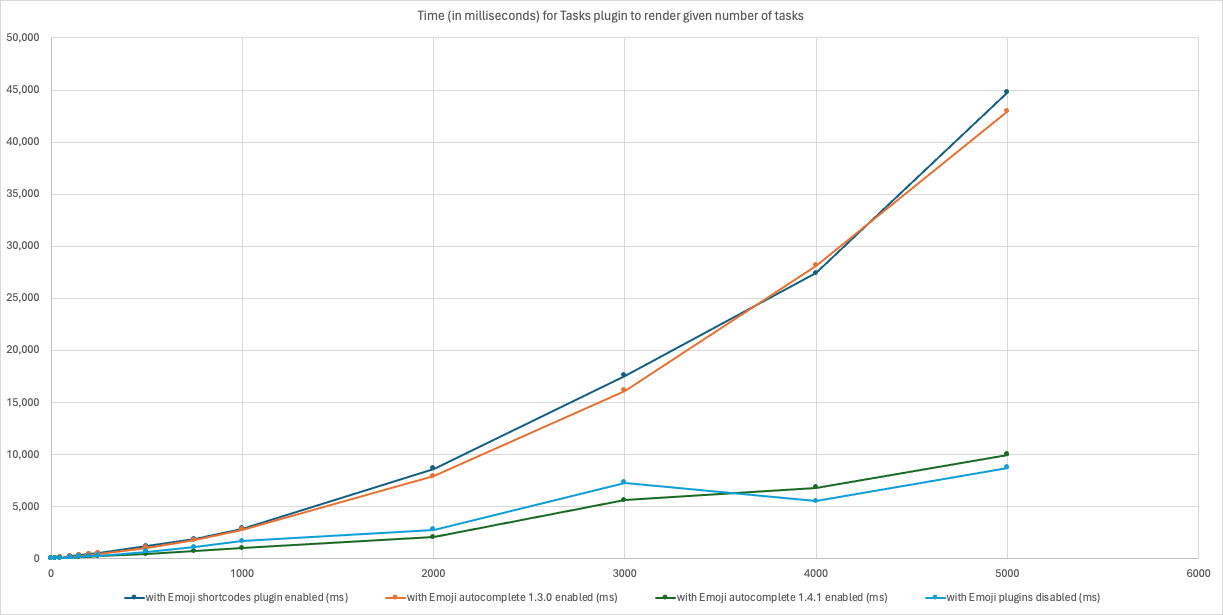
credit: @claremacrae 03/2024