Bible Reference
 tim-hub59k downloads
Take Bible study notes easily. Automatically suggests Bible verses as references.
- Overview
- Scorecard
- Updates119
- Simplify your Bible Study note-taking experience with the user-friendly Obsidian.md notes app.
- Experience the seamless assistance of automated Bible Verse suggestions for effortless referencing.
These contributions will be highly appreciated in supporting the development of the project. 👍
- 👉
Starthe Project- ☕️ Buy me a coffee @Github Sponsor
- ❤️ Provide Feedback in
Issuesor joinDiscussion
About
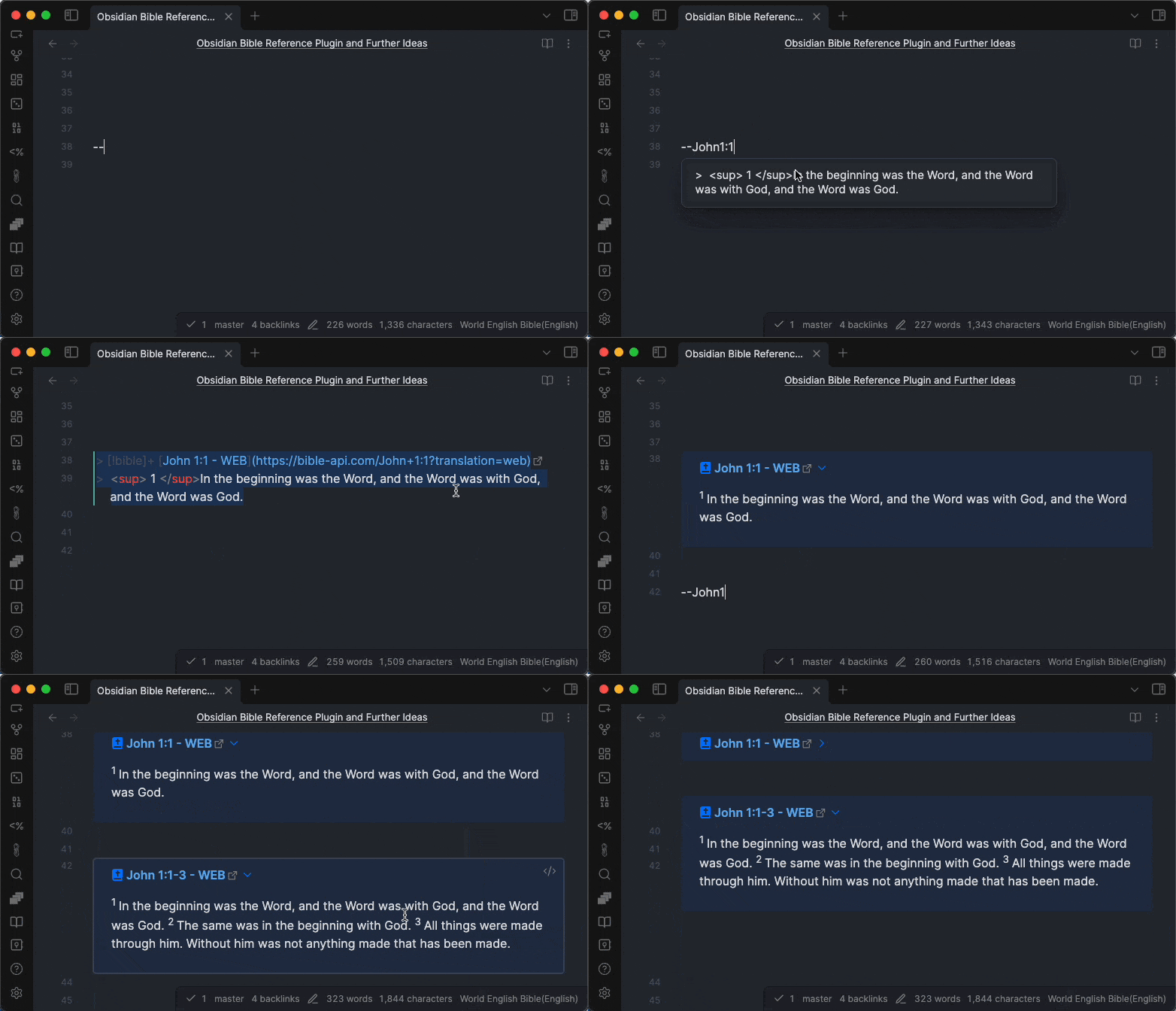
How to use
- Open a note in Obsidian.md application
- In a note, for example type
--John1:1 - Select the suggestion
Type
--John1:ato insert all verses in a chapter (a= the whole chapter). A chapter on its own (--John1) does not suggest anything - it is treated as a reference you are still typing, so add:1or:ato finish it.
To pull a reference from another translation, add
@and the version key:--John1:1@esv. Keys are the ones listed under Default Bible Version in the settings, and they are not case sensitive. The version you name is kept for later lookups too, so it also switches the default.
You can also get a "verse of the day" by typing --vod.
To insert just a link to a passage instead of the verse text, enable Link Only in the settings, or run the Insert Bible Reference Link command. This never fetches, so it works offline.
Polish translations are available as well, including UBG (Uwspółcześniona Biblia Gdańska) and BG (Biblia gdańska).
Read more about How to use
On iOS devices, there is a known issue about conflict between
Smart Punctuationand double hyphens--.To make it work,
- you can use
++instead of--in the beginning of the verse reference =>++John1:1(recommended)- or you can turn Smart Punctuation off => How to use
Contribution and Credits 🙏
- All different kinds of contributions are welcome, see: How to Contribute
- Credits: Bible API/Data Source Providers
Sponsors and Contributors ✨
Thanks goes to these wonderful people (emoji key):


Special thanks for the sponsors
Related Projects
- Bible Vector Search To search Bible verses in meaning not in keywords. This is another open source project I built recently to implement AI Embedding and Vector Search for Bible verses (in BBE translation).
Packages in this Monorepo
This repository is a Bun workspace monorepo. The repository root doubles as the installable Obsidian plugin folder (manifest.json, versions.json, styles.css, and the built main.js live at the root), while all source lives under packages/:
obsidian-bible-reference— the Obsidian plugin source (this README documents it). Its build emitsmain.jsto the repository root.bible-reference-toolkit— Normalize Bible references, convert them to machine-readable formats, query and manipulate them.bible-book-names-intl— Bible book names in multiple languages (the source used to resolve non-English book names).
Development
bun install          # install all workspace deps
bun run build        # build the plugin (main.js -> repo root)
bun run dev          # watch build
bun test             # run all package tests
bun run lint         # lint the plugin package