Search...Search plugins and themes...
⌘K
Sign in
  • Get started
  • Download
  • Pricing
  • Enterprise
  • Account
  • Obsidian
  • Overview
  • Sync
  • Publish
  • Canvas
  • Mobile
  • Web Clipper
  • CLI
  • Learn
  • Help
  • Developers
  • Changelog
  • About
  • Roadmap
  • Blog
  • Resources
  • System status
  • License overview
  • Terms of service
  • Privacy policy
  • Security
  • Community
  • Plugins
  • Themes
  • Discord
  • Forum / 中文论坛
  • Merch store
  • Brand guidelines
Follow us
DiscordTwitterBlueskyThreadsMastodonYouTubeGitHub
© 2026 Obsidian

Dynamic Timetable

l7cyl7cy10k downloads

Calculate the estimated time of completion from the estimated time of the task and dynamically create a timetable.

Add to Obsidian
  • Overview
  • Scorecard
  • Updates63

Dynamic Timetable is an Obsidian plugin that dynamically generates task timetables from Markdown files. This plugin was inspired by タスクシュート(TaskChute).
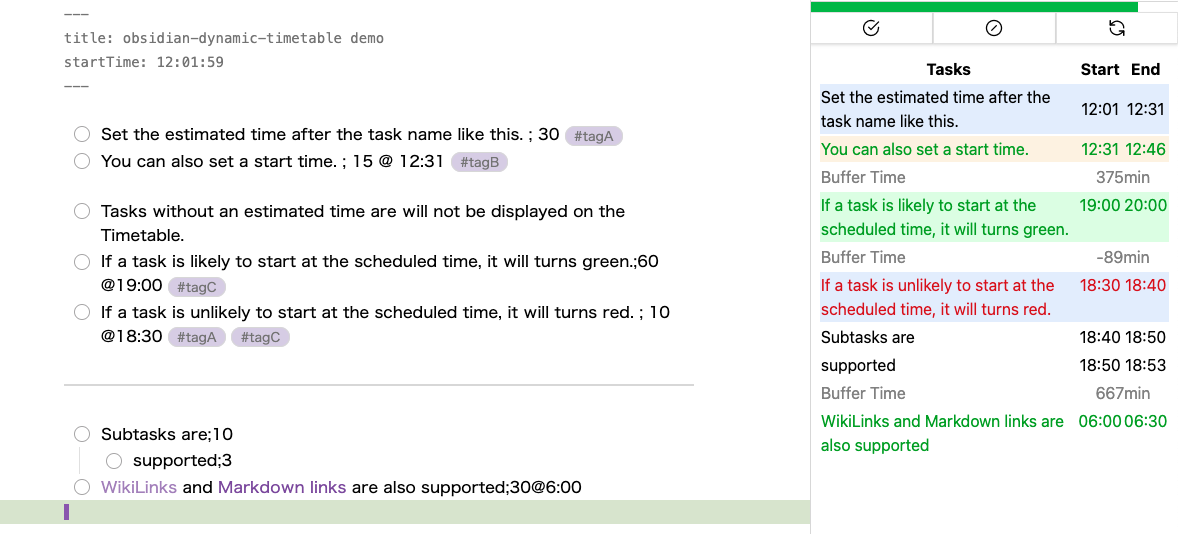
Image from Gyazo

Installation

The plugin is now officially released as a community plugin. You can install it from below.

obsidian://show-plugin?id=dynamic-timetable

If you want to try the beta version, install it with L7Cy/obsidian-dynamic-timetable using BRAT.

Usage

Task description format

The plugin supports the following markdown formats for tasks.

- [ ] Task name ; Estimated time
- [ ] Task name ; Estimated time @ Start time
- [ ] Task name @ Start time ; Estimated time

Start time format

The start time is optional and can be added in two formats:

  • Time only (e.g., @ 14:30)
  • Date and time (e.g., @ 2023-04-16T14:30)

Task completion and interruption

To complete or interrupt a task, execute the commands "Complete Task" or "Interrupt Task." Upon execution, the topmost incomplete task is checked, and the estimated time and scheduled start time are overwritten with the actual time taken and actual start time.
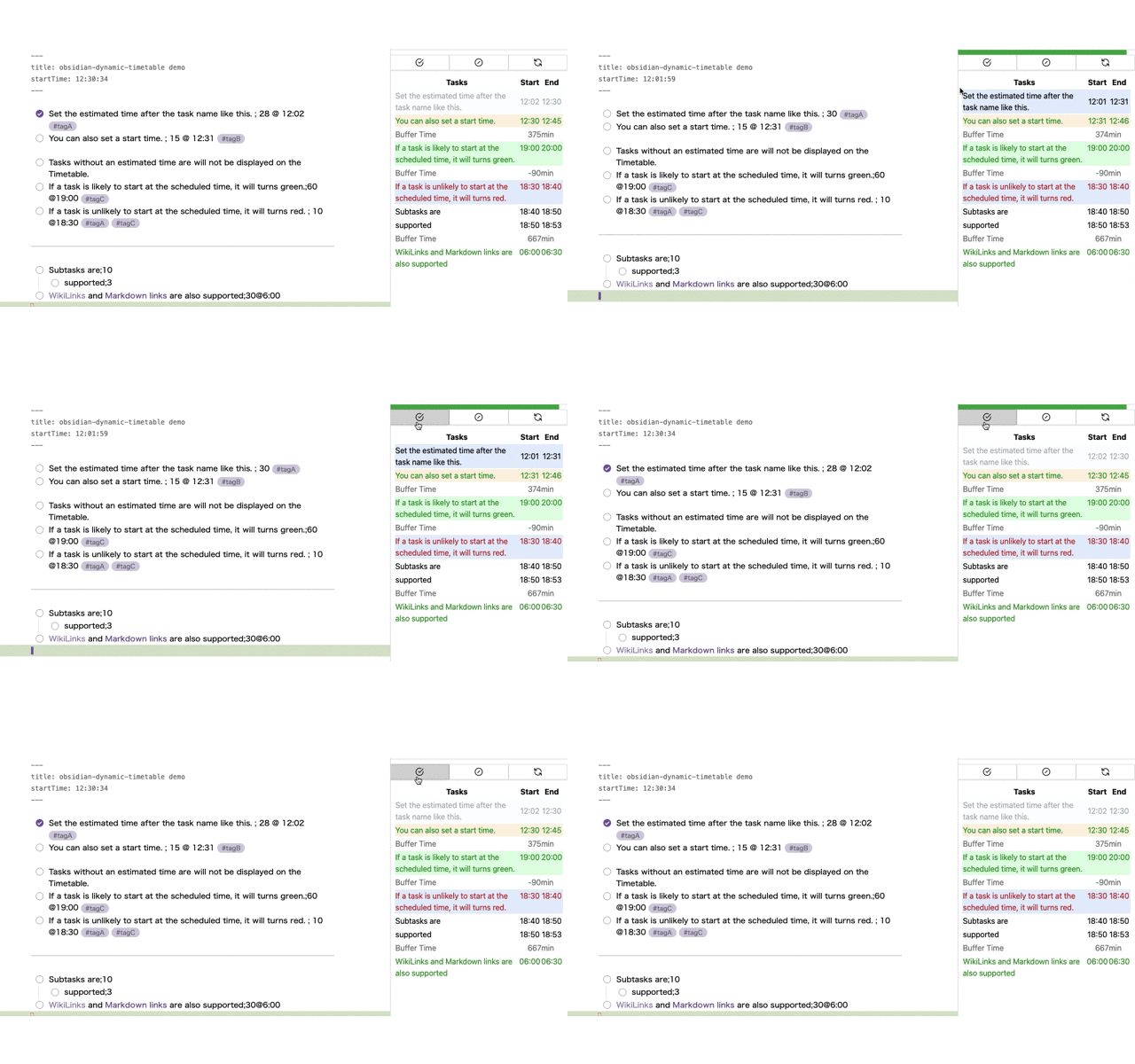
Image from Gyazo

In the case of "Interrupt Task," in addition to this, a new task with the same name is created and the remaining time is set to the estimated time.
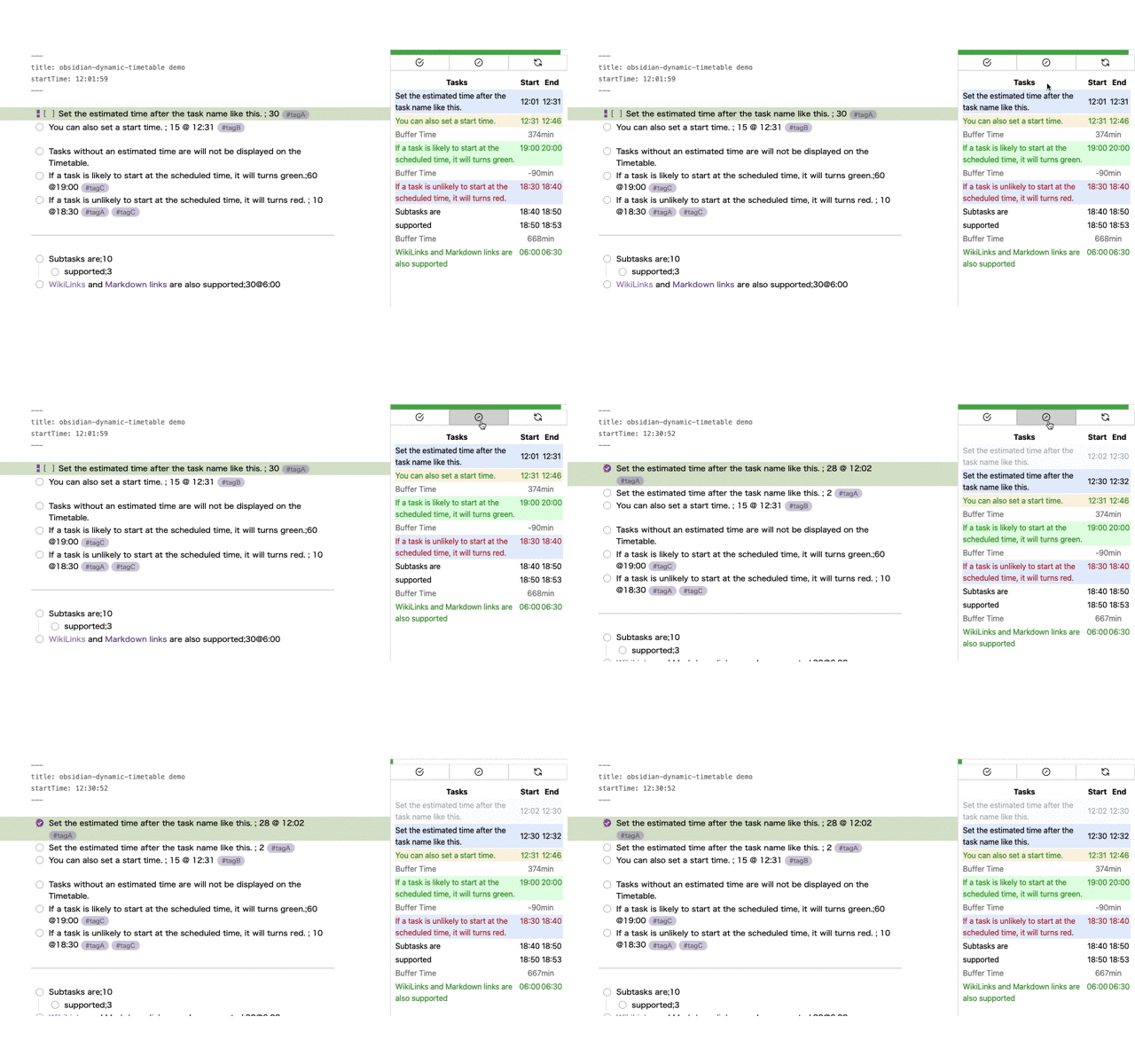
Image from Gyazo

Task text color

When a start time is specified, tasks will have a text color based on the comparison with the end time of the previous task:

  • 🟢Green: Indicates that the task is likely to start at the scheduled time, and there may be room to add more tasks before it.
  • 🔴Red: Indicates that it may be difficult to start the task at the scheduled time, and adjustments to previous tasks may be necessary.

This visual cue helps us understand how to effectively adjust our tasks.

66%
HealthFair
ReviewCaution
About
Generate dynamic timetables from Markdown tasks that include estimated durations and optional start times. Mark tasks complete or interrupt to record actual start and duration and automatically create resumed tasks for remaining time. Display color-coded tasks to reveal schedule gaps or conflicts against previous task end times.
TasksVisualizationDates
Details
Current version
4.6.1
Last updated
3 years ago
Created
3 years ago
Updates
63 releases
Downloads
10k
Compatible with
Obsidian 1.2.8+
Platforms
Desktop, Mobile
License
MIT
Report bugRequest featureReport plugin
Author
l7cyl7cy
github.com/L7Cy
GitHubl7cy
  1. Community
  2. Plugins
  3. Tasks
  4. Dynamic Timetable

Related plugins

Day Planner

Day planning from a task list in a Markdown note with enhanced time block functionality.

Tasks

Track tasks across your vault. Supports due dates, recurring tasks, done dates, sub-set of checklist items, and filtering.

Reminder

Manage Markdown TODOs with reminder.

Day Planner (OG)

Day planning from a simple task list in a Markdown note (bare bones, preserves the features and behavior of the original plugin).

Rollover Daily Todos

Rollover any unchecked checkboxes from your last daily note into today's note.

TODO | Text-based GTD

Collect all outstanding TODOs from your vault and presents them in lists Today, Scheduled, Inbox and Someday/Maybe.

Markwhen

Create timelines, gantt charts, calendars, and more using markwhen.

April's Automatic Timelines

Simple timeline generator for story tellers.

Prisma Calendar

Prisma turns any note with a date into a flexible planning system inside Obsidian. There are no rigid schemas or predefined structures — just your data, your rules, fully under your control.

Pomodoro Timer

Manage your daily focus using the Pomodoro Technique.