Search...Search plugins and themes...
⌘K
Sign in
  • Get started
  • Download
  • Pricing
  • Enterprise
  • Account
  • Obsidian
  • Overview
  • Sync
  • Publish
  • Canvas
  • Mobile
  • Web Clipper
  • CLI
  • Learn
  • Help
  • Developers
  • Changelog
  • About
  • Roadmap
  • Blog
  • Resources
  • System status
  • License overview
  • Terms of service
  • Privacy policy
  • Security
  • Community
  • Plugins
  • Themes
  • Discord
  • Forum / 中文论坛
  • Merch store
  • Brand guidelines
Follow us
DiscordTwitterBlueskyThreadsMastodonYouTubeGitHub
© 2026 Obsidian

Dropdown Vars

majid-khonjimajid-khonji121 downloads

Dropdowns in Reading and Live Preview; sync to frontmatter or inline Dataview.

Add to Obsidian
  • Overview
  • Scorecard
  • Updates3

Easily create interactive dropdowns in your notes and optionally sync their values to Dataview inline fields.

Features

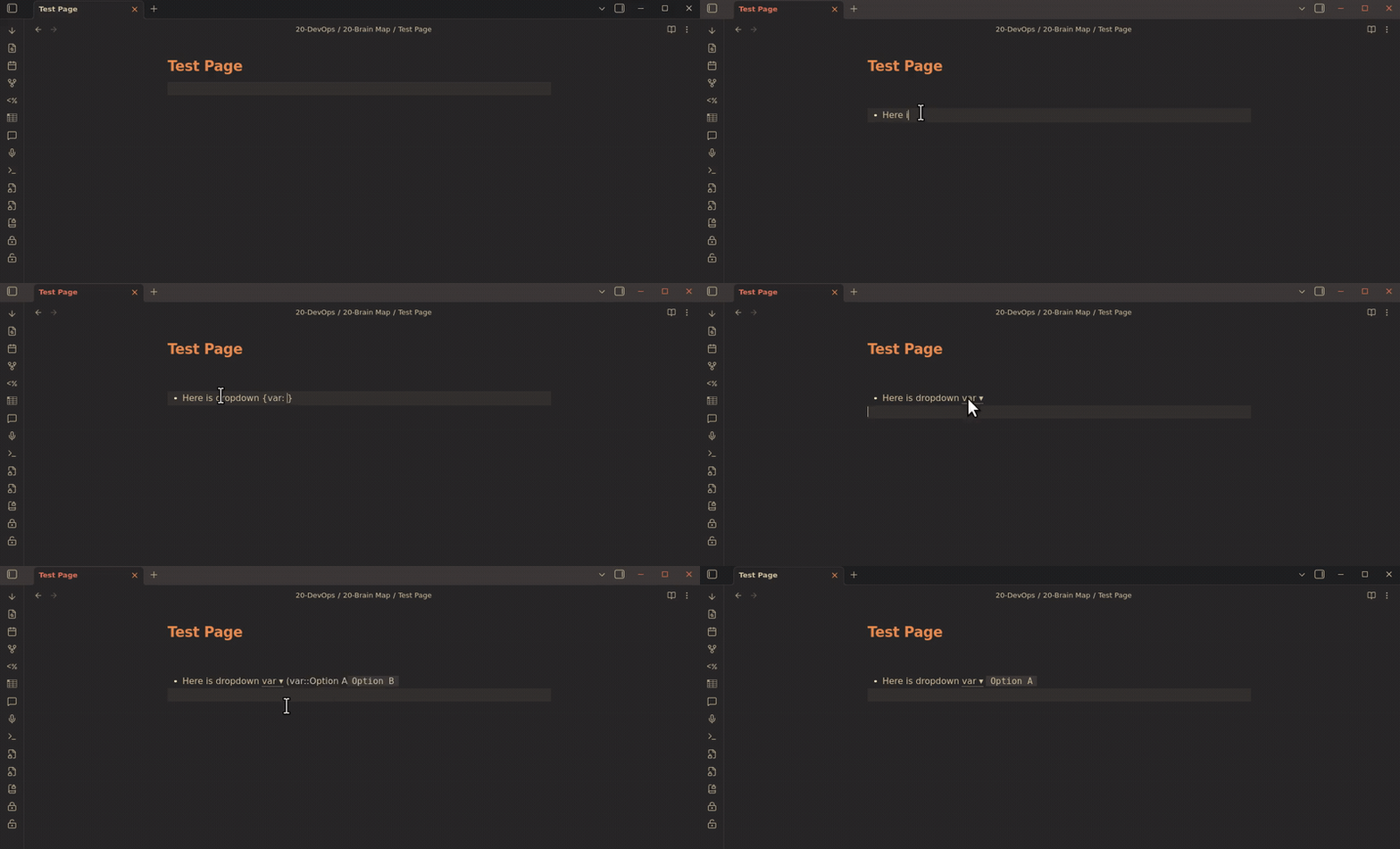
  • Dropdowns with syntax: {Status: A | B | ^C}
  • Click to open and select a value; caret ^ marks the selected option
  • Optionally sync selection to Dataview inline field: (Status::C)
  • Dropdown renders as Status ▾ in Live Preview when Dataview sync is enabled
  • Only one inline field per dropdown, always updated
  • Compatible with Dataview queries: = this.Status

Usage

  1. Write a dropdown token in your note:
    {Status: Todo | ^In Progress | Done}
    
  2. Enable "Persist to inline Dataview" in plugin settings to sync selection:
    {Status: Todo | ^In Progress | Done} (Status::In Progress)
    
  3. Use Dataview inline queries:
    Status: `= this.Status`
    

Settings

  • Persist to frontmatter: Save selection to YAML frontmatter
  • Persist to inline Dataview: Add inline field after dropdown token

License

MIT

96%
HealthExcellent
ReviewPassed
About
Create interactive dropdowns in your notes using tokens such as {Status: Todo | ^In Progress | Done}. Sync selections to Dataview inline fields or YAML frontmatter so Dataview queries (e.g., = this.Status) and Live Preview reflect the current value.
PropertiesEditingIntegrations
Details
Current version
1.1.3
Last updated
4 months ago
Created
7 months ago
Updates
3 releases
Downloads
121
Compatible with
Obsidian 1.5.0+
Platforms
Desktop, Mobile
License
MIT
Report bugRequest featureReport plugin
Author
majid-khonjimajid-khonji
github.com/majid-khonji
GitHubmajid-khonji
  1. Community
  2. Plugins
  3. Properties
  4. Dropdown Vars

Related plugins

Meta Bind

Make your notes interactive with inline input fields, metadata displays, and buttons.

LanguageTool Integration

advanced spell/grammar checks with the help of language-tool.

MetaEdit

Manage your metadata.

Advanced Tables

Improved table navigation, formatting, and manipulation.

Local REST API & MCP Server

Unlock your automation needs by interacting with your notes over a secure REST API.

Advanced Canvas

Supercharge your canvas experience. Create presentations, flowcharts and more.

BRAT

Easily install a beta version of a plugin for testing.

Outliner

Work with your lists like in Workflowy or Roam Research.

Maps

Adds a map layout to bases so you can display notes as an interactive map view.

Various Complements

Complete words similar to auto-completion in an IDE.