Search...Search plugins and themes...
⌘K
Sign in
  • Get started
  • Download
  • Pricing
  • Enterprise
  • Account
  • Obsidian
  • Overview
  • Sync
  • Publish
  • Canvas
  • Mobile
  • Web Clipper
  • CLI
  • Learn
  • Help
  • Developers
  • Changelog
  • About
  • Roadmap
  • Blog
  • Resources
  • System status
  • License overview
  • Terms of service
  • Privacy policy
  • Security
  • Community
  • Plugins
  • Themes
  • Discord
  • Forum / 中文论坛
  • Merch store
  • Brand guidelines
Follow us
DiscordTwitterBlueskyThreadsMastodonYouTubeGitHub
© 2026 Obsidian

Drag To Scroll

constszconstsz2k downloads

Drag to scroll - just like on a touch device!

Add to Obsidian
  • Overview
  • Scorecard
  • Updates3

Adds drag-to-scroll functionality to Obsidian. Hold mouse button and drag - now you can scroll like on touch device!

Works in both Edit and Reading modes. Inspired by PDF viewers and similar browser extensions.

Only for Desktop (on mobile this is a basic functionality).



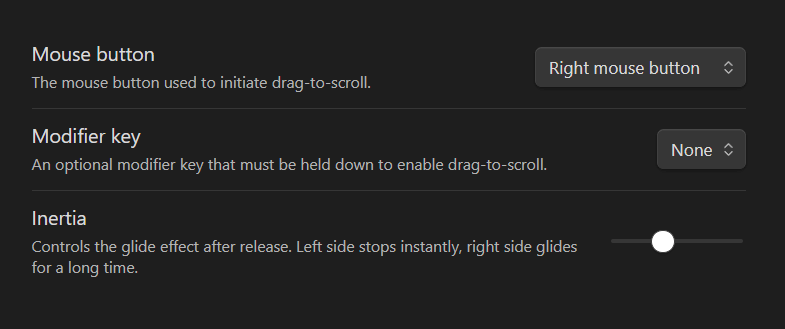
Plugin Settings


Plugin Menu:

Plugin Settings

74%
HealthGood
ReviewSatisfactory
About
Enable drag-to-scroll across Obsidian. Hold the mouse button and drag to scroll like on a touch device, working in both Edit and Reading modes on desktop only.
NavigationInterface
Details
Current version
1.0.2
Last updated
9 months ago
Created
11 months ago
Updates
3 releases
Downloads
2k
Compatible with
Obsidian 0.15.0+
Platforms
Desktop only
License
MIT
Report bugRequest featureReport plugin
Author
constszconstsz
constantinesazonov.com
GitHubconstsz
  1. Community
  2. Plugins
  3. Navigation
  4. Drag To Scroll

Related plugins

Hover Editor

Transform the Page Preview hover popover into a fully working editor instance.

Graph Banner

Display a local graph view to the note header

Dragger

Drag and drop any block (paragraphs, headings, lists, etc.) to rearrange content like Notion.

Disable Tabs

Disables having more than one tab open at a time.

Image Toolkit

Click images to preview with zoom, move, rotate, flip, invert, and copy.

Beautitab

Creates a customizable new tab view with beautiful backgrounds, quotes, search, and more.

Notebook Navigator

A better file browser and calendar inspired by Apple Notes, Bear, Evernote and Day One.

Homepage

Open a note, base, or workspace on startup, or set it for quick access later.

Recent Files

Display a list of recently opened files.

Hider

Hide interface elements such as tooltips, status bar, titlebar, and more.