Documents Bundle
 kq996214 downloads
Treat each Markdown document as a self-contained bundle with local assets.
- Overview
- Scorecard
- Updates4
English | 简体中文
A Notion-style attachment experience for Obsidian, without giving up plain Markdown files.
In Notion, you paste an image or drop a PDF and it simply belongs to the page. No attachment folder housekeeping, no "where did that file go?", no little chores stealing focus from writing.
Documents Bundle brings that same low-friction feeling to Obsidian. Each Markdown note can live as a small self-contained bundle:
Project Brief/
  Project Brief.md
  assets/        # optional until attachments are added
Paste an image, drop a PDF, migrate an old local attachment link, and the file lands next to the note instead of wandering off into a vault-wide attachments folder. It feels page-native, but stays plain, portable, and easy to inspect.
Screenshots
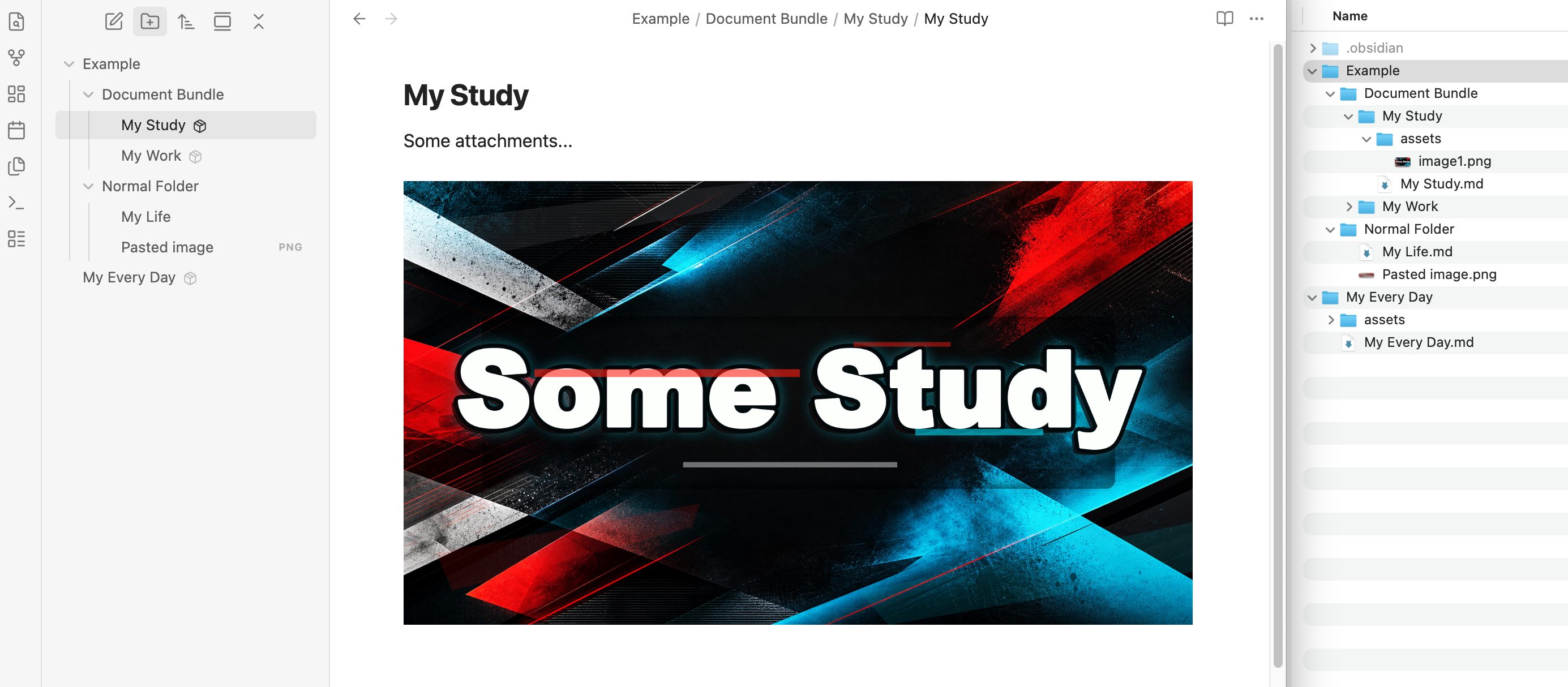
What It Does
- Creates bundle documents from Obsidian's native file menu.
- Converts existing Markdown files into bundle folders.
- Saves pasted and dropped files into the active bundle's
assets/folder. - Inserts portable relative Markdown links like
./assets/sketch.png. - Migrates old local attachment links into the bundle and rewrites the note.
- Keeps bundle folder renames in sync with the main Markdown file.
- Marks bundle folders in Obsidian's Files pane, so they read like one document object.
Why Use It
Obsidian is great at plain files. Attachments are where things can get messy.
Documents Bundle is for notes that should travel with their supporting files: project briefs, research notes, client docs, writing drafts, class notes, anything with screenshots, PDFs, audio, or diagrams attached.
The bundle stays boring on purpose:
Document/
  Document.md
  assets/
    image.png
    brief.pdf
No database. No custom archive format. No lock-in. If the plugin is disabled, the folder is still just a folder. A folder with only Document.md is already a bundle; if assets/ is missing, it appears when attachments are added.
Usage
Create a Bundle
In Obsidian's Files pane, right-click a folder and choose New bundle document here.
The plugin creates an untitled bundle. Rename the bundle folder directly in the Files pane, and Documents Bundle keeps the main Markdown file name in sync.
Project Brief/
  Project Brief.md
  assets/
Convert an Existing Note
Right-click a Markdown file in the Files pane and choose Convert to bundle.
The plugin previews any local attachments that will be moved, asks for confirmation, then moves the note into a same-named folder, creates assets/, migrates those attachments into the bundle, and rewrites their links.
Paste or Drop Attachments
When the active editor is a bundle's main document, pasted and dropped files are saved into that bundle's assets/ folder.

[contract.pdf](./assets/contract.pdf)
Normal notes are left alone. If the current file is not a bundle main document, Obsidian handles paste and drop as usual.
Migrate Existing Attachments
Right-click a bundle folder and choose Migrate attachments to bundle.
Documents Bundle reviews local attachment links, copies the files into assets/, and rewrites the note with relative links. Shared source files are copied instead of moved, so one cleanup does not quietly break another bundle.
Settings
- Handle pasted and dropped attachments in bundles saves incoming files to the active bundle's
assets/folder. - Enhance native File Explorer marks bundle folders, hides bundle internals visually, and opens the main document when the bundle title is clicked.
- Bundle marker style lets bundle folders show no marker, a small icon badge, a bold title, or a
Bundletext badge.
Mobile Support
Documents Bundle is not desktop-only. Core bundle operations and attachment handling use Obsidian vault APIs and work on mobile.
Opening an assets/ folder in the operating system file browser is desktop-only. On mobile, or in any environment without a system file-browser API, the plugin shows the vault path instead.
Limitations
- The native File Explorer enhancement is visual only. It does not modify Obsidian core files or change your vault structure.
- Bundle internals are ordinary files. Other plugins, sync tools, and file managers can still see and edit them.
- The Files pane enhancement depends on Obsidian's current file-explorer DOM structure. If Obsidian changes that structure, disable Enhance native File Explorer until the plugin is updated.
- Attachment migration only rewrites links it can safely resolve to local vault files.