Docker Connector
 Anthony Fitzpatrick214 downloads
A desktop Docker environment dashboard with secure local, Context, SSH, and mutual TLS connections.
- Overview
- Scorecard
- Updates1
Docker Connector brings multi-host Docker monitoring and deliberately opt-in container management into Obsidian. Connect to local or remote Docker Engines, inspect Docker Compose applications and Docker resources, check image availability, and use explicit lifecycle actions without leaving your vault.
Docker Connector supports desktop Obsidian on macOS, Windows, and Linux with Local Docker Socket, Docker Context, SSH, and mutual TLS connections. Docker Connector is read-only by default; each Online connection's Connections-card switch controls its own session-only management authorization. SSH usernames are shown only while adding or editing a host, not in normal dashboard cards.
Docker access is highly privileged. A user or process that can control Docker can often gain extensive control of that Docker host. Connect only to Docker hosts, Docker Contexts, and credentials you trust.
Features
- Connect multiple Docker environments and switch the Current Environment at any time.
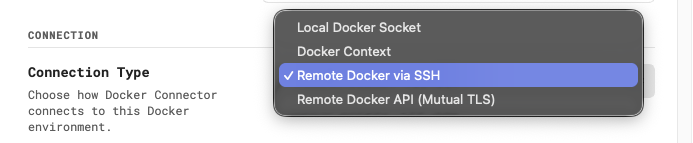
- Use Local Docker Socket, Docker Context, Remote Docker via SSH, or Remote Docker API (Mutual TLS).
- Read consistent host cards: the same purple host identity, safe endpoint details, inventory/runtime preview, action row, and per-profile management row for every transport.
- Manage saved connections from Connections: add, edit, reconnect or retry when relevant, inspect status, and delete the plugin-only profile safely.
- Browse host Overview data, Docker Compose Applications, Containers, Images, Volumes, and Networks.
- Inspect container, image, volume, network, and Compose application details without opening a separate Docker dashboard.
- Check eligible standalone containers for image updates on a 24-hour schedule or with Check now.
- Explicitly enable confirmed Start, Shut down, Stop, Restart, and safe standalone-container Update actions.
- Use a backup-first update transaction with rollback/recovery guidance for eligible standalone containers.
- Keep SSH passwords and key passphrases, and TLS client-key passphrases, in memory only for the current Obsidian session by default. Password SSH profiles may explicitly opt in to separate unencrypted local plugin-data storage on a trusted device.
Screenshots
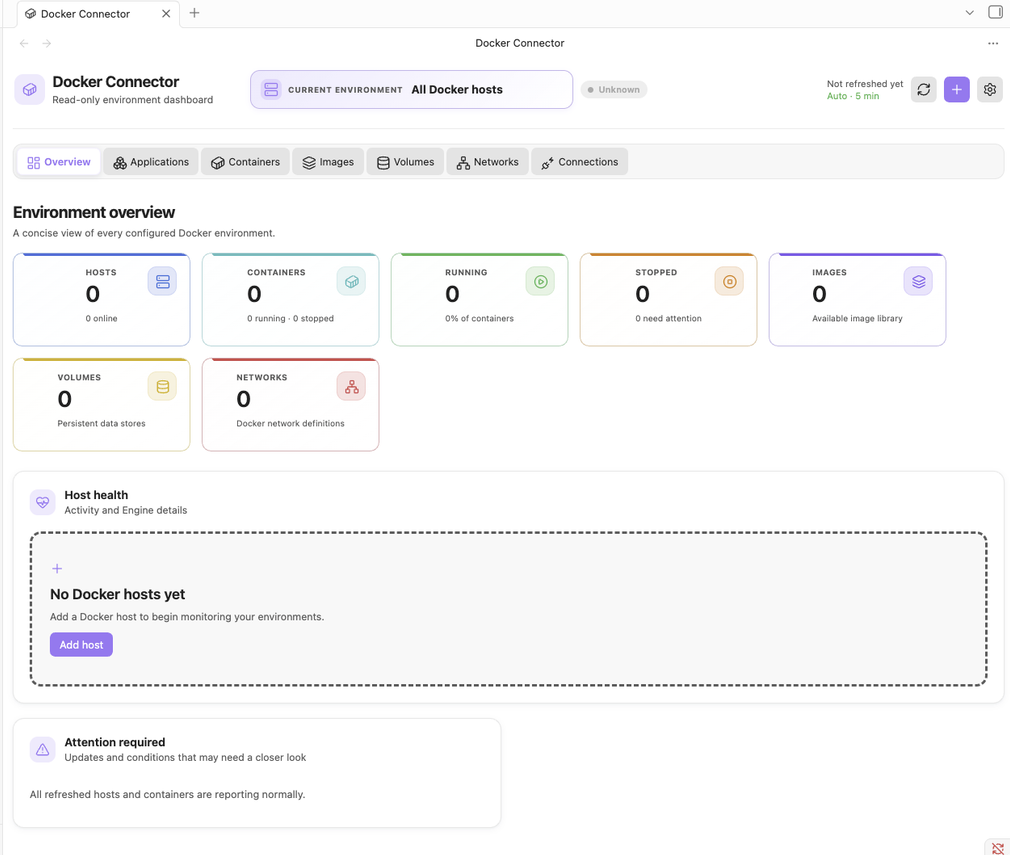
Overview. Every configured Docker environment at a glance: host, container, image, volume and network counts, host health, and anything needing attention.
Four ways to connect. A local Docker socket, an existing Docker Context, a remote host over SSH, or the Docker Engine API over mutual TLS.
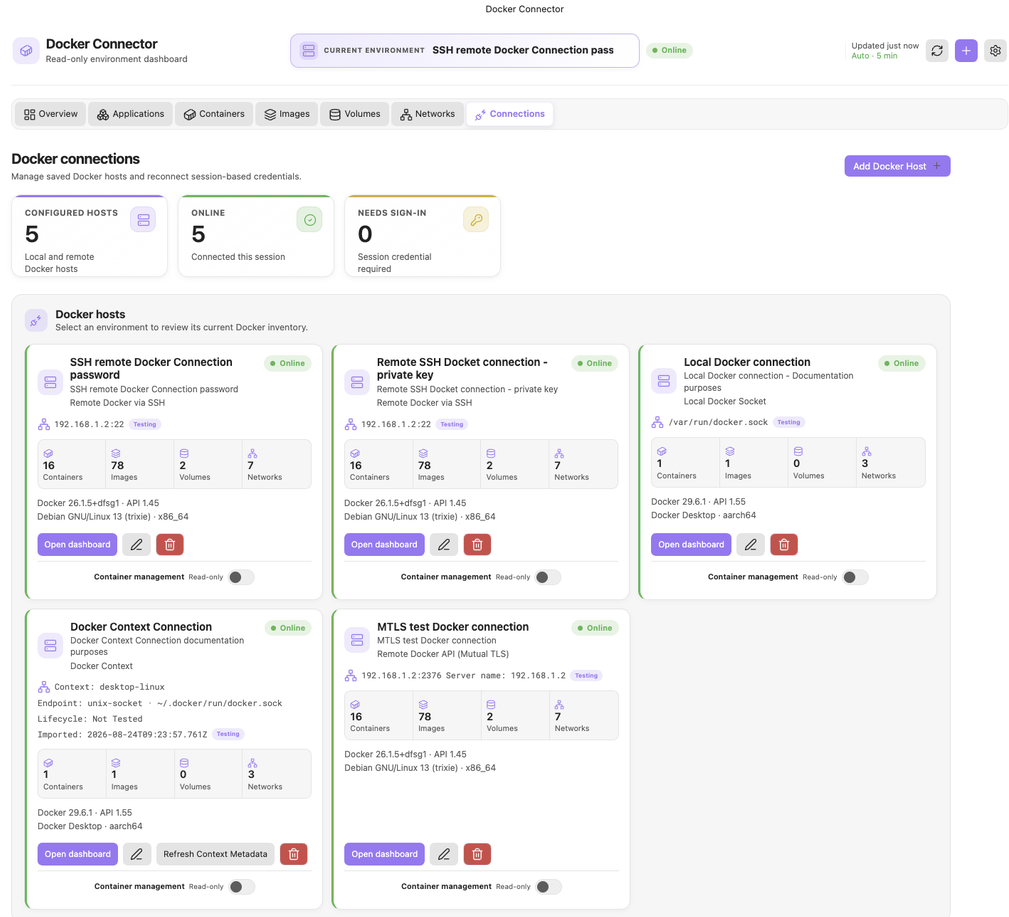
Connections. Each saved host shows its status, endpoint, inventory counts and Engine details. Container management is the per-connection switch on each card, off by default.
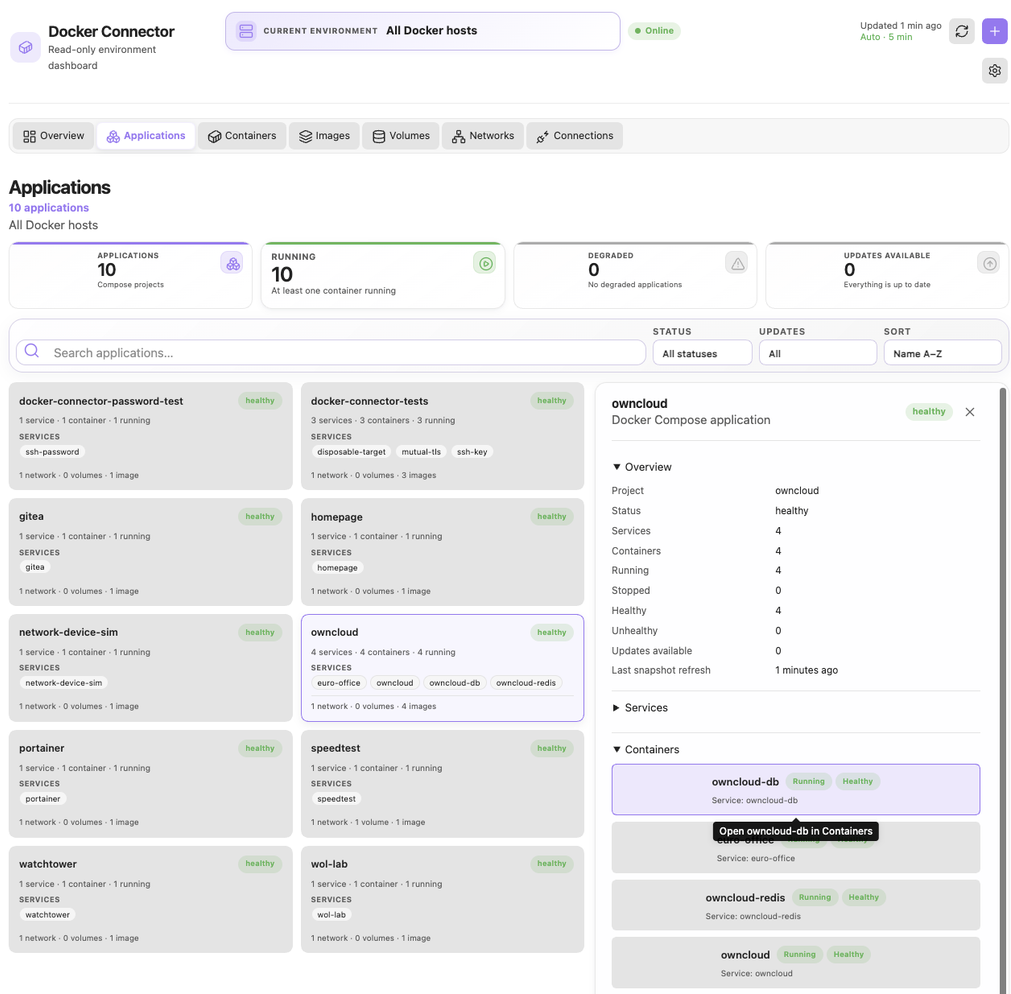
Applications. Containers grouped into their Docker Compose projects, with services, health and update status, and an inspector for each one.
Containers. Per-container state, health and image-update status. Lifecycle actions appear only once management is enabled for that connection, and each one confirms before it is sent.
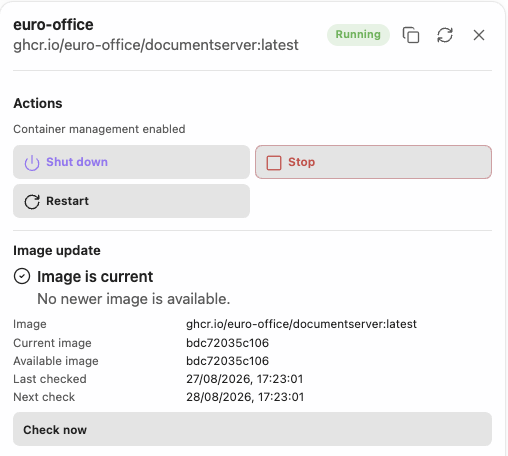
The User Guide is illustrated throughout, from first launch and each connection method to the dashboard views, container management, and settings.
Connection methods
| Connection method | Best for | Authentication | Direct Docker API exposure |
|---|---|---|---|
| Local Docker Socket | Docker running on the same computer | Local Docker permissions | No |
| Docker Context | Existing Docker CLI configurations | Context-defined | Depends on Context |
| Remote Docker via SSH | Most remote Docker hosts | Password or private key | No |
| Remote Docker API (Mutual TLS) | Direct secured Docker Engine API access | CA + client certificate + private key | Yes |
Local Docker Socket discovers and validates local Unix sockets or Windows named pipes. Docker Context uses an existing Docker CLI Context without changing your active Context; local Context endpoints route through the local transport, while supported SSH Contexts use Docker CLI’s secure Context transport. Remote Docker via SSH carries Docker traffic through SSH, so the Docker API does not need to be exposed directly. Remote Docker API (Mutual TLS) requires a trusted CA, client certificate, client private key, and mandatory server identity verification.
Plain unauthenticated Docker TCP is not supported.
Read-only by default
The normal Docker Engine client is restricted to approved read-only GET requests. Container management is disabled by default, resets after restarting or reloading Obsidian, and is enabled only from the Connections-card switch for an individual Online connection. It turns off immediately if that connection is lost and never restores automatically after reconnecting. Even then, Docker Connector exposes only explicit typed actions—Start, Shut down, Stop, Restart, and eligible Update—not a general-purpose Docker command shell or arbitrary API interface.
Applications and Docker resources
Docker Connector’s Applications view groups only Docker Compose-labelled containers. It uses Docker’s Compose project and service labels, rather than guessing from container names. Applications are a read-only project-level overview: Docker Connector does not run docker compose up or docker compose down, edit Compose files, or update an entire Compose application.
The Containers, Images, Volumes, and Networks views provide searchable, filterable inventories and read-only detail inspectors. Docker Connector does not delete images, volumes, or networks.
Update availability and safe updates
Image update checks are advisory. For eligible standalone containers, Docker Connector compares the current image with the image resolved for the configured tagged reference. Automatic checks occur on a 24-hour stale interval while Container management is enabled; they do not automatically update, stop, restart, or recreate containers.
When a newer image is confirmed and a standalone container is eligible, Update opens a preview before it starts a backup-first transaction. Docker Connector attempts to preserve supported configuration, creates and verifies a replacement, and attempts rollback if the transaction fails. Compose-managed containers are intentionally blocked from this standalone update workflow. Read the Safe Container Updates note before using it.
Security and privacy
- Docker access remains privileged; use least-privileged access where possible.
- SSH passwords, SSH private-key passphrases, and TLS client-key passphrases are session-only by default. Only an explicit per-profile SSH password opt-in stores a password separately in unencrypted local plugin data; it is never a profile field. Passive cards hide SSH usernames, authentication labels, credential paths, and secrets.
- Selected key and certificate paths can be saved; their file contents are not copied into settings.
- Mutual TLS requires server-certificate and Server name verification, enforced against the Server name you configure whether it is a host name or an IP address. There is no insecure verification bypass.
- Docker Contexts are discovered and used without
docker context use, create, update, remove, import, or export commands. - Insecure plain Docker TCP is blocked.
- Delete connection removes only Docker Connector’s profile, runtime credentials, cache, and transport state. It never deletes Docker resources, Docker Contexts, sockets, SSH keys, TLS certificate files, or remote-server configuration.
- Docker Connector includes no telemetry or analytics service.
- Network activity is limited to the Docker hosts you configure and to anonymous, read-only version lookups against the registry named in an image reference — Docker Hub when the reference is unqualified. Those lookups populate the Overview's advisory update notices and send no credentials, vault content, or identifying data. The separate per-container update check resolves image metadata through your own Docker daemon rather than from Obsidian, and runs only while Container management is enabled.
For details, read the Security Review.
Capabilities this plugin uses
Obsidian's plugin check reports the platform capabilities a plugin reaches for. Docker Connector uses four, and this is what each one is for:
- Filesystem access (Node
fs). Reads the SSH private key,known_hosts, and the TLS CA, certificate, and key files you select, plus the local Docker socket paths and Docker CLI config it probes during discovery. It writes only when you ask it to generate an SSH key pair. It never reads or writes vault files. - Shell execution (Node
child_process). Runs the localdockerCLI for Docker Context discovery anddocker system dial-stdio, and runs one fixed capability probe over SSH. Arguments that come from a profile are POSIX-quoted, and profile fields are rejected up front if they contain quotes, backslashes, shell expansion characters, or control characters. There is no free-form command entry anywhere in the interface. - Clipboard. Write-only, and only when you press a copy button: the full container ID or image ID. The plugin never reads the clipboard.
- Dynamic code execution. None in this plugin's own source. The single
new Functionin the release bundle is inside the vendoredssh2dependency, which uses it once as a fixednew Function("return 2n ** 32n")feature probe for BigInt support. No plugin, vault, or daemon data reaches it.
Releases are built by a GitHub Actions workflow that publishes build provenance attestations for main.js, manifest.json, and styles.css, so you can verify a downloaded release was built from this repository:
gh attestation verify main.js --repo anthonyfitzpatrick/obsidian-docker-connector
Requirements
| Requirement | Details |
|---|---|
| Obsidian | Obsidian 1.13.0 or later on desktop. |
| Local Docker Socket | A local Docker Engine/Docker Desktop and permission to access its Unix socket or Windows named pipe. |
| Docker Context | Local Docker CLI and an existing Context. |
| Remote Docker via SSH | SSH access and Docker access for the remote account; no interactive sudo. |
| Remote Docker API (Mutual TLS) | A correctly secured Docker HTTPS endpoint plus CA, client certificate, and client key. |
Installation
When Docker Connector is available in Obsidian Community Plugins:
- Open Settings → Community plugins → Browse.
- Search for Docker Connector.
- Install and enable it.
For manual release installation, place these files in your vault’s .obsidian/plugins/docker-connector/ directory, then enable the plugin in Obsidian:
.obsidian/plugins/docker-connector/
├── main.js
├── manifest.json
└── styles.css
Do not install source files, test fixtures, or node_modules for normal use.
Quick start
- Open Docker Connector → Connections.
- Select Add Docker host.
- Enter a Friendly name and choose a connection method.
- Complete its method-specific fields.
- Choose Test connection and review diagnostics.
- Choose Save host.
- Select the profile as the Current Environment.
- Browse the dashboard, which remains read-only until Container management is enabled.
For complete setup walkthroughs, connection fields, diagnostics, update behavior, recovery guidance, and troubleshooting, see the Docker Connector User Guide.
What update checking does—and does not do
For eligible standalone containers, Docker Connector can compare the running image ID with the image currently resolved for the configured tagged image. The 24-hour stale interval and Check now are advisory checks. A check can ask Docker to pull/resolve image metadata, but it never stops, starts, restarts, or recreates a container.
An available image is not automatically eligible for a standalone update. Docker Compose-managed containers remain under Compose’s control, and unsupported configurations are blocked before any mutation. When Update is available, it always begins with a preview and an explicit user decision. Read the User Guide’s update and recovery chapters before using it.
Documentation
- Docker Connector User Guide — complete illustrated end-user manual, troubleshooting, and FAQ.
- Connections View — saved connection actions and status.
- Docker Context — Context discovery, lifecycle, and secure routing.
- Docker Compose Awareness — how Applications grouping works.
- Container Management and Safe Container Updates — opt-in mutation boundaries and recovery behavior.
- Security Review — security and privacy boundaries.
- Testing — automated and manual validation scope.
- Release Checklist — release-candidate and marketplace gates.
- Community Plugin Compliance — current compliance record and remaining manual review.
Known limitations
- Docker Connector requires desktop Obsidian.
- Insecure unauthenticated Docker TCP is unsupported.
- Compose applications are read-only at the project level.
- Standalone Update is blocked for Compose-managed and other unsupported containers.
- Runtime-only passwords and passphrases can require reconnecting after Obsidian restarts.
- Some Docker Context endpoint types are blocked when they cannot be routed through an existing secure transport.
- Docker permissions, Docker Engine availability, registry access, and host policy determine what can be inspected or managed.
Development
npm install
npm test
npm run lint
npm run build
The automated test suite covers connection routing, lifecycle behavior, update transactions, UI boundaries, and security constraints. See CONTRIBUTING.md, CHANGELOG.md, Testing, Release Checklist, and Community Plugin Compliance.
Contributing
Contributions should preserve the plugin’s read-only-by-default posture, avoid insecure Docker TCP and arbitrary mutation routes, and include focused tests for behavior changes. Please read the project documentation and contribution guidance before proposing a change.
License
MIT. See LICENSE.
Author
Created by Anthony Fitzpatrick and published by Wolf 359 Press AB. See the product page on wolf359.app for more, and wolf359.app for the other plugins and themes.