Search...Search plugins and themes...
⌘K
Sign in
  • Get started
  • Download
  • Pricing
  • Enterprise
  • Account
  • Obsidian
  • Overview
  • Sync
  • Publish
  • Canvas
  • Mobile
  • Web Clipper
  • CLI
  • Learn
  • Help
  • Developers
  • Changelog
  • About
  • Roadmap
  • Blog
  • Resources
  • System status
  • License overview
  • Terms of service
  • Privacy policy
  • Security
  • Community
  • Plugins
  • Themes
  • Discord
  • Forum / 中文论坛
  • Merch store
  • Brand guidelines
Follow us
DiscordTwitterBlueskyThreadsMastodonYouTubeGitHub
© 2026 Obsidian

Dictionary translator

grover572grover5722k downloads

Helps you to quickly underline word translations and insert word cards in your notes.

Add to Obsidian
  • Overview
  • Scorecard
  • Updates3

English Doc

我能帮你做什么?

这是一个简单的插件,帮助你在完成你的知识库的同时可以快速的翻译陌生的单词或句子,并将其生成单词卡插入笔记本中。 此外,你还可以将翻译引擎的发音文件保存到你的vault,如果你想,你也可以录制自己的发音。

如何使用

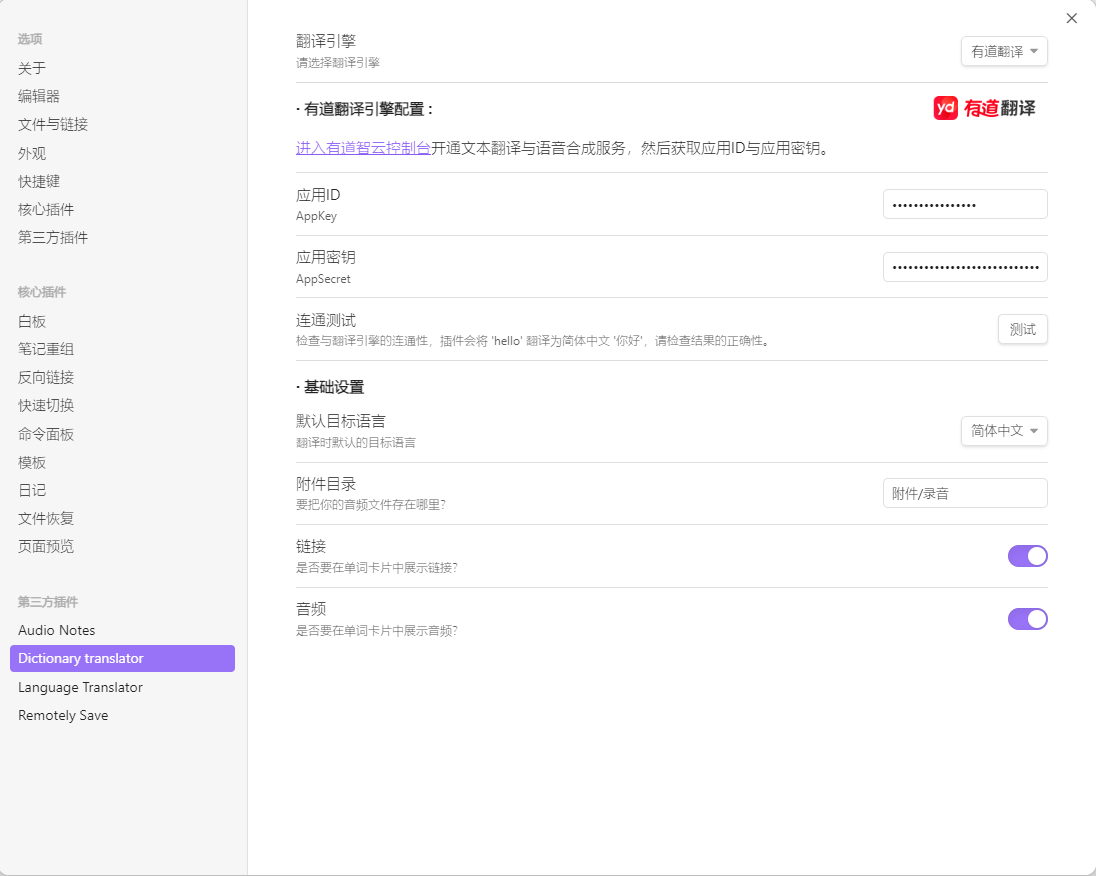
  1. 配置翻译引擎 setting.png
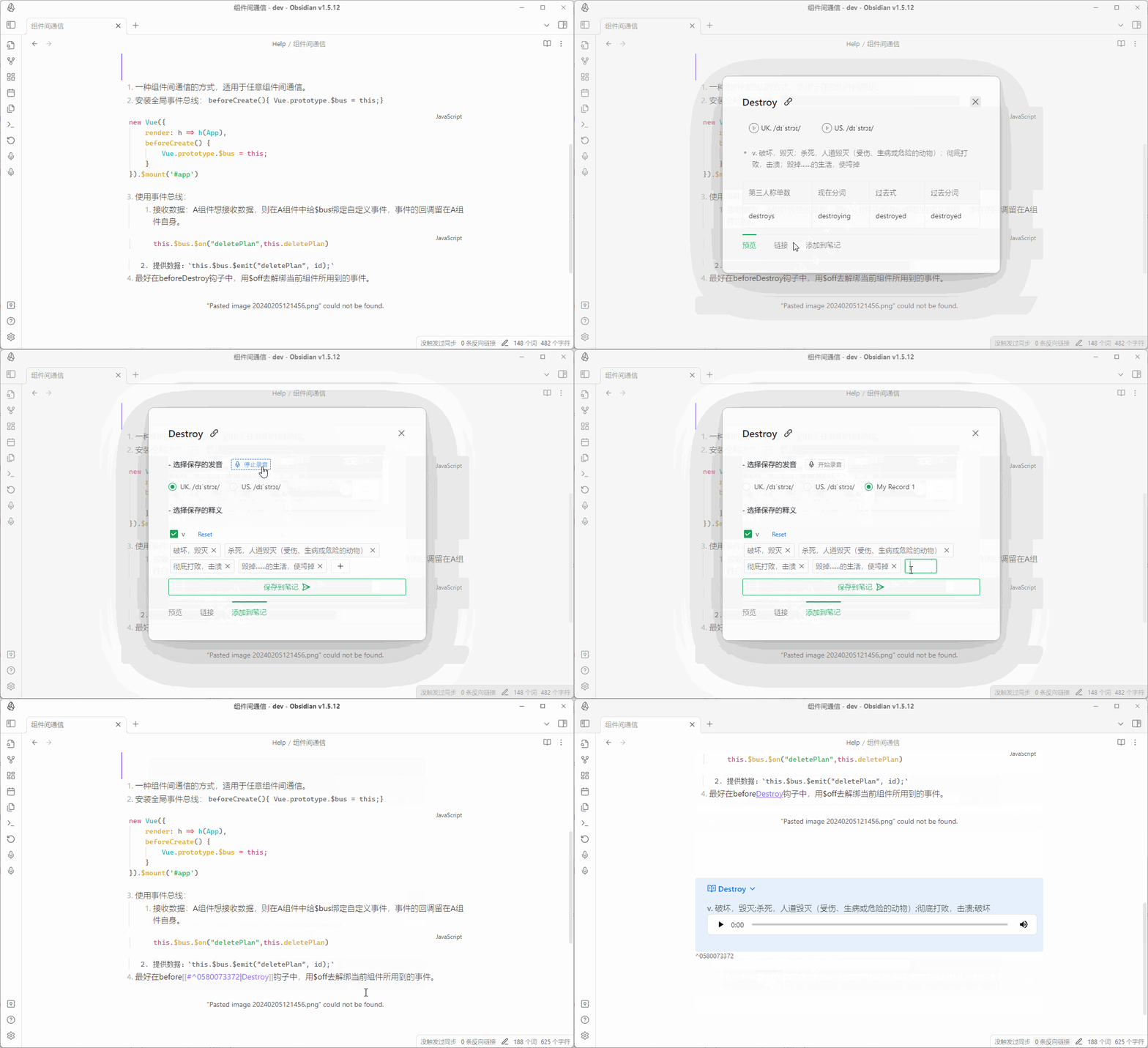
  2. 右键划词翻译 (你可以录制自己的发音) translator.gif

翻译引擎支持

  • 有道翻译

    2024-04-23
    由于有道文本翻译接口返回内容更新,依赖的词典相关数据缺失,导致插件体验不完整,只能展示基础的释义、链接、基础发音等。

  • 百度智能云翻译
  • 谷歌翻译
  • 微软翻译

自定义翻译引擎

  1. 自定义策略类: 实现TranslationStrategy抽象类
  2. 在TranslateEngines中添加自定义的策略类
    1. 请求自定义的翻译引擎
    2. 解析响应结果,封装为TranslateResponse类型的响应
  3. 为你的翻译引擎在setting.ts中添加独特的配置项
65%
HealthGood
ReviewCaution
About
Translate selected words or sentences instantly via right-click and insert generated flashcards into your notes. Save or record pronunciation audio into your vault and use Google, Microsoft, Baidu, Youdao or custom translation engines.
LanguagesFlashcardsAttachments
Details
Current version
1.0.4
Last updated
2 years ago
Created
2 years ago
Updates
3 releases
Downloads
2k
Compatible with
Obsidian 1.1.1+
Platforms
Desktop only
License
MIT
Report bugRequest featureReport plugin
Author
grover572grover572
github.com/grover572
GitHubgrover572
  1. Community
  2. Plugins
  3. Languages
  4. Dictionary translator

Related plugins

Aosr

Another Obsidian spaced repetition. Use flashcards to review and remember knowledge.

Spaced Repetition

Fight the forgetting curve by reviewing flashcards & entire notes.

Simplified Chinese Word Splitting

Adds Simplified Chinese word splitting support for the editor and Vim mode.

Image Context Menus

Image context menus (mostly on right click): Copy to clipboard, Open in default app, Show in system explorer, Reveal file in navigation, Open in new tab.

Easy Typing

Auto format when typing.

Ink

Hand write or draw directly between paragraphs using a digital pen, stylus, or Apple pencil.

Local Images Plus

A reincarnation of Local Images to download images in Markdown notes to local storage.

LanguageTool

Unofficial integration of the LanguageTool spell and grammar checker.

Local GPT

Local Ollama and OpenAI-like GPT's assistance for maximum privacy and offline access.

Consistent Attachments and Links

Move note attachments and update links automatically.