
- Overview
- Scorecard
- Updates10
Obsidian Dialogue Mode is a plugin designed to enhance your writing experience in Obsidian by fading out non-dialogue text, making it easier to focus on the most relevant parts of your writing.
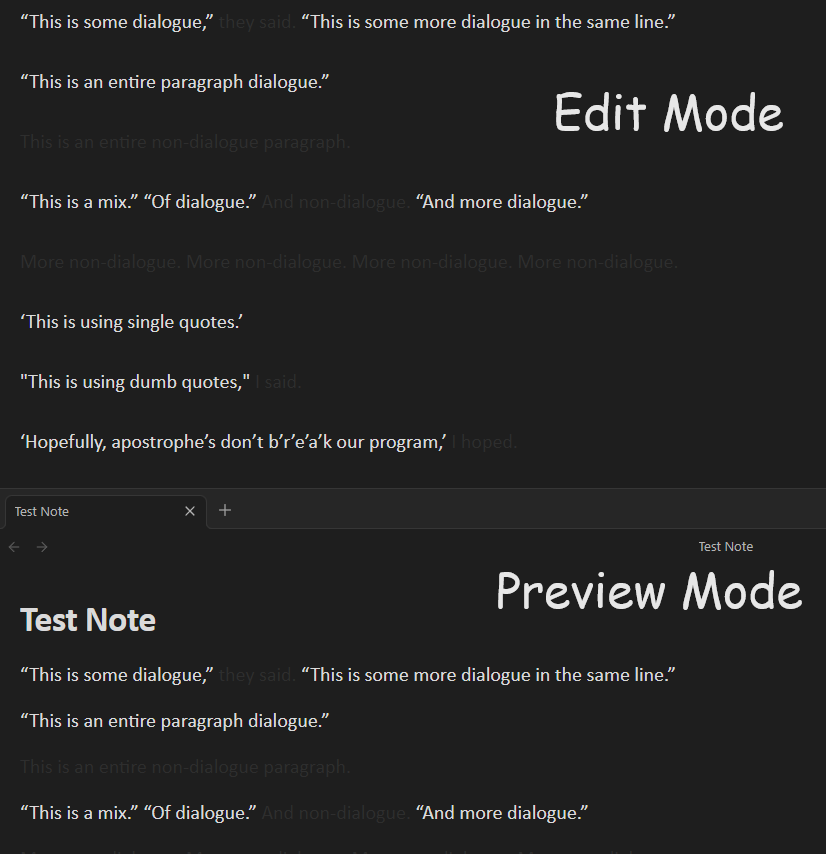
Usage
Dialogue mode is enabled by default.
Toggle Dialogue Mode: Use the command palette (Ctrl+P or Cmd+P) and search for "Toggle dialogue mode" to enable or disable the fade-out effect.
Customizable Fade Intensity: Adjust the fade intensity in the settings tab.
Customizable Dialogue Color: Adjust the color of the text in dialogue.
Installing
- Install the Plugin:
- (Recommended) If installing through Obsidian, go to Settings > Community plugins > Browse and search for "Dialogue Mode".
- If downloading manually, place the plugin files in your Obsidian plugins folder.
- Enable the Plugin: Go to Settings > Community plugins, find "Dialogue Mode" and toggle it on.
- Configure Settings: Adjust the plugin settings to your preference by navigating to Settings > Dialogue Mode Settings.
Advanced Customization
For theming, the faded out color (at max intensity) can be changed via this CSS variable:
--dialogue-excluded-text-color
Development
If you want to contribute or modify the plugin, follow these steps:
- Clone this repo.
- Make sure your NodeJS is at least v16 (
node --version). npm ioryarnto install dependencies.npm run devto start compilation in watch mode.- Feel free to file a pull request with any improvements.
HealthFair
ReviewCaution
About
Fade out non-dialogue text to spotlight spoken lines while writing. Adjust fade intensity and dialogue text color to suit your focus and style.Details
Current version
1.1.0
Last updated
2 years ago
Created
2 years ago
Updates
10 releases
Downloads
2k
Compatible with
Obsidian 1.6.2+
Platforms
Desktop, Mobile
License
MIT