Diachronic
 Johannes Kaindl1 downloads
Track changes for Markdown: versions per note, word-level suggestions you accept or reject, comments, and a review sidebar.
- Overview
- Scorecard
- Updates1
🇬🇧 English · 🇩🇪 Deutsch
Track changes for Markdown: versions per note, word-level suggestions you accept or reject, comments, and a review sidebar.
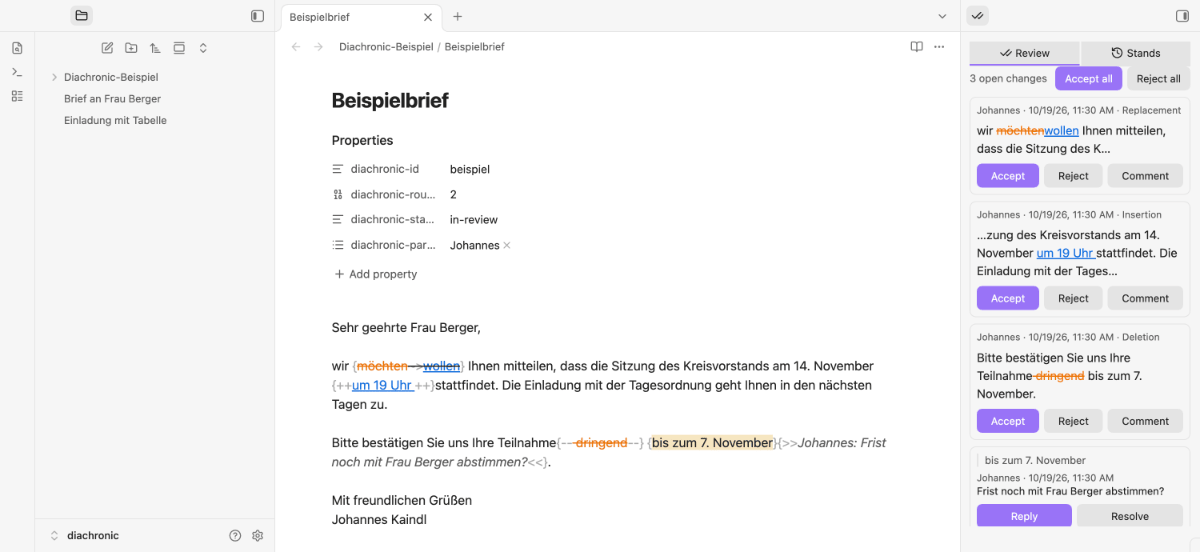
A colleague writes a letter in Obsidian and sends it to you as one Markdown file. You rework it freely, Diachronic compares your version with what you received and writes the differences into the file as suggestions. She sees every change on its own card, accepts or rejects it, comments, and writes on. The suggestions are plain CriticMarkup in the text, so the file stays readable without the plugin.
Features
- Stands per note. Every round starts with a saved stand; you can list the stands of a note, compare any two word by word and restore one. Older stands are stored as small changes, not as copies.
- Suggestions you accept one by one. "Mark changes" turns the difference to the incoming text into insertions, deletions and replacements. Nothing is written unless you press a button.
- Review sidebar. One card per change with Accept, Reject and Comment, comment threads with replies and "Resolve", all in text order. Works on the phone, too.
- Comments on changes and on any passage of text.
- Send back and take over. "Send back" counts the round up and opens the share sheet; a returned file with the same document id is offered as the next round, and nothing is overwritten when both sides changed.
- Release. When no change is open, "Release" saves version v1, removes the comments from the text and sets the status in the frontmatter.
- Readable without the plugin. Insertions are underlined, deletions struck through, never by colour alone. Other CriticMarkup plugins can read the marks.
Requirements
- Obsidian 1.8.7+, desktop and mobile (iPhone and iPad).
- No other plugin and no network access. Diachronic writes only the notes you work on and its own folder of stands.
Install
Community plugins
Open Settings → Community plugins → Browse, search for Diachronic, install and enable it.
Manual
Download main.js, manifest.json and styles.css from the latest release into <vault>/.obsidian/plugins/diachronic/ (use your configuration folder if it is not .obsidian), then enable Diachronic under Settings → Community plugins.
BRAT (beta)
Install the BRAT plugin, choose Add beta plugin and enter the repository johannes-kaindl/diachronic.
From source
git clone https://github.com/johannes-kaindl/diachronic
cd diachronic
npm install
npm run build   # produces main.js
Quick start
- Open Settings → Diachronic and enter your name. It stands on every suggestion and comment you write.
- Open the note you received and run Hold as incoming (command palette). The note gets a document id in its properties and a first stand.
- Rework the text as you like, without any special mode.
- Run Mark changes. Your changes appear as suggestions in the text.
- Run Open review sidebar to see them as cards; accept, reject or comment.
- Send back counts the round up and opens the share sheet for the file.
Usage
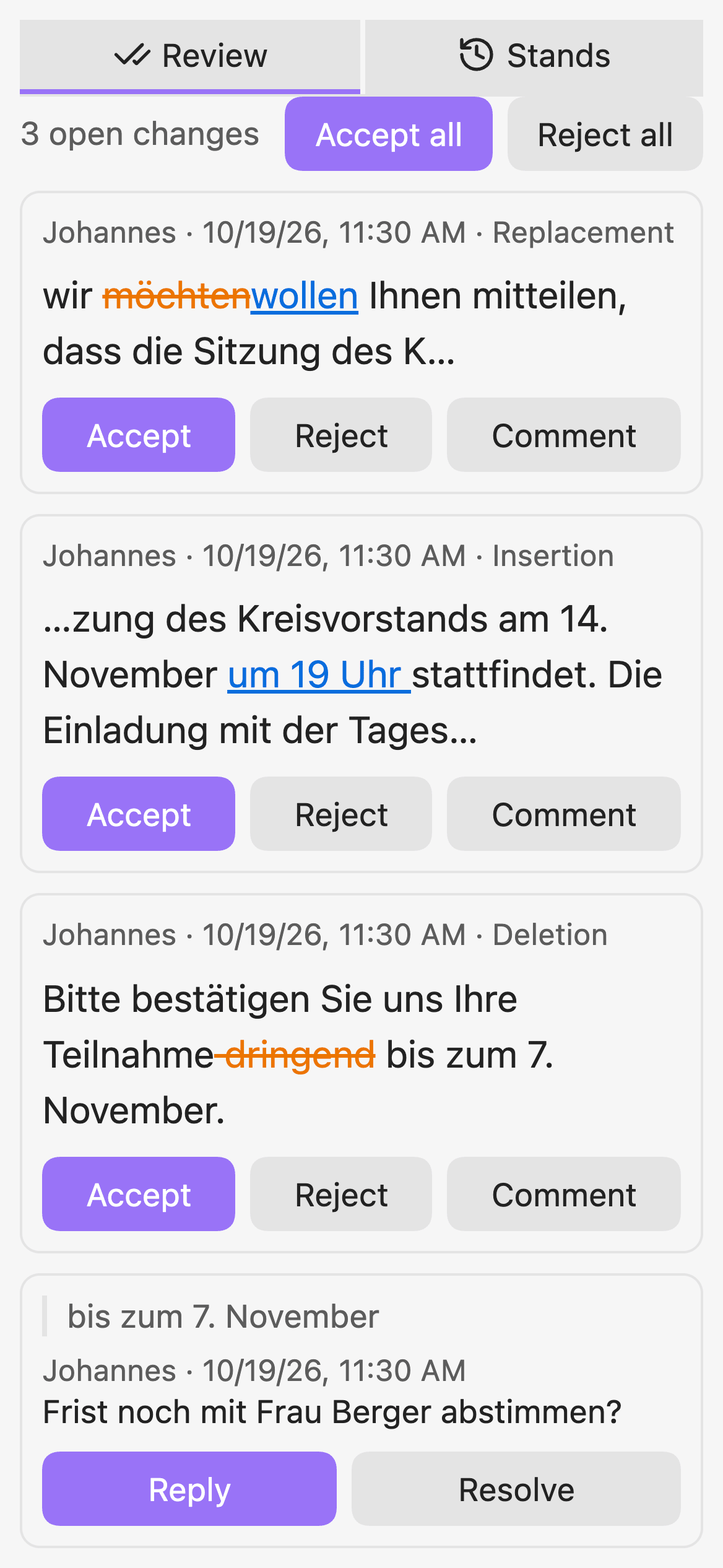
Click the preview for the full-size image
- Review tab: a card per change (author, time, kind, the words around it) and per comment thread. A click on a card jumps to the passage; a click on a mark in the text opens its card. "Accept all" and "Reject all" save a stand first and ask for confirmation.
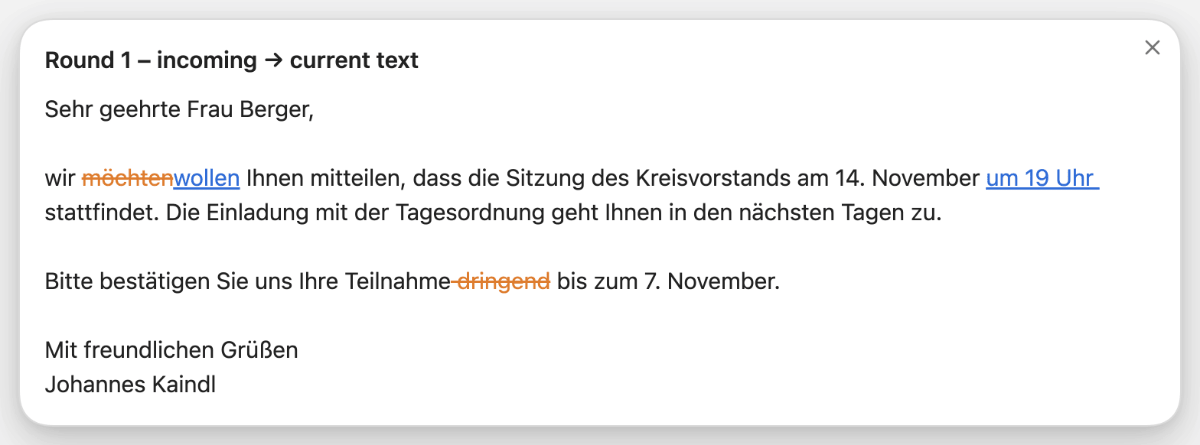
- Stands tab: the stands of the note grouped by round. Choose one to compare it with the current text or with another stand, or to restore it. Restoring saves the current text first.
- Commands: Hold as incoming, Mark changes, Open review sidebar, Comment on selection, Accept next change, Reject next change, Send back, Take over this file as the next round, Release. Assign hotkeys under Settings → Hotkeys; none are set.
- Colour by author: a setting, off by default. The kind of a change always shows by form.
Configuration
Settings → Community plugins → Diachronic: your name, the folder for stands (default Diachronic), hiding that folder in the file explorer (on) and colour by author (off). Details in the reference.
How it works
A suggestion is a CriticMarkup mark in the text ({++new++}, {--old--}, {~~old~>new~~}). Who wrote it and when sits in a hidden block at the end of the note, so the marks stay clean. The stands live in a folder you choose, found by the document id in the properties, so they follow a renamed note. Read Why CriticMarkup and Stands and the file format.
Known limits
- Stands are Markdown files, so Obsidian lists them in search, the graph and the quick switcher until you add the folder under Excluded files (Diachronic asks once and opens the setting).
- On the Mac, Send back opens the exported file with your default app instead of a share menu.
- The reading view shows the marks as plain text; the editor marks them.
- A returned file that holds new marks of the sender next to unmarked changes cannot be compared automatically.
Documentation
Documentation index: getting started, how-tos, reference and explanation.
License
Code under AGPL-3.0-or-later, documentation under CC BY-SA 4.0. A commercial license is available on request, see LICENSING.md.