Debugger Output Highlight
 ott3r0724 downloads
Syntax highlighting for GDB, pwndbg, GEF and PEDA output in code blocks.
- Overview
- Scorecard
- Updates2
Syntax highlighting for pasted GDB, pwndbg, GEF and PEDA output in Obsidian code blocks.
Before (Obsidian's default code block)
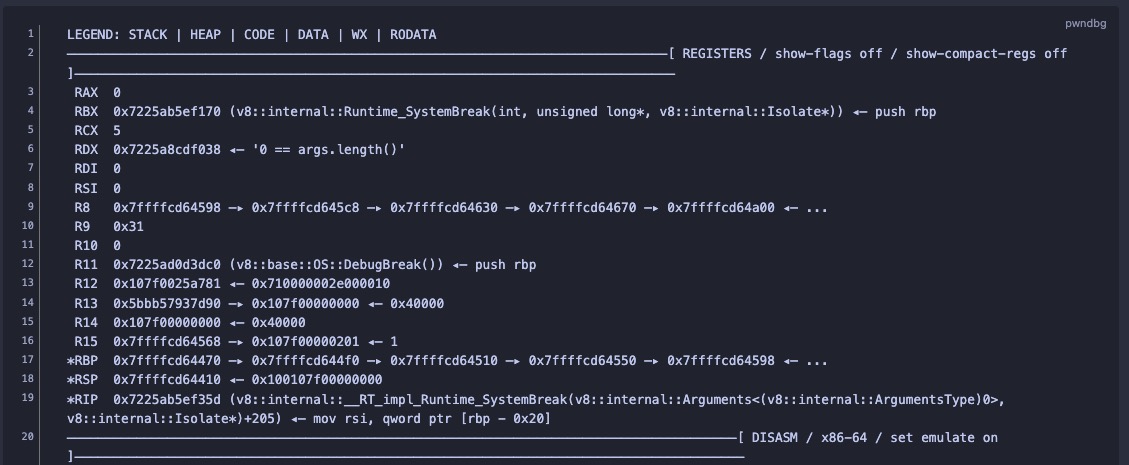
After
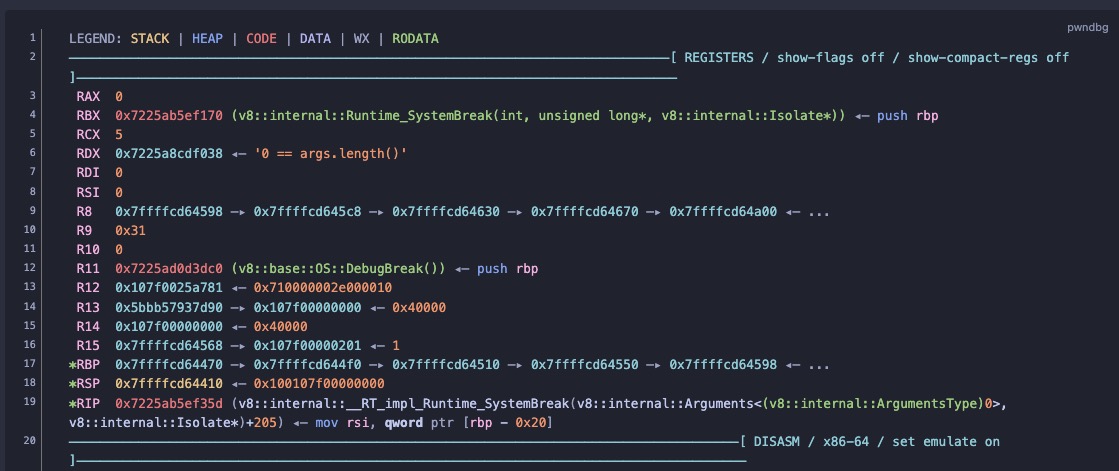
```pwndbg
pwndbg> context
LEGEND: STACK | HEAP | CODE | DATA | WX | RODATA
─────────────[ REGISTERS / show-flags off / show-compact-regs off ]─────────────
*RAX  0x5555555572fb (main) ◂— endbr64
...
```
Languages: gdb, pwndbg, gef, peda (aliases gdb-pwndbg, gdb-gef, gdb-peda).
Each tool grammar also understands plain GDB output (breakpoint hits, x/, bt, p, signals, …).
What it recognises
- prompts and commands, section banners, legends
- registers (changed-register markers, EFLAGS set/clear), disassembly (current-instruction markers, branch taken/not taken,
<sym+off>, Intel / AT&T / aarch64) - telescope / stack / dereference chains (
—▸,◂—,→,-->), strings, annotations vmmap,checksec,got, heap chunks and bins,hexdump,search, pattern/cyclic output, messages ([+],[*],[!])- old and current formats of each tool (e.g. GEF decimal vs hex symbol offsets, pwndbg
RWX→WXlegend)
Copy/paste damage is tolerated: tabs turned into spaces, trailing spaces, CRLF, NBSP, uniformly indented pastes.
Address colours (stack / heap / code / data) are only used when the text itself proves the kind
(e.g. rsp label, heap chunk header, disassembly row, function-pointer type). Plain-text output has
lost the debugger's colours, so everything else is shown as a neutral address rather than a guess.
How it works in Obsidian
- Reading view: the grammars are registered with Obsidian's own Prism, so the native code block (copy button, theme) is kept.
- Live Preview / source mode: CodeMirror 6 mark decorations — blocks stay editable.
- Works inside callouts, blockquotes and list items. Desktop and mobile.
Colours follow your theme (--color-red, --color-blue, …). Override any of them with a CSS snippet:
body { --dbg-address-stack: #e5c07b; --dbg-address-code: #e06c75; }
See styles.css for the full list of --dbg-* variables.
Using the grammars elsewhere (blogs, Docusaurus, …)
The grammars in src/grammars/ are plain Prism grammars with standard aliases (keyword, number,
string, …), so they look reasonable with any Prism theme:
import Prism from "prismjs";
import { LANGUAGES } from "./src/grammars/index.ts";
Object.assign(Prism.languages, LANGUAGES);
The token contract is documented in src/grammars/TOKENS.md.
Install
Until it is listed in Obsidian's community plugins, either:
- BRAT: install the BRAT plugin, then
Add beta plugin →
ott3r07/obsidian-debugger-highlight. BRAT also keeps it updated. - Manually: download
main.js,manifest.jsonandstyles.cssfrom the latest release into<vault>/.obsidian/plugins/debugger-highlight/. - From source:
npm install && npm run install-vault -- "/path/to/your/vault".
Then enable Debugger Output Highlight under Settings → Community plugins.
Development
npm install
npm run dev     # watch build → main.js
npm test        # node --test (grammar, fence-scanner and core tests)
node scripts/hl.ts pwndbg path/to/output.txt          # render in the terminal
node scripts/hl.ts pwndbg --stats path/to/output.txt  # lines no rule matched
The format specifications, adversarial reviews and real captures the grammars were built and
tested against (pwndbg 2026.10, GEF 2021.10–2026, PEDA, GDB 15; about 26 MB) live on the separate
research branch, so a normal checkout stays small:
git clone --single-branch https://github.com/ott3r07/obsidian-debugger-highlight.git   # plugin code only
git fetch origin research && git archive origin/research research | tar -x   # optional: ./research
With ./research present, the tests also verify that every quoted sample line exists in its source.
License
MIT