cmux Agent Orchestrator
 Swayam Gupta139 downloads
Coordinate Claude Code and Codex sessions running in cmux from Obsidian.
- Overview
- Scorecard
- Updates7
cmux Agent Orchestrator is a desktop-only Obsidian community plugin for coordinating Claude Code and Codex CLI sessions that already run inside cmux. It is a human-in-the-loop orchestration layer: Obsidian owns durable work context, cmux remains the terminal and process owner, and each provider retains its own session state.
The repository targets Obsidian 1.10 and newer. It feature-detects both the legacy cmux 0.62.2 snapshot-only command surface and the current sessions --json plus live-events command surface. It has no runtime npm dependencies, telemetry, hosted service, or background external network requirement. Selecting a Help and feedback destination explicitly opens the corresponding GitHub page in the user's browser.
Install
Install cmux Agent Orchestrator from its Obsidian Community Plugins listing, or open it directly in Obsidian.
Screenshots
Work
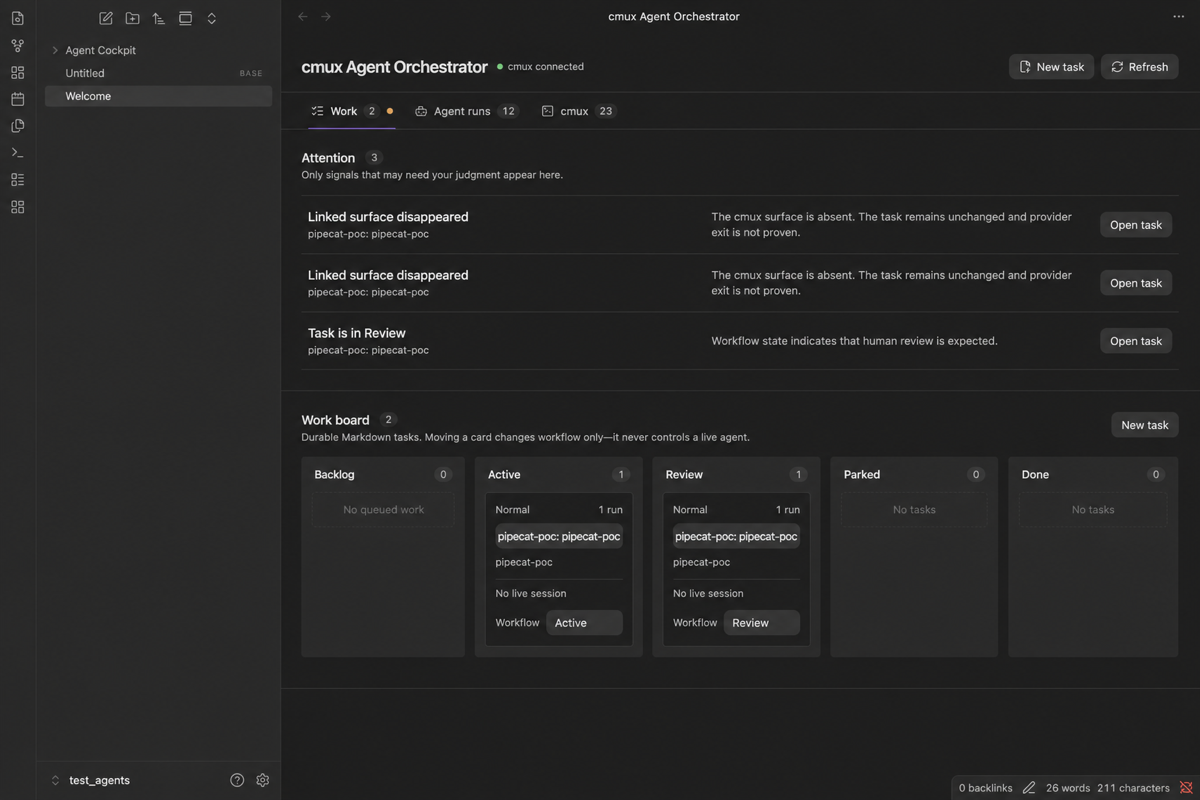
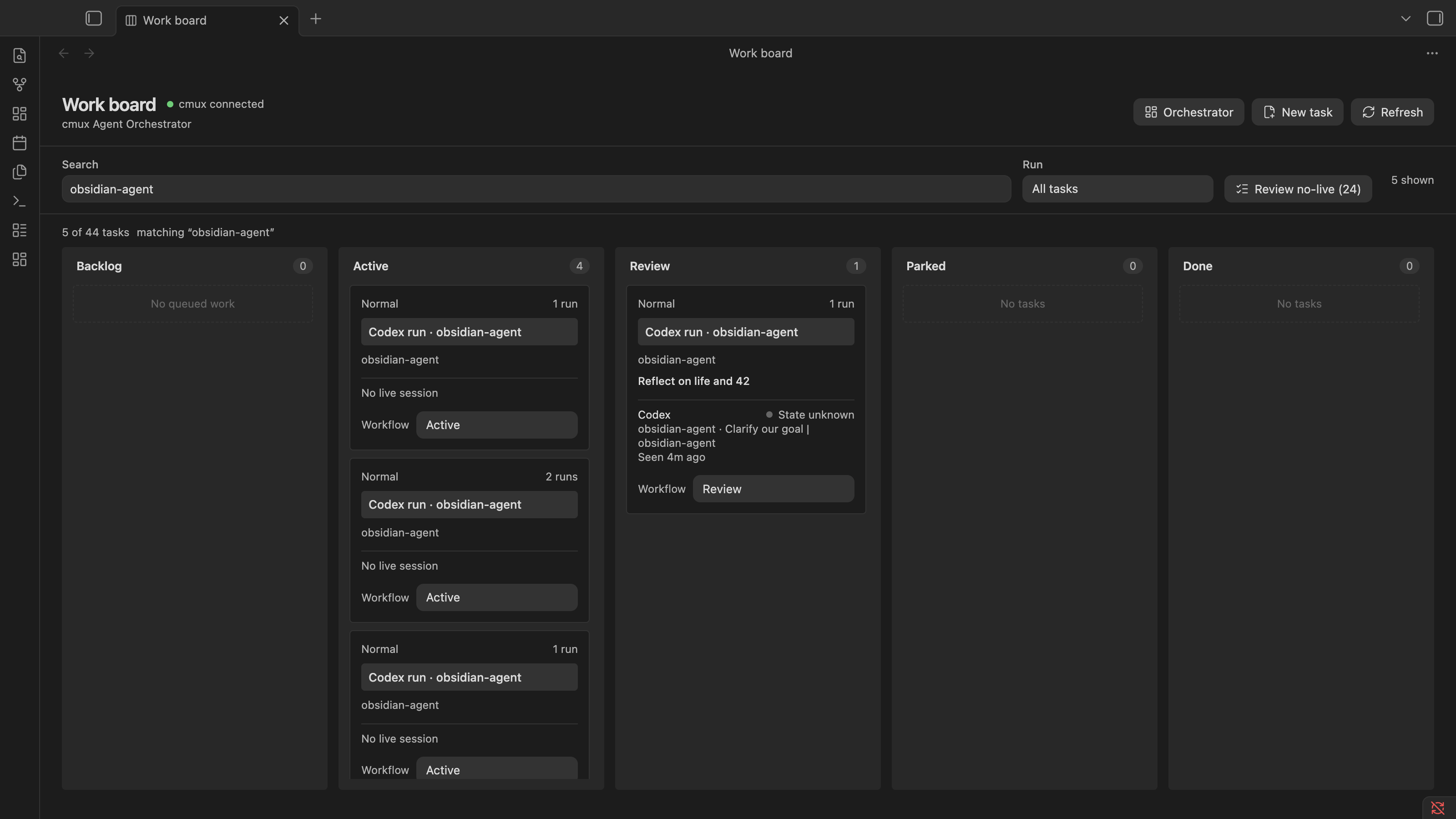
Work board
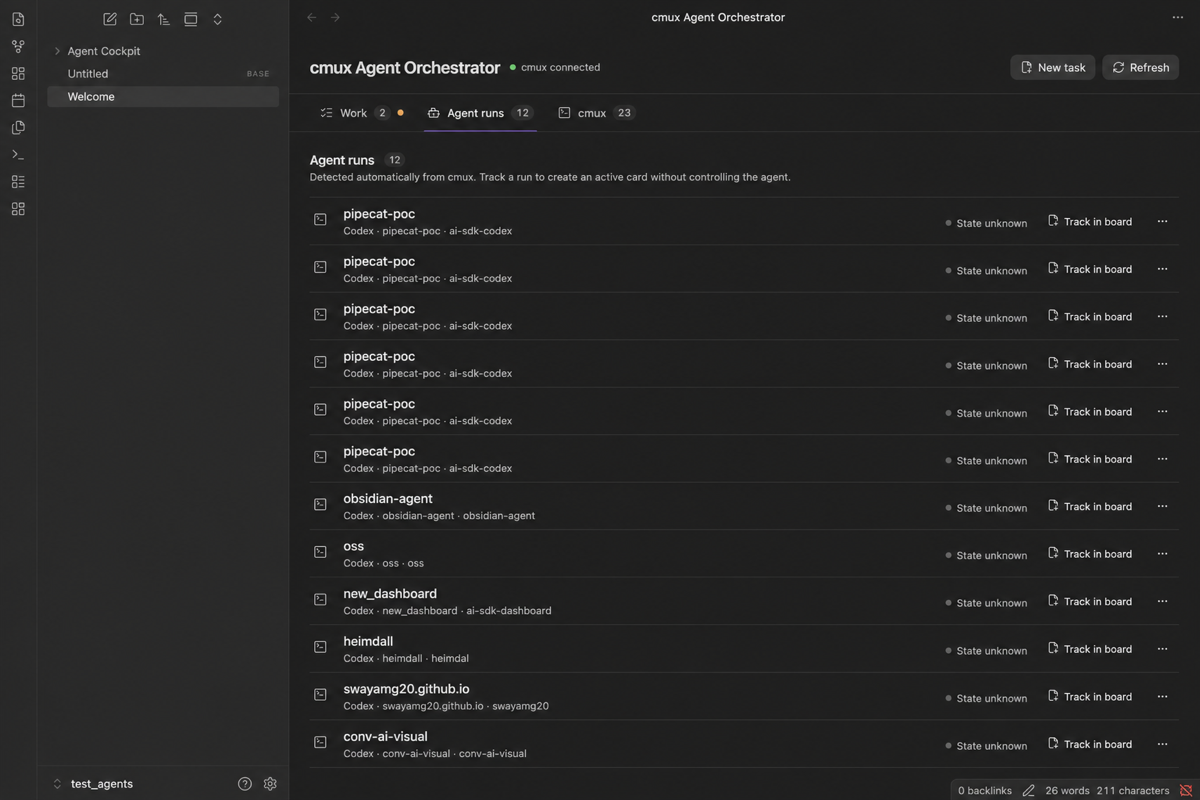
Agent runs
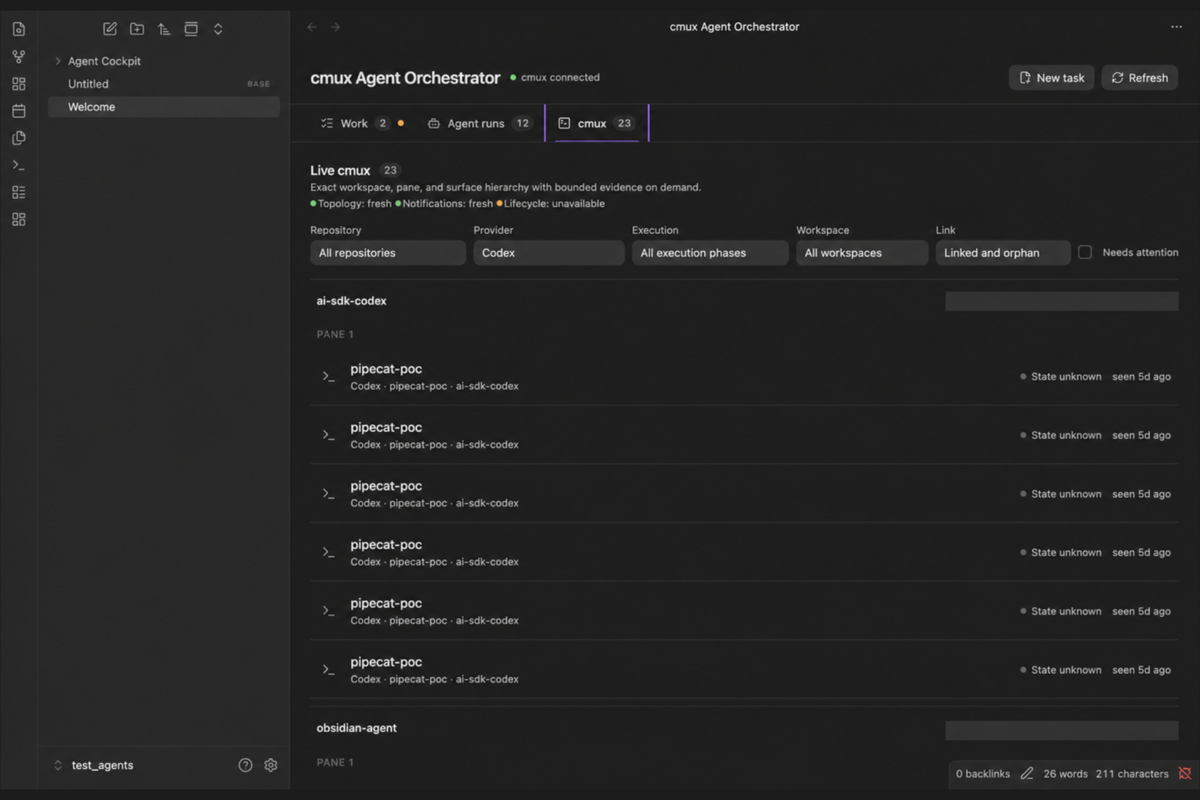
cmux
Repository graph
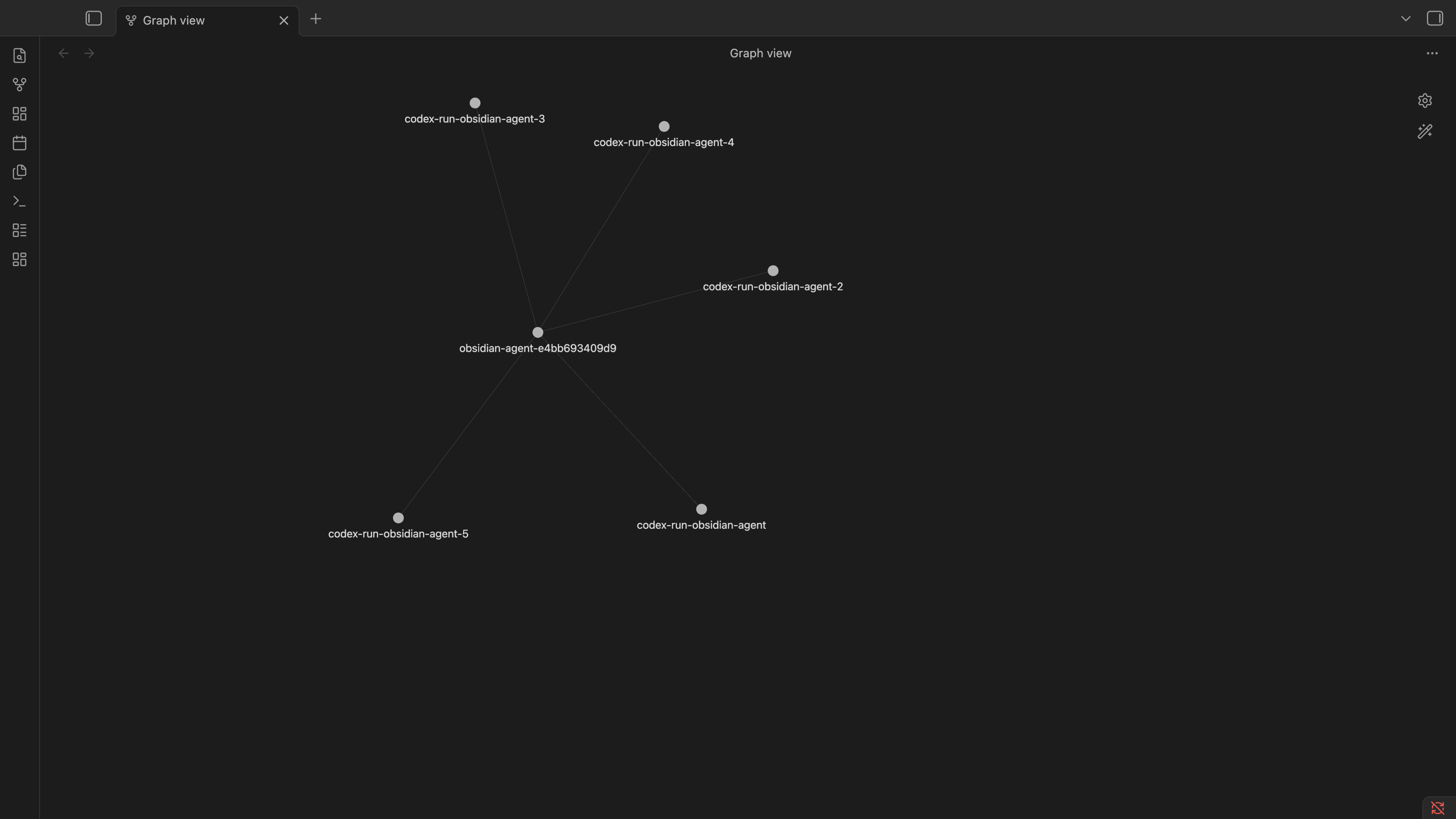
What the current build provides
- A compact native orchestrator view plus a dedicated native Work board, both opened from the command palette and reused instead of duplicated.
- Three focused orchestrator modes: Work for attention and a workflow summary, Agent runs for the complete detected Claude/Codex run inventory, and cmux for the exact terminal tree.
- A full-height board with independently scrolling columns, task/context search, live-run filtering, and all five workflow columns even in a brand-new vault.
- Explicit bulk review for Active tasks without a live run. Parking remains a user-selected workflow action and revalidates fresh cmux topology, task state, and live-session absence before every write.
- Canonical workspace, pane, and surface UUIDs from cmux JSON output.
- Conservative Claude, Codex, shell, and unknown detection with evidence and confidence.
- Automatic provider conversation titles when an exact surface/process/session correlation is provable, with a manual picker fallback.
- Default-on automatic Work tracking for exact, uniquely resolved Claude and Codex sessions, with an opt-out in settings and manual review for ambiguous runs.
- Bounded, memory-only terminal previews loaded only when a session is expanded or explicitly requested.
- Exact Focus in cmux with fresh target resolution and bounded postcondition retries.
- Markdown task creation and workflow states: Backlog, Active, Review, Parked, and Done.
- Automatic repository hub links that connect same-repository task notes in Obsidian's graph without creating pairwise task links.
- Off, Suggest, and Safe auto workflow-automation modes, with conservative suggestions enabled by default.
- Guarded Apply and Dismiss actions for workflow proposals, plus a visible marker for safely auto-applied changes.
- Machine-scoped task, run-history, surface, provider-conversation, and proposal-dismissal records in schema-v5 plugin data.
- Orphan sessions and stale bindings.
- Configurable stale-working attention for structured lifecycle evidence, without changing task workflow.
- Review attention and workflow suggestions when credible evidence says an agent turn finished; only fresh high-confidence structured evidence can auto-apply Active to Review or resumed Review work back to Active in Safe auto mode.
- Event-driven refreshes when cmux advertises
events.streamor exposes the currenteventscommand, enabled only after a valid acknowledgement and guarded by the advertised heartbeat interval, with startup plus manual Refresh on older or stalled streams. - Clear cmux disconnected, blocked, malformed-output, timeout, and output-limit states.
- One-time GUI onboarding for normal Finder, Dock, and Spotlight launches when cmux rejects external clients.
cmux Agent Orchestrator does not host a PTY, autonomously resume providers, send terminal input, read complete transcripts, or decide that a task is complete.
Help and feedback
Open cmux Agent Orchestrator: Open help and feedback from the command palette or use the plugin settings. The support center routes bugs and compatibility problems to GitHub issue forms, ideas and questions to GitHub Discussions, and vulnerabilities to private security reporting.
Its optional diagnostics preview is generated locally and shown before copying. Nothing is transmitted automatically. See Support and feedback for the available channels and the complete privacy boundary.
Ownership boundary
| System | Owns |
|---|---|
| cmux | Workspaces, panes, terminal surfaces, process lifetime, and terminal interaction |
| Claude Code and Codex | Provider conversation and session persistence |
| cmux Agent Orchestrator | Runtime observations, task associations, human-directed coordination, and narrow explicit actions |
| Markdown notes | Human-owned goals, criteria, context, decisions, run summaries, and outcomes |
Agent evidence and workflow state are deliberately independent. Runtime evidence feeds a pure proposal policy; it does not directly own Markdown workflow. Quiet, missing, errored, idle, stale, unknown, or ended evidence never authorizes an automatic move, and no evidence can move a task to Done. The separate no-live review flow can park a user-selected Active task only after a fresh connected snapshot proves that no linked surface is present.
Workflow automation is configurable as Off, Suggest, or Safe auto, with Suggest as the default. Backlog to Active for an exact attached run remains suggestion-only. Active to Review and Review to Active are also normally suggestions; Safe auto may apply either direction only when the latest relevant provider state is fresh, high-confidence, structured evidence. If another exact run attached to the same task still has fresh Working evidence, an Active-to-Review change remains manual. Parked and Done are always protected. Every write revalidates the current task, exact session binding, evidence, source health, settings, and proposal before using a compare-and-set workflow update.
Exact, uniquely resolved Claude and Codex sessions become one neutral Active Markdown task and Work card by default. Identity is deduplicated by provider plus canonical session ID, so a refresh or reload cannot create a second task for the same run. If that exact provider conversation later appears on one new surface after its complete previous cmux target has disappeared, the existing binding moves to the new target without creating another task or run. If a different exact provider session reuses the same cmux surface, it does not inherit the previous task; automatic tracking creates a separate task and run while retaining the earlier task and history. The plugin refuses a move while the old target still exists or when either the saved binding or new identity is ambiguous. Conversation titles remain memory-only and appear on the live card; they are never copied into an automatically created note. Ambiguous, heuristic-only, duplicate, shell, and unknown sessions remain in Agent runs for manual review. Turning automatic tracking off stops new automatic tasks, and manually detaching a run prevents later refreshes from silently recreating it. If an explicit attachment races with background tracking, the user's attachment wins. Neither automatic nor manual tracking messages, resumes, interrupts, or otherwise controls the provider.
If a linked task note is moved outside the configured task folder or deleted, the machine-local binding and run history are preserved and Work shows Linked task note missing. The plugin never recreates or deletes that note automatically; the user can explicitly attach the live session to an existing task or create a replacement.
Task-note and managed repository-hub changes, moves, and deletions are observed only for their configured trees and containing folders. Unrelated vault paths are ignored, and these events do not trigger cmux or provider reads.
Track in board remains available for manual cases: it opens a prefilled form, writes an Active durable task note, and attaches the exact cmux surface. The row's overflow menu provides Focus in cmux, Attach to existing task, and Choose provider conversation. A saved exact manual association takes precedence when it remains consistent with current evidence; the picker refuses a choice that contradicts a fresh exact cmux or provider-process identity. Moving any board card changes workflow only and never controls the agent. Workflow proposals remain separate, explain their evidence, and can be applied or dismissed from Attention or the dedicated board.
Build
Requirements:
- macOS
- Node.js 22.13 or newer
- npm
- Obsidian desktop 1.10 or newer
- cmux 0.62.2 or a current feature-compatible build; fixtures cover legacy snapshot-only output and current structured session/event output
npm install
npm run check
npm run build creates main.js in this repository. For a manual Obsidian installation, copy main.js, manifest.json, and styles.css into a vault-local .obsidian/plugins/cmux-agent-orchestrator/ directory. The build command does not install the plugin into a vault.
Maintainers should follow the complete release procedure, including the normal macOS launch and vault-local safety checks, before creating a tag.
Project documentation
- Release roadmap
- Product principles
- Design system
- Detailed design brief
- Security model
- Support and feedback
- Release procedure
Storage
Markdown task notes default to Agent Cockpit/Tasks/ and contain durable fields only. The pre-release folder and frontmatter marker remain stable so existing task notes continue to load after the public rename:
---
agent-cockpit: task
schema-version: 1
task-id: stable-uuid
title: Human-readable task title
workflow-status: active
priority: normal
repository:
repository-note: "[[Agent Cockpit/Repositories/example-a1b2c3d4e5f6|example]]"
branch:
worktree:
run-count: 0
created-at:
updated-at:
---
For every non-empty repository path, the plugin creates or reuses one managed note in a Repositories/ folder beside the configured task folder. Every matching task receives a repository-note wikilink to that hub, so Obsidian's graph and backlinks connect all Claude and Codex work for the repository without an all-to-all link mesh. A stable hash of the normalized absolute path keeps repositories with the same basename distinct. Existing managed tasks are backfilled through Obsidian's frontmatter API without replacing their user-authored body, and repeated reconciliation is idempotent. Clearing a task's repository removes only this managed link. The original repository field remains the runtime matching value.
cmux UUIDs and provider observations do not go into task frontmatter. Automatically created notes use a deterministic task UUID derived from the provider kind and canonical provider session ID without embedding or displaying that original ID. Plugin data.json schema version 5 stores settings, surface bindings, durable run relationships, idempotent task run-count targets, exact cmux-surface-to-provider-session-ID mappings, and a bounded set of dismissed workflow-proposal IDs under a one-way hashed machine namespace. Existing schema-v1 through schema-v4 data migrate in memory and are written as v5 on the next plugin-data mutation. Conversation titles, provider previews, terminal previews, notification bodies, event payloads, evidence ledgers, output fingerprints, source-health snapshots, and recent auto-apply markers remain memory-only.
A task may own several runs and several currently attached surfaces. Each binding has its own canonical binding ID and run ID. Reattaching the same surface/provider run reuses that run; a different provider is recorded as a handoff; uncertain same-provider relationships remain explicitly unknown rather than being invented as a resume or fork. If high-confidence exact evidence proves that cmux reused a surface for another provider conversation, the previous task is never inherited by the new run. Attention identifies the change, and a manual attachment may replace only the live surface binding while preserving the previous task and run history.
cmux transport
The CmuxTransport interface separates authoritative CLI snapshots from optional event signals. CliCmuxTransport invokes only an executable file named cmux, with spawn and exact argument arrays. It never uses exec, sh -c, command interpolation, or text from Markdown.
Read-only allowlist:
cmux --version
cmux --json capabilities
cmux --json --id-format uuids tree --all
cmux --json --id-format uuids list-workspaces
cmux --json --id-format uuids list-notifications
cmux --json --id-format uuids list-agents
cmux sessions --json
cmux --json --id-format uuids identify --no-caller
cmux events --help
cmux events --reconnect
cmux --id-format uuids read-screen --workspace <uuid> --surface <uuid> --lines <1..500>
When events.stream is advertised or the current events command is feature-detected, the plugin subscribes without category filters because cmux sequence numbers are global. It keeps only the current boot/sequence cursor in memory, reduces relevant window/workspace/pane/surface, notification, agent, and feed envelopes to content-free refresh signals, and immediately discards every raw payload. A boot change, replay gap, or sequence gap triggers a complete snapshot resync. If streaming is unsupported or stops, the plugin falls back to explicit Refresh without starting a polling loop.
Explicit user-initiated selection:
cmux focus-panel --panel <surface-uuid> --workspace <workspace-uuid>
Focus refreshes the tree before the command, requires the exact workspace/pane/surface tuple to resolve once, invokes the exact surface, and verifies cmux's authoritative focused workspace/pane/surface tuple afterward. Verification is retried only inside a bounded 500 ms window so normal cmux selection propagation is not reported as an immediate false negative. It sends no terminal text and changes no workflow state.
Provider conversation titles
Repository equality is not an identity signal, so the plugin never assigns a conversation title from CWD alone. On startup and every relevant topology or lifecycle refresh, it feature-detects structured cmux lifecycle metadata: alternate/legacy builds may expose list-agents, while current builds expose sessions --json. Either accepted shape can supply a surface/session association and lifecycle state directly. If neither command is available, macOS uses a bounded read-only correlation fallback:
- Read fixed
psfields and consider only foreground processes whose executable basename is exactlyclaudeorcodex. - Pipe that PID's environment from
/bin/psdirectly into fixed/usr/bin/grep; JavaScript receives only a canonicalCMUX_SURFACE_ID, never the full environment. - For Claude, require the local registry entry to match PID, UTC process start time, exact CWD, and canonical session ID.
- For Codex, require a non-empty bounded set of open locks (at most eight) inside the active Codex data directory (
$CODEX_HOME/thread-writer-locks/, defaulting to~/.codex/thread-writer-locks/), then verify through metadata-only Codex app-server access that every locked thread belongs to one rooted CLI thread tree for the same CWD. - Re-read the process inventory and discard matches if PID/start/executable identity changed during resolution.
Any missing, duplicate, stale, or conflicting evidence fails closed and leaves the cmux title visible. The row's Choose provider conversation action remains a manual fallback when exact live evidence is absent or consistent with the selected conversation; it cannot contradict fresh exact identity evidence.
After an exact match, the provider title becomes the primary row label. The inferred surface-to-provider match is recomputed and kept only in memory. When automatic Work tracking is enabled, the resulting task binding and provider session ID are persisted so that the durable run survives a reload; the title itself is still memory-only. Explicit manual matches survive reloads by reloading title metadata from the provider-owned source. If the exact title cannot be loaded, the UI explicitly labels the cmux surface title as a fallback. One provider conversation cannot be assigned to two cmux surfaces. A current exact manual match wins over automatic evidence, while a mapping whose complete canonical cmux tuple is absent cannot shadow fresh exact evidence for a live surface.
The provider metadata boundary is deliberately narrow:
- Codex: starts the locally installed
codex app-server --listen stdio://withspawn,shell: false, a five-second deadline, and byte ceilings. It sends only the localinitialize, repository-filteredthread/list(maximum 50), and exact-ID metadata-onlythread/read(includeTurns: false) protocol messages. The owned child is terminated after each bounded exchange. - Claude Code: reads at most 200 small files from the active Claude configuration directory (
$CLAUDE_CONFIG_DIR/sessions/, defaulting to~/.claude/sessions/), each capped at 64 KiB, to find exact session IDs for the requested CWD. For a selected ID it reads only bounded 128 KiB edge windows from the exact provider-owned JSONL and parses onlycustom-titleandai-titlerecords. - The in-memory provider metadata cache is capped at 1,000 entries. Raw responses, title records, previews, and transcript bytes are never written to Markdown or
data.json.
These adapters sit behind a ProviderSessionSource interface because both local formats are version-sensitive. No global provider hook is installed or modified.
Refresh and performance
- Startup probes cmux once, loads topology and notifications in parallel, then resolves provider identity in bounded background work. Explicit Refresh repeats those read-only observations.
- On builds that advertise
events.streamor expose the currenteventscommand, cmux events schedule authoritative snapshot reads. A 100 ms coalescing window combines bursts; topology plus notification changes or any detected stream gap trigger one full refresh, while isolated notification or lifecycle changes use narrower reads. - After identity resolution, default-on automatic tracking serially creates at most one neutral task and binding for each newly observed exact provider session. It can also reconnect an existing binding after the old full cmux target disappears and the same provider session is proven uniquely on a new target. Relevant event-driven refreshes can schedule the same guarded reconciliation on cmux builds with acknowledged event support.
- Global Refresh never reads terminal previews. Concurrent refresh requests coalesce, stale generations are ignored, and a notification failure does not discard a healthy topology snapshot.
- There is no repeating topology, notification, lifecycle, provider, or preview timer. Older cmux builds refresh at startup or after an explicit Refresh only.
- Stale-working attention is evaluated after an authoritative refresh or when settings are saved; it does not add a timer.
- Automatic identity work and provider metadata reads run only after a topology/lifecycle refresh or explicit title request; there is no repeating process scan. Resolution and mapped metadata groups use concurrency two.
- Provider title metadata is also loaded when the user opens the conversation picker. Mapped reads are grouped by provider and CWD with at most two groups active.
- Workspace CWD metadata is cached for 30 seconds across closely spaced refreshes.
- Display previews load only when a row is expanded or the user presses Load/Refresh preview; they allow at most two concurrent reads.
- Displayed previews remain configurable up to 80 lines with a 16 KiB default ceiling and live in a 20-entry, 1 MiB in-memory LRU.
- Cached and in-flight display previews are discarded if the cmux connection, surface identity, or associated provider conversation changes.
- A newly discovered terminal that still lacks provider evidence may receive one provider-only background read, bounded to 500 lines and 64 KiB with two-process concurrency. That deeper text is discarded immediately after classification, is never displayed, and is not repeated by later global refreshes.
- Every read-screen process retains a 96 KiB raw output ceiling.
- Unloading the plugin terminates only cmux and provider children launched by the plugin, including its optional event-stream child.
Agent evidence
Each session projects separate dimensions: surface presence, agent presence, execution phase, recent activity, evidence coverage, source, confidence, and explanation. This avoids compressing unrelated facts into a misleading single runtime badge.
- In cmux 0.62.2, topology proves only that a canonical surface exists. Exact local process evidence can prove a provider/session attachment, and a PID-bound Claude registry status can add lifecycle evidence; a Codex writer lock alone does not prove a live turn.
- Structured lifecycle rows from current
sessions --jsonor alternatelist-agentsbuilds become execution evidence only after bounded decoding and conflict checks. Currentrunning,idle, active-turn, and last-turn fields are conservatively projected toworking,idle,turn-finished, orunknown; a finished provider turn never means durable work is Done. - Unread cmux notifications can support medium-confidence
Needs input,Error reported, orReview output. - Structured or notification-backed
Turn finishedevidence creates review attention and may create an Active-to-Review proposal. Fresh structured Working evidence may create a Review-to-Active proposal. Notification or partial evidence remains suggestion-only; Safe auto requires fresh, high-confidence structured evidence in either direction. - A changed on-demand preview records low-confidence recent activity such as reading, editing, or command output, but leaves execution phase
State unknown. - Generic words such as
approvalorconfirmin terminal prose never assertNeeds input. - A missing linked surface creates an attention item but does not prove provider completion.
- A session is marked potentially stale only when structured lifecycle evidence still reports Working and its newest proven activity exceeds the configured threshold. Idle, unknown, waiting, and failed sessions are never relabeled as stale and never authorize a workflow change.
- Provider session IDs remain absent unless modern cmux metadata, exact local process correlation, a manual match, or an existing exact task binding proves the association.
- Source health is independent: topology, notifications, and provider lifecycle each report fresh, stale, or unavailable. Native lifecycle is honestly unavailable when neither structured cmux lifecycle command nor exact provider lifecycle evidence can supply it, even if conversation identity is otherwise resolved.
The in-memory evidence ledger is bounded to 32 entries per session and 2,048 total. The deterministic reducer ranks structured lifecycle evidence above notifications, preview heuristics, and surface presence. The reducer never changes Markdown; a separate proposal engine and guarded reconciler own the optional workflow action.
Tests
npm run lint
npm test
npm run build
Sanitized fixtures under tests/fixtures/cmux-0.62.2/, tests/fixtures/cmux-modern/, and tests/fixtures/providers/ preserve the installed and feature-detected metadata shapes without copying live terminal output, prompts, notification content, paths, or UUIDs.
A read-only local smoke test is opt-in:
npm run test:live:read-only
The aggregate command above runs all four guarded checks. Individual checks can also be run while diagnosing one boundary:
CMUX_AGENT_ORCHESTRATOR_LIVE_CMUX=1 npm test -- tests/smoke/cmux.live.test.ts
CMUX_AGENT_ORCHESTRATOR_LIVE_PROVIDERS=1 npm test -- tests/smoke/provider-metadata.live.test.ts
CMUX_AGENT_ORCHESTRATOR_LIVE_IDENTITY=1 npm test -- tests/smoke/automatic-identity.live.test.ts
CMUX_AGENT_ORCHESTRATOR_LIVE_TRACKING=1 npm test -- tests/smoke/automatic-tracking.live.test.ts
The cmux smoke probes capabilities and current command fallbacks, reads topology, notifications, and structured lifecycle rows when available, validates canonical UUIDs, and reads three lines from one selected terminal. The provider smoke performs local read-only title discovery for the repository running the test. The identity smoke verifies canonical, one-to-one process/session/surface mappings against the current machine. The tracking smoke runs that identity pipeline through the controller while keeping all generated task Markdown and plugin data in memory; it supplies blank previews and fails if the controller attempts to focus cmux. None of these tests sends input, resumes a conversation, changes provider data, or writes to a real vault.
Normal-launch connection setup
cmux defaults to access_mode: cmuxOnly, which authorizes only processes descended from cmux terminals. When a normally launched Obsidian process is rejected, cmux Agent Orchestrator presents an in-product setup panel instead of requiring Obsidian to be started from a terminal.
The recommended setup is cmux Settings → Automation → Socket Control Mode → Password mode, with the Socket Password set inside cmux. The cmux CLI consumes its own saved password; cmux Agent Orchestrator never reads, receives, passes, logs, or persists it. Automation mode is supported as a broader same-macOS-user alternative. Full open access is never recommended.
The setup panel can retest the connection and then load the complete orchestrator. cmux Agent Orchestrator does not change cmux settings, restart the listener or app, install hooks, or introduce a relay daemon. If the installed cmux build retains its previous socket policy, the UI explains that cmux may need a user-controlled restart after active sessions are safe.
System access and privacy
The plugin accesses the local cmux executable and running cmux instance to discover topology, notifications, optional structured agent metadata, bounded terminal previews, and to focus an exact surface after an explicit click. For automatic conversation labels on macOS, it reads bounded process fields, extracts only CMUX_SURFACE_ID through a fixed pipe, inspects open files only inside the configured Codex writer-lock directory, starts a bounded local Codex app-server child, and reads bounded Claude metadata under the configured Claude data directory. Absolute, bounded $CODEX_HOME and $CLAUDE_CONFIG_DIR values inherited by Obsidian are honored; invalid values fall back to the provider defaults. It makes no plugin-originated network requests, collects no telemetry, and transmits no vault, terminal, process, or provider metadata. Inferred mappings, provider titles, and bounded source responses remain in memory. Exact provider session IDs are persisted only in a user-selected mapping or in the machine-scoped binding/run record created by automatic Work tracking.
Security limits
- Desktop-only manifest.
- No arbitrary command setting or general terminal executor.
- Canonical UUID validation for every cmux target.
- User-controlled Markdown is display data only and is never executed.
- Untrusted titles, paths, notifications, and previews are inserted as text, not HTML.
- No socket passwords, tokens, API keys, or complete transcripts are read from cmux settings or persisted.
- Provider metadata is treated as untrusted text, bounded before use, and never executed.
- No provider queue, resume, fork, interrupt, close, kill, delete, or hook action exists in the current release.
- No
pkill, broad process matching, or provider session-file deletion.
Repository layout
src/
  app/          orchestration controller
  cmux/         transport, subprocess runner, commands, and decoders
  agents/       conservative provider adapters
  providers/    bounded title sources, exact automatic identity resolvers, and in-memory cache
  evidence/     bounded evidence ledger, event types, and deterministic reducer
  runtime/      preview cache/scheduler, session projection, and attention
  workflow/     pure proposal policy, proposal engine, and guarded reconciler
  state/        typed observable store
  tasks/        Markdown schema, template, and repository
  tracking/     exact automatic-task candidate selection
  bindings/     machine-scoped task/session mappings
  actions/      allowlist, validators, and exact focus action
  security/     shared canonical-identity validation
  views/        orchestrator modes, compact Work summary, dedicated board, and cmux explorer
  components/   session/task rendering and native modals
  settings/     validated plugin settings
tests/
  fixtures/     sanitized cmux 0.62.2 and provider metadata shapes
Still requiring manual verification
Repository-local tests cannot prove that Obsidian renders both themes, preserves hover/focus under every third-party theme, persists through an actual Obsidian reload, or transfers macOS focus to the intended cmux window. Those checks require the vault-local build and a controlled manual click. Password mode already supports normal Finder, Dock, and Spotlight launches without passing the socket password through cmux Agent Orchestrator. The final focus test should target a user-approved development surface and must not send input.
Pre-release migration
The public plugin ID is cmux-agent-orchestrator. On first load, it may copy valid bounded data from the former vault-local agent-cockpit/data.json into its own plugin folder when no current data exists. The importer never deletes or edits the legacy file, and current plugin data always wins.