Search...Search plugins and themes...
⌘K
Sign in
  • Get started
  • Download
  • Pricing
  • Enterprise
  • Account
  • Obsidian
  • Overview
  • Sync
  • Publish
  • Canvas
  • Mobile
  • Web Clipper
  • CLI
  • Learn
  • Help
  • Developers
  • Changelog
  • About
  • Roadmap
  • Blog
  • Resources
  • System status
  • License overview
  • Terms of service
  • Privacy policy
  • Security
  • Community
  • Plugins
  • Themes
  • Discord
  • Forum / 中文论坛
  • Merch store
  • Brand guidelines
Follow us
DiscordTwitterBlueskyThreadsMastodonYouTubeGitHub
© 2026 Obsidian

Clear Properties

yujiayujia4 downloads

Delete, remove or strip all properties (YAML frontmatter / front matter metadata) from a note in one click with a button beside the properties block. Undoable. Quick cleanup of old notes, mobile too.

Add to Obsidian
Clear Properties screenshot
  • Overview
  • Scorecard
  • Updates2

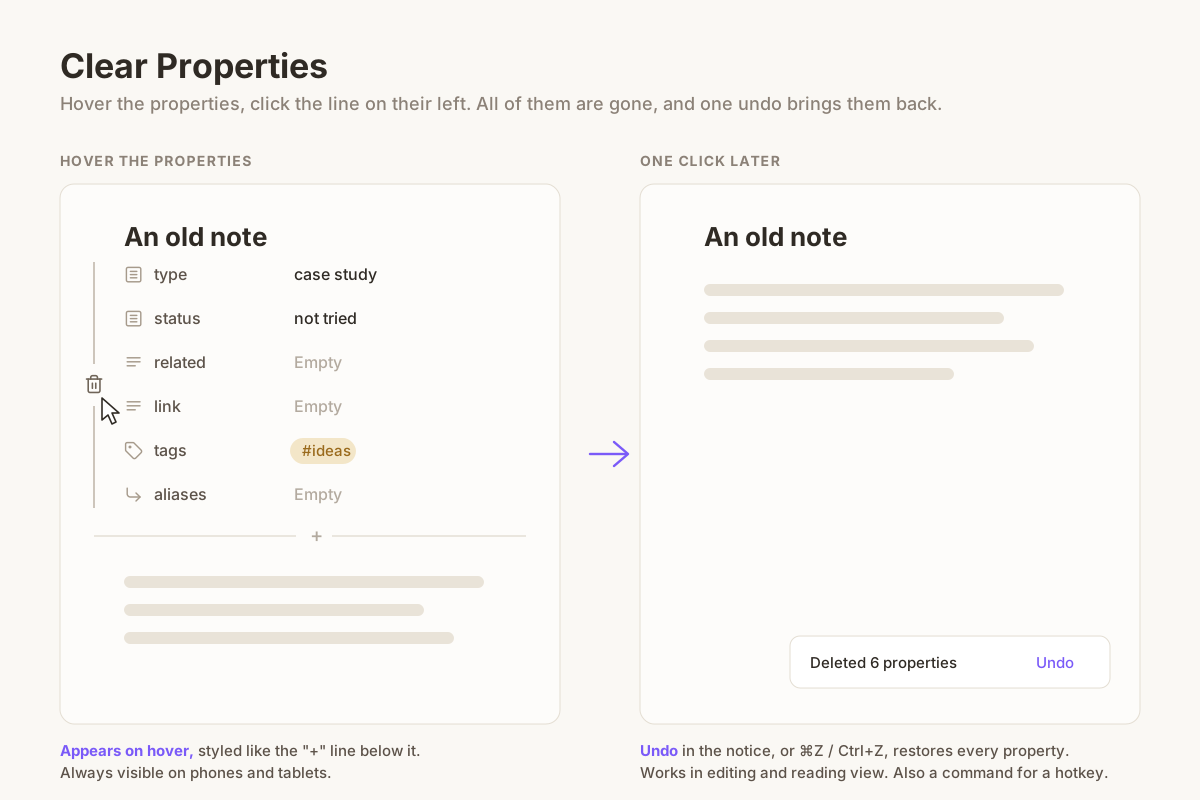
Hover the properties, click the line on their left, and every property is deleted

Cleaning up old notes often means getting rid of properties (YAML frontmatter) you no longer use. Obsidian only lets you delete them one at a time, each with its own menu.

Clear Properties adds a thin line to the left of a note's properties. Hover the properties to see it, click the trash icon on it, and every property of the note is deleted at once, together with the --- lines around them.

Features

  • One click, all properties. The whole frontmatter block goes, along with the blank lines right after it, so the note starts with its first line of text.
  • Out of the way. The line only shows up when you hover the properties, and it is drawn like the hairline of the "+ Add property" button, so it fits most themes.
  • Undoable. A notice says how many properties were deleted and has an Undo link. In editing view, ⌘Z / Ctrl+Z works too.
  • Editing and reading view. In reading view the note is saved first, then the properties are removed from the file.
  • Works on phones and tablets. There is no hover on touch screens, so there the line is always visible. Tap it to delete.
  • A command, Clear Properties: Delete all properties of current note, for a hotkey or the mobile toolbar.
  • English and Chinese interface, following Obsidian's language.

Use cases

  • Strip leftover YAML from notes imported from other apps or old templates.
  • Remove frontmatter before sharing or publishing a note.
  • Clean up old notes one by one while you review them, on desktop or on your phone.

Install

Search for Clear Properties in Settings → Community plugins, or copy main.js, manifest.json and styles.css from the latest release into <vault>/.obsidian/plugins/clear-properties/.

There are no settings.

License

MIT

HealthExcellent
ReviewPassed
About
Cleaning up old notes often means getting rid of properties you no longer use. Obsidian only lets you delete them one at a time, each through its own menu. Clear Properties adds a thin line to the left of a note's properties. Hover the properties to see it, click the trash icon on it, and every property is deleted at once, together with the --- lines and the blank lines after them. The line is drawn like the hairline of the "+ Add property" button, so it stays out of the way and fits most themes. On phones and tablets there is no hover, so there it is always visible: tap it. Nothing is lost by accident. A notice tells you how many properties were deleted and has an Undo link; in editing view Ctrl+Z / Cmd+Z works too. It works in editing and reading view, and there is a command for a hotkey.
PropertiesEditing
Details
Current version
0.1.1
Last updated
6 hours ago
Created
6 hours ago
Updates
2 releases
Downloads
4
Compatible with
Obsidian 1.8.7+
Platforms
Desktop, Mobile
License
MIT
Report bugRequest featureReport plugin
Author
yujiayujiarainajia716
GitHubrainajia716
  1. Community
  2. Plugins
  3. Properties
  4. Clear Properties

Related plugins

Meta Bind

Make your notes interactive with inline input fields, metadata displays, and buttons.

MetaEdit

Manage your metadata.

Advanced Canvas

Supercharge your canvas experience. Create presentations, flowcharts and more.

LanguageTool Integration

Advanced grammar and spell checking, powered by LanguageTool.

Thino

Quickly capture memos and display them in the sidebar with a heatmap. (Closed source)

Advanced Tables

Improved table navigation, formatting, and manipulation.

Editing Toolbar

The Editing Toolbar is modified from cMenu, which provides more powerful customization settings and has many built-in editing commands to be a MS Word-like toolbar editing experience.

Simplified Chinese Word Splitting

Adds Simplified Chinese word splitting support for the editor and Vim mode.

Hover Editor

Transform the Page Preview hover popover into a fully working editor instance.

Gemini Scribe

Allows you to interact with Gemini and use your notes as context.