Citation Graph
 Rolando Reiner38 downloads
Build literature citation graphs with canvases, including import from Zotero collections and reference expansion via Semantic Scholar.
- Overview
- Scorecard
- Updates13
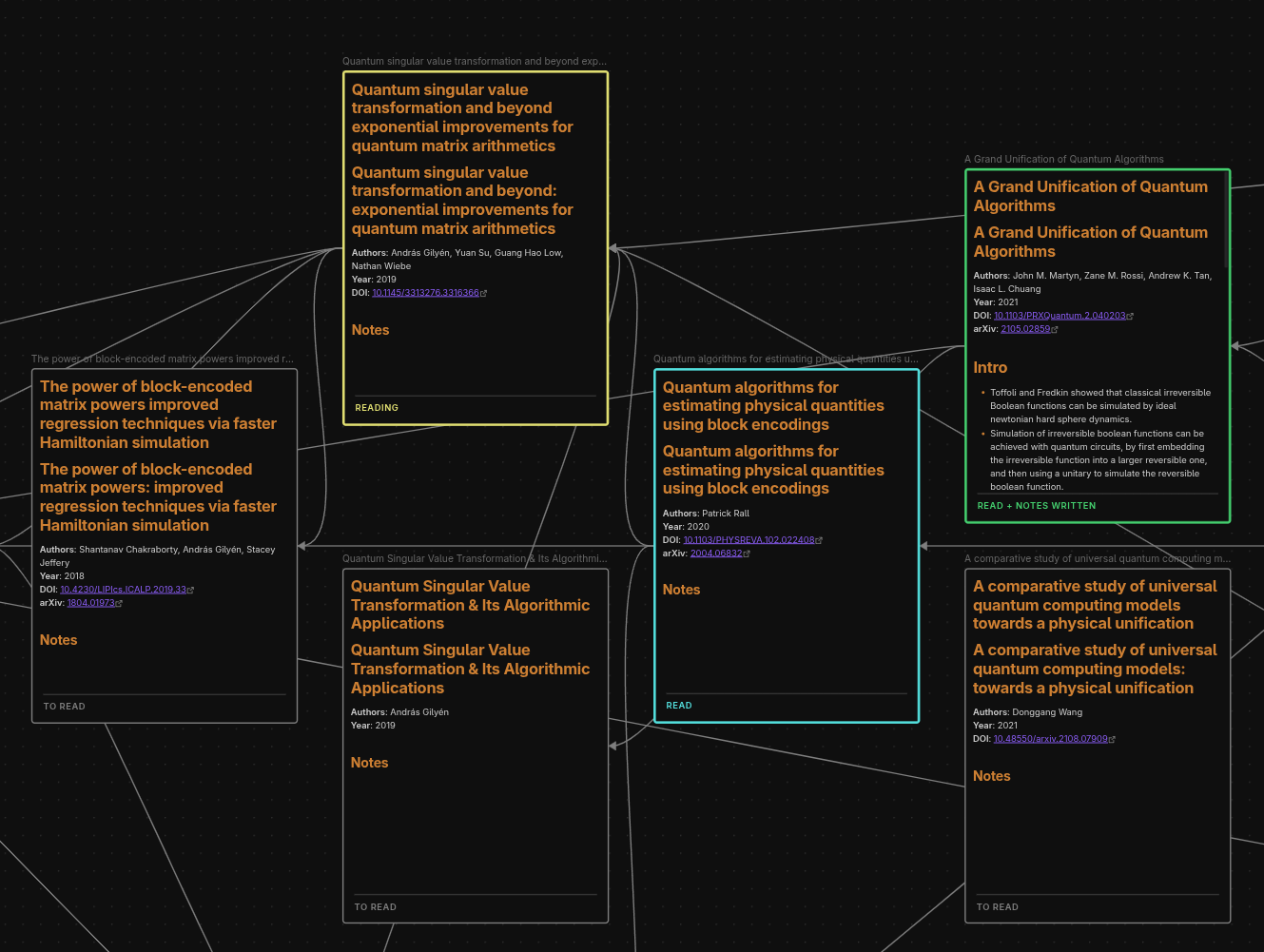
Turn your literature into a citation graph on an Obsidian canvas: papers as nodes, citations as arrows, laid out on a timeline by year.
Features
- Build a canvas from a Zotero collection or tag, or add papers one at a time by DOI or arXiv ID. Each paper gets a literature note.
- Grow it with any paper's references and citing works, filtered by year and keyword, and sorted by citations, year, title or the order the paper cites them.
- Track your reading: every paper shows its status (to read, reading, read, abandoned) as a coloured border.
- Download PDFs from arXiv into a vault folder.
- Summarize papers with an LLM, written straight into the note.
- Get recommendations: an LLM suggests papers that belong on the canvas, and each one is checked against a citation database before you see it.
Desktop only. Requires Obsidian 1.13.0 or later.
Quick start
- Install Citation Graph from Settings, Community plugins, and enable it.
- Start Zotero and enable its local API: Edit, Settings, Advanced, tick Allow other applications on this computer to communicate with Zotero. (Better BibTeX is recommended for citekeys.)
- Run Citation Graph: Canvas: create from collection from the command palette and pick a collection.
- Select a paper and run Papers: expand paper to add its references and citing works.
- Put Reading: cycle reading status on a hotkey to mark papers as you read them.
Every per-paper command is also on the right-click menu of a canvas node. No Zotero? Start from any canvas with Papers: add by DOI or arXiv.
Optional setup
| To use | You need |
|---|---|
| Faster citation lookups | A free Semantic Scholar API key. Without one, a large collection takes minutes |
| Summaries and recommendations | A provider under Settings, Summaries (see below) |
| PDF downloads | A vault folder under Default download folder, or pick one when downloading |
| Syncing back to Zotero | A Zotero API key and user ID from zotero.org/settings/keys |
LLM providers.
- Claude CLI (default) uses your Claude subscription instead of an API key. Install Claude Code and sign in once by running
claudein a terminal. The plugin finds it in~/.local/binor on your PATH; otherwise set Claude CLI path. - Anthropic, OpenAI or Google Gemini API: paste your API key. These bill you per call.
Keeping PDFs out of git or Sync. PDFs are stored in your vault. Add the download folder to your .gitignore, or to Excluded folders in Obsidian Sync's settings.
Commands
| Command | What it does |
|---|---|
| Canvas: create from collection / from tag | Builds a canvas from Zotero |
| Canvas: resolve missing citation edges | Draws arrows still missing between papers on the canvas |
| Canvas: relayout | Re-sorts nodes by year |
| Canvas: sync to Zotero | Pushes the canvas's papers to a Zotero collection |
| Canvas: send papers to another canvas | Copies or moves papers with their arrows |
| Papers: expand paper | Adds a paper's references and citing works |
| Papers: add by DOI or arXiv | Adds one paper |
| Papers: recommend papers | Asks the LLM for papers that fit the canvas |
| Papers: delete paper | Deletes the node, its arrows and its note |
| Reading: set / cycle / refresh reading status | Sets or repaints reading status |
| PDFs: download | Fetches PDFs from arXiv |
| PDFs: write summary | Writes an LLM summary into the note |
| Maintenance: clear Semantic Scholar cache | Drops cached citation data |
Privacy and costs
- No telemetry. Each service is contacted only by the command that needs it: the Zotero app on your computer, Semantic Scholar, OpenAlex, Crossref and arXiv for paper data, zotero.org for sync, and your chosen LLM provider for summaries and recommendations.
- Vault only. The plugin reads and writes files only inside your vault.
- One local program. With the Claude CLI provider, the plugin runs your installed
claudebinary, only for summaries and recommendations, without a shell, and with only the tools the request needs. Choose an API provider and no program is ever run. - Costs. The plugin is free. Summaries and recommendations bill your LLM account or Claude subscription; everything else works without one.
More
- Full guide: every command, setting and behaviour, exactly what is sent to each service, limitations, and development.
- Changelog · Contributing · License: MIT
HealthExcellent
ReviewSatisfactory
About
Build literature citation graphs on an Obsidian canvas: papers as nodes, citations as edges, laid out on a timeline by year.
Start a canvas from a Zotero collection or tag, add papers by DOI or arXiv ID, or expand any paper with its references and the works that cite it. Track your reading status on the canvas, download PDFs from arXiv, summarize papers with an LLM, and get LLM recommendations for relevant papers to add.
Desktop only. Importing from Zotero needs the Zotero desktop app running; adding papers by DOI or arXiv ID does not.
## Getting started
1. Start Zotero and enable its local API: Edit, Settings, Advanced, then tick "Allow other applications on this computer to communicate with Zotero". Better BibTeX is recommended for citekeys.
2. Run **Citation Graph: Canvas: create from collection** from the command palette and pick a collection. The plugin writes a literature note for each paper and opens a canvas.
3. Select a paper and run **Papers: expand paper** to pull in itsDetails
Payments
Optional
Current version
0.8.0
Last updated
5 days ago
Created
2 months ago
Updates
13 releases
Downloads
38
Compatible with
Obsidian 1.13.0+
Platforms
Desktop only
License
MIT
Payments
The plugin includes optional LLM calls that can require a subscription to an LLM provider.