Choreday
 Paul Chiu49 downloads
Track and complete recurring household chores. See what you should do today, when it was last done, or skip/move them all to another day. All tracked with Obsidian notes.
- Overview
- Scorecard
- Updates22
Choreday is a chore tracker for Obsidian. Each recurring household chore is a note in your vault. It records how often the chore should be done and when it was last done. Choreday reads those notes to show what's due, what's coming up and each chore's history over the last few months.
Chores don't fit neatly into a traditional task manager or reminder system. They have no strict deadline and never finish repeating. Often it's more important to know when a chore was last done. For example, descaling the kettle or cleaning the range hood filter should be done every few months, with doing it more frequently not having too much benefit.
Everything Choreday tracks is kept in each chore note's frontmatter. So even without the plugin, your chores and completion history remain readable as Properties, Bases and in Dataview.
Install

Choreday is in Obsidian's community plugin directory. To install it:
- In Obsidian, open Settings, then Community plugins, and turn on community plugins if they're off.
- Select Browse, search for "Choreday", then select Install and Enable.
Obsidian picks up new releases when you select "Check for updates" under Community plugins. For a manual install from a GitHub release, or to move an install over from BRAT, see Install.
Add your first chore

- Run
New chorefrom the command palette, or select New chore in the Chores view. - Give it a name and an interval, for example
Descale kettleevery 4 weeks. - Save. Choreday creates
Chores/Descale kettle.md, and the chore shows under Needs doing, since it has never been done.
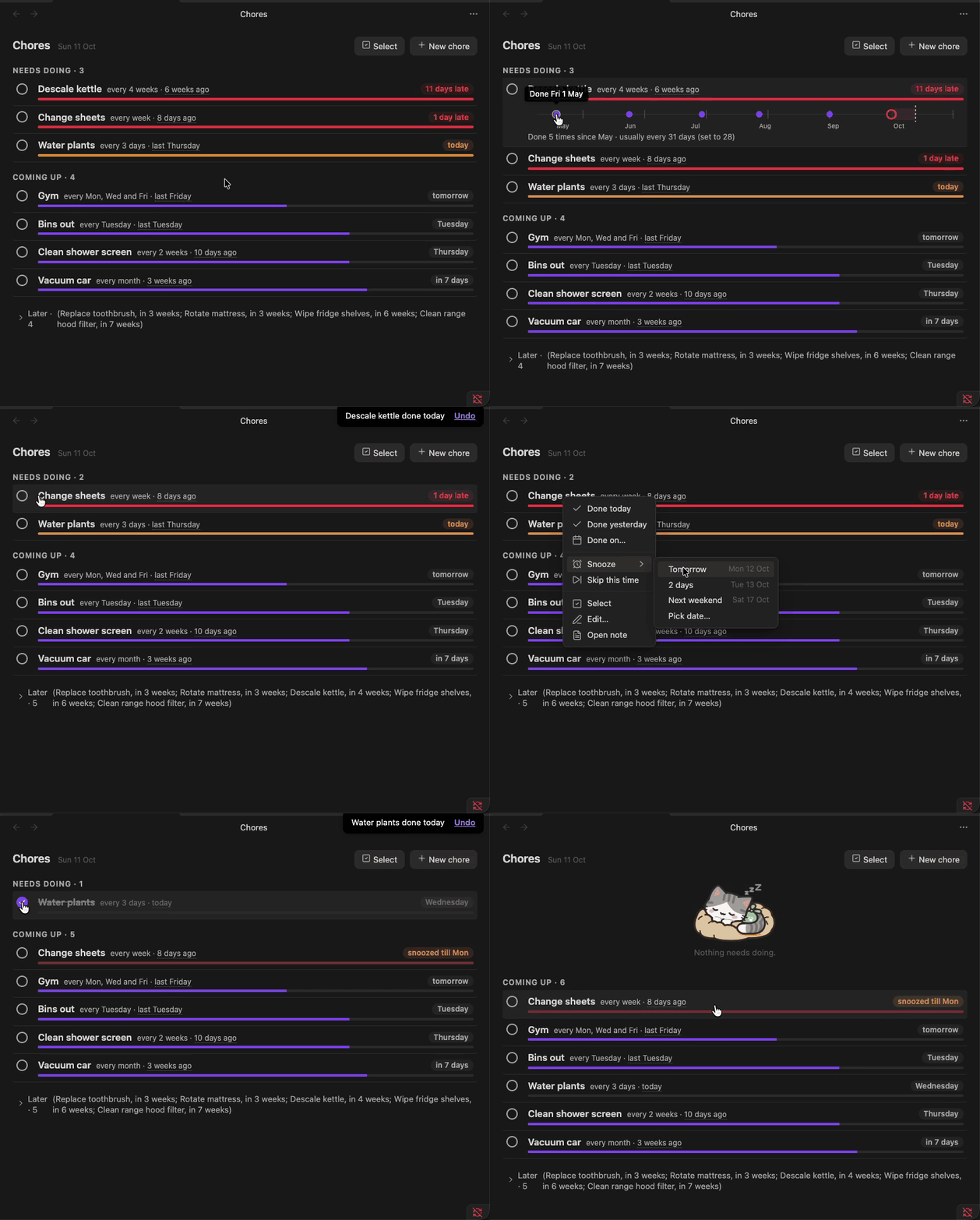
Run Open chores (or select the ribbon icon) to open the Chores view. Tick the circle beside a chore when you do it. The row is struck through briefly while an Undo toast appears, then moves according to its next due date.
The Chores view

Chores can be in one of three groups.
- Needs doing holds chores due today or overdue, with the most urgent first (see The urgency bar).
- Coming up holds chores due in the next two weeks, plus anything snoozed.
- Later holds the rest and stays collapsed to a one-line summary until you open it.
The urgency bar
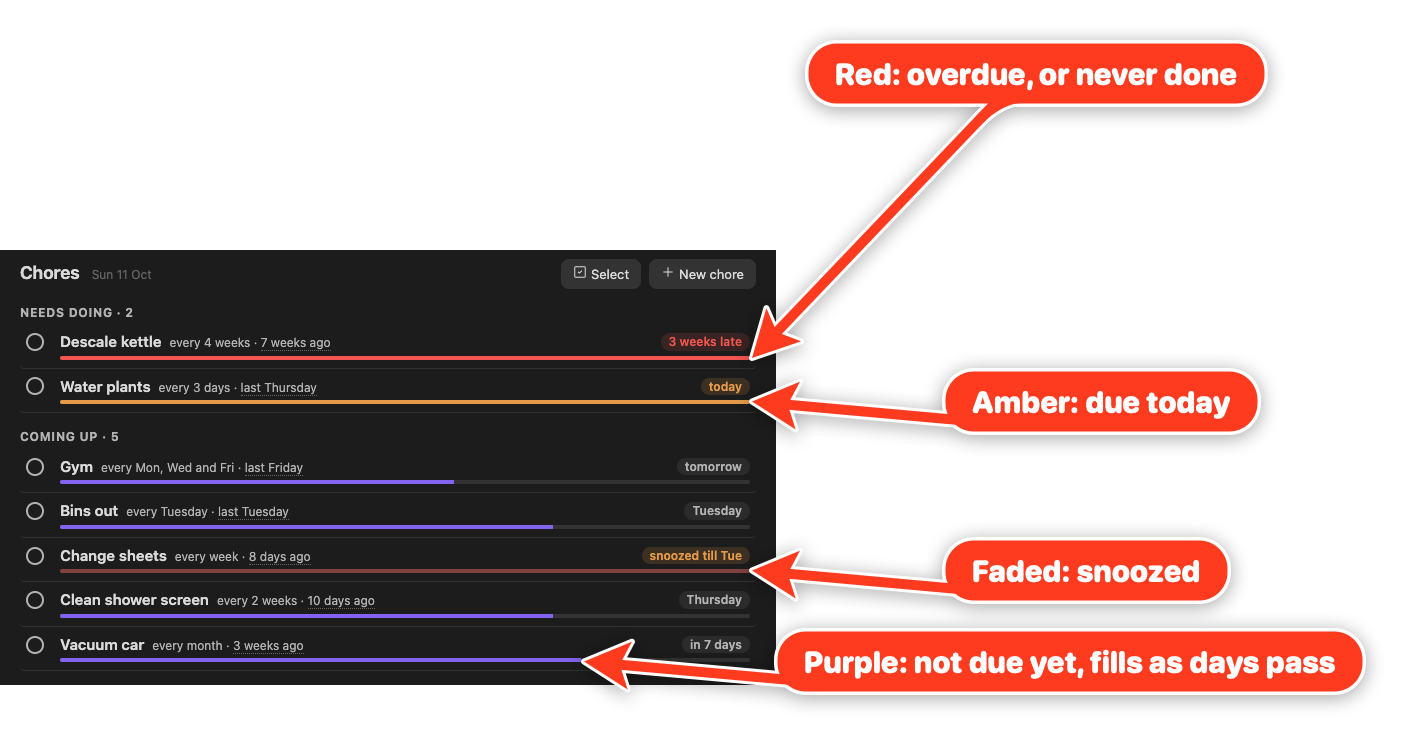
The bar under each chore fills as it comes due. It's empty on the day you do the chore and full once the interval has passed. The fill shows the chore's urgency, capped at full. The formula is:
$$\text{urgency} = \frac{\text{today} - \text{last done}}{\text{interval in days}} \qquad \text{fill} = \min(\text{urgency},\ 1)$$
Vacuum car, for example, is done every month and was last done 23 days ago, so its urgency is $23 / 30.44 \approx 0.76$ and its bar is three quarters full. A week counts as 7 days, a month as 30.44 and a year as 365.25. A skip counts as the last time it was done, since it starts the next cycle.
The colour shows where the chore stands:
- The theme's accent colour (purple by default) before the due date.
- Amber on the due date.
- Red once it's overdue, and for a chore that has never been done.
- Faded while it's snoozed, in whichever colour it would otherwise have.
Needs doing is sorted by urgency without the cap. Three days late on a weekly chore gives an urgency of $10 / 7 \approx 1.43$. Three days late on a yearly chore gives $368 / 365.25 \approx 1.01$, so the weekly chore comes first. A chore that has never been done goes to the top.
A chore on set days (anchor: calendar) measures urgency from its due date instead, in steps of the average gap between its days:
$$\text{urgency} = 1 + \frac{\text{today} - \text{due date}}{\text{interval in days} \div \text{days in the schedule}}$$
Gym on Monday, Wednesday and Friday has an average gap of $7 / 3 \approx 2.33$ days, so on a Sunday, with Friday done and Monday next, its urgency is $1 - 1 / 2.33 \approx 0.57$.
History
Select a row to expand its history strip. It covers about the last six intervals, or three weeks for a chore scheduled on several days a week.
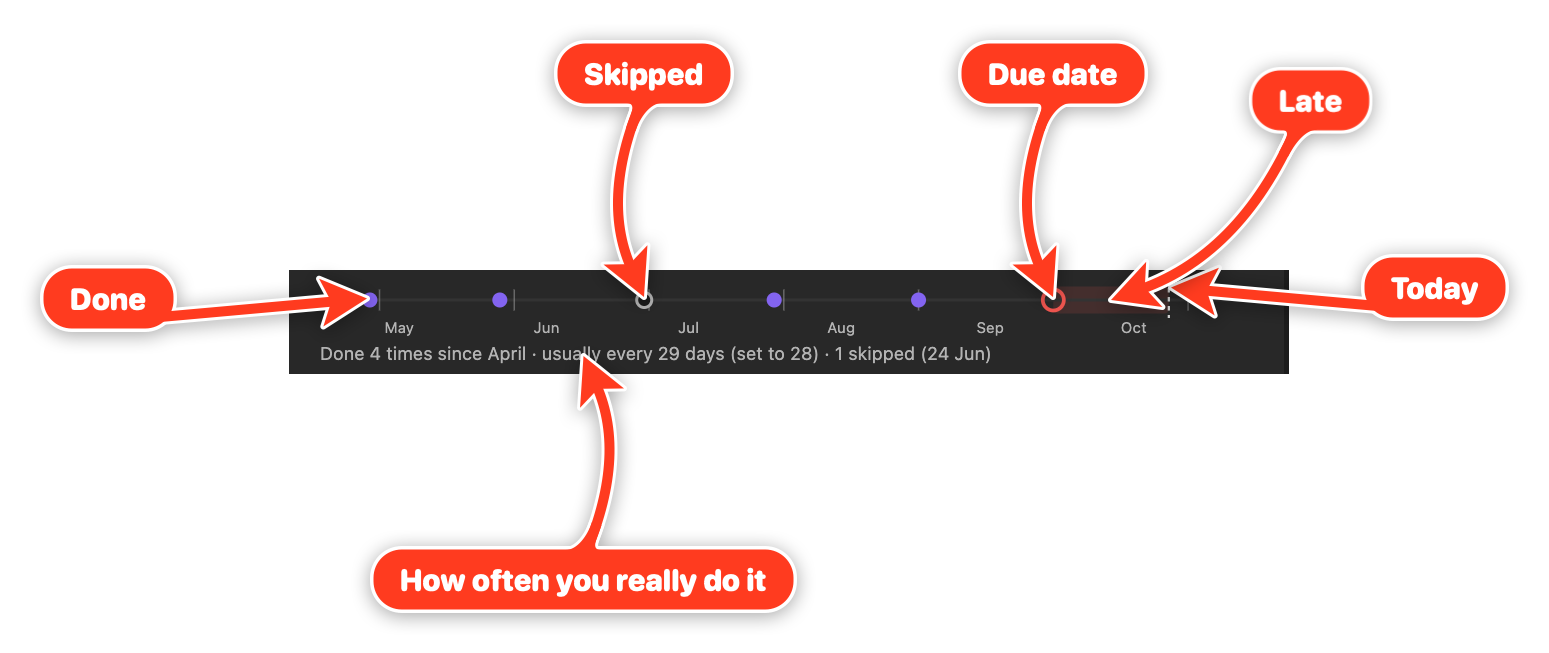
Each completion is a dot; each skip is a hollow dot. The ring marks the due date: amber until it passes, then red. The late stretch is shaded up to today's dotted line. Faint ticks mark each interval counted back from the due date, so a dot close to its tick was done on time. For a chore on set days, a missed day appears as a dashed red circle.
The line underneath compares how often you do the chore with the interval you set (for example, 'usually every 29 days (set to 28)'). Hover over a dot to see its date. Select it to remove an entry logged by mistake.
Row menu
Right-click a row (long-press on mobile) for its menu:
- Done today, Done yesterday, or Done on a date you pick.
- Snooze until tomorrow, a preset scaled to the chore's interval, next weekend, or a date you pick. A snoozed chore sits in Coming up until the snooze ends.
- Skip this time, which starts the next cycle without recording a fake completion.
- Edit the name, interval or schedule, with a preview of how the change moves the next due date.
- Open the chore's note.
- Select, to pick several chores and snooze or skip them together.
To snooze or skip several chores at once, select Select at the top of the view, or Select in a row's menu. Selecting a row then picks it instead of opening its history, and Select all on a group heading picks the whole group. Snooze offers tomorrow, next weekend, the interval-scaled preset when every picked chore shares it, or a date you pick; Skip skips each one this time.
After the toast disappears, Undo last change lets you step back through your 20 most recent ticks, snoozes, skips and removed history entries, newest first. It's in the view's more options menu (⋮) and the command palette. Mod+Z runs it while the Chores view has focus. The undo list lasts until Obsidian restarts and doesn't cover edits or new chores.
Chore notes

A chore note looks like this:
---
type: chore
every: 4w # <n><d|w|m|y>
anchor: done # done (default) or calendar, with days: [tuesday]
keep: 6 # optional per-chore history limit
early: false # optional, overrides the Early ticks count setting
snoozed_until: 2026-10-24
done: # newest first
  - 2026-09-02
  - 2026-08-01
skipped:
  - 2026-07-20
---

Citric acid, 2 tbsp in a full kettle. Boil, leave 30 min, rinse twice.
Only type: chore and every are required. The note name is the chore name, and the body allows for free text like instructions. Choreday doesn't write anything to the body.
anchor: done counts the next due date from the last time you did the chore. For chores tied to the calendar, use anchor: calendar with a days list and an interval in weeks, for example if you have:
- Bins every Tuesday:
every: 1w,days: [tuesday]. - Gym on Monday, Wednesday and Friday:
every: 1w,days: [monday, wednesday, friday]. - Every second week on Monday and Thursday:
every: 2w,days: [monday, thursday]. Weeks start on Monday, and weeks are loosely counted so you can tick a little late (or early) and you'll still get completion credit.
Three-letter names (mon) work too. Choreday still reads the older day: tuesday as days: [tuesday]. Without an anchor, either days or day puts the chore on set days. After missed days, the latest one is due and earlier ones appear as missed on the strip, so one tick clears them. With Early ticks count on, a tick before the next scheduled day counts for that day: taking the bins out on Monday night covers Tuesday.
You can edit chore notes by hand or in the view. When Choreday writes to a note, it changes only the lines for keys that changed, so comments and your frontmatter formatting survive. Choreday flags unreadable values on the row for you to fix. A note without a readable every appears under Needs fixing at the bottom of the view.
Choreday works out last done, next due and how late a chore is from these dates each time it draws the view. It doesn't store those values.
Show a chore in its note

Add an empty choreday code block to a chore note to show that chore's row and history strip. You can then tick it off from the note itself:
```choreday

```
To show a different chore, name it:
```choreday
chore: Descale kettle
```
When two chores share a name in different folders, the block lists them rather than guessing. Add the folder to pick one, for example chore: Kitchen/Clean.
Settings
- Chores folder: notes with
type: chorein this folder and its subfolders are chores. Defaults toChores. - History to keep: completions kept per chore (default 12). Older ones are trimmed the next time Choreday writes to that note. A chore note can override it with
keep. - Early ticks count: for chores on set days, a tick before the next scheduled day counts for that day (default on). Turn it off to count only ticks on or after it. A chore note can override it with
early: trueorearly: false.
Limitations
- No reminders or notifications outside Obsidian.
- History is deliberately short (a dozen entries by default), so questions like 'how often did I do this in 2025?' are out of scope.
- No per-completion notes or who-did-it; an occasional remark belongs in the note body.
- Changing a chore's interval is not recorded; the history strip redraws at the new interval.
- Calendar chores repeat in weeks only (every Tuesday, weekdays, every second Sunday). Monthly calendar dates such as 'the 1st of each month' are not supported.
- Long-press for the row menu has only been checked in Obsidian's mobile emulation so far, not on a phone.
Development
See CONTRIBUTING.md for how to propose changes and what a good PR looks like.
Run npm install to install dependencies, then npm run dev to start esbuild in watch mode. It produces main.js next to manifest.json at the repo root.
To point a dev vault at the build, symlink main.js, manifest.json, and styles.css from the repo root into <vault>/.obsidian/plugins/choreday/. Reload Obsidian, or toggle the plugin off and on, to pick up new builds.
Before pushing, run npm test, npm run lint and npm run format.
On merge to main, the Release workflow stamps a version using the PR's label (major, minor, patch, or norelease) and publishes a GitHub release with main.js, manifest.json, and styles.css attached. Obsidian's community plugin directory installs and updates Choreday from these releases.
See AGENTS.md for project conventions.
Licence
MIT.