ChordPro Viewer
 Jason Heddings1k downloads
Render ChordPro format code blocks in Obsidian.
- Overview
- Scorecard
- Updates22
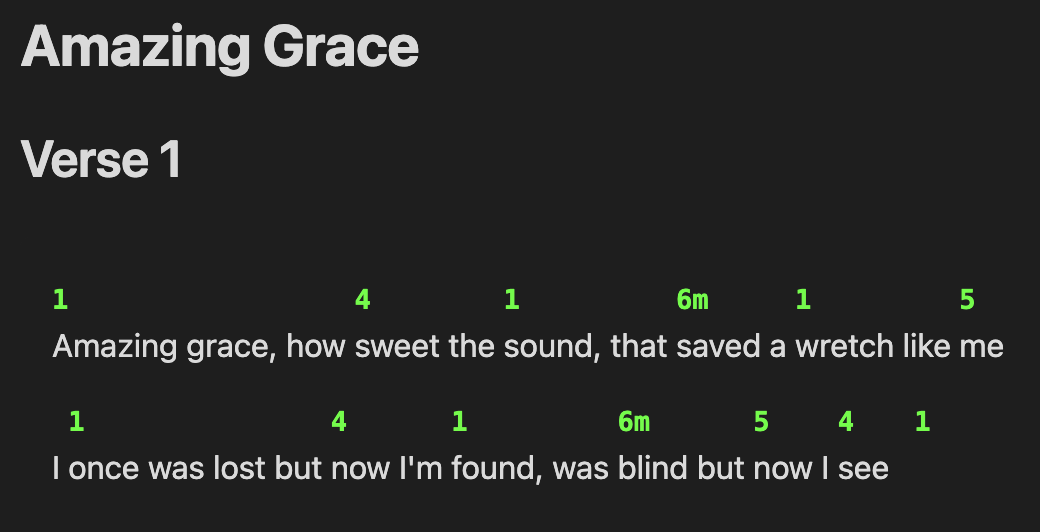
An Obsidian plugin that renders ChordPro format chord sheets with accurate chord positioning above lyrics.
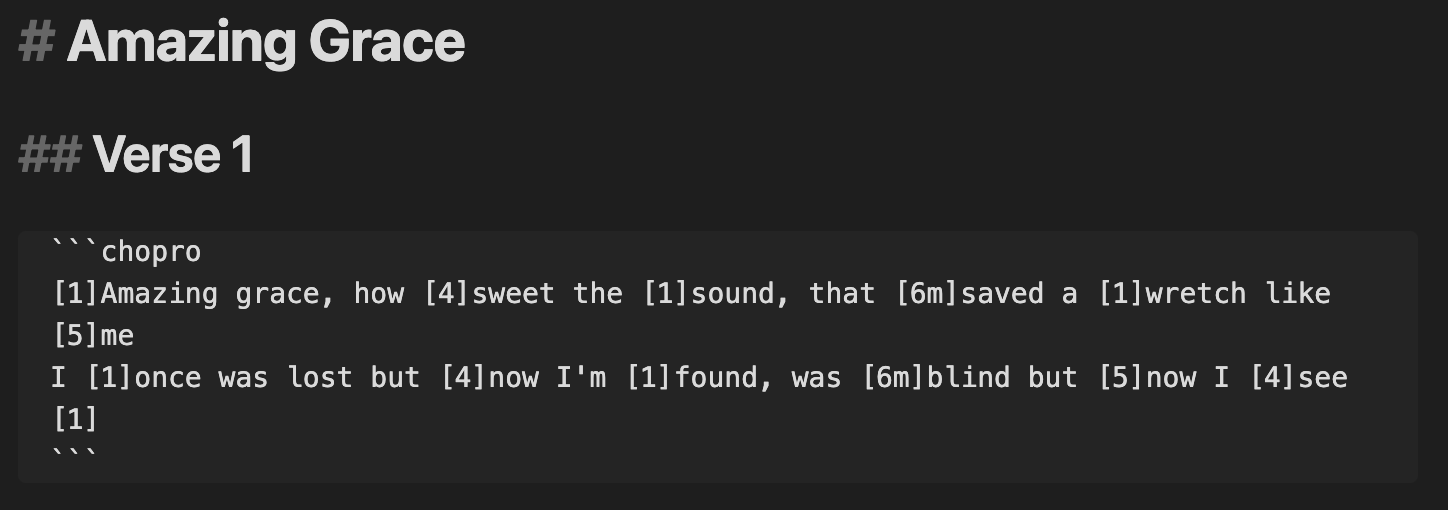
... becomes ...
Features
- Accurate Chord Positioning: Improved algorithm for precise chord-to-lyric alignment
- Configurable Styling: Customizable chord color, directive display
- Chord Normalization: Automatic cleanup and standardization of chord notation
- Transpose Files: Transpose entire files between keys or chord notations
- ChoPro Callouts: Custom
[!chopro]callouts for advanced song transclusion with flow control and key transposition - Metadata Rendering: Render metadata from frontmatter in a typical chord sheet format
Usage
Create a code block with the chopro language identifier:
```chopro
[C]Amazing [F]grace how [G]sweet the sound
That [C]saved a [Am]wretch like [F]me[G]
[C]I once was [F]lost but [G]now am found
Was [C]blind but [Am]now I [F]see[C]
```
ChoPro Callouts
The plugin supports custom [!chopro] callouts for advanced song rendering with flow control:
> [!chopro] [[song-name]]
> flow: on
This feature allows you to:
- Transclude entire song files or render with custom flow
- Control rendering order with flow definitions in frontmatter
- Create dynamic set lists and practice sheets
See docs/callout.md for detailed documentation.
Commands
These actions are available using the Command Palette:
- Transpose chords in current file: Open the transpose dialog for the current file
- Insert flow content from file: Insert song flow content from files with flow properties
Flow System
The plugin supports a powerful flow system for organizing and reusing song content. Define flow patterns in your song files' frontmatter and use them with callouts or the insert command.
See docs/flow.md for detailed documentation.
Configuration
Access settings via Settings → Community Plugins → ChordPro Viewer:
- Chord Color: Set the color for chord text (CSS color value, default:
#2563eb) - Chord Size: Font size for chord text (CSS size value, default:
1em) - Superscript Chord Modifiers: Display chord modifiers (7, maj7, sus4, etc.) as superscript
- Chord Decoration: Wrap chords with bracket pairs for emphasis (None, [ ], ( ), { }, < >)
- Italic Annotations: Display annotations (text starting with asterisk) in italics
- Song Folder: Limit song file selection to a specific folder (e.g., "Songs/")
The settings panel includes a live preview that updates as you change configuration options.
Supported ChordPro Features
Chords
- Basic chords:
[C],[F],[G],[Am], etc. - Complex chords:
[Am7],[Bmaj7],[C#dim],[F/A],[Gsus4] - Nashville numbers:
[1],[4],[5],[6m],[1maj7],[5/7], etc. - Multiple consecutive chords:
[C][F][G]or[1][4][5] - Chords at any position: Beginning, middle, or end of lines
- Chord modifiers: Support for superscript display of extensions (7, maj7, sus4, etc.)
Annotations
- Performance markings:
[*Rit.],[*Forte],[*Andante] - Dynamic markings:
[*pp],[*ff],[*Crescendo] - Structural annotations:
[*Fine],[*D.C. al Fine],[*Begin softly] - Configurable styling: Toggle italic display for all annotations
Installation
Manual Installation
- Download the latest release files from the GitHub repo.
- Unzip the release file in your vault's
.obsidian/plugins/directory - Enable the plugin in Settings → Community Plugins
Development Installation
- Clone this repository into your vault's
.obsidian/plugins/directory - Run
npm installto install dependencies - Run
npm run devfor development with hot reload - Run
npm run buildfor production build
BRAT
- Add this repo to your BRAT plugin list.
- Enable the plugin in Settings → Community Plugins
License
MIT License - see LICENSE file for details
Support
If you encounter any issues or have feature requests, please open an issue on the GitHub repository.