Card Walk
 马自立50 downloads
Review #card flashcards and ==cloze== blocks from your notes with Anki scheduling. Answers made on your phone reach Anki on your computer within seconds, and every sync step is shown.
- Overview
- Scorecard
- Updates6
English · 简体中文
Review the #card flashcards and ==cloze== blocks in your notes from a side panel: read the question, reveal, answer Again / Hard / Good / Easy, and let Anki do the scheduling. It works on your phone too: answers made there reach Anki on your computer within seconds, and every step of the sync is visible.
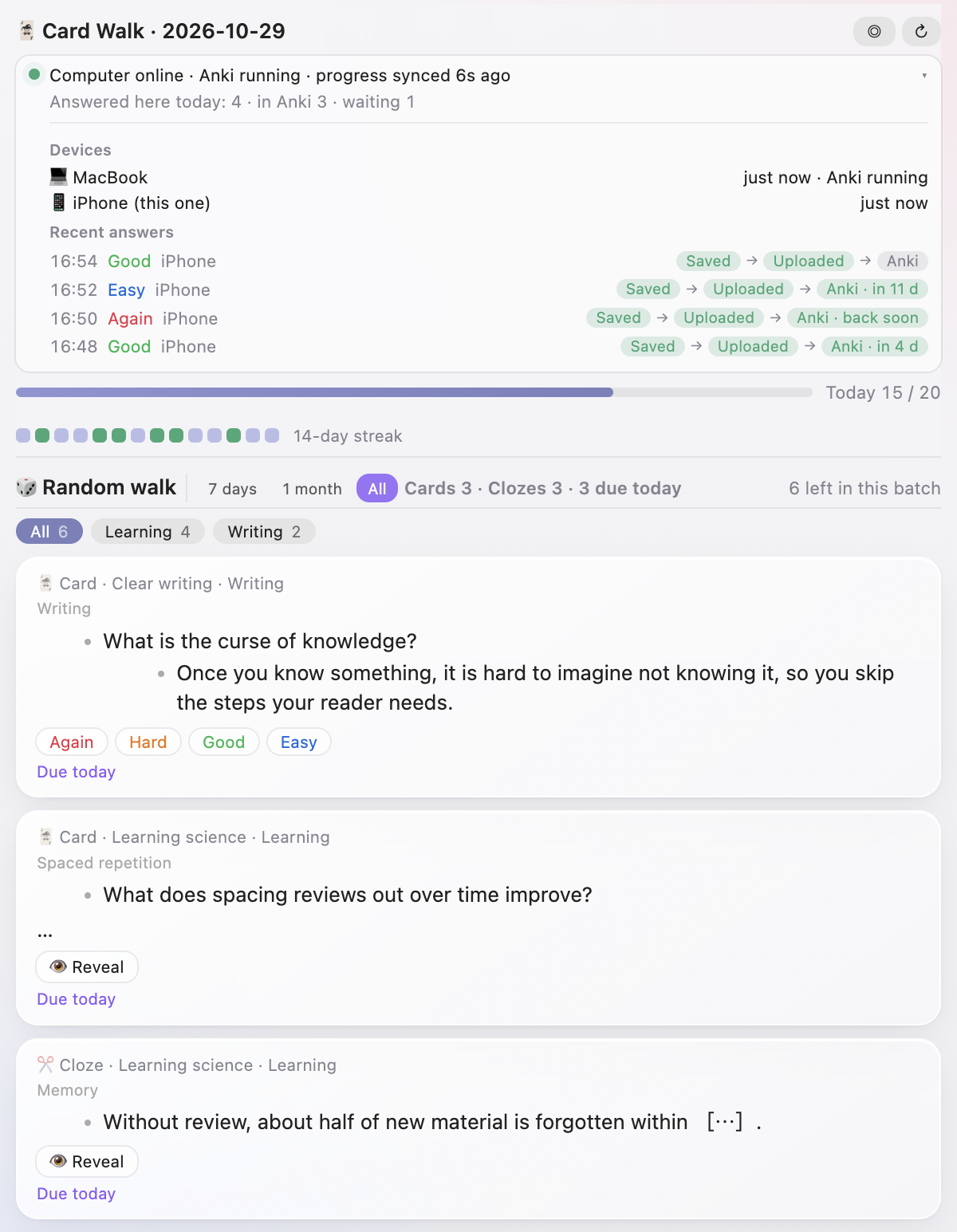
The interface follows Obsidian's language (English or Chinese).
Contents
Reviewing
- Open it from the ribbon or the command Open Card Walk. Optionally, a tab is added to the right sidebar the first time you open Obsidian each day.
- Cards: the list item containing
#card, with its children; the first line is the question, the children are the answer. Clozes:==…==,{{c1::…}}and{1:…}are hidden as [⋯], numbered the same way as the Flashcards plugin. Content is rendered as Markdown, with the parent blocks shown above as breadcrumbs. - Expand the context: as in Roam's linked references, click a parent in the breadcrumbs to show that whole block with all its children (siblings included); the breadcrumbs keep only the levels above it, so you can keep zooming out. The card's own block is highlighted, and its answer stays hidden until you reveal. Collapse goes back to the card alone.
- Look back: answered cards are kept in a history. Press ↶ at the top (or ↑ on the top card) to see the previous card again, and keep pressing to go further back. These cards are read-only and show what you answered and the result. Answering a new card puts them away; the history stays.
- Drawing: only cards you can answer are drawn: cards due today in Anki come first, then new cards, alternating between cards and clozes. Cards not due yet are left out, and cards not synced to Anki come last. If Anki can't be reached, everything is drawn and can only be read. The draw is stable for the day (↻ draws again). Filter by when cards were added (7 days / 1 month / all), by subject, and, if configured, by a separate Language tab. Subjects are yours to define in settings (by links or folders); Suggest proposes a few from the pages your cards link to and the folders they're in. Weights multiply together: newer cards (fading with age), the most overdue among due cards, cards linking to chosen pages, and each subject.
- Daily goal: a progress bar and the last 14 days (from Anki's review log, so phone reviews count too). Cards marked Again come back three cards later.
- Keyboard: click to select, Space to reveal, 1–4 to answer, ↑↓ to move (↑ on the top card looks back at answered cards); ⌥⌘→ focuses on one card, ⌥⌘← or Esc goes back. ⌘-click opens the source note with the line selected.
- Right-click → Stop using as a card removes the
#cardtag or cloze marks and keeps the text (undoable). - Optional sounds and sparks when you answer, and an optional line in today's journal logging the session. Review time is real: each card counts from the previous action, at most 60 seconds, and goes into Anki's review log too (newer AnkiConnect with the
/api/v1interface takes it directly; older versions ignore it unless patched). Press ⏸ at the top of the panel to stop the timer when you step away.
Phone ⇄ computer sync
When you review on your phone you need to trust what you see: is this card's progress current, or was it already answered on the computer? Did the answers you just made actually reach Anki?
Card Walk uses an Upstash Redis database as a relay (the free plan is enough):
- Answer on the phone → uploaded immediately → your computer picks it up and records it in Anki → the new progress goes back to the phone. While a phone is active the computer checks every 5 seconds; otherwise every 30–60 seconds, so the very first answer after you open the panel can take up to a minute.
- A status line on both sides, expandable to devices and recent answers:
- 🟢 Computer online · Anki running · progress synced 3s ago
- 🟡 Computer offline since 2 h ago · using its last progress (nobody changes Anki while it's off, so the progress is still current; answers wait in the queue)
- 🟡 Computer online, Anki not running · answers are queued
- 🔴 Can't reach the sync server · 3 answers saved here, they'll upload when online
- Every answer shows three steps — Saved → Uploaded → In Anki (next in 3 days) — updating live. Answers made offline are kept on the device and uploaded later, never twice. If Anki refuses an answer (for example, the card was deleted), you see that too.
- Stale cards are caught: when new progress arrives, cards already answered elsewhere turn grey on the spot. On the computer, cards answered on the phone but not yet in Anki can't be answered again.
- Only card IDs, ratings, times, device names and an Anki progress snapshot (card IDs) are uploaded. Card content never leaves your vault.
Setup
- Create a Redis database at console.upstash.com (or Upstash for Redis in the Vercel Marketplace) and copy the REST URL and token from the database page (not the read-only token).
- Settings → Phone sync: paste both and press Test connection. Use the same database on every device; if your plugin settings sync with your vault, entering them once is enough.
Without sync, the computer works directly with Anki and the phone can read cards but not answer them.
Requirements
- Anki with AnkiConnect, running on the computer.
- The Flashcards plugin, which syncs cards to Anki and records each block's Anki note ID in the note's
flashcardsproperty. Card Walk uses that mapping to find each card in Anki. - Optional: an Upstash Redis database for phone sync.
Network use
Card Walk talks to AnkiConnect on your computer (http://127.0.0.1:8765 by default) and, if you set it up, to your own Upstash database. Nothing else, and no telemetry.
Install
Search for Card Walk in Settings → Community plugins, or download main.js, manifest.json and styles.css from Releases into <vault>/.obsidian/plugins/card-walk/. BRAT also works: MatsuriMW/card-walk.
Feedback and updates
To follow new features, send feedback or keep up with progress, follow me on Twitter: @Matsurimywaifu.
License
MIT