Search...Search plugins and themes...
⌘K
Sign in
  • Get started
  • Download
  • Pricing
  • Enterprise
  • Account
  • Obsidian
  • Overview
  • Sync
  • Publish
  • Canvas
  • Mobile
  • Web Clipper
  • CLI
  • Learn
  • Help
  • Developers
  • Changelog
  • About
  • Roadmap
  • Blog
  • Resources
  • System status
  • License overview
  • Terms of service
  • Privacy policy
  • Security
  • Community
  • Plugins
  • Themes
  • Discord
  • Forum / 中文论坛
  • Merch store
  • Brand guidelines
Follow us
DiscordTwitterBlueskyThreadsMastodonYouTubeGitHub
© 2026 Obsidian

Canvas Layer Order

fengzhefengzhe235 downloads

PowerPoint-style layer controls for Canvas: bring cards to front, send to back, move forward/backward, and preserve layer order when focusing overlapping cards.

Add to Obsidian
Canvas Layer Order screenshot
  • Overview
  • Scorecard
  • Updates4

Canvas Layer Order adds PowerPoint-style layer controls to Obsidian Canvas, making it easier to work with overlapping cards.
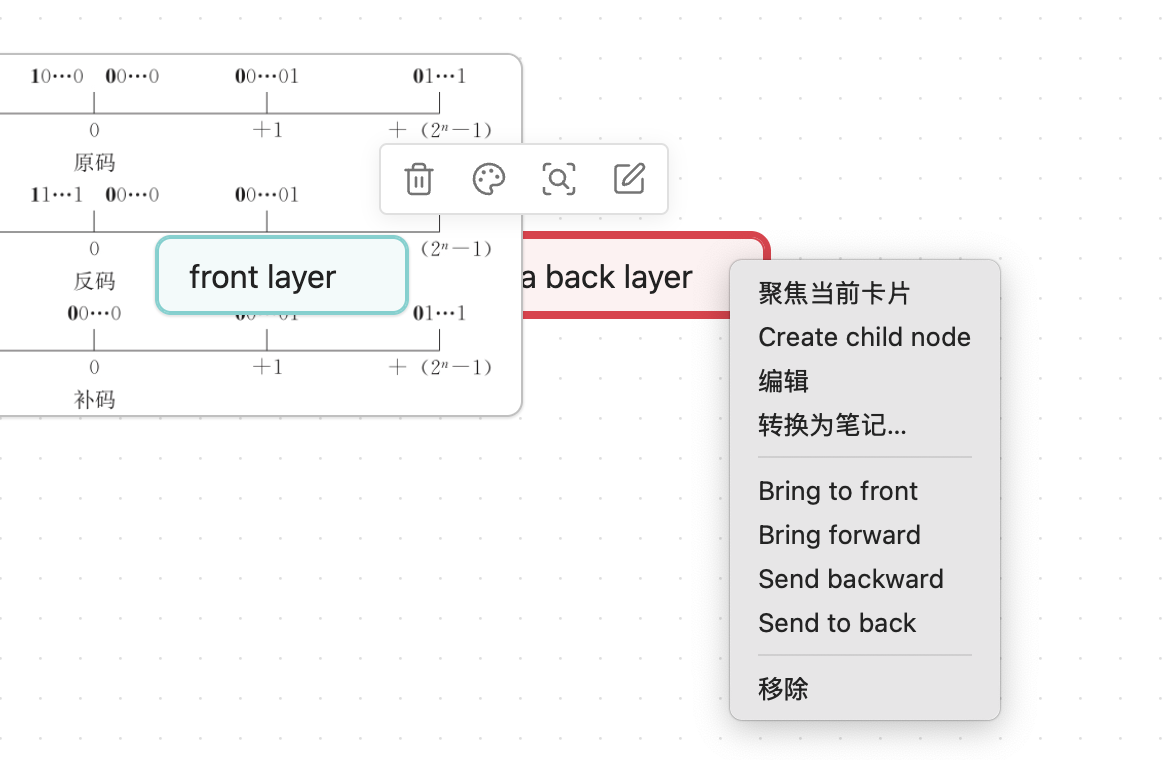
Canvas Layer Order context menu demo

Obsidian Canvas stores cards in the nodes array of a .canvas JSON file. In overlapping areas, cards that appear later in that array render above cards that appear earlier. This plugin changes layer order by moving the selected card inside that array.

Features

  • Bring a Canvas card to front
  • Send a Canvas card to back
  • Bring a Canvas card forward by one layer
  • Send a Canvas card backward by one layer
  • Optional focus behavior that keeps the saved layer order visible when a card is focused

Usage

  • Canvas: Bring selected card to front
  • Canvas: Send selected card to back
  • Canvas: Bring selected card forward
  • Canvas: Send selected card backward

These commands can be used from the command palette or assigned to hotkeys. They are also available from the Canvas card context menu in supported Obsidian versions.

Focus Behavior

Obsidian may temporarily lift a focused Canvas card above nearby cards. Enable Preserve layer order when focusing cards in this plugin's settings to keep the visual stack aligned with the saved Canvas node order.

Manual Installation

Copy these files into your vault's plugin folder:

<vault>/.obsidian/plugins/canvas-layer-order/

Required files:

  • main.js
  • manifest.json
  • styles.css

Then reload Obsidian and enable Canvas Layer Order in Community plugins.

Development

npm install
npm run dev

To create a production build:

npm run build

Release files for Obsidian community plugins:

  • main.js
  • manifest.json
  • styles.css

Notes

Canvas internals are not part of Obsidian's public plugin API. This plugin keeps those assumptions isolated in a small part of the codebase so future Obsidian changes are easier to adapt to.

HealthExcellent
ReviewSatisfactory
About
Reorder overlapping Canvas cards by bringing a card to front, sending it to back, or moving it forward or backward in the layer stack. Preserve saved layer order when focusing cards to keep the visual stack aligned with the node order.
CanvasCommands
Details
Current version
0.1.3
Last updated
Last month
Created
Last month
Updates
4 releases
Downloads
235
Compatible with
Obsidian 1.5.0+
Platforms
Desktop, Mobile
License
MIT
Report bugRequest featureReport plugin
Author
fengzhefengzhelaplacede
GitHublaplacede
  1. Community
  2. Plugins
  3. Canvas
  4. Canvas Layer Order

Related plugins

Canvas Send to Back

Move cards in canvas to the top or behind all other cards.

Advanced Canvas

Supercharge your canvas experience. Create presentations, flowcharts and more.

Find orphaned files and broken links

Find files that are not linked anywhere and would otherwise be lost in your vault. In other words: files with no backlinks.

Quick Switcher++

Enhanced Quick Switcher, search open panels, and symbols.

Commander

Customize your workspace by adding commands everywhere, create macros and supercharge your mobile toolbar.

Note Toolbar

Add customizable toolbars to your notes.

Tab Switcher

Switch your tabs with Ctrl + Tab in recently used order like in a browser.

Sort and Permute lines

Sort and Permute lines in whole file or selection.

Actions URI

Add additional `x-callback-url` endpoints to the app for common actions — it's a clean, super-charged addition to Obsidian URI.

Lean Terminal

Embedded terminal panel powered by xterm.js and node-pty - no external windows.