Search...Search plugins and themes...
⌘K
Sign in
  • Get started
  • Download
  • Pricing
  • Enterprise
  • Account
  • Obsidian
  • Overview
  • Sync
  • Publish
  • Canvas
  • Mobile
  • Web Clipper
  • CLI
  • Learn
  • Help
  • Developers
  • Changelog
  • About
  • Roadmap
  • Blog
  • Resources
  • System status
  • License overview
  • Terms of service
  • Privacy policy
  • Security
  • Community
  • Plugins
  • Themes
  • Discord
  • Forum / 中文论坛
  • Merch store
  • Brand guidelines
Follow us
DiscordTwitterBlueskyThreadsMastodonYouTubeGitHub
© 2026 Obsidian

Canvas Extra Colors

spacefacespaceface10 downloads

Adds additional favorite color swatches to the Canvas editor.

Add to Obsidian
  • Overview
  • Scorecard
  • Updates1

plugin that allows you to store and access custom colors in canvas.
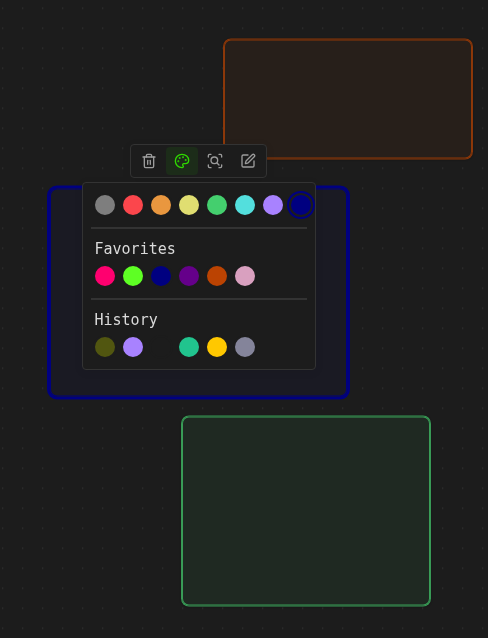
example

Favourites

In the settings you can define and name custom colors using the color picker. These colors then show up in the canvas editor under the the color selector menu.

History

When you select custom colors using the color palette in the color selector menu, they are stored in the color history. In the settings you can 'pin' colors from your history to add them to your favourites list.
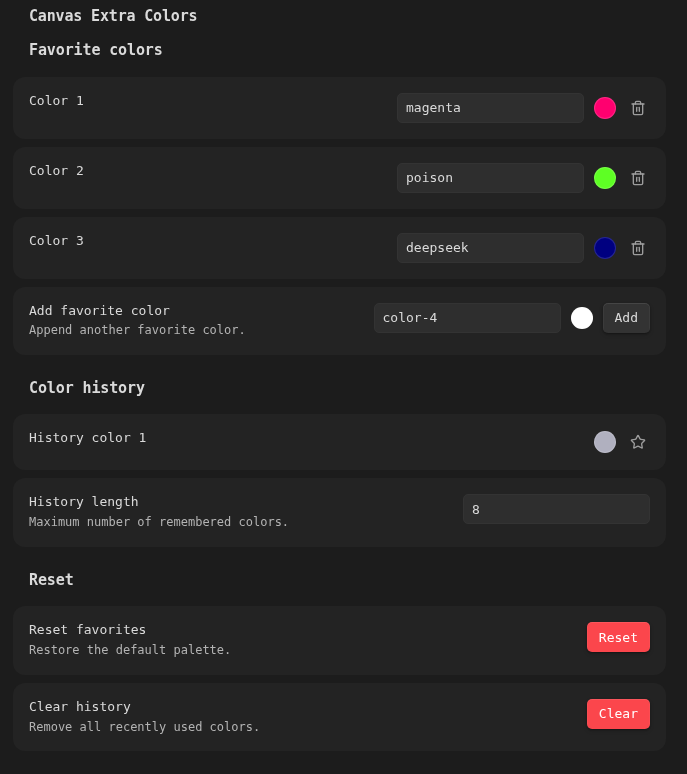
settings
HealthExcellent
ReviewSatisfactory
About
Define and name custom colors with the color picker and save them for use in Canvas. Show favorites in the Canvas color selector, record selected shades to a color history, and pin history entries to add them to your favorites list.
CanvasAppearance
Details
Current version
1.0.0
Last updated
Yesterday
Created
Yesterday
Updates
1 release
Downloads
10
Compatible with
Obsidian 1.8.0+
Platforms
Desktop, Mobile
License
Unlicense
Report bugRequest featureReport plugin
Author
spacefacespaceface
GitHubgittermarie
  1. Community
  2. Plugins
  3. Canvas
  4. Canvas Extra Colors

Related plugins

Minimal Theme Settings

Control the colors and fonts in Minimal Theme.

Advanced Canvas

Supercharge your canvas experience. Create presentations, flowcharts and more.

Hider

Hide interface elements such as tooltips, status bar, titlebar, and more.

Supercharged Links

Add attributes to internal links with the values of target note's frontmatter attributes.

Style Settings

Adjust theme, plugin, and snippet CSS variables.

Link Favicons

See the favicon for a linked website.

Colored Tags

Colorize tags in different colors to visually distinguish them from each other.

Chat View

Chat View lets you quickly and easily create elegant Chat UIs in your Markdown Files.

Custom Font Loader

Customize your vault with any font you want (+ Support for Android and iOS).

Cursor-Smith

Forge your cursor with the most advanced cursor engine there is!