Search...Search plugins and themes...
⌘K
Sign in
  • Get started
  • Download
  • Pricing
  • Enterprise
  • Account
  • Obsidian
  • Overview
  • Sync
  • Publish
  • Canvas
  • Mobile
  • Web Clipper
  • CLI
  • Learn
  • Help
  • Developers
  • Changelog
  • About
  • Roadmap
  • Blog
  • Resources
  • System status
  • License overview
  • Terms of service
  • Privacy policy
  • Security
  • Community
  • Plugins
  • Themes
  • Discord
  • Forum / 中文论坛
  • Merch store
  • Brand guidelines
Follow us
DiscordTwitterBlueskyThreadsMastodonYouTubeGitHub
© 2026 Obsidian

Callout Copy Buttons

alythobanialythobani2k downloads

Adds copy buttons to callout blocks in your notes.

Add to Obsidian
  • Overview
  • Scorecard
  • Updates3

An Obsidian plugin that adds copy buttons to callout blocks in your notes.

Features

  • Adds 'Copy (Markdown)' and 'Copy (plain text)' buttons to callout blocks in your notes.
  • Customizable settings to control the appearance and behavior of the copy buttons (e.g., show/hide, format indicators, etc.).
  • Reactively syncs the UI with your chosen settings, so you can see how they affect the editor in real-time.

Usage examples

Copy (Markdown) button

[!NOTE] Due to technical limitations, 'Copy (Markdown)' buttons are only available in Source Mode and top-level Reading Mode callout blocks (i.e. not in Live Preview callouts, or in nested Reading Mode callouts).

This button copies content in Markdown format, stripping out the callout block syntax.
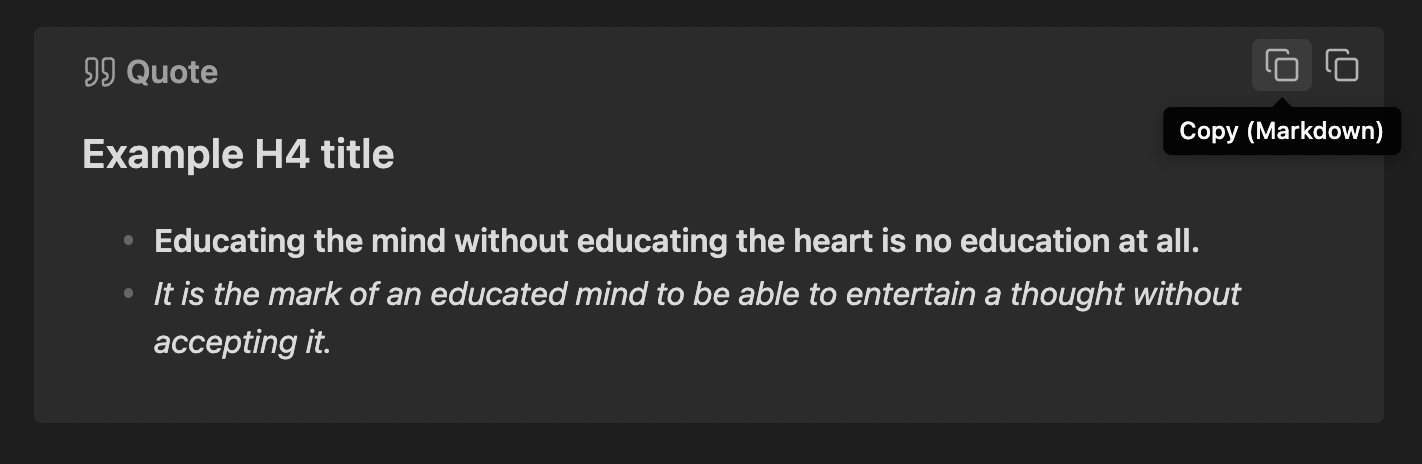
Copy Markdown Button

Clicking 'Copy (Markdown)' above would copy the following content to your clipboard:

#### Example H4 title
- **Educating the mind without educating the heart is no education at all.**
- *It is the mark of an educated mind to be able to entertain a thought without accepting it.*

Copy (plain text) button

This button copies content as plain text (copied directly from the rendered preview), without any Markdown syntax.
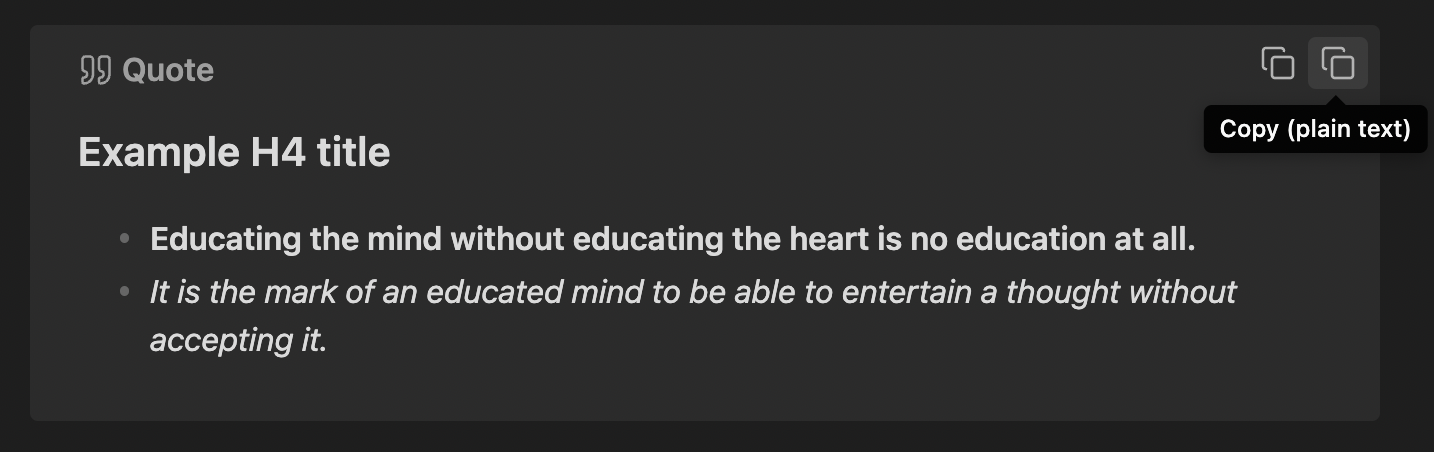
Copy Plain Text Button

Clicking 'Copy (plain text)' above would copy the following content to your clipboard:

Example H4 title
Educating the mind without educating the heart is no education at all.
It is the mark of an educated mind to be able to entertain a thought without accepting it.

[!NOTE] Under the hood, this uses the innerText HTML attribute, which may lead to slight inconsistencies in the copied content depending on whether a callout is folded or expanded; particularly in terms of whitespace.

Contributing & Feedback

My capacity may be limited for this plugin, but feel free to open an issue for any bug reports or feature requests and I'll take a look if I do have time. Also feel free to submit a pull request or fork the project.

Have a great day and try to make someone else's day great too!

73%
HealthGood
ReviewCaution
About
Add "Copy (Markdown)" and "Copy (plain text)" buttons to callout blocks for quick clipboard export. Customize button appearance and behavior and preview changes live. Be aware Markdown copy works only in Source Mode and top-level Reading Mode; plain-text copy uses rendered innerText and may vary when callouts are folded.
MarkdownInterfaceEditing
Details
Current version
1.0.2
Last updated
11 months ago
Created
Last year
Updates
3 releases
Downloads
2k
Compatible with
Obsidian 1.7.7+
Platforms
Desktop, Mobile
License
GPL-3.0
Report bugRequest featureReport plugin
Sponsor
Buy Me a Coffee
Author
alythobanialythobani
github.com/alythobani/
GitHubalythobani
  1. Community
  2. Plugins
  3. Markdown
  4. Callout Copy Buttons

Related plugins

Meta Bind

Make your notes interactive with inline input fields, metadata displays, and buttons.

Outliner

Work with your lists like in Workflowy or Roam Research.

Various Complements

Complete words similar to auto-completion in an IDE.

Hover Editor

Transform the Page Preview hover popover into a fully working editor instance.

Advanced Tables

Improved table navigation, formatting, and manipulation.

Importer

Import data from Notion, Evernote, Apple Notes, Microsoft OneNote, Google Keep, Bear, Roam, and HTML files.

Hider

Hide interface elements such as tooltips, status bar, titlebar, and more.

Commander

Customize your workspace by adding commands everywhere, create macros and supercharge your mobile toolbar.

Agent Client

Chat with Claude Code, Codex, Gemini CLI, and more via the Agent Client Protocol — right from your vault.

Creases

Tools for effectively folding Markdown sections.