Brief Coder
 Ahmad AlModhayan47 downloads
Run, view and edit code in 40 languages: Run and Copy on code blocks with live output, an editor for code files, and a local, opt-in bridge for AI agents.
- Overview
- Scorecard
- Updates5
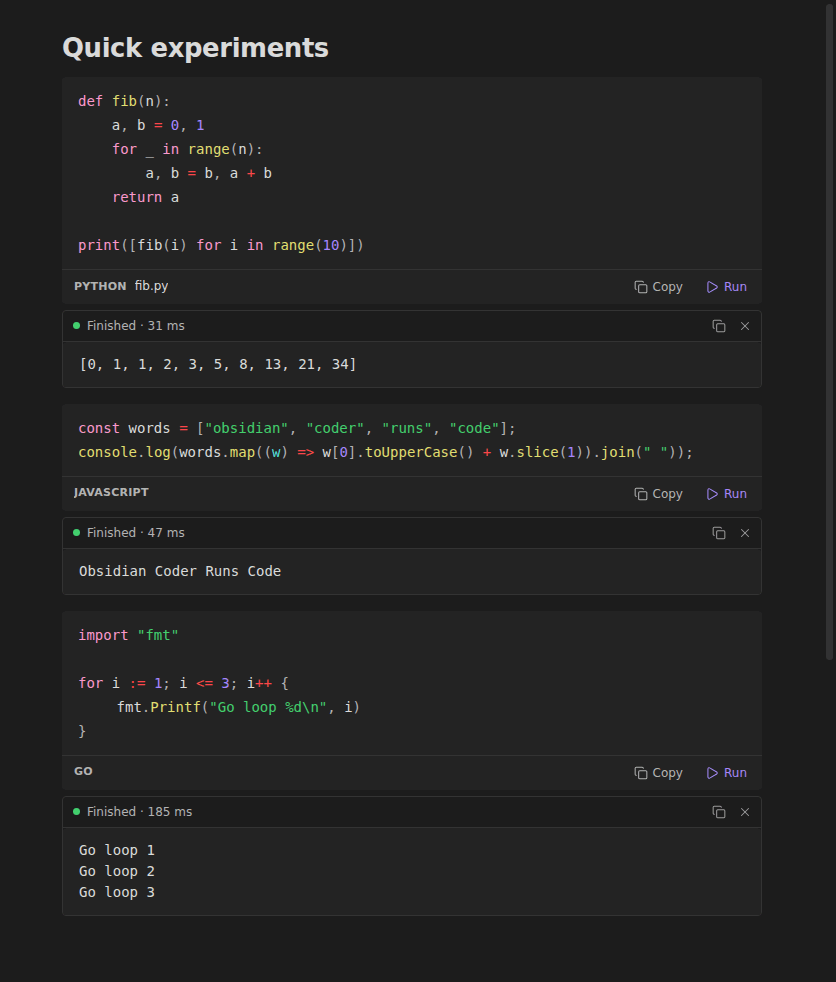
Run, view and edit code inside Obsidian. Every code block gets Run and Copy, output appears live under the block, and code files open in a real editor. It supports 40 languages, speaks English and Arabic, and stays light, with nothing running until you press Run.
New in 1.1: trusted folders for notes from other people, an Arabic interface, and an opt-in agent bridge that lets local AI agents (Claude Code, Raqeeb) read the folders you choose and propose note changes that wait for your Accept.
Brief Coder was called Obsidian Coder (plugin ID
coder-studio) until 1.0.1. The community directory doesn't allow "Obsidian" in plugin names, so it was renamed, ID included. See Moving from Obsidian Coder.
What it does
- Run and Copy on every code block, in Reading view and Live Preview, including blocks inside lists and callouts.
- Live output.
- Output streams in as the program prints.
- Errors show in red, with the exit code and how long it took.
- Stop ends long or stuck programs, along with anything they started.
- Programs that ask for input (
input(),Scanner,read) get a box to type into.
- No boilerplate for snippets. Go, Rust, Java, C, C++, Dart and PHP blocks run without
main, a class or<?php; Brief Coder adds them for you. - HTML renders as a live preview, and its
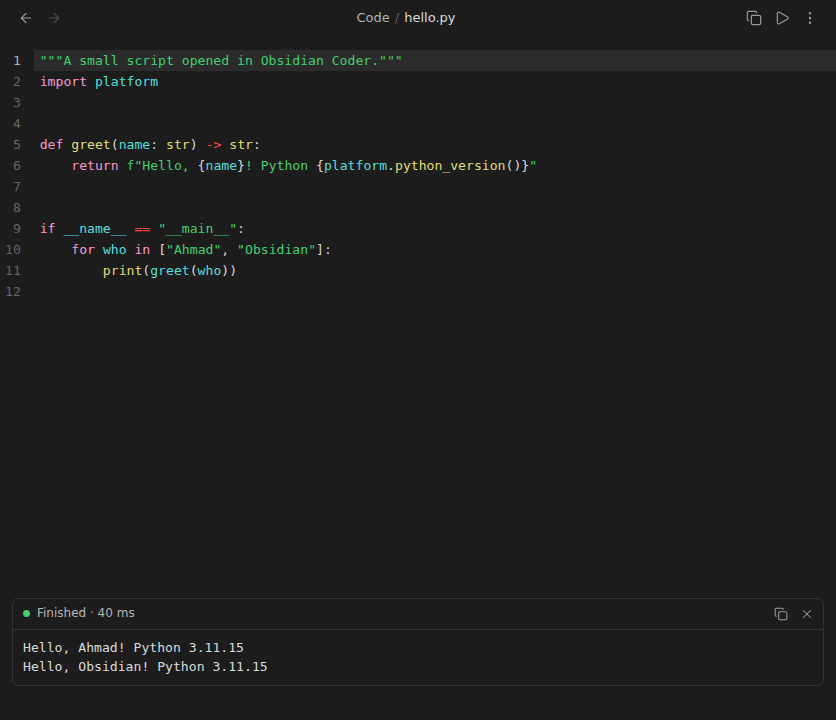
console.logoutput appears with the rest. - Code files open in an editor.
.py,.js,.ts,.go,.rs,.java,.c,.cs,.shand more get:- Syntax colours from your theme, line numbers, bracket matching, search and undo.
- Ctrl/Cmd + Enter to run, with output below.
- Jupyter notebooks open read-only.
.ipynbfiles show their cells and saved outputs, on desktop and on phones. See Notebooks. - Safe with shared vaults. Notes outside your trusted folders show their code and ask before running. Nothing ever runs on its own.
- English and Arabic. The interface follows Obsidian's language. Code always reads left to right, and each output line takes its own direction, so Arabic output reads right to left even in mixed text.
- Works on phones and tablets. JavaScript and HTML run inside Obsidian; other languages keep their Copy button.
- Agent bridge (optional). Local agents read only the folders you share, and any change they suggest is held for your review. See Agent bridge.
Languages
On desktop, Brief Coder uses the languages installed on your computer. Settings → Brief Coder → Check shows which ones it found.
| Group | Languages (code block names) |
|---|---|
| Built in, no install | JavaScript (js), HTML (html) |
| Scripting | Python (python, py), JavaScript with Node.js / Bun / Deno, TypeScript (ts), Shell (bash, sh), Zsh, Fish, PowerShell (pwsh), Batch (Windows), Ruby, PHP, Perl, Lua, R, Julia, AppleScript (macOS), SQL (sql, runs in a temporary SQLite database) |
| Compiled | Go, Rust, C, C++ (cpp), C# (cs), F#, Java, Kotlin, Scala, Groovy, Swift, Dart, Haskell, Elixir, Clojure, OCaml, Nim, Zig, Crystal, Racket, Common Lisp, Fortran, Octave / MATLAB |
| Copy only | CSS, JSON, YAML, TOML, XML, Dockerfile, Makefile, diff, LaTeX and about 70 more |
Blocks that Obsidian or other plugins render, such as mermaid, dataview, tasks and query, are left untouched.
Install
Brief Coder needs Obsidian 1.8.7 or newer.
From Community plugins
- Open Settings → Community plugins → Browse and search for Brief Coder.
- Select Install, then Enable.
Manually
- Download
main.js,manifest.jsonandstyles.cssfrom the latest release. - Put them in
<your vault>/.obsidian/plugins/brief-coder/. - Reload Obsidian and enable Brief Coder.
With BRAT (optional)
BRAT gets a new GitHub release as soon as it's out, before the directory lists it.
- Install BRAT from Settings → Community plugins.
- Run BRAT: Add a beta plugin and enter
Ahmad-AlModhayan/brief-coder. - Enable Brief Coder in Settings → Community plugins.
Moving from Obsidian Coder
The plugin ID changed from coder-studio to brief-coder, so Obsidian treats Brief Coder as a new plugin:
- Install Brief Coder as above. On first start it imports your settings from
coder-studioand says so. - Disable and remove Obsidian Coder (
coder-studio) in Settings → Community plugins. With BRAT, also remove the old entry from BRAT's list, so it doesn't reinstall it.
Using it
Code blocks
```python title="Squares"
print([n * n for n in range(5)])
```
title="…"shows a name in the block's bar.norunkeeps the Copy button but hides Run, for example```python norun.- Output stays when you switch between Live Preview and Reading view. Clear it with ×, or with Clear all outputs in this note.
- Code blocks run in the note's folder, so
open("data.csv")reads a file next to the note. Settings can switch this to a temporary folder.
Trusted folders
By default the whole vault is trusted (/), and code runs when you press Run, as in earlier versions. If your vault holds notes from other people (a shared or synced folder, an imported vault), list only your own folders in Settings → Brief Coder → Trusted folders. Code in any other note then shows the code and asks first. Run all code blocks in this note always asks once, and names what will run. Ask before running makes every run ask, wherever the note is.
Code files
- Code files open straight from the file list.
- To make one, run Create new code file and type a name such as
scratch.pyortools/convert.js. - Edits save automatically, like notes. Ctrl/Cmd + Enter, or ▷ in the tab header, runs the file in place.
- Text, data and config files open too:
.txt,.log,.rst,.adoc,.csv,.tsv,.ndjson,.conf,.cfg,prod.env,.properties,.tf,.tex,.diffand more. They have no Run button..txt,.log,.rst,.adocand.textwrap long lines; Settings → Brief Coder → Wrap text files turns that off, unless Wrap long lines is on, which covers every file..csvand.tsvshow as plain text. - Files over 5 MB when you open them are read-only, with a notice. Nothing is written back to them while they're open that way.
- Limits, set by Obsidian: hidden files (
.env,.gitignore) aren't part of the vault, so Obsidian can't open them;prod.envopens,.envdoesn't. Files with no extension (Dockerfile,Makefile) don't open either: Obsidian picks a viewer by extension only, so opening them would mean claiming every extensionless file in the vault, binaries included. - Types you remove from the list stay removed, and new versions only add types you haven't been offered. A type another plugin already holds stays with that plugin.
Notebooks
.ipynb files (Jupyter's format 4) open in a read-only view, on desktop and mobile. Brief Coder doesn't write to the file, and opening a notebook never runs its code.
- Shown: markdown cells through Obsidian's renderer, code cells with syntax colours, and saved text, images and errors.
- Blocked until you press Trust this notebook: saved HTML and scripts. Trusted outputs show in a sandboxed frame, cut off from your vault and from Obsidian. They can still reach the internet.
- Trust is per notebook. It's remembered, Revoke trust ends it, and it ends by itself if the file changes.
- Markdown cells are limited, because a notebook is treated as untrusted even after you trust its outputs:
- Raw HTML shows as text, apart from simple tags such as
<br>and<b>. - Images in markdown show as links, so opening a notebook loads nothing from the internet. Images attached to the cell show.
![[embeds]]and[[links]]show as text. Code blocks show as code, so plugins such as Dataview don't run them.
- Raw HTML shows as text, apart from simple tags such as
- Not supported: format 3 and older get a clear message. Interactive widgets show as a note saying they can't be shown.
- Who opens
.ipynb: if another plugin handles it, that plugin keeps it. If you addedipynbto Code files, it keeps opening as text in the editor.
HTML
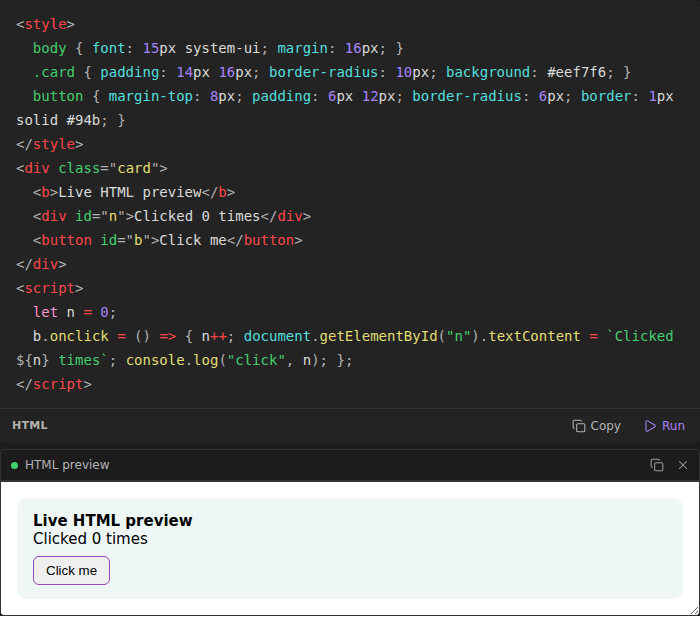
HTML blocks and .html files render in a sandboxed frame that grows to fit the page. Drag its bottom edge to resize it.
Commands
- Run code block at cursor
- Run all code blocks in this note
- Copy code block at cursor
- Clear all outputs in this note
- Stop all running code
- Create new code file
- Run current code file
- Review agent changes
Assign hotkeys to any of them in Settings → Hotkeys.
Agent bridge
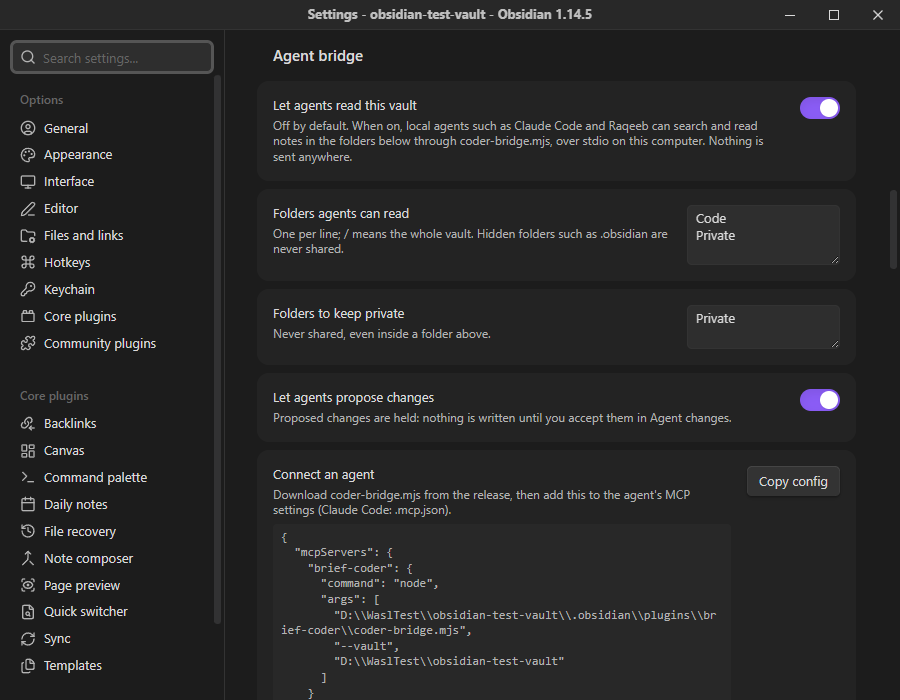
The agent bridge gives local AI agents your notes as context without giving them your vault. It is off by default. Full design: docs/AGENT_BRIDGE.md.
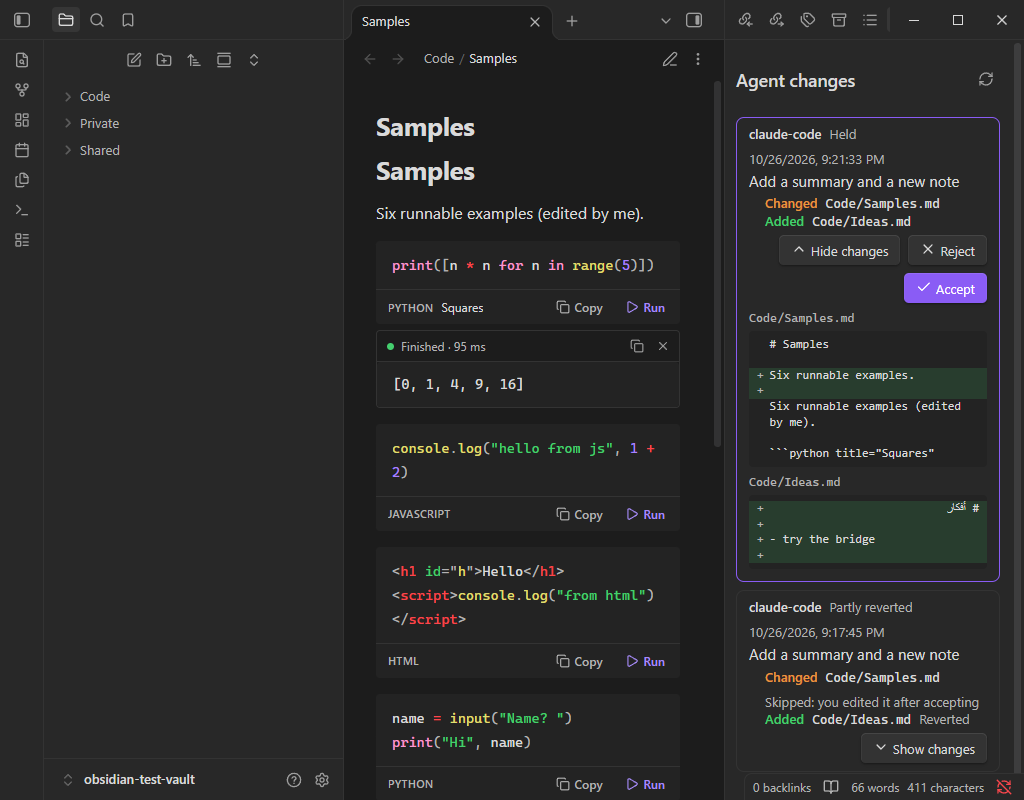
- Read only what you share. Agents see the folders you list, never hidden folders such as Obsidian's configuration folder, and never the folders you mark private.
- Proposals are held. An agent can propose new notes, edits and deletions. Nothing is written until you press Accept in Agent changes, which shows each change as a diff. Reject discards it. Revert undoes an accepted change.
- You win. Accept skips a note that changed since the proposal, and Revert skips a note you edited after accepting.
- Local. The bridge is
coder-bridge.mjs, a small MCP server the agent starts on your computer. It talks over stdin/stdout: no port, no network, no account.
Set it up:
- Settings → Brief Coder → Agent bridge → Let agents read this vault. Choose the folders to share and the ones to keep private.
- Download
coder-bridge.mjsfrom the latest release into<vault>/.obsidian/plugins/brief-coder/. It needs Node.js 18 or newer. - Press Copy config in settings and add it to the agent's MCP settings. For Claude Code, put it in
.mcp.json.
Agents get six tools: list_notes, search_notes (Arabic-aware), read_note, list_code_blocks, propose_change and list_changes. The bridge never runs code.
Settings
| Setting | What it does |
|---|---|
| Show Run and Copy bar | Turns the bar under code blocks on or off. |
| Hide Obsidian's copy button | Avoids two copy buttons on one block. |
| Click inline code to copy | In Reading view, clicking inline code copies it. |
| Trusted folders | Notes in these folders run on click; others show the code and ask. / is the whole vault. |
| Ask before running | Asks before every run, wherever the note is. |
| Time limit | Stops programs after this many seconds. 0 means no limit. |
| Output kept per run | Keeps the newest output (200 KB by default), so endless printing can't slow Obsidian. |
| JavaScript runs with | Auto (Node.js if installed), Node.js, or the in-app sandbox. |
| Code files | Which extensions open in Brief Coder's editor, plus line numbers, wrapping (all files, or text files only) and tab size. |
| Agent bridge | Off by default. Shared folders, private folders, whether agents may propose changes, and the config to copy. |
| Languages | Per-language command, e.g. /opt/homebrew/bin/python3.12 or py -3.12. |
Safety and disclosures
- Code runs on your computer with your permissions, the same as running it in a terminal. Only run code you trust, and use trusted folders if your vault contains notes from other people.
- Nothing runs on its own. Opening, syncing or rendering a note or a notebook never runs its code.
- Why it needs filesystem and shell access: running a program takes both, and Obsidian's plugin API can't start programs or write outside the vault. On desktop,
src/run/process.tsuses Node'sfsfor the temporary files described below, andchild_processto start the interpreter or compiler you installed, read your shell's PATH and stop a run. Scanners, including the community directory's, flag both. The agent bridge usesfsto read the folders you share with it and to save proposed changes in<vault>/.coder/agent-changes. - Files outside the vault: to run code, Brief Coder writes the block to a temporary folder in your system's temp directory and starts the installed interpreter or compiler there. Temporary folders are removed after each run. Build caches for C#, Scala, Nim and Crystal are kept per block and removed after 14 days unused.
- Clipboard: Brief Coder writes to the clipboard only when you press a copy button or run a copy command, and never reads from it.
- Network: Brief Coder itself makes no network requests and collects nothing. Code you run can use the network, like any program you run yourself. HTML previews run in a sandboxed frame with no access to Obsidian or your files.
- Notebooks are treated as untrusted. Saved HTML and scripts stay blocked until you trust that notebook, and then run in a sandboxed frame with no access to your vault or to Obsidian, though they can reach the internet. The agent bridge can't read notebooks.
- The in-app JavaScript sandbox runs like JavaScript in a browser tab: it has no access to your files, your vault or Obsidian.
- The agent bridge is off by default, runs only when an agent you configured starts it, and writes nothing to your notes until you accept a change. Any program running as you can still edit your files directly; the bridge narrows what a well-behaved agent does, it isn't a sandbox.
Performance
Brief Coder was built to keep Obsidian fast. Measured in Obsidian 1.13 and 1.14:
- Small: about 123 KB, with no bundled libraries; CI fails a build over 150 KiB. The code editor and syntax colours reuse what Obsidian already ships. The Arabic interface is about 13 KB of that.
- Quick to load: its own startup work is a few milliseconds.
- Desktop-only modules load the first time you press Run.
- File types are registered in one step, so the file list refreshes once instead of 70 times.
- Cheap in notes:
- A note is parsed once, however many code blocks it has. While you type, only the code block you're in is read again.
- In Live Preview, bars are drawn only for blocks on screen.
- Output panels are created only after a block runs, and HTML previews load only when they come on screen.
- Typing costs about 0.06 ms per keystroke in ordinary text, and about 0.6 ms inside a code block of a 3,000-line note.
- Large notebooks: only cells near the screen are drawn. A notebook of 5,000 cells and 104 MB opened in under 0.5 s on a Windows PC and scrolled at over 60 frames per second.
- Idle means idle: no timers or file watchers run while nothing is running, and memory doesn't grow as you open notes and code files. New agent proposals are checked when you come back to Obsidian.
- Never blocks Obsidian:
- Programs run in their own process; JavaScript in a background worker; HTML previews in a separate sandboxed frame.
- Obsidian stayed above 60 frames per second while a program printed endlessly (6.8 million characters in 4 seconds). Output is drawn incrementally in small pages, and pages scrolled out of view aren't drawn at all.
- Stop works at once, even while a program is still starting, and also ends anything the program started.
- Faster re-runs: an unchanged C#, Scala, Nim or Crystal block reuses its build cache, so C# re-runs take about 0.3 s instead of several seconds.
Troubleshooting
- "… isn't installed, or Obsidian can't find it": install the language, or enter its full path in Settings → Brief Coder → Languages. On macOS and Linux, Brief Coder reads your shell's PATH, so tools from Homebrew, pyenv, nvm, cargo and similar are found automatically.
- C# files run with .NET 10 or newer (
dotnet run app.cs). On older .NET, installdotnet-scriptand set it as the C# command. - Java files run directly with Java 11 or newer.
- TypeScript needs one of
tsx, Bun, Deno or Node.js 22.6+. - Windows: Python runs through the
pylauncher, andbashblocks use Git Bash. A background job started with&in a Git Bash block keeps running after Stop; end it from the Task Manager, or don't start background jobs in blocks. - The agent bridge says it's off: turn on Let agents read this vault in settings. The bridge reads the setting on every request, so no restart is needed.
Compared with Execute Code
Execute Code is the most-used plugin for running code blocks. Brief Coder covers the same ground with a different focus:
- Code files, not only blocks.
.py,.go,.rsand other files open in an editor and run with Ctrl/Cmd + Enter. - Light. Nothing runs until you press Run, and Obsidian stays smooth while a program prints without end.
- Safe with shared vaults. Code from notes outside your trusted folders asks before it runs.
Execute Code has features Brief Coder doesn't, such as notebook-style shared state between blocks and plots drawn into the note. Pick the one that fits how you work.
FAQ
Does it work on phones and tablets? Yes. JavaScript and HTML run inside Obsidian, and code files open in the editor. Other languages need a desktop computer to run; on mobile their blocks keep the Copy button.
Does it send my notes or code anywhere? No. Brief Coder makes no network requests and collects nothing. Code you run can use the network, as any program you run yourself can.
Is it safe to open a vault someone shared with me? Nothing runs when a note opens, syncs or renders. Code runs only when you press Run, and code in notes outside your trusted folders asks first and shows what will run.
Will it slow Obsidian down? It shouldn't. Startup takes a few milliseconds, desktop-only parts load the first time you press Run, and nothing runs in the background while you aren't running code. See Performance.
Where is output kept? In memory only. Output isn't written into your notes, and it's dropped when you clear it, when Obsidian closes, or after ten minutes with nothing showing it.
Why does it say a language isn't installed? Brief Coder runs code with the tools already on your computer. Install the language, or set its full path in Settings → Brief Coder → Languages. See Troubleshooting.
Do I need the agent bridge? No. It's off by default and only matters if you use a local AI agent such as Claude Code. See Agent bridge.
Development
npm install
npm run dev     # rebuilds main.js on change
npm run build   # type-check + production build
npm test        # unit tests + runs real snippets in every language installed on the machine
src/languages.ts: the language table (names, file types, commands, snippet helpers).src/run/: desktop process runner, in-app runners, output buffer and run sessions.src/ui/: code-block bar (Reading view and Live Preview), output panel, code file editor, settings, Agent changes view.src/agent/changes.ts: held changesets (accept, reject, revert, diff).src/i18n.ts: English and Arabic interface text. A test fails if a string has no Arabic.bridge/coder-bridge.mjs: the agent bridge (MCP over stdio, no dependencies).
The test suite runs snippets in 32 languages end to end, and also covers Stop, the time limit, typed input, output limits, temporary-file cleanup, error messages, the bridge's scope rules, and accepting and reverting changesets. docs/TESTING.md records the last run inside Obsidian.
To contribute, see CONTRIBUTING.md.
Releasing: run npm version patch (or minor / major), update .github/RELEASE_NOTES.md and CHANGELOG.md, and push to main. GitHub Actions builds, tests and publishes the release with main.js, manifest.json, styles.css and coder-bridge.mjs.
License
MIT © Ahmad AlModhayan