Search...Search plugins and themes...
⌘K
Sign in
  • Get started
  • Download
  • Pricing
  • Enterprise
  • Account
  • Obsidian
  • Overview
  • Sync
  • Publish
  • Canvas
  • Mobile
  • Web Clipper
  • CLI
  • Learn
  • Help
  • Developers
  • Changelog
  • About
  • Roadmap
  • Blog
  • Resources
  • System status
  • License overview
  • Terms of service
  • Privacy policy
  • Security
  • Community
  • Plugins
  • Themes
  • Discord
  • Forum / 中文论坛
  • Merch store
  • Brand guidelines
Follow us
DiscordTwitterBlueskyThreadsMastodonYouTubeGitHub
© 2026 Obsidian

BookXNote Sync

codelisteningcodelistening621 downloads

Sync reading notes from BookXNote.

Add to Obsidian
  • Overview
  • Scorecard
  • Updates4

BookXNote 是一款优秀的读书笔记软件,可以在读书的同时快速做读书笔记,支持PDF、epub、mobi、txt、docx等格式的电子书。

关于本插件

本插件是BookXNote的插件,可以把保存在BookXNote中的笔记一键同步到Obsidian中 插件原理很简单,BookXNote把笔记都存在一个Notebooks文件夹下面,并且作者使用json格式存放,存储的结构清晰(给BookXNote作者大大的赞)。 只要读取笔记文件,然后重新组织下放到我们的OB笔记中就可以了。

如何使用

1. 安装插件

当前BookXNote的插件正在提交到插件平台上(2024年08月25日 还没有通过),所以想要使用插件的朋友需要自行下载安装,具体安装请搜索Obsidian插件手动安装方法,就不再赘述。 项目地址:https://github.com/CodeListening/obsidian-bookxnote/tree/master

2. 启动插件

3. 设置插件

找到booxnote的笔记本路径,找到笔记文件夹,以notebooks结尾,例如 C:\Users\user\documents\bookxnote\notebooks 替换成自己的路径 设置
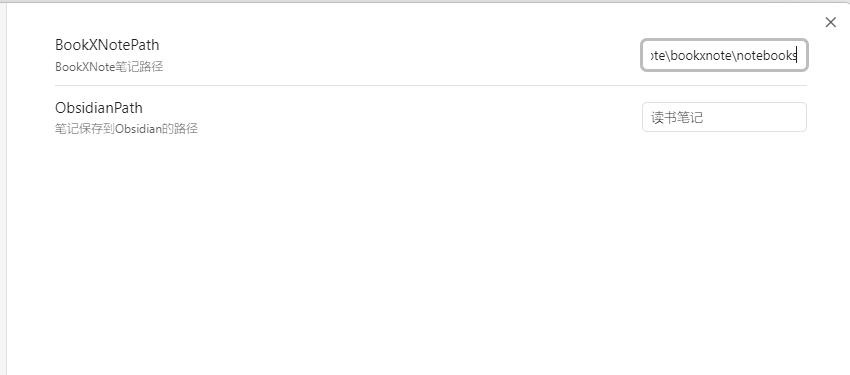
  1. BookXNotePath 是BookXNote笔记存放的位置,定位到notebooks文件夹。例如C:\Users\bookxnote\notebooks,注意最终是notebooks结尾,没有 \。
  2. ObsidianPath 是Obsidian笔记存放路径,注意使用 / 区分文件夹

4. 同步笔记

导入所有的笔记
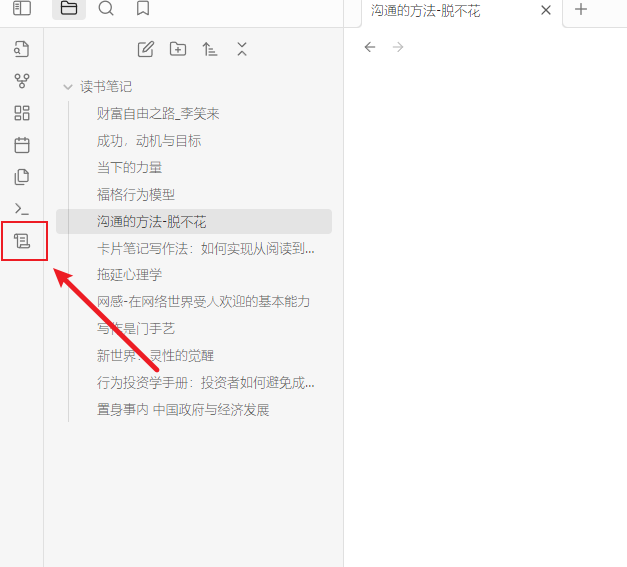
同步所有笔记

单条笔记导入

插图-bookxnote单条笔记更新.png

68%
HealthFair
ReviewSatisfactory
About
Sync BookXNote reading notes into Obsidian as organized Markdown files. Read BookXNote's JSON Notebooks and import all or individual notes while keeping notebook structure and note content intact.
ImportSyncingJSON
Details
Current version
0.3.0
Last updated
2 years ago
Created
2 years ago
Updates
4 releases
Downloads
621
Compatible with
Obsidian 0.15.0+
Platforms
Desktop only
License
MIT
Report bugRequest featureReport plugin
Author
codelisteningcodelistening
github.com/CodeListening
GitHubcodelistening
  1. Community
  2. Plugins
  3. Import
  4. BookXNote Sync

Related plugins

Importer

Import data from Notion, Evernote, Apple Notes, Microsoft OneNote, Google Keep, Bear, Roam, and HTML files.

Self-hosted LiveSync

Sync vaults securely to self-hosted servers or WEBRTC.

Zotero Integration

Insert and import citations, bibliographies, notes, and PDF annotations from Zotero.

Readwise Official

Sync highlights from Readwise to your vault.

Fast Note Sync

Real-time sync of your vaults across server, mobile, and web; shareable with anyone; supports REST and MCP integrations to build your personal AI knowledge base.

Weread

Sync Tencent Weread highlights and annotations.

Full Calendar Remastered

Complete Calendar HUB experience. Work with all your calendars in one place. Analyze your time and take action!

ZotLit

Integrate with Zotero, create literature notes, and insert citations from a Zotero library.

Kindle Highlights

Sync your Kindle book highlights using your Amazon login or uploading your My Clippings file.

Local Images Plus

A reincarnation of Local Images to download images in Markdown notes to local storage.