Better Search Result Views
 shechu-ovo-10127 downloads
Show search results grouped under their headings, in find in note and in the built-in search, and still find words split by line breaks, tags or page markers.
- Overview
- Scorecard
- Updates4
Search results grouped under their headings, in find in note and in Obsidian's built-in search. 简体中文
This plugin improves how Obsidian shows search results, in two places:
- Find in note: all matches in one view. Press
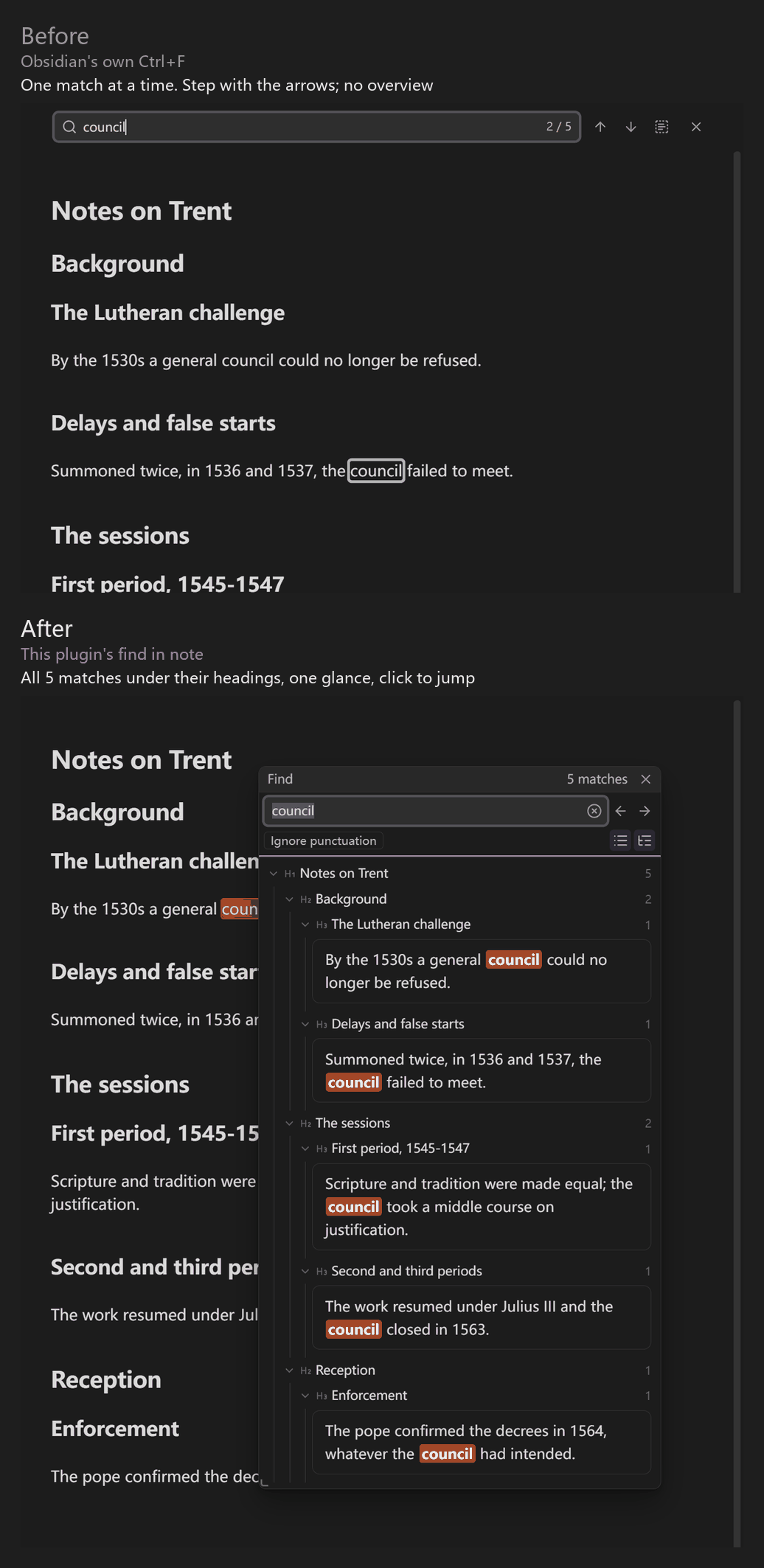
Ctrl+F(taking it over is optional) for a floating panel that lists every match under its headings, which fold; click one and the note jumps to it and highlights it. Obsidian's ownCtrl+Fmarks one match at a time, and you step through them with the arrows. The panel switches between tree and compact (one line per match). - A better built-in sidebar search. Obsidian's own sidebar Search shows its results as a heading tree, and clicking a result jumps as usual. Its ⚙ menu gets a group of "Search enhancement" options (on by default; switch it off in settings); limit the scope with the built-in
path:operator. The enhancement brings three things: results grouped under headings; words split by a line break, a<!--p.12-->page marker, a tag or a comment are still found; and variant characters such as鄴and邺count as the same (used for searching only; your notes are never changed).
Variants and page markers are mainly for people who read Chinese historical texts; you can ignore them otherwise. If your notes mark pages like <!--p.12-->, the find-in-note panel shows each result's page number (see "Page markers" below).
An independent plugin, not affiliated with Better Search Views (see Acknowledgements).
No network access, no telemetry, no account; works on desktop and mobile. The interface follows Obsidian's language (Chinese, or English otherwise). In the English interface the variant-character features are hidden by default (turn them on in settings if you read Chinese sources). A short feature guide opens the first time the plugin is enabled; reopen it any time with the command "Show feature guide".
Before and after
Real screenshots of the same notes and the same search word.
Find in note
Top: Obsidian's own Ctrl+F, which marks one match at a time. Bottom: this plugin's find in note, with every match under its headings, so you see the whole note at a glance and click to jump.
Built-in sidebar search
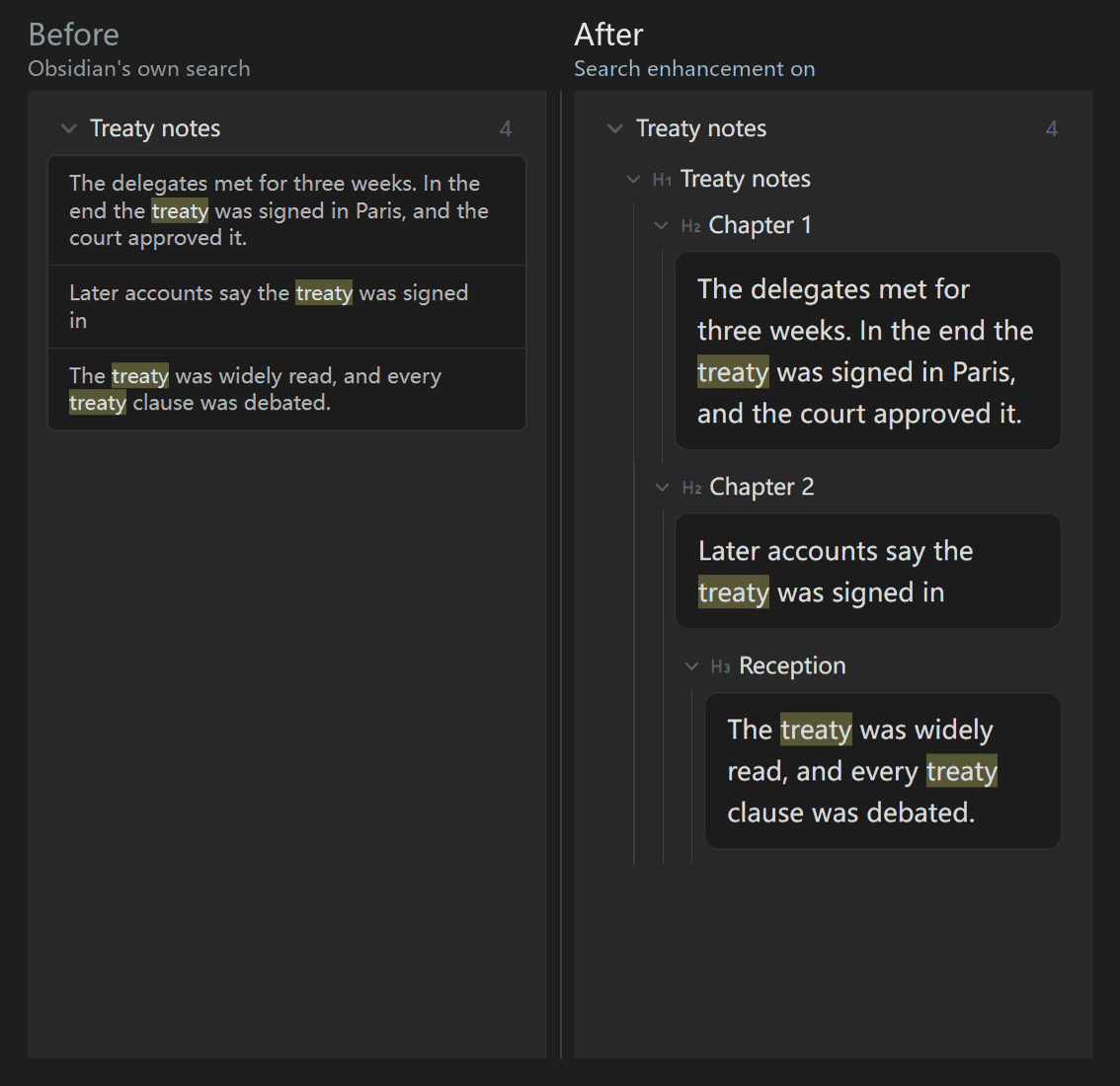
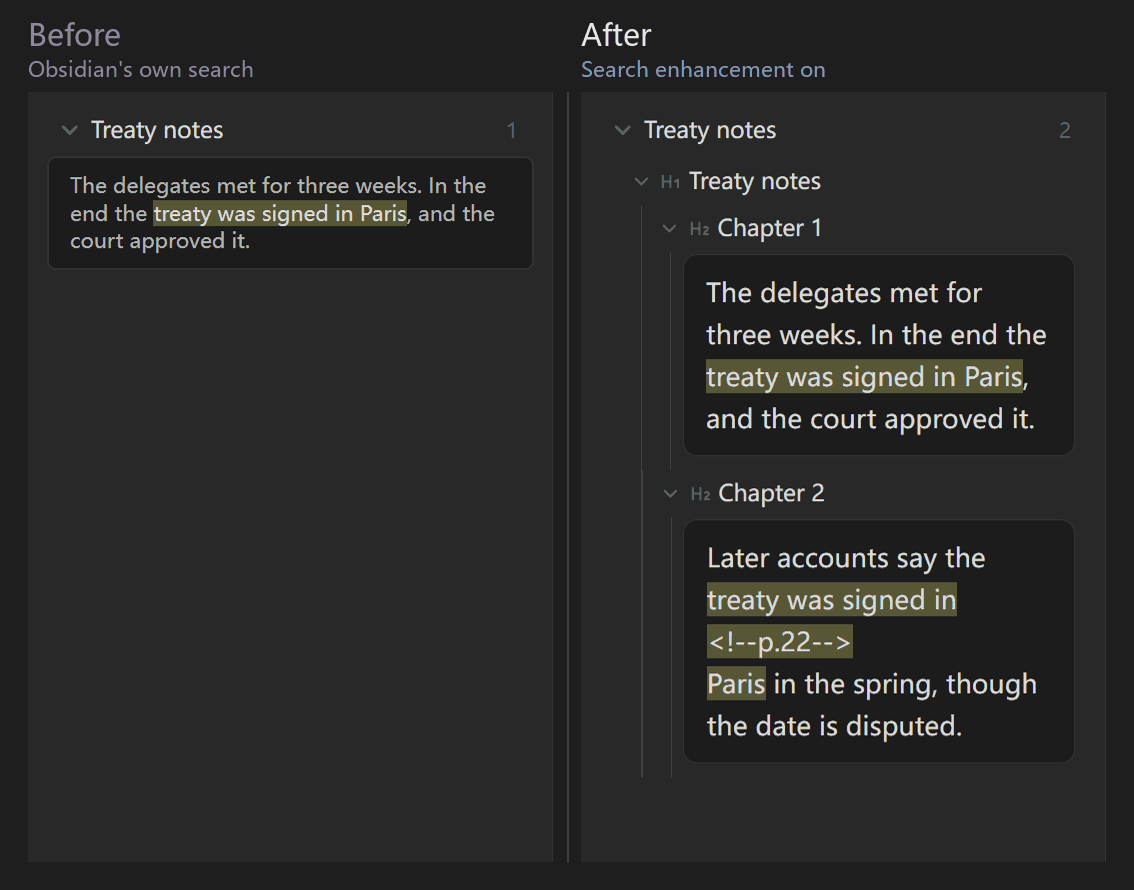
In each pair, left: Obsidian's own search; right: with the "Enhance Obsidian search" setting on (the default). Put a phrase in quotes so Obsidian treats it as one phrase.
Results grouped by heading. Search for "treaty". Obsidian lists the results flat; with the enhancement they sit under their headings, and each heading folds.
Words split by a page marker. Search for "treaty was signed in Paris". The enhancement also finds the one split by a line break and a <!--p.22--> page marker.
Usage
Commands in the command palette:
- Find in note (with result list): opens the floating panel over the note; selected text becomes the query.
- Obsidian built-in find in note: if you let the plugin take over
Ctrl+F, this still opens the built-in find bar (with replace). - Switches on the panel: variants, ignore punctuation, show or hide the result list, and tree or compact view.
Settings
Everything is on one page: custom variant groups (one group per line, such as 於于), the three Unicode Unihan tables (traditional and simplified, Z-variants, semantic variants), the maximum number of results, whether find in note takes over Ctrl+F, and the position and size of the panel.
Page markers
If your notes are transcriptions of old books or edited texts, write an HTML comment where page N begins: <!--p.N-->, with N an integer (it may be negative when the front matter has no printed page number, as in <!--p.-3-->). Spaces inside the comment are fine, as in <!-- p.12 -->.
- Only this format is recognised.
[p.12],<p12>and第12页are not. - With markers in place, the find-in-note panel shows the page number of each result, and words split by a marker are still found (see the comparison above).
- Notes without such markers can still be searched and grouped by heading; they just don't show page numbers.
Enhance Obsidian's built-in search
The setting "Enhance Obsidian search" is on by default and can be switched off at any time. While it is on, Obsidian's built-in Search changes in two ways:
- Search enhancement options. In the menu behind the ⚙ button next to the search box, below the three built-in switches, a "Search enhancement" group appears: variants, across page markers and line breaks, across markup and comments, ignore punctuation, headings only. A small dot on the ⚙ button shows that an option is in effect. The first time you use it, the menu opens once by itself; after that it follows you.
- Heading tree. Each result gets the line of the heading it sits under, indented by level; click a heading line to fold or unfold the results below it.
How it works:
- The ticked options only rewrite the words you type into a regular expression that Obsidian's search understands at the moment of searching. The text in the search box stays as it is, and saved searches are unchanged.
- Only plain words and quoted phrases are rewritten. Operators such as
path:,tag:,file:andline:, your own/regular expressions/,[properties],OR, parentheses and the exclusion sign-are kept as typed; the panel says that these are not affected by the options. - It approximates the matching rules of this plugin's find-in-note panel with a regular expression, so the two can differ on unusual input (for example, an HTML comment that contains
>cannot be skipped here).
Limits to know about:
- It reads and modifies the internal structure of the built-in search panel (Obsidian offers no public interface for this), so it may stop working after an Obsidian update. If the structure does not match or something fails, it undoes its changes and turns itself off, and the rest of the plugin is not affected.
- Switching the setting off restores the panel at once.
- "Headings only" uses a lookbehind; iOS before 16.4 does not support it, so there it falls back to a form that also counts the heading marker as part of the match.
- Fold state is kept only in the open search panel and is not written to any file.
Acknowledgements
The tree view follows the idea of Better Search Views by ivan-lednev (MIT), which shows Obsidian's own search results as an outline of heading breadcrumbs. This plugin does not use its code and draws its own find-in-note panel. The enhancement reads and modifies the built-in search panel only while the setting is on (it is on by default); backlinks and embedded queries are not touched.
Data and licence
The Unihan variant tables are generated from the Unicode Character Database (Unihan, Unicode License v3); see THIRD_PARTY_NOTICES.txt. The plugin is released under the MIT licence.
Development
npm install
npm run build   # produces dist/main.js, dist/styles.css, dist/manifest.json
npm test
npx eslint src  # the official Obsidian review rules
npm run unihan -- <Unihan.zip>   # regenerate the Unihan tables