Bear Cursor
 tuatara45 downloads
Add a red, gently blinking 2px caret inspired by Bear, with line-height matching and reduced-motion support.
- Overview
- Scorecard
- Updates1
A red, gently blinking 2px insertion caret for Obsidian, inspired by Bear. The caret follows the current line height and respects your system’s reduced-motion preference.
Works independently of Bear Style and requires no theme, CSS snippet, settings, or account.
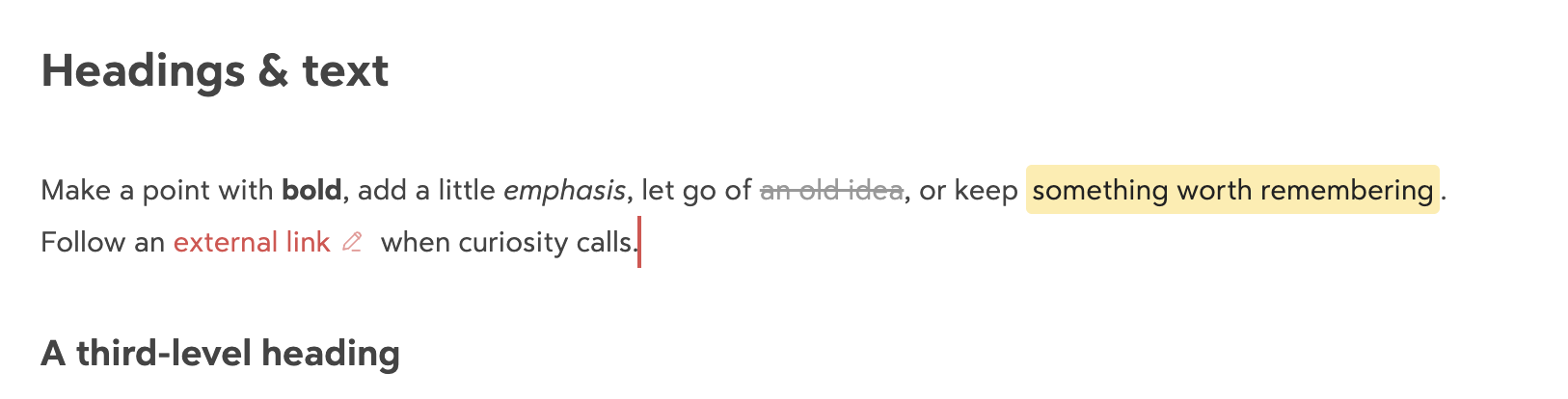
The screenshot uses the optional Bear Style appearance. Bear Cursor changes only the insertion caret.
Compatibility
- Desktop only; requires Obsidian 1.13.7 or later.
- Previously tested on macOS with Obsidian 1.13.7 in the original Bear Style repository. Later versions and other desktop platforms have not been fully tested.
- Works in the Markdown editor (Live Preview and Source mode).
- Text selections and secondary cursors remain managed by Obsidian.
- The replacement yields to IME composition and Vim mode. IME candidate windows and Vim have not been fully tested.
- Other cursor replacement plugins or CSS that hides the native caret may conflict.
Installation
Install from the Bear Cursor community listing, or open Settings → Community plugins → Browse, search for Bear Cursor, install it, and enable it.
For manual installation:
- Download
manifest.json,main.js, andstyles.cssfrom the latest release. - Place these three files directly in
<vault>/.obsidian/plugins/bear-cursor/. Use your actual configuration folder if you renamed.obsidian. - Reload Obsidian and enable Bear Cursor in Settings → Community plugins.
Updating an existing Bear Style installation
The plugin ID remains bear-cursor. Disable the existing plugin, replace its three runtime files with the files from this repository’s release, reload Obsidian, and enable it again. There are no saved plugin settings to migrate. Do not install a second copy under a different folder name.
Updates are available through Obsidian’s community plugin update controls. You can also repeat the manual replacement steps for new releases.
Appearance
The default caret is 2px wide and red (#DD4C4F), with a one-second fade. To customize it, add an optional CSS snippet:
body {
  --bear-caret-color: #DD4C4F;
  --bear-caret-width: 2px;
}
With Reduce motion enabled in your operating system, the caret stays visible without blinking. Disabling the plugin restores the native caret automatically.
Privacy
No network requests, telemetry, file writes, stored settings, payment, account requirement, or automatic updater. The plugin does not change note content, selections, or undo history.
Development
main.js is the readable source and the release entry point; no build step or dependency installation is required. Obsidian supplies obsidian, @codemirror/view, and @codemirror/state at runtime. Run npm run check with Node.js 22 or later for syntax and release metadata checks.
The plugin uses CodeMirror’s layer API and RectangleMarker.forRange for editor-relative positioning. CodeMirror owns layer lifecycle; a scoped observer refreshes caret geometry when Obsidian changes hanging indents. The observer is disconnected when its layer is destroyed. CSS hides the native caret only while a replacement marker exists in the focused editor.
To release, update manifest.json, package.json, and versions.json, then push a tag exactly matching the version (for example, 1.0.3, without a v prefix). The release workflow checks the files and uploads all three runtime assets.
License and origin
MIT, copyright 2026 cherishh. Extracted from the author’s Bear Style plugin. Bear Cursor is an independent community project and is not affiliated with Bear or Obsidian.