Beads
 Rome Thorstenson387 downloads
A live pane and editor for the Beads (bd) issue tracker — see what's ready, edit issues inline, and embed live queries in your notes. Desktop only.
- Overview
- Scorecard
- Updates4
A tiny, desktop-only Obsidian plugin that renders a live, clickable pane for the
Beads (bd) issue tracker — and does real
integration: click any issue to edit it in a tab, as YAML frontmatter + a markdown
body, and save straight back to bd.
No Obsidian + Beads plugin existed before this one — it fills a genuine gap for anyone
who tracks work in bd and lives in Obsidian.
Features
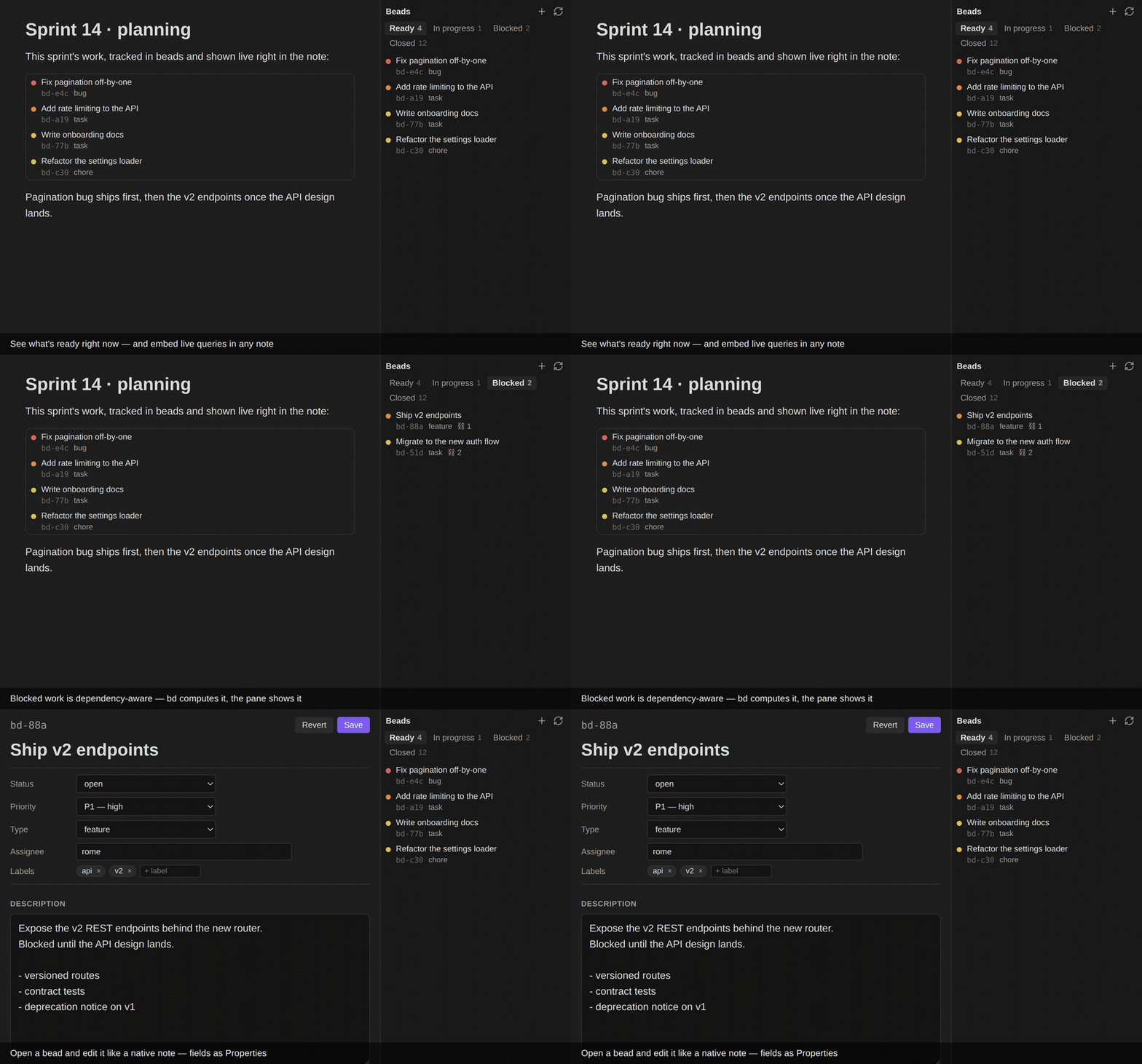
- 🗂️ Ready-first, tabbed pane — a native
ItemViewwith Ready · In progress · Blocked · Closed tabs (each with a live count), so you open straight to what you can do right now. Only the active tab hitsbd, and each paginates with Load more, so the pane opens fast even with thousands of closed issues. Blocked rows show a⛓ nhint. - ✏️ Edit in a tab — click a row and the bead opens like a note (not a popup): a
title, a Properties panel of typed controls (status — set it to
closedto close, or back toopento reopen — priority, type, assignee, labels) and a markdown description. Save (or ⌘/Ctrl-S) writes only the changed fields viabd update. Blocked by / Blocks and the comment thread (rendered markdown) show below. - ⚡ New bead — Beads: New bead (or the
+in the pane) opens the same editor, blank (bd create). - 📄 Live
beadscode blocks — embed a query in any note (Dataview-style) and get the same clickable rows inline. See Embedding queries. - 🔢 Status-bar count — an ambient
● N readyeven when the pane is closed. - 🟢 Live updates — with Beads 1.3's events journal on, the pane follows
bd's own change feed and updates the moment a bead changes, from any terminal or agent. Without it, the pane refreshes on an interval and whenever.beads/changes on disk. See Live updates. - ⚙️ Near-zero setup — if your vault folder itself contains a
.beads/, the project root auto-fills on first load.
Requirements
- Obsidian desktop — the plugin shells out to a local binary via Node's
child_process, which is unavailable on mobile.isDesktopOnlyis set. - The
bdCLI — install Beads and make surebdis on yourPATH(or set an explicit path in settings).
Installation
Community plugins (once accepted)
Settings → Community plugins → Browse → search "Beads" → Install → Enable.
Manual
- Download
main.js,manifest.json, andstyles.cssfrom the latest release. - Copy them into
<your-vault>/.obsidian/plugins/beads-pane/. - Reload Obsidian and enable Beads under Community plugins.
Usage
- Open Settings → Beads and set Project root to a directory that contains a
.beads/database (auto-filled if your vault folder has one). Click Test connection to confirmbdis reachable. - Open the pane: click the list-checks ribbon icon, or run "Beads: Open pane" from the command palette. Switch tabs (Ready / In progress / Blocked / Closed) and use Load more to page through long lists.
- Click a row to open the bead in an editor tab. Edit the title, the properties
(status — set it to
closedto close, or back toopento reopen — priority, type, assignee, labels) and the description, then Save (or ⌘/Ctrl-S). Dependencies and the comment thread show below. - Add new work anytime with "Beads: New bead" (bind it to a hotkey) or the
+in the pane header.
Embedding queries in notes
Put a fenced beads code block in any note to render a live, clickable list right
where you're thinking. One directive per line:
```beads
ready
```
```beads
query: status=open AND priority<=1
limit: 10
```
Accepted directives:
| Directive | Meaning |
|---|---|
ready |
Unblocked, actionable issues (bd ready). |
blocked |
Issues waiting on dependencies (bd blocked). |
list |
All open issues (bd list). |
query: <expr> |
A bd query expression, e.g. status=open AND priority<=1. |
limit: <n> |
Max rows (clamped to 50). |
Embeds re-run when the note renders and when beads change (coalesced to at most twice a
second) — never on a timer — and share a global read cache, so many blocks won't hammer
bd.
Live updates
Beads 1.3.0 can keep an
ordered events journal: every change made through bd is recorded, with the bead's
full new state, in the same transaction as the change. When the journal is on, the
plugin runs one bd events tail --follow and applies each record to what is on screen:
- Edits to a bead you can see (title, priority, labels, status) are patched in place,
with no
bdcall. - A bead that stops belonging to a tab (closed, claimed, newly blocked) leaves it at once.
- Only when
bdhas to decide membership (is this bead now ready?) does the visible tab re-read, once per burst of changes. Tab counts re-read only when a status can have moved. - An open bead editor reloads when its bead changes. If you have unsaved edits it keeps them and says the bead changed; Revert loads the new version.
- The small dot beside the pane title is filled green while live.
The journal is off by default, and turning it on is a workspace-wide choice: bd config set events-journal true writes .beads/config.yaml, so every bd command in
that workspace, agents included, is journaled from then on (and every clone, if the file
is committed). So the plugin never turns it on by itself. With bd 1.3.0+ and the journal
off, the pane offers it once; Turn on… explains the effect and asks first. You can
also turn it on in Settings → Beads → Live updates, or from a terminal. Turn it off
with bd config set events-journal false; the plugin notices and goes back to polling.
Some changes never reach the journal: bd dolt pull and other syncs, bd sql, and a
switch to another clone (each clone numbers its own journal). While live, the plugin
checks the workspace's Dolt commit every Auto-refresh interval seconds (one cheap
bd vc status); if it moved with no journal record to explain it, the pane rebuilds from
current state. A sync that lands in the same interval as a local write can't be told
apart this way, and a defer date passing changes Ready without any record, so the pane
also re-reads every tenth check (every 5 minutes by default). If the plugin falls behind the journal's retention window (7 days or
100,000 records by default, for example after the computer sleeps for a week), bd
reports the gap and the plugin rebuilds, then follows from the newest record.
The follow process is a long-lived bd: near-zero CPU, but it holds bd's working set
(about 150 MB with an embedded store). With older bd, or the journal off, the plugin
behaves as before: it re-reads on an interval and when .beads/ changes on disk.
The plugin does not use bd serve. It adds nothing over bd events tail for a single
local reader, it is still in preview, and today it refuses the default embedded store.
Settings
| Setting | Default | Description |
|---|---|---|
| Project root | (empty) | Absolute path to the directory containing .beads/. |
bd binary path |
bd |
Path to the bd executable. If not found, use the full path from which bd (see Troubleshooting). |
| Auto-refresh interval | 30 |
Seconds between refreshes (0 disables). With live updates on, how often to check for changes the journal can't see, such as a sync. |
| Live updates | — | Shows whether the pane is following the events journal, and offers to turn it on. |
Troubleshooting
- "bd binary not found" / the pane is empty and Test connection fails. GUI-launched
apps often don't inherit your shell
PATH, so the defaultbdcan't be resolved. Runwhich bdin a terminal and paste the full path into Settings → Beads → bd binary path. - "No bd database here." The project root must be a directory that contains a
.beads/folder. Point it at yourbdproject (not necessarily your vault). bdwon't close a blocked issue. It won't close an issue that still has open blockers; the error is shown as a notice. Close its blockers first (the editor tab lists them under Blocked by — click one to jump to it).- The pane didn't update after a CLI change. Without live updates it refreshes on an
interval and when
.beads/changes on disk; hit the refresh icon to force it. Hover the dot beside the pane title to see which mode it is in and why. With bd 1.3.0+, turn on live updates. - The status bar says "● bd error".
bdfailed (not found, or the store is broken). Hover it for the message, and use Test connection in settings.
Security
- The plugin runs the
bdbinary you configure, in the project root you configure — the same trust model as the Shell commands plugin. Point it only at abdyou trust. - Commands are invoked with
execFile(orspawn, for the one long-livedbd events tail) and an argument array — never a shell string — so issue IDs and other values can't inject shell metacharacters. - Issue titles and descriptions render as plain text (never HTML) in the pane, so a bead
authored elsewhere and synced in can't inject markup. Comment threads in the editor
render through Obsidian's own
MarkdownRenderer— the same sanitized path as any note. Data-controlled values are also passed after a--sentinel (or as--flag=value) so they can't be reparsed asbdflags. - The plugin runs
bdagainst whatever.beads/your project root points at (including an auto-detected vault-local one). It never executes anything from the dataset — but that means you trustbd's own parsing of that database, as with anybdinvocation.
Development
npm install
npm run dev     # esbuild watch → main.js
npm run build   # typecheck + production bundle
To test against a real vault, symlink or copy main.js, manifest.json, and
styles.css into <vault>/.obsidian/plugins/beads-pane/.
Prior art (inspiration)
- Taitava/obsidian-shellcommands
— the canonical desktop-only
child_processpattern. - Beads —
bd --help,bd list --json,bd show --json,bd close. - High-star pane/view plugins (Kanban, Tasks, Dataview) for
ItemViewand workspace-leaf conventions.
License
MIT © Rome-1