Search...Search plugins and themes...
⌘K
Sign in
  • Get started
  • Download
  • Pricing
  • Enterprise
  • Account
  • Obsidian
  • Overview
  • Sync
  • Publish
  • Canvas
  • Mobile
  • Web Clipper
  • CLI
  • Learn
  • Help
  • Developers
  • Changelog
  • About
  • Roadmap
  • Blog
  • Resources
  • System status
  • License overview
  • Terms of service
  • Privacy policy
  • Security
  • Community
  • Plugins
  • Themes
  • Discord
  • Forum / 中文论坛
  • Merch store
  • Brand guidelines
Follow us
DiscordTwitterBlueskyThreadsMastodonYouTubeGitHub
© 2026 Obsidian

Bastion

Chad KirkendallChad Kirkendall129 downloads

Bastion turns your Obsidian vault into a full command center — AI search, tasks, projects, a calendar, and dashboards — without asking you to restructure a single note.

Add to Obsidian
Bastion screenshot
Bastion screenshot
Bastion screenshot
Bastion screenshot
Bastion screenshot
Bastion screenshot
Bastion screenshot
Bastion screenshot
Bastion screenshot
Bastion screenshot
  • Overview
  • Scorecard
  • Updates20

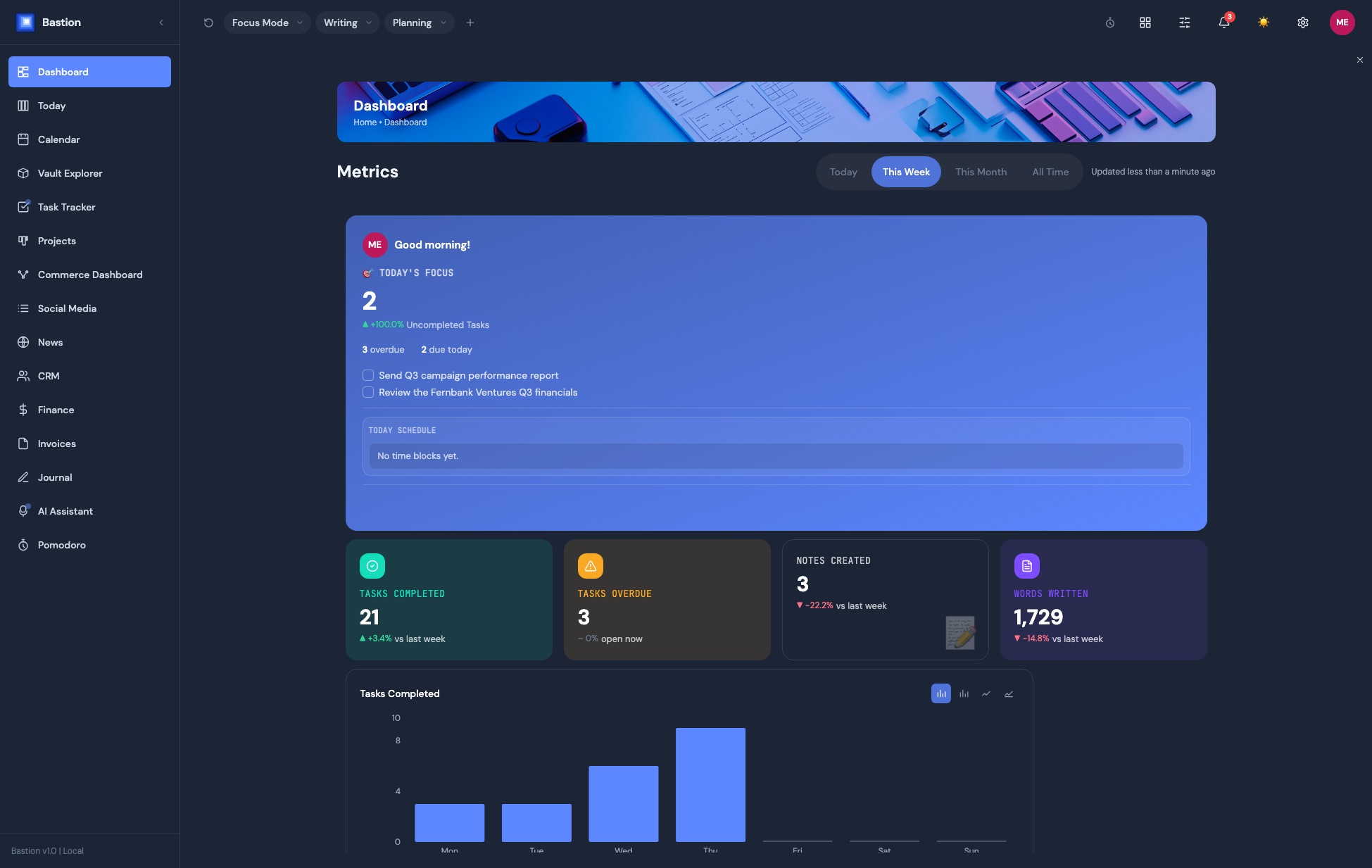
Bastion Dashboard

Bastion turns your Obsidian vault into a full command center — AI search, tasks, projects, a calendar, and dashboards — without asking you to restructure a single note. Everything reads from and writes back to plain Markdown files already in your vault.

Learn more, and start a 14-day free trial, at getbastion.app.

This plugin is closed source. This repository distributes compiled releases only — see LICENSE.

Features

  • Dashboard — customizable widget grid (drag/resize/hide), per-widget backgrounds, chart-type switching
  • Today / Planning Surface — daily planning view, task scheduling
  • Vault Explorer — browse, read, and edit notes, plus an Inbox / Health / Rules workflow for capturing new material into a searchable, AI-organized Knowledge Base and keeping it tidy
  • AI Assistant — chat against your vault's own content, 7 providers
  • Calendar — month/week/day views, synced from Google, Apple, or Microsoft/Exchange
  • Task Tracker — synced from 12 sources (Todoist, Apple Reminders, Asana, ClickUp, Jira, Linear, Monday.com, Trello, GitHub Issues, Google Tasks, Microsoft To Do, TickTick)
  • Projects — kanban boards, gantt timelines, progress tracking
  • Pomodoro — timers with real Flowtime (open-ended) mode, idle detection, task linking
  • CRM (Pro) — contacts, companies, and a deals pipeline in one dashboard, synced from Google/Apple/Exchange contacts, with email thread history and AI-assisted create/update
  • Finance (Pro) — wallets, budgets with rollover, savings goals, cash-flow forecasting, net worth tracking, a bill-triage view, and PDF/receipt import with AI-read transactions
  • Commerce Dashboards (Pro) — multi-instance store analytics (Etsy, Stripe, Shopify, Gumroad, Lemon Squeezy), each with its own layout
  • Invoices — 20 built-in layouts with a theme editor, e-signatures, and print-to-PDF, right from the vault
  • Social Media Analytics (Pro) — engagement/follower tracking across YouTube, Instagram, Facebook, X, TikTok, Dribbble
  • News — a personalized industry feed from sources you configure, AI-ranked, with thumbs-down feedback and save-for-later
  • Journal — guided writing templates, mood tracking, streaks, and "on this day" memories
  • Web Browser — an in-app browser tab that can clip pages straight into your Knowledge Base
  • Terminal — a real PTY-backed terminal panel, not a fake console (Windows Terminal now bundles its own Node runtime — no separate install needed)

Multiple panels can be docked side-by-side (desktop), with saved workspace presets (Focus Mode, custom layouts) and full light/dark theming.

Installing

Option 1 — Community Plugins (recommended)

  1. In Obsidian, open Settings → Community plugins → Browse, and search for Bastion.
  2. Click Install, then Enable.

Option 2 — Manual install

  1. Download main.js, manifest.json, and styles.css from the latest release.
  2. Create a folder named bastion inside your vault's .obsidian/plugins/ folder.
  3. Copy the three downloaded files into that folder.
  4. In Obsidian, go to Settings → Community plugins, reload, and enable Bastion.

Getting a subscription

Bastion needs a Bastion account to unlock Plus/Pro features. Sign up or start your trial at getbastion.app/pricing, then use Settings → Bastion → Sign in to Bastion inside the plugin to connect it.

Support

Help Center: getbastion.app/help

HealthExcellent
ReviewCaution
About
Bastion turns your Obsidian vault into a full command center — AI search, tasks, projects, a calendar, and dashboards — without asking you to restructure a single note. Everything reads from and writes back to plain Markdown files already in your vault. Dashboard — customizable widget grid (drag/resize/hide), per-widget backgrounds, chart-type switching Today / Planning Surface — daily planning view, task scheduling Vault Explorer — browse, read, and edit notes without leaving the dashboard AI Assistant — chat against your vault's own content, 7 providers Calendar — month/week/day views, synced from Google, Apple, or Microsoft/Exchange Task Tracker — synced from 12 sources (Todoist, Apple Reminders, Asana, ClickUp, Jira, Linear, Monday.com, Trello, GitHub Issues, Google Tasks, Microsoft To Do, TickTick) Projects — kanban boards, gantt timelines, progress tracking Pomodoro — timers with real Flowtime (open-ended) mode, idle detection, task linking
AITasksProject management
Details
Payments
Paid
Current version
1.2.0
Last updated
2 weeks ago
Created
2 months ago
Updates
20 releases
Downloads
129
Compatible with
Obsidian 1.5.0+
Platforms
Desktop, Mobile
License
OTHER
Report bugRequest featureReport plugin
Author
Chad KirkendallChad Kirkendallnerdsanddragons
GitHubnerdsanddragons
  1. Community
  2. Plugins
  3. AI
  4. Bastion

Related plugins

Tasks

Track tasks across your vault. Supports due dates, recurring tasks, done dates, sub-set of checklist items, and filtering. Maintained by Clare Macrae and Ilyas Landikov, created by Martin Schenck.

Copilot

Run AI agents such as Claude Code, Codex, and OpenCode inside your vault. Turn your second brain into a smart assistant that gets knowledge work done.

TickTickSync

Sync TickTick tasks.

Operon

Task and project management system that unifies inline tasks and file-based tasks in the same workflows with Tables, Filters, Calendars, Kanban boards, Gantt views, Canvas, and time tracking.

dotpm

Full-featured task and project management: stunning Gantt charts, Kanban boards, Table views, customizable fields, due date notifications, dependancies

Base Board

Organize notes into Kanban boards using frontmatter properties. Drag and drop cards between columns powered by Bases.

Apex Dashboard

Your personal command center — memos, todos, and projects in one stunning glassmorphism dashboard.

TaskNotes

Note-based task management with calendar, pomodoro and time-tracking integration.

Claudian

Embeds Claude Code/Codex and other local Agents as AI collaborators in your vault.

Smart Connections

Find related notes and excerpts while writing. Your AI link building copilot displays relevant content in graph + list view. A local embedding model powers semantic search. Zero setup. No API key.