Apex Dashboard
 PandoraReads38k downloads
Your personal command center — memos, todos, and projects in one stunning glassmorphism dashboard.
- Overview
- Scorecard
- Updates70
Obsidian 一页纸工作台。一个页面,搞定一切。随手记灵感、管理待办、追踪项目 — 而且好看得不像实力派。English
截图预览
功能特色
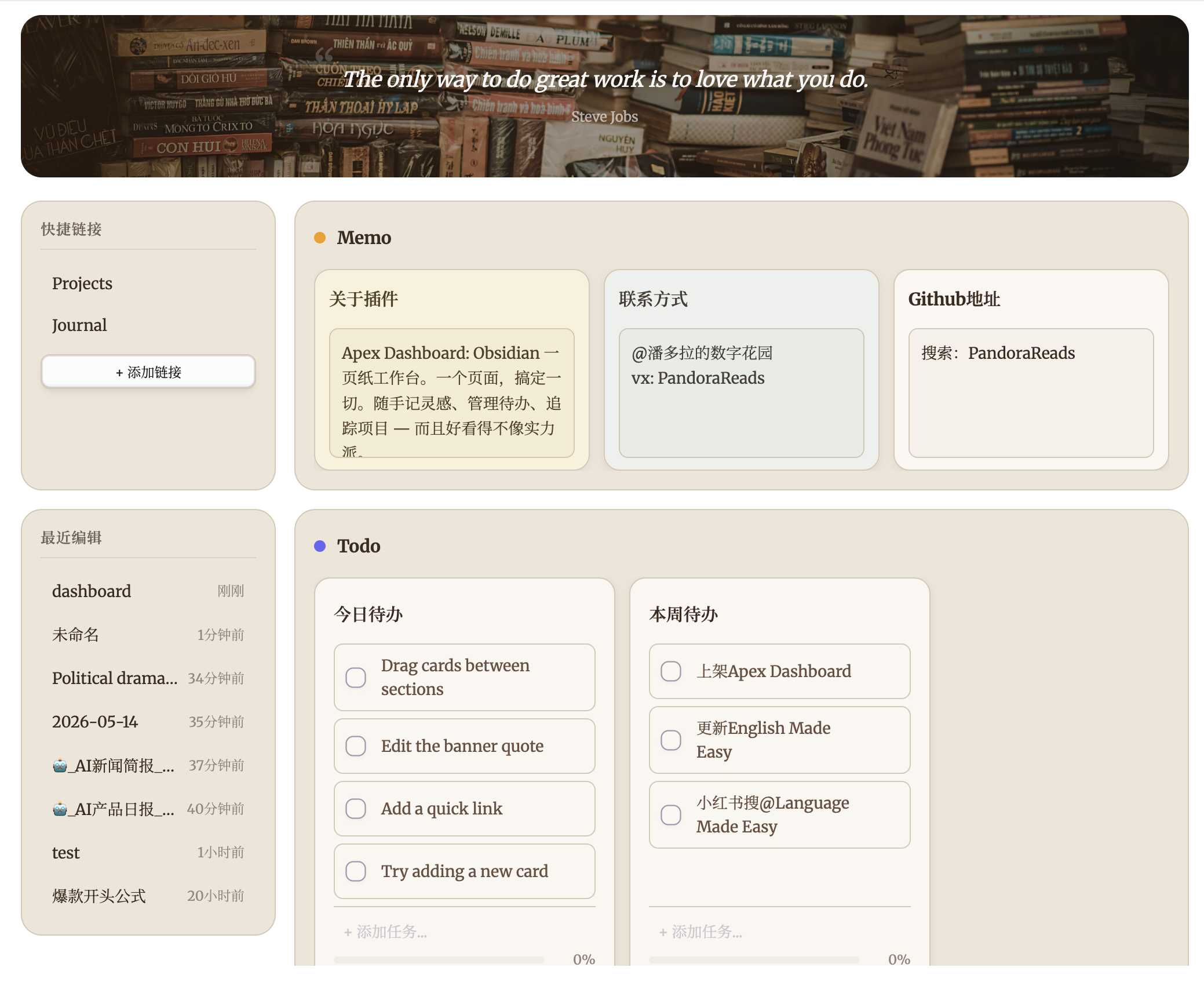
🗒️ Memo(备忘)
内置便签式 Memo 卡片,每张卡片都有可编辑文本区域,随时记录灵感、会议笔记或每日反思,无需离开仪表盘。支持 [[双链]] 渲染为可点击链接,轻松关联笔记。
✅ Todo(待办)
交互式任务清单,支持添加、拖拽排序、勾选完成。底部进度条以百分比实时显示完成进度。待办项同样支持 [[双链]],方便交叉引用。
📁 Projects(项目)
将 Vault 文档组织为项目卡片。每张卡片可关联多篇笔记,支持封面图片(支持本地 Vault 图片和网络图片链接)和内联文档搜索,快速添加文件。支持管理多种文件类型,包括 Markdown 笔记、PDF、图片、音频和视频。
📝 Notes(笔记)
紧凑的列表式分区,用于整理参考文档和快捷访问文件。每行最多显示 5 张卡片,无封面图片,最大化信息密度。
📅 日历(Calendar)
原生月历格子,展示全仓库所有带日期的任务(无需 dataview 或外部插件)。每格列出当天任务,点击格子查看当日日程;可打开全屏大月历,支持月份切换与就地勾选。多日行程([start::]/[end::])跨天显示。侧栏日历小组件的全屏放大视图也可以作为日历分区直接嵌入工作台:完整月视图(多日横条)与周时间轴网格、任务筛选、今日跳转一应俱全,点击日期数字即可为该日添加待办(自动写入日记或工作台待办清单)。
🔍 查询(Dataview)
用内置 DQL 引擎查询整个仓库,无需安装 Dataview 插件。添加查询分区后即可书写查询语句,例如 TABLE file.name, rating FROM "Books" WHERE rating >= 4 SORT rating DESC。支持 TABLE、LIST、TASK、CALENDAR、HEATMAP 五种输出,来源可用文件夹、标签、链接(FROM),搭配 WHERE、SORT、GROUP BY、FLATTEN、LIMIT 子句、约 40 个内置函数、全部 file.* 隐式字段、YAML frontmatter 和内联字段([key:: value])。配置弹窗实时校验语法并提供一键示例查询。TASK 复选框可直接回写源笔记,CALENDAR 绘制月历网格,HEATMAP 用任意数值字段绘制年度贡献热力图。结果通过分区刷新按钮按需更新。
🌐 网页(Web)
在分区内嵌入任意网页:填入网址即可像内嵌浏览器面板一样浏览。嵌入引擎全自动——预检站点的嵌入策略,允许 iframe 的站点直接嵌入;拒绝的站点在桌面端自动改用独立网页视图(webview,自带持久登录态,Google Keep、滴答清单网页版等登录型应用可用),手机端则显示兜底卡片并提供"在浏览器中打开"。显示比例提供 50%–125% 预设按钮(密集 Web 应用缩小显示)。移动端建议嵌入 https 站点;嵌入以浏览为主,弹窗与下载请在系统浏览器中进行。
⚡ 快捷操作
将常用快捷方式固定到侧边栏,支持两种操作类型:文件链接可打开任意文档,命令快捷方式可触发任意 Obsidian 命令。内置新建日记和新建笔记预设。
🌤️ 侧栏小组件
左侧栏提供 11 种可独立开关、可拖拽排序的小组件:
- 天气 — 实时天气(温度、体感、湿度、风速)+ 5 日预报(每日图标与最高/最低温)。基于 Open-Meteo,无需 API key;城市搜索自动补全精确定位
- 农历黄历 — 农历日期、传统节日与宜忌速览
- 番茄钟 — 专注计时器:活动标签、专注/休息循环、今日活动分布甜甜圈图;统计页提供目标进度、效率分、趋势图、12 周热力图与今日时间线
- 阅读追踪 — 豆瓣搜书或手动添加书目,计时阅读并按页码记录进度;书卡显示封面、作者与进度条
- 倒计时 — 自定义多个目标日期,按天/小时显示剩余
- 年度进度 — 今年已流逝百分比一览
- 日历 — 月/周双视图日历网格,汇总全库带日期任务;点日期看日程、可直接添加任务(自动写入当日日记),多日事件横跨显示
- 习惯打卡 — 每日勾选打卡,支持昨日补卡、连续天数与热力图统计
- 记账 — 快捷记录收支(备注、补录、自定义类目),今日小计与周/月/年/全部统计,明细账本支持筛选、编辑与 CSV 导入导出
- 相册 — 像电子相框一样自动轮播指定文件夹的图片:悬停暂停、左右手动切换与序号角标,1:1 / 3:4 面板比例,渐隐、左推、右推、放大淡入四种切换动画,可选是否递归子文件夹;轮播间隔 3–60 秒可调,文件夹内图片增删改名后原地刷新、不打断当前播放位置
- 音乐 — 侧栏搜索并播放网易云音乐免费歌曲(可在设置中登录网易云账号,按账号权限播放会员歌曲),支持粘贴歌单链接一键导入、音量与循环模式、播放列表持久化(封面懒加载补全),播放时可选显示全局浮动迷你播放条(关闭仪表盘也能控制;仅桌面端)
侧栏还常驻 周历条(7 天紧凑条、高亮今天)、最近文档 与 滚动回顶 按钮;手机端有同款小组件条,小组件数据跨设备同步合并。
🎨 Banner(横幅)
可自定义的横幅区域,支持编辑引言和背景图片(支持本地 Vault 图片和网络图片链接)。双击即可修改。
🔄 拖拽排列
在分区之间拖拽卡片来重新组织工作空间,也可以在 Todo 卡片内拖拽任务项进行排序,还支持在 Projects/Notes 卡片之间拖拽文档链接。
🧩 自定义分区
共 14 种分区类型自由组合 — 待办、备忘、便利贴、笔记(项目卡)、无封面笔记、数据视图、数据库、文件夹、图片、视频、日历、微信读书、滴答清单、网页 — 每种类型都有独立的布局与交互,打造专属工作流。
🕐 最近文档
侧边栏展示最近编辑的文件及相对时间,快速回到最近的工作。
主题
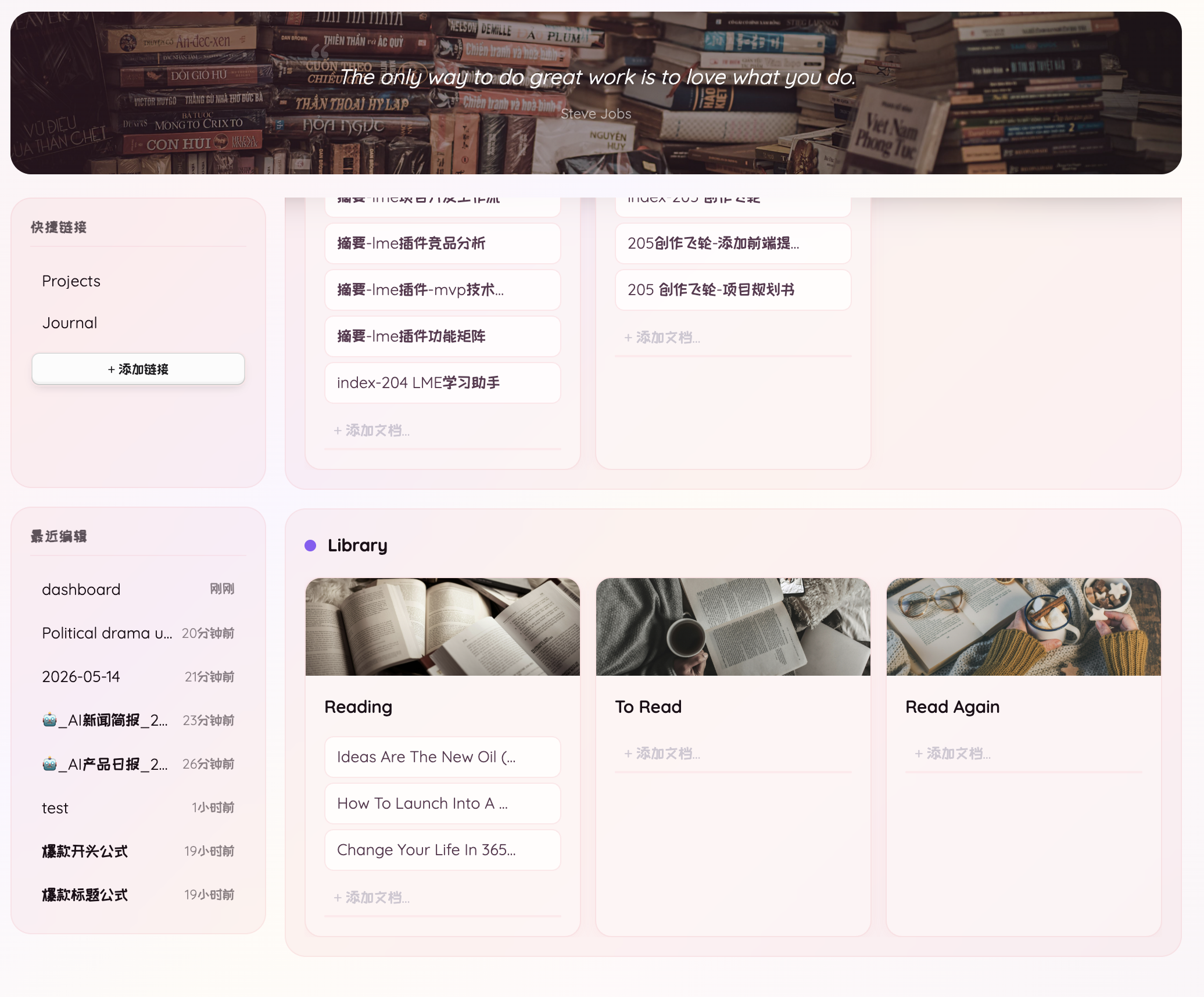
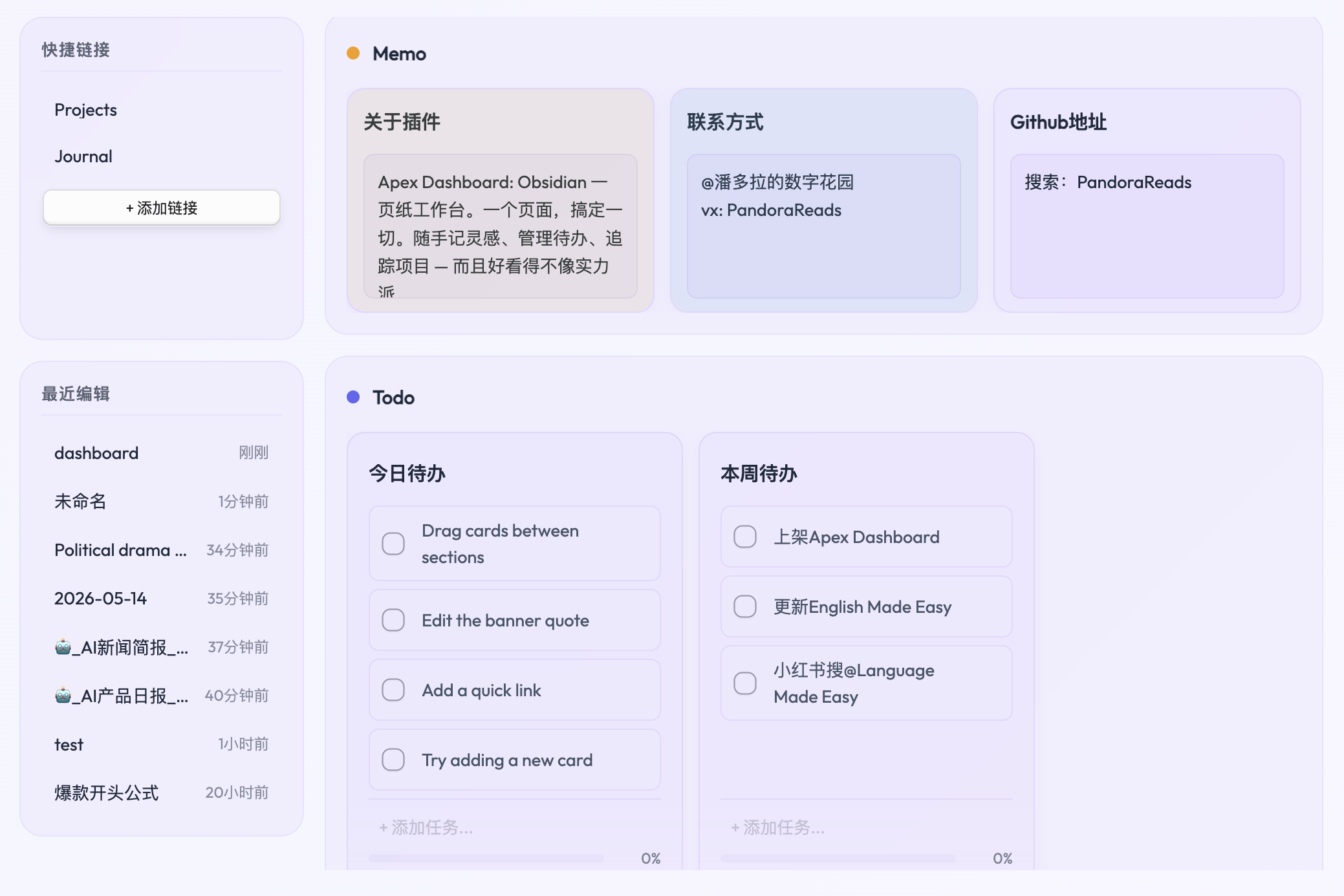
13 款精心设计的主题,各具风格:
| 主题 | 风格 |
|---|---|
| 大地 | 托斯卡纳暖阳:32 秒慢速暖光漂移的羊皮纸底,陶土强调色配橄榄点缀 |
| 北欧 | 极夜峡湾:霜青冰蓝的极光缓漂冷白底,冰川青强调色 |
| 宝莉 | 小马宝莉风高饱和多彩:夜空底六色彩虹极光渐变,每个分区一匹小马的专属色 |
| 花漾 | 玫瑰色柔光,透明分区无边框 |
| 丁香 | 印象派庭院:28 秒慢速漂移的花境水彩底,半透明象牙卡片,藤紫强调色 |
| 岛屿(默认) | 动物森友会风格柔和色调,森林绿配海洋蓝 |
| 苔原 | 冷灰底 + 牛油果绿极光,鼠尾草绿玻璃卡片 |
| 抹茶 | 茶碗美学:26 秒缓漂的茶庭洗地,米色陶瓷卡片配深抹茶强调色与金茶点缀 |
| 朱砂 | 墨韵极简:宣纸底与松烟墨的黑白搭配,40 秒墨晕缓漂,朱砂印章点睛 |
| 霓虹 | 近黑底 + 霓虹品红高亮,亮暗模式一致 |
| 伏特 | 近黑底 + 电光青高亮,亮暗模式一致 |
| 岩浆 | 暖近黑底 + 岩浆橙高亮,亮暗模式一致 |
| 曜黑 | 纯黑底配柠檬高亮,亮暗模式一致 |
所有主题均支持 Obsidian 亮色和暗色模式。
设置选项
- Dashboard 文件路径 — 自定义仪表盘数据文件的存放路径
- 样式 — 从 13 款视觉主题中选择
- 语言 — 支持英文和中文界面
- 最近文档数量 — 控制侧边栏显示的最近文件数量
安装
从 Obsidian 社区插件市场安装
- 打开 设置 > 第三方插件
- 浏览并搜索 "Apex Dashboard"
- 点击安装,然后启用
手动安装
- 从 GitHub Releases 下载最新版本
- 解压到 Vault 的
.obsidian/plugins/apex-dashboard/目录 - 打开 设置 > 第三方插件,启用 "Apex Dashboard"
使用方法
- 通过左侧功能区图标(主页图标)或命令面板打开:
Apex Dashboard: Open dashboard - 首次使用会在 Vault 根目录自动创建
dashboard.md文件 - 所有更改直接保存到文件 — 纯文本格式,你的数据完全属于你
注意: 删除、重命名或对分区进行排序,需要在
dashboard.md笔记中进行操作。在笔记中的任何修改,会在工作台界面中直接生效。
☕ Buy Me a Coffee
如果 Apex Dashboard 让你的 Obsidian 日常更顺手,欢迎请我喝杯咖啡,支持项目持续更新。
更新日志
2.5.2
- 音乐播放断流自愈 — 偶发播放失败不再弹「播放出错,跳到下一首」并永久跳歌:改为静默换新链接原曲重试一次(播放中途断流按原进度续播;暂停太久链接过期也自动换新再续),重试仍失败才安静跳到下一首。只保留三种可操作提醒:手动点 VIP 歌、登录失效、连续多首失败熔断停播
- Banner 名言字体改为下拉选择 — 不用手输字体名了:下拉直接挑——中文字体 8 款(楷体、宋体、仿宋、隶书、行楷、圆体、黑体、霞鹜文楷),英文字体 8 款(Georgia、Times、Palatino、Baskerville、Garamond、Didot、Helvetica、Courier);每项内置跨平台字体栈,macOS / Windows / iPad 同一设置直接生效;此前手输过的字体名会保留在下拉里,不会丢
2.5.1
- 网易云账号登录 — 桌面版在「设置 → 小组件 → 音乐」打开网易云官方页面登录(手机号或扫码),登录后按账号权限播放:会员、购曲曲目完整播放。凭据直接提交网易云,会话仅保留在本机 Electron 独立分区,不写入插件配置、不随仓库同步;退出登录即清除。匿名使用一切如旧
- 跨分区移动卡片 — 拖动卡片标题栏,即可在待办清单、备忘录、便利贴之间移动卡片;备忘/待办互转时保留任务与勾选状态,笔记链接随行;有/无封面笔记卡片也可移入这三个分区
- Banner 名言字体 — 名言颜色旁新增自定义字体:填入本机字体名(如 楷体、Georgia)即刻生效,名言与作者行一同应用;重置即回到主题默认
- 手机端数据库/文件夹分区加高 — 分区行高 50vh→60vh、工具栏瘦身(计数/每页条数收起),网格视图在主流手机可显示 3-4 张卡片;平板与桌面不受影响
- 修复:拖拽书籍偶发消失 — 拖动落点判定与写入序列加固,跨分区拖拽后刷新/重载不再丢失卡片
2.5.0
- 相册小组件 — 指定一个仓库文件夹即可像电子相框一样自动轮播其中图片:悬停暂停、左右手动切换(手动后重新计时,不会连着跳两张)、右下角序号角标;面板比例 1:1 或 3:4 竖版,切换动画四选一(渐隐 / 左推 / 右推 / 放大淡入,双层交替实现),轮播间隔 3–60 秒可调,默认递归子文件夹;起始张按时间播种(不会每次都停在第一张),下一张自动预载;文件夹内图片增删改名后原地刷新,当前照片幸存则不打断播放位置
- 音乐小组件 — 侧栏搜索并播放网易云音乐免费歌曲:可在设置中登录网易云账号,按账号权限播放会员歌曲,粘贴歌单链接一键导入,音量与循环模式可调,播放列表持久化(封面懒加载补全),播放时可选显示全局浮动迷你播放条(关掉仪表盘也能控制;仅桌面端)
- 修复:小组件内控件拖动误触发排序 — 侧栏小组件此前整体设为可拖拽,从音量滑块、输入框、下拉或按钮上按下拖动会被识别成"拖动排序"(音乐面板调音量时最明显);现在改为按下时按手势判定——落在表单控件与按钮上就不武装拖拽,落在面板空白处才可拖动排序,各小组件一致生效
- 公告弹窗 — 标题改为「新增 2 个分区+2 个小组件」,内容补上相册与音乐两个小组件的介绍
2.4.1
- 朱砂主题(原「墨白」改版并更名) — 根治纯黑白搭配的丧礼感:宣纸暖白底与松烟墨蓝黑替代纯中性灰阶,40 秒超慢墨晕缓漂(全主题最慢),朱砂印章红作为唯一强调色(链接、复选框、焦点、进度条),引用竖条保持墨色、卡片添一缕纸感投影——黑白搭配原样保留,气质从灵堂变成书房
- 主题更名 — 「墨白 / Mono」正式更名「朱砂 / Vermilion」,存量安装的选择无缝保留
- 主题顺序调整 — 花漾、丁香移至宝莉之后,朱砂移至抹茶之后;设置下拉、循环切换命令与主题表三处同步
2.4.0
- 五款主题大改版 — 宝莉、丁香、大地、北欧、抹茶全部获得慢速漂移的洗地背景动画(26–32 秒,呼吸感而非炫技;移动端与减少动态偏好下自动停漂),并补上不透明弹窗底色保险(杜绝亮色 Obsidian 下弹窗白底白字)
- 宝莉(原「极光」) — 小马宝莉风高饱和多彩:深夜空底上双轮六色彩虹极光,每个分区一匹小马的专属标题色(闪念=萍琪派热粉、待办=苹果杰克琥珀、笔记=小蝶奶油黄、项目=云宝天蓝、书库=暮光紫……),卡片悬停泛同色光晕,进度条为糖果双色渐变
- 丁香 — 印象派庭院:藤紫/玫瑰/象牙水彩在 28 秒里缓缓流动,半透明象牙卡片浮于花境之上,藤紫强调色取代与底色难分的灰紫
- 大地 — 托斯卡纳暖阳:蜜金/陶土/橄榄暖光以 32 秒爬过羊皮纸底,分区改为暖玻璃、卡片保持奶油实色,强调色升级为陶土红
- 北欧 — 极夜峡湾:霜蓝/冰青/靛蓝/薄荷的极光缓漂冷白底,强调色换为冰川青,告别 slate 死灰实心板
- 抹茶 — 茶碗美学:茶庭洗地 + 半透明米色陶瓷卡片,深抹茶强调色与底色明确分离(原来两者几乎同色),金茶作点缀
- 全局修复 — 添加分区/微信读书等 4 处硬编码紫色选中态改为按各主题强调色自动派生,全部主题受益
2.3.0
- 日历分区 — 侧栏日历的放大视图直接嵌入工作台:完整月视图(多日事件横跨横条)与周时间轴网格、月/周切换、任务筛选与今日跳转;悬停日期即可速览当天全部待办,点击日期数字直接添加任务(自动写入日记或工作台待办清单);待办自动汇总全库,笔记变更原地刷新、不打断当前浏览
- 网页嵌入分区 — 把常用网页钉进工作台:填入网址即可嵌入,引擎全自动——预检站点嵌入策略,允许 iframe 的站点直接嵌入,拒绝的站点在桌面端自动改用网页视图(自带持久登录态,Google Keep、滴答清单网页版适用),手机端显示兜底卡片并可一键在浏览器打开;显示比例 50%–125% 预设按钮一键选择
- 修复:删除确认弹窗按 Enter 屏幕逐层变黑 — 弹窗此前不接管键盘与焦点,回车会反复触发底下仍聚焦的删除按钮、叠出多层半黑遮罩;现在弹窗打开即聚焦安全默认按钮,Enter/Escape 行为明确,不再叠层
2.2.1
- 快捷按钮小组件 — 快捷操作更名为「快捷按钮」,正式加入侧栏小组件体系:可在设置中开关、与其他小组件一样拖动排序;侧栏固定图钉移至 Banner 左下角(桌面端,手机端布局不变)
- 快捷按钮配色 — 新增调色板按钮,可分别自定义组件背景色与按钮颜色(暖色预设 + 自定义取色);按钮改为两列等宽网格 + 小圆角,面板高度 180px、隐藏滚动条
- 设置页三标签 — 设置重构为「常规 / 小组件 / Buy Me a Coffee」横向标签页;微信读书与滴答清单留在常规页;新增 Buy Me a Coffee 打赏页
- 快捷筛选改版 — 弹窗更名「快捷筛选」,移除文件夹筛选,单个日期按钮 + 日历面板直接框选起止区间(不透明底色),筛选生效时仅按钮高亮、工具栏不再显示筛选内容
- 修复 — 待办卡片内向下拖拽排序多跳一位的问题;设置页搜索框宽度/间距、数字输入框高度、日历添加行输入等高、微信读书与番茄钟设置卡等宽等多项样式修复
- 公告弹窗改为内容驱动 — 版本升级不再触发公告弹窗,只有公告内容真正更新时才会再次显示
2.2.0
- 画廊视图 — 数据库与文件夹分区新增画廊视图:卡片带封面图(
封面/cover字段或任意图片值自动识别),工具条小/中/大三档尺寸选择,选择按分区持久保存;小档封面为 1:1 方形,中/大档为 16:10 - 媒体分区尺寸记忆 — 图片/视频分区的缩略图尺寸选择跨刷新、跨设备重启保持
- 指定显示字段 — 卡片属性支持勾选要显示的字段(常见字段置顶 + 全库字段 + 自定义添加),与"最多属性数"互补:命中勾选字段的卡片只显示命中项,未命中的回退自动显示
- 文件夹配置:标签搜索 — 标签筛选区新增搜索框,标签多时快速定位
- 修复 — 笔记预览弹窗在 Obsidian 1.13+ 出现两个关闭按钮的问题;日历任务插入位置、日期数字渲染、路径选择器、天气符号映射等多项强化
2.1.2
- 岛屿(Island)成为默认主题 — 新用户首装即入动物森友会 pastel 配色;新增两幅默认 Banner 图
- 番茄钟热力图上移 — 统计弹窗中热力图移至"今日时间线"上方,先看趋势再看节奏
- 编辑后滚动保持 — 卡片编辑触发原地刷新时不再跳回顶部,长分区阅读/编辑位置保持
2.1.1
- 习惯昨日补打卡 — 习惯小组件新增时钟图标,可为昨天补打卡(逐项勾选或一键全选)
- 待办新增置顶 — 待办卡片新增事项自动排在最上
- Banner 间距优化 — 横幅与内容区间距收紧,首屏利用率更高
2.1.0
- 多工作台 — 一套仪表盘变多套:每个工作台独立的 dashboard 文件与配置;Banner 左上角数字切换器一键切换;设置页支持拖拽排序、重命名与路径重定向,手机端同样可用
2.0.0
- 分组视图更紧凑 — 数据库/文件夹分区分组视图间距收紧,同屏容纳更多卡片
- 工具条右簇对齐 — 计数与分页控件统一右对齐
- 新群二维码 — 交流群邀请更新
1.9.6
- 记账明细账本 — 统计弹窗记录列表封顶最近 20 条,新增"查看全部"入口:Excel 风格全量表格(日期/金额/类型/分类/备注,固定列宽),支持按类型、分类、日期区间、备注关键词筛选,点列头排序,行内编辑(复用补录弹窗、全字段预填),勾选批量删除(带确认),CSV 导入(中英表头、未知类目自动注册为自定义类目)与导出(带 BOM,Excel 直接打开),50 条/页分页 + 筛选合计
- 自定义记账类目 — 每个类目下拉末尾新增"+ 新增类目…"与"管理类目…":新名称即时校验(1-12 字、不与内置重复、每方向上限 30)并自动选中;管理面板按支出/收入分组展示使用笔数、删除有确认;自定义类目入
expense.json、参与同步合并,图表按名称哈希取稳定配色 - 小组件数据跨设备同步(习惯/番茄/阅读/记账) — 窗口聚焦/手机回前台时自动重读数据文件并按记录并集合并,界面即时刷新、不打断计时中的番茄;每次写盘前对比磁盘内容与上次写入,有外部写入先合并再落盘——整文件覆盖式回退不再发生,删除也不会被误复活
- 记账统计弹窗重排为对齐两栏 — 左栏 KPI + 记录列表,右栏分类占比、分类排名、每日趋势、收支对比四段竖排、边缘对齐;布局跟随弹窗自身宽度(容器查询),窄于约 700px 折叠为单栏、图表自动下移;环形图随列宽收缩;记录表分类列放宽容纳 4-7 字类目、日期列收窄;小组件金额输入行加账本式下划线
- 读书封面支持库内/本地图片路径 — 封面引用现可解析 http(s) 链接、
data:URI、库内路径与桌面端本地绝对路径/file://(先探测再启用,错误路径保留占位图) - 悬浮小组件可拖动,番茄悬浮条可关闭 — 番茄悬浮条与阅读计时器共享一套拖拽/定位实现(位置钳制在视口内并记忆),新增设置项可整体关闭番茄悬浮条;日历全屏弹窗记住任务筛选
- 修复:统计弹窗中窄窗口区块重叠 / 番茄与阅读数据可能被首次读失败清空 — 前者是固定列宽网格只在视口断点折叠+行轨道压缩所致,改为命名区域布局后修复;后者补齐读失败禁存+重读合并与串行写队列(与习惯/记账同款防护)
1.9.5
- 记账小组件 — 侧栏与手机端小组件条新增记账:支出/收入两行快捷输入(回车即存)、备注、补记历史日期,今日收支与净额一目了然;统计弹窗覆盖周/月/年/历史(KPI 环比、分类环形图、趋势、排行、可删除记录列表),货币符号可配置
- 手机端日历小组件 — 小组件条新增日历页签:月/周切换、日程查看/添加/勾选、全屏月视图与跳转定位,手机专用的延迟扫描在显式点按时跳过
- 日历:计划/完成日期成为一等公民 — 带
⏳/✅日期的任务在所有日历表面锚定到对应日期并带来源标记;全屏月视图多日跨度渲染为跨格连续条 - 媒体/文件夹分区分组 — 文件夹分区看板支持按子文件夹分组;图片/视频分区支持按顶层文件夹或标签分组
1.9.4
- 修复:霓虹 / 电光 / 熔岩 / 曜黑主题下弹窗白底白字 — 这四个暗色主题的卡片表面是透明的(近黑背景由仪表盘自己绘制),而弹窗渲染在仪表盘之外:标准配置弹窗只剩一层遮罩托底,阅读选书/结束/统计、番茄钟统计与下钻、习惯统计、删除确认、倒计时日历、日历悬停预览等一批自绘弹窗更是硬编码了 Obsidian 原生背景(浅色模式下为纯白),白字落在白底上几乎不可见。这些主题现在定义了不透明的弹窗表面(含内嵌卡片/输入框的浮起变体),所有弹窗统一解析;挂在 body 层的弹窗(阅读系列、日历悬停预览)补上了主题变量镜像。其他主题经回退链保持原有外观不变
- 修复:手机上便利贴分区被桌面高度钳死 — 在桌面拖拽调整过的分区高度会以内联样式保存并在每次渲染时重新应用,手机上这个按大屏调的像素值把分区压得远低于移动端应有高度,便利贴里的待办卡只能看到一条。拖拽保存的高度现在仅桌面生效,手机分区完全按移动端布局排版,便利贴分区单独给了 45vh
- 修复:手机上待办输入框多出圆角底框 — iOS 会按
-webkit-appearance给文本输入框绘制原生圆角背景,background/border: none压不掉(桌面端 Chromium 不绘制)。无框输入样式现在同时关闭原生外观,与桌面完全一致
1.9.3
- 快捷输入框宽度跟随窗格而非视口 — 操作条的快捷输入改用针对操作条本身的容器查询(cqw)计宽,旧引擎回退到视口宽度。平板分栏或窄侧栏里输入框随实际可用空间缩放;极窄时纯 flex 让位链生效——按钮组保底、输入框缩成铅笔图标,聚焦时再展开
- 习惯统计弹窗支持拖拽排序 — 统计弹窗里每张习惯卡带拖拽把手,拖到另一卡的上/下半区即可重排(桌面拖放;触屏长按标题行拖动)。顺序存入
habits.json,侧栏小组件实时同步 - 修复:勾选后习惯统计只剩第一个习惯 — 已打卡的日期渲染热力图格子时用了带空格的类名字符串,Obsidian 的
createSvg把它当成单个 token 传给classList.add直接抛错,渲染在第一张卡中途中断。番茄钟统计的趋势柱与热力图格子里的同类潜伏问题一并修复 - 修复:习惯数据可能并发写乱序丢失 — 每次习惯变更都是一次不排队的独立写盘,两个写竞争乱序完成时旧数据会干净地覆盖新数据。保存现在走串行写队列(与看板文件同一套模式);启动时读取失败(iCloud 未下载、移动端文件锁)也不再整会话禁用保存——写盘前重读并按习惯与打卡合并两侧状态
- 修复:手机上快捷输入框贴顶显示 — 操作条内容原锚定顶边,手机上输入药丸是唯一不透明块、明显贴顶。现改为单行内容垂直居中,仅在输入框增长超过一行时重新锚顶保持向下扩展
1.9.2
- 排除文件夹,覆盖所有扫描入口 — 新增统一的「排除文件夹」设置(支持输入路径或浏览选择,含子文件夹、大小写不敏感),库、文件夹、Dataview、全部任务、日历(分区+侧栏)、图片/视频分区的配置里都有;排除文件夹内的文件不进入分区数据,DQL 查询不可见,统计横幅的笔记数、连续天数与连接度指标也全部跳过
- 16 个配置弹窗统一骨架与主题 — 所有分区和小组件的配置弹窗共用同一套头/体/脚骨架与操作条规范(取消在左、实色主按钮在右、危险操作用主题危险色)。外观工作室的自定义颜色、圆角、毛玻璃此前到不了弹窗(弹窗在主题根之外),现在通过实时镜像主题变量全部生效;倒计时日期选择器同步处理,每日运势弹窗加入移动端模糊禁用清单
- 弹窗细节主题化 — 硬编码白色滚动条拇指(浅色模式不可见)改为主题强调色、四种危险红收敛为
--db-danger、删除约 950 行每主题弹窗覆盖块——以后新增主题不再需要配套弹窗样式
1.9.1
- 修复:全屏日历无主题 — 展开日历与日程弹窗在 Obsidian 弹窗层渲染、拿不到主题变量,日期格子没有边框背景、今天没有强调色。现在把主题变量镜像到弹窗容器,整张网格套用真实主题;全屏月视图每个日期格加了随主题自适应的浅边框,今天的格子带强调色底与加粗日期
- 修复:Dataview 文字比其他分区小一号 — 表格继承库表格的 0.75em、表头进一步压缩到约 8px。四种视图主文字统一到看板通行的行文字大小,表头与来源列同比放大
1.9.0
- 习惯打卡侧栏小组件 — 侧栏新增打卡习惯列表:点一下标记今天完成(再点撤销),带实时 x/y 计数与每习惯连续天数徽章;标题栏
+添加习惯(查重、1–50 字),统计按钮进统计页。设置 → 小组件开启(新装默认开)。小组件加入拖拽排序体系,跨日自动翻转 - 习惯统计弹窗 — 每个习惯一张卡:当前连续、近 30 天完成率(分母按习惯年龄封顶,新习惯不会显示 3%)、累计总数、12 周打卡热力图带日期提示。改名与删除都在这里(删除清扫历史),小组件与横幅实时刷新
- 统计横幅:热力图源 — 横幅统计新增「热力图源」:笔记活跃(默认)或习惯打卡;习惯模式可画单个习惯或全习惯汇总,中间副标题同步切换文案;引用的习惯被删时静默回退笔记活跃
- 三个新暗色主题:霓虹 / 电光 / 熔岩 — 与曜黑同族的近黑主题:单一高冲击强调色 + 浅色文字,浅色/深色模式外观完全一致。霓虹配霓虹品红、电光配电子青、熔岩配熔岩橙,按钮文字色按强调色亮度自动取黑或白
- 主题精简 14 → 13 — 移除薄雾、翡翠、日食;存量安装自动迁移到最接近的主题(薄雾→电光、翡翠→抹茶、日食→朱砂),不会回退默认
1.8.5
- 常用操作条新增快捷命令 — 置顶操作条支持第四种按钮:一键执行任意 Obsidian 命令(核心或插件)。在配置弹窗里通过实时过滤的搜索框从仓库全部命令中选择添加,每个命令可重命名、换图标、拖拽排序。命令失效(所属插件停用或卸载)时点击会弹出提示而非静默失败
1.8.4
- 修复:Obsidian 1.13+ 上设置页布局错乱 — 设置桥把各模块暴露为可导航的子页面,新版设置界面把它们散落到独立页面、设置行被横向压缩。现在恢复为单一垂直页面,与 1.13 之前布局一致,同时修复了重复渲染问题
1.8.2
- Dataview 上线公告 + 用户交流群 — 更新后弹窗一次性介绍新的 Dataview 分区,并邀请你加入微信群交流(附二维码;邀请码若过期,可添加微信
PandoraReads) - 修复:带标题/块引用的 Wikilink 跳转 — 备忘录和 Dataview 分区里的
[[笔记#标题]]、[[笔记#^块ID]]现在会跳到锚点本身而非只打开笔记:标签页路径走原生链接解析,站内弹窗用setEphemeralState滚动定位,悬停预览也定位到标题处
1.8.0
- 专注统计重设计为横版数据看板 — 番茄钟统计弹窗升级为三栏布局:KPI 列(目标进度、今日专注、效率分、打断次数、休息遵守率、连续天数)、时间分配环形图 + 自适应趋势图(按范围切小时/天/月粒度,虚线每日目标基准线,点击日柱下钻当天记录)、可筛选趋势的活动排行、12 周梯度热力图、展示工作-休息节律的今日时间轴。日/周/月/年/全部自然周期切换,900px 以下自动降级单列
- 每日番茄目标 — 设置页滑杆或统计页 Hero 卡铅笔按钮设定目标;进度显示为
3/8,单活动时环形图自动切换为目标完成度仪表盘 - 番茄钟标签管理 — 统计页齿轮进入:重命名/删除/合并/固定活动标签,历史记录原地改写,固定标签排在小组件快捷选择最前
- 番茄钟数据 v2 — 当前活动标签重启保留;记录真实专注时长(暂停不计)、打断次数、休息结果(休息/跳过);自动开始休息开关生效(阶段完成后停在待命,显示"开始休息/继续专注")
- 图片/视频分区媒体标签 — 为单个图片/视频打标签并按标签筛选;网格、表格、灯箱三处可编辑,写入防抖且只重渲染该分区
1.7.0
- Dataview 分区(自研 DQL 引擎) — 新增一种分区,无需安装外部插件即可运行 Dataview 风格查询:
TABLE、LIST、TASK、CALENDAR、HEATMAP,支持FROM/WHERE/SORT/GROUP BY/FLATTEN/LIMIT、约 40 个函数、file.*字段、YAML frontmatter 与行内字段。配置弹窗支持实时语法校验、一键示例、手动刷新按钮。原独立「热力图」分区被HEATMAP查询取代(旧热力图分区会安全回退为项目样式) - 回到顶部按钮 — 右下角浮动按钮,一键平滑滚回看板顶部,移动端带安全区避开原生底栏
- 子项折叠/展开更快 — 点击箭头展开/折叠子待办(或嵌套文档)此前可能要等几秒。折叠现在改为静默的就地 DOM 切换,不再触发全量重渲染,即时响应
- 修复:勾选兄弟项后父项无法展开 — 勾选同层任务会触发重渲染,让折叠父项的子项 DOM 没被创建,箭头点了没反应。现在子项始终渲染(折叠时用 class 隐藏),跨重渲染展开正常,嵌套折叠也正确
- 备忘卡拖拽更快(无卡顿、无残影) — 移动备忘卡此前会重建整个看板,并在过渡中把卡片撕成重影。现在改为物理移动 DOM 节点 —— 已解析的链接和悬停绑定都保留,松手即时到位
- 大仓库下链接解析更快 — 精确路径未命中的链接此前每次渲染都要扫一遍整个仓库(每个链接一次)。现在用缓存的 basename 索引解析,随文件增删改名实时同步 —— 全仓库扫描变成哈希查找
1.6.3
- iOS 点击崩溃修复 — 仪表盘渲染完成后点击可能导致 iOS 上 Obsidian 崩溃重启。移动端现在彻底禁用所有背景模糊(此前仅禁用走变量的面板,硬编码模糊层与弹窗模糊仍生效,叠加 iOS 首次点击的 sticky-hover 重绘,把 WKWebView 推过 GPU/内存上限)
- 手机端统计横幅 — 窄屏下数据统计横幅现在只显示中间(活跃)栏;左右两栏此前会被裁切
1.6.2
- 横幅「数据统计」视图 — 横幅新增第二种模式(魔法棒弹窗顶部切换),三栏看板:规模(总笔记 + 小字条)、活跃(连续天数 + 贡献热力图)、生产力(任务完成率 / 链接每篇 / 连通度 + 进度条)。所有指标实时从仓库计算
- 可配置 — 三栏显隐与主指标、右栏进度项勾选、背景模糊与暗度滑块、强调色、连续天数所用日记文件夹
- 背景模糊 — 数据统计模式保留海报图,叠加可调的模糊 + 暗化滤镜
- 持久化修复 — 横幅视图及其配置现在能跨重载 / 插件更新保留(之前会被重置为海报)
- 实时刷新修复 — 编辑笔记后统计会自动更新(之前在默认配置下刷新被跳过)
- 默认语言改为中文
1.6.1
- 闪念笔记收集修复与模板支持 — 收集到指定笔记现在能正确追加到目标文件(路径不带
.md不再误建无后缀文件);在收集文件夹新建笔记时可套用模板(新增「新建笔记模板」设置项) - 更完整的时间戳 — 收集行末尾时间戳由仅时间改为 wiki 链接日期 + 时间(
[[2026-08-09]] 14:30),便于全仓库按日期筛选,日期还会链接到当天日记、在反链面板可见 - 「收集」区块更名 — 「常用操作」配置弹窗中的「收集」区块更名为「收集闪念」
- 天气刷新更快 & 移动端模糊更轻 — 天气定时刷新改为原地更新卡片,不再重建整个仪表盘;移动端移除按钮/卡片背景模糊、弹窗模糊压至 6px,降低 GPU 负担
1.6.0
- 「常用操作」工具条首次启动引导 — 启动时居中弹出欢迎弹窗,介绍新增的工具条,可一键开启(每个版本仅提示一次)
- 快捷按钮拖拽排序 — 配置弹窗中支持拖拽调整创建/固定按钮顺序;工具条布局同步优化(「今日」居左、操作区分组)
- 每日笔记模板修复 — 「今日」按钮创建笔记时正确替换
{{date}}等模板变量,并增强不同 Obsidian 版本下的兼容性 - 微信读书书架与密钥校验 — 优化书架分页与进度条渲染;API 密钥前置校验(需以
wrk-开头)
1.5.0
- 外观工作室 — 独立面板,实时自定义颜色、背景图、卡片透明度、毛玻璃模糊与圆角
- 「常用操作」工具条 — 置顶于仪表盘顶部,支持一键创建笔记、固定笔记与快速记录
- 仪表盘备份与恢复 — 定期快照仪表盘文件,支持一键恢复
- Trello 风格看板 — 项目分区支持看板视图,及多项稳定性修复与细节打磨
1.4.4
- 滴答清单时区设置 — 新增可配置时区(默认
Asia/Shanghai),修复系统时区与滴答账号不一致时今日待办时间/日期错误的问题。在「设置 → 滴答清单 → 时区」配置 - 直接在标签页打开笔记 — 新增设置(及命令面板开关),跳过仪表盘内编辑弹窗:点击文档卡片立即在标签页打开笔记。默认关闭,保留原弹窗行为
1.4.1
- 滴答清单清单视图重构 — 用视图切换按钮(今日/清单)替代配置弹窗;今日视图三卡片(今日+已完成+习惯);清单视图横向滚动+拖拽调宽+清单筛选
- 热力图统计弹窗 — 统计数据移至标题栏按钮弹窗;方块色彩更鲜亮(brightness+saturate);颜色跟随主题强调色
- 文件夹属性设置 — 文件夹配置弹窗增加卡片属性显示开关和上限
- 看板视图不分页 — 数据库/文件夹看板视图改为横向滚动
- 性能优化 — 毛玻璃模糊半径减半(24→12px);31 处 transition:all 替换为显式属性;修复倒计时 setInterval 泄漏
- 修复: 待办拖放嵌套定位、扫描分区刷新后丢失拖拽、热力图单列布局、热力图强调色跟随主题、卡片日期属性显示、视图切换界面跳动、新建分区命名框无边框
- 移除: 余烬主题(迁移至 Eclipse)
1.4.0
- 微信读书分区 — 接入官方 Agent Skill API(wrk- 密钥),支持书架/统计/划线多组件堆叠,书架分页、进度+分类双多选筛选、一键导入划线到 Obsidian 笔记
- 滴答清单分区 — 接入 V2 非官方 API(cookie 鉴权),支持今日/按清单(卡片布局)/已完成/习惯打卡多组件堆叠;全互动——勾选完成、行内改名、编辑日期/优先级、拖拽排序,实时同步回滴答;桌面弹窗登录自动抓取 cookie+CSRF
- 热力图分区 — 侧边栏热力图升级为独立分区类型(可多开),GitHub 风格年度矩阵(周列+7 天行+月份标题在上),格子按分区宽度自适应铺满,强调色跟随 Obsidian 主题
- 分区拖拽排序 — 桌面端拖拽分区标题栏手柄即可上下重排
- 分区高度调整 — 桌面端拖拽分区底边即可自定义高度(持久化)
- 卡片视图显示全部属性 — 数据库/文件夹分区网格卡显示所有 frontmatter 属性徽章(可开关、可设上限)
- 倒计时多开 — 侧边栏倒计时支持在设置中添加多个
- 新建分区弹窗 — 替换内联输入为弹窗(移动端友好的图标网格)
- 文件夹看板分组 — 文件夹配置弹窗新增看板分组依据
- 修复: 待办拖放嵌套定位、分区调整高度时重叠、扫描型分区刷新后丢失拖拽、热力图单列布局
- 移除: 侧边栏热力图组件(已升级为分区类型)、邮箱密码滴答登录(改用弹窗登录)
1.2.9
- 日历周视图 — 日历分区新增「月/周」切换。列内为紧凑列表(按时间排序、显示时段);全屏弹窗为 Google 风格时间网格(小时轴 + 7 列、按起止时间定位定高、全天栏、"现在"红线)。时间取自
⏰提醒及带HH:MM的[due::]/[start::]/[end::] - 从日历添加任务 — 点击某天打开日程,可直接添加任务(可选时间),写入当天日记(不存在则按核心「日记」插件的模板/路径自动新建);带时间用
⏰,仅日期用📅 - 移除:全库待办分区 — 它每次渲染都扫描全仓库每个 md 文件,导致手机严重发烫。日历分区仍可做带日期任务的汇总
- 性能与移动端修复 — 视频缩略图不再泄漏解码器(修复内存暴涨 + 手机发烫/卡死);移动端改用静态占位。编辑笔记时只就地刷新相关分区,不再整块重建看板(视频库不再"一直刷新")
- 桌面端视频懒加载 + 扫描提速 + 移动端 GPU — 只有进入视口的缩略图才挂载真实
<video>;日历所用 的全仓库任务扫描会跳过无复选框的文件并周期性让出 UI 线程;移动端关闭逐卡片毛玻璃模糊以降低 GPU/发热
1.2.8
- 全库待办分区 — 新分区类型,汇总全仓库所有
- [ ]/- [x]待办(类似 dataview 的TASK查询);支持搜索、状态筛选(未完成/全部/已完成)、排序 - 分组 + 看板 — 按日期(已逾期/今日/本周/以后/无截止)或优先级分组;列表模式带可折叠分组,看板模式每个分组一列
- 勾选回写 — 在全库待办或日历视图勾选任务,会同步改写源笔记里的复选框
- 截止日期与优先级 — 识别
⏰、[due::]、📅截止日期和[priority::]优先级 - 日历分区 — 新分区类型:原生月历格子,展示全仓库所有带日期的任务(无需 dataview 或外部插件);列内紧凑月历 + 全屏大月历;多日行程(
[start::]/[end::])跨天显示 - 排除文件夹 — 全库待办与日历分区可排除指定文件夹(如 归档/模板)不参与汇总
1.2.7
- 缩略图尺寸切换 — 图片/视频网格视图工具栏新增 S/M/L 尺寸切换(中 = 原尺寸)
- 反向链接 — 图片/视频列表与表格视图显示引用/嵌入该文件的笔记;点击标签在就地编辑弹窗打开该笔记
- 每页数量选择 — 图片/视频分区可选每页 20 / 50 / 100 项
- 移动端笔记弹窗 — 移动端点击文档链接和双链现在会弹出就地笔记编辑器(与桌面一致;此前会打开新标签页)
- 分区增高 + 工具栏布局 — 图片/视频分区默认更高;文件数量与每页选择器移到工具栏最右侧
- 修复重叠 — 图片/视频分区增高后不再与下方内容重叠
1.2.6
- 媒体分页 — 图片/视频分区的分页现与数据库分区一致:居中、显示多个页码(含首末页与省略号),不再是单一的上/下一页
- 媒体文件夹选择 — 筛选漏斗的文件夹字段新增「浏览」按钮,点击弹出模糊搜索文件夹(与文件夹分区配置一致),无需手动输入路径
1.2.5
- 移除漏斗的标签筛选 — 数据库/文件夹分区的筛选(漏斗)弹窗不再有标签筛选(冗余),只保留日期筛选。文件夹分区齿轮配置里的标签筛选不变
1.2.4
- 媒体筛选漏斗 — 图片/视频分区新增工具栏筛选漏斗:可按创建/修改时间范围和文件夹路径筛选(含子文件夹);已选筛选项以可删除的标签显示
- 表格名称列固定宽度 — 图片/视频表格视图的名称列改为固定宽度加省略号,不再随长文件名变宽
1.2.3
- 媒体列表与表格视图 — 图片/视频分区新增列表和表格视图(除网格缩略图墙外),工具栏可切换
- 重命名媒体文件 — 在表格视图双击文件名即可重命名,
![[嵌入]]和[[双链]]自动更新 - 删除媒体文件 — 网格/列表/表格每个媒体项都有删除按钮(带确认弹窗),删除后进入 Obsidian 回收站(可恢复)
- 修复番茄钟周/月统计 — 周/月统计改用自然边界(周一到周日 / 1 号到月底),不再用滚动 7/30 天窗口
- 修复媒体灯箱 — 图片/视频现在在视口内正确居中、完整显示
1.2.2
- 标签筛选移到漏斗 — 数据库分区的标签筛选从配置弹窗移到工具栏漏斗弹窗(与日期筛选并列)
- 属性值搜索框位置调整 — 数据库配置:属性值搜索框移到属性下拉右侧(同一行)
- 文件夹卡片标签数量限制 — 文件夹分区网格卡片最多显示 2 个标签(多余用 +N 徽标),单行显示,卡片不再因标签多而变高
1.2.1
- 图片分区 — 新分区类型,扫描全仓库图片文件(png/jpg/jpeg/gif/svg/webp/bmp),以缩略图墙展示;点击打开全屏灯箱(←/→ 翻页,Esc 关闭)
- 视频分区 — 同样的视频分区(mp4/mov/mkv/avi/webm/m4v);网格显示首帧 + 播放图标,点击内联播放
- 两者均支持搜索、排序、分页
1.2.0
- 编辑快捷操作 — 悬停自定义快捷链接/命令气泡显示编辑按钮(左上角);可重命名和选择新图标。仅桌面端
- 删除分区 — 每个分区头部都有删除按钮,可删除整个分区(带确认弹窗)
- 修复「创建日记」 — 现走 Obsidian 命令系统,生成的日记遵守核心日记插件的文件夹/格式/模板设置
1.1.9
- 文件夹卡片显示标签 — 文件夹分区网格卡片改为显示文件标签(chips)而非文件夹路径
- 属性值搜索框 — 数据库配置:每个属性值选择器新增搜索框,可过滤标签列表
- 看板默认按标签分组 — 数据库配置「分组依据」默认使用标签
1.1.8
- 标签筛选 — 文件夹和数据库分区新增专门的标签筛选区(可点选切换;文件含任一选中标签即显示)
1.1.7
- 文件夹分区 — 新分区类型,列出指定仓库文件夹下的所有文档(含子文件夹);可输入路径或用模糊选择器浏览;复用数据库分区的网格/列表/表格/看板视图,支持排序、搜索、分页
1.1.6
- 保存待办到日记 — 每张待办卡新增保存按钮,把任务(含完成状态和嵌套)写入当天日记开头(通过核心日记插件设置定位)
- 归档已完成任务 — 待办分区头部新增归档按钮,把已勾选任务移到累积归档文件(带时间戳日志)
- 任务归档路径设置 — 新增归档文件路径设置(默认
归档/已完成.md)
1.1.5
- 链接悬停预览 — 按住 Ctrl/Cmd 并将鼠标悬停在文档链接或
[[双链]]上,即可在不离开仪表盘的情况下查看原生页面预览浮窗。覆盖项目/笔记卡片的文档列表、备忘录与待办里的双链、以及数据库(library)分区 - 就地编辑笔记弹窗 — 单击链接即弹出居中窗口,内嵌完整的 Obsidian Markdown 编辑器(实时预览,并提供「阅读/源码」切换且记住上次选择),无需打开新标签页即可在仪表盘内直接阅读和编辑笔记;需要完整编辑时可点「在标签页打开」
- 数据库分区支持 — 库分区文件(网格、列表、表格、看板)现支持悬停预览与就地编辑弹窗,与项目分区体验一致
- 移动端保持不变 — 移动端链接仍维持原有的「打开标签页」行为
1.1.4
- 子任务折叠 — 含子任务的任务现可折叠其子项,折叠状态持久化保存,重开 Obsidian 后保持。仅含子项的父任务显示折叠箭头,叶子任务不再有左侧占位空白,列表更紧凑
- 项目卡片文档嵌套(子文档)与折叠 — 项目卡片的文档链接现支持像待办子任务一样拖拽嵌套:拖拽一个文档到另一个上即可嵌套为子文档(置前 / 置后 / 嵌套三种落点),含子文档的项可折叠。以缩进 Markdown 嵌套列表保存,链接在任何 Obsidian 视图下都保持有效(不会因缩进变代码块而失效)
- 嵌套任务(子任务) — 任务现支持多层级嵌套,以缩进 Markdown 持久化保存。拖拽任务到另一任务上即可嵌套(支持置前 / 置后 / 嵌套三种落点),可重排顺序或跨卡片移动。移动端长按拖拽、横向滑动嵌套/取消嵌套。勾选父任务会联动勾选其所有子任务
- 新增两款主题:墨白与曜黑 — 新增 Mono(墨白,纯黑白极简;现更名为「朱砂」,墨韵极简:宣纸松烟墨配朱砂印章点睛)和 Onyx(曜黑,纯黑配柠檬黄强调色,明暗模式完全一致)。同时移除了春日(Prism)主题
- 热力图小组件增强 — 侧边栏热力图现可从可配置的日记文件夹解析每日日记,支持自定义显示标题,并提供两种范围模式:滚动(最近 N 天)或周期(当月/当季/当年)
- 侧边栏日历自动刷新 — 侧边栏星期日历现会在午夜后自动更新"今天"高亮和日期,即使工作台视图保持固定打开(此前会停留在首次打开那一天的日期)
- 快捷操作自定义命名 — 添加文件或命令类快捷操作时,可在确认步骤设置自定义显示名称(并选择图标),不再只能使用默认名称
- 修复手机端拖放文字残影 — 长按卡片拖动时,若触摸被系统中断(边缘手势、通知下拉、滚动抢占),不再在屏幕上留下永久的文字残影。新增 touchcancel 处理来清理拖拽幽灵元素,重渲染时清扫残留幽灵,并禁用幽灵与拖拽卡片的过渡动画以消除拖尾
- 备忘录另存为笔记 — 备忘录卡片新增"另存为笔记"按钮,可将内容保存为独立的笔记文件,保存路径可在设置中配置(memoSavePath)
1.1.3
- 移动端小组件栏重构 — 将覆盖在 Banner 上的标签按钮改为 Banner 下方的可折叠横条。点击横条展开书签标签(番茄钟、阅读、农历),再点击标签展开对应的小组件面板
- 主题自适应标签颜色 — 标签图标从灰色(未激活)过渡到主题主文字颜色(激活),同时适配亮色和暗色主题
- 更宽的标签按钮 — 标签按钮宽度增加,更易点击
- 更新小组件图标 — 番茄钟使用沙漏图标,农历使用月亮图标,视觉识别更清晰
- 自定义对话框 — 用 Obsidian 风格的自定义弹窗替代原生浏览器对话框
- 类名规范化 — 清理内部类命名约定
- 样式优化 — 多处视觉打磨和一致性修复
1.1.2
- Obsidian 插件审核修复 — 回应官方 Obsidian 插件审核流程的反馈
- MIT 许可证 — 许可证从 ISC 更改为 MIT
v1.1.1
- Library 配置持久化 — 修复关键 Bug:数据库分区的配置(筛选条件、视图模式、排序设置、每页数量)在重启 Obsidian 后丢失。YAML 解析器现在能正确处理列定义中的嵌套对象
- 网格位置持久化 — 修复网格定位值(gcol/grow)从未被保存到 dashboard 文件的问题,导致卡片位置在重载后重置
- 写入竞态修复 — 修复快速连续更新时文件监视器可能用旧数据覆盖新数据的竞态条件
v1.0.7
- 任务提醒 — 为每个任务设置提醒时间。点击任务旁的铃铛图标,通过日历弹窗选择日期和时间
- 日历选择器 — 可视化月历弹窗,支持翻月、点选日期、小时和分钟下拉选择(无需手动输入日期)
- 过期提醒 — 过期任务的铃铛图标变红并带脉冲动画
- Obsidian 通知 — 60 秒定时检查,任务到期时弹出 Obsidian Notice 通知
- Markdown 内联存储 — 提醒以
⏰ YYYY-MM-DD HH:MM格式存储在任务文本中,可在 Markdown 文件中直接查看和编辑 - 岛屿主题 — 全新动物森友会风格柔和色调主题,森林绿分区配海洋蓝点缀
- 国际化 — 提醒 UI 支持中英文
- 分区卡片拖拽伸缩 — 所有分区卡片支持拖拽调整宽度,带最小/最大宽度约束,尺寸自动持久化
- 可伸缩侧边栏 — 左侧边栏可自由伸缩调整宽度,点击图钉按钮可固定侧边栏
- 6 款新主题 — 苔原(鼠尾草绿极光)、花漾(玫瑰柔光透明分区)、薄雾(烟雾蓝雾玻璃质感)、余烬(暖烟篝火渐变)、暮霞(紫色暮光薄雾)、翡翠(翠绿竹雾)
- 透明分区 — 苔原、花漾、薄雾、余烬、暮霞、翡翠均采用无边框透明分区,卡片悬浮显示
- Banner 遮罩移除 — Banner 图片不再被半透明滤镜覆盖
- 加速轮播 — 名言每小时轮换,图片每 30 分钟轮换
v1.0.6
- 多名言轮播 — Banner 支持存储多条名人名言,可在编辑弹窗中添加、编辑和删除
- 背景图轮播 — 支持添加多张背景图片,每 2 小时自动切换,带淡入淡出过渡效果
- 名言自动轮播 — 名言每 2 小时自动切换(与背景图错开 1 小时,不会同时切换)
- 双击重命名分区 — 双击任意分区标题即可内联编辑名称(Enter 保存,Escape 取消)
- 分区折叠 — 点击分区标题左侧的倒三角可折叠/展开分区,折叠状态跨会话保留
- 跨卡片拖拽 — 支持在 Projects/Notes 卡片之间拖拽文档链接,在 Todo 卡片之间拖拽任务项
- 卡片排序修复 — 修复所有分区(待办、项目、笔记)的卡片拖放定位问题,卡片现在会精确放置到拖放位置
- 空卡片交互 — 清空所有项目后的卡片仍可通过拖拽或输入框添加新内容
v1.0.5
- 移动端优化 — 隐藏备忘录调色板按钮、抽屉使用实色背景适配所有主题、快捷操作列表加高显示
- 分区类型颜色 — 四种分区类型(备忘、待办、项目、笔记)各有独立的倒三角颜色
- 横幅弹窗按钮尺寸 — 编辑横幅弹窗中的「添加名言」和「添加图片」按钮改为自适应宽度,不再撑满整行
- 项目卡片默认宽度 — 修复新建项目卡片拉伸占满整个分区的问题,卡片现在使用 280px 默认宽度
- 分区类型加固 — 三层防御体系确保分区类型不丢失:frontmatter type 字段、名称推断、卡片类型分布分析。支持手动编辑文件、重命名标题、调换位置等场景
- 项目卡片类型持久化 —
type: project现在会写入文件并在保存/重载后保留,防止卡片类型回退为 generic - 默认模板修复 — Projects 和 Library 分区在默认模板和列定义中现在包含 sectionType
v1.0.4
- 快捷操作 — 快捷链接升级为快捷操作,支持文件链接和 Obsidian 命令快捷方式
- 添加操作弹窗 — 双标签页(文件/命令)添加自定义操作,内置新建日记和新建笔记预设
- 4 种分区类型 — Memo、Todo、Projects、Notes,每种类型拥有独立布局和行为
- 多格式文档支持 — 在项目卡片中管理 Markdown、PDF、图片(PNG、JPG、GIF、SVG、WebP)、音频(MP3、M4A)和视频(MP4、MOV)
- 双向链接 — Memo 和 Todo 卡片将
[[双链]]渲染为可点击链接,支持 basename 回退 - 日记路径设置 — 配置新建日记的保存路径
- UI 优化 — 桌面端隐藏垂直滚动条、主题色水平滚动条、Notes 分区布局优化
- Bug 修复 — 修复备忘录卡片双链点击、快捷链接重命名竞态条件、插件卸载时重命名监听器清理
v1.0.3
- 双链支持 — Memo 和 Todo 卡片现在会将
[[双链]]渲染为可点击链接 - 分区类型选择 — 创建新分区时可选择分区类型
- 移动端侧边栏抽屉 — 移动端导航采用滑入动画
- 分区创建体验优化 — 移动端分区创建增加确认按钮,新增"添加新分区"命令快捷方式
- Bug 修复 — 卡片拖拽限制在标题/封面区域,修复移动端横幅编辑按钮和抽屉对齐问题
v1.0.2
- 分区管理 — 支持手动删除分区、分区类型选择器
- 移动端优化 — 改善卡片滚动和移动端布局
- Bug 修复 — 遵循正文分区顺序,防止表单意外重置
兼容性
- Obsidian v0.15.0+
- 桌面端和移动端
- 所有主题均适配亮色和暗色模式
许可证
0BSD
网易云账号登录与隐私
在桌面版的「设置 → Apex Dashboard → 小组件 → 音乐」选择「手机号 / 网易云登录」,在官方页面选择手机号登录并完成验证;如网易云限制手机号入口,请按官方页面使用扫码登录。此入口不提供独立短信发送接口。登录成功后返回音乐小组件播放。会员有效期、单独购曲及地区版权均由网易云校验,试听片段不会作为完整歌曲播放。
手机号、密码或验证码直接提交给网易云官方页面。插件仅使用网易云登录会话请求账号和音乐地址;凭据保存在本机 Obsidian 的独立 Electron 会话中,不写入 data.json,也不随仓库同步。退出登录会停止播放并清除该本机会话。登录失效时请重新登录。无需第三方代理服务。
跨分区移动卡片
拖动卡片标题栏,可在待办清单、备忘录和便利贴之间移动卡片。有封面及无封面的笔记卡片也可移入这三个分区。
- 移入备忘录:变为备忘卡片,显示原文字、任务、勾选状态及笔记链接。
- 移入待办清单:变为待办卡片,原有任务保留;其他文字按非空行转成未完成条目,笔记链接也作为条目保留。
- 移入便利贴:保留原形态;笔记卡片保留有封面/无封面的区别。
跨区后会重新绘制卡片并更新操作入口,保存、重新打开仍保持转换结果。移动的是工作台卡片,不移动或删除其链接的笔记文件。