Bases Serializer
 pedroilidio1 downloads
Serialize a Bases view into static Markdown, wrapped in sentinel comments so it can be refreshed in place.
- Overview
- Scorecard
- Updates1

Bases Serializer
Freeze an Obsidian Bases view into real, static Markdown — wrapped in sentinel comments so you can refresh it in place.
Bases views are dynamic: they live inside a .base and don't exist as text, so
their results are invisible to the Graph, Search, Publish, exports, and other
tools. Bases Serializer writes the current result as ordinary Markdown, so:
- links become real links (they show up in the Graph and in backlinks),
- rows become real tasks/lists you can check off and query,
- and the snapshot is readable by anything — no plugin required to read it.
Re-run it any time to update the block in place.
![A note containing a single base embed: ![[tasks.base#Today]]](https://raw.githubusercontent.com/pedroilidio/obsidian-bases-serializer/HEAD/assets/before.png) |
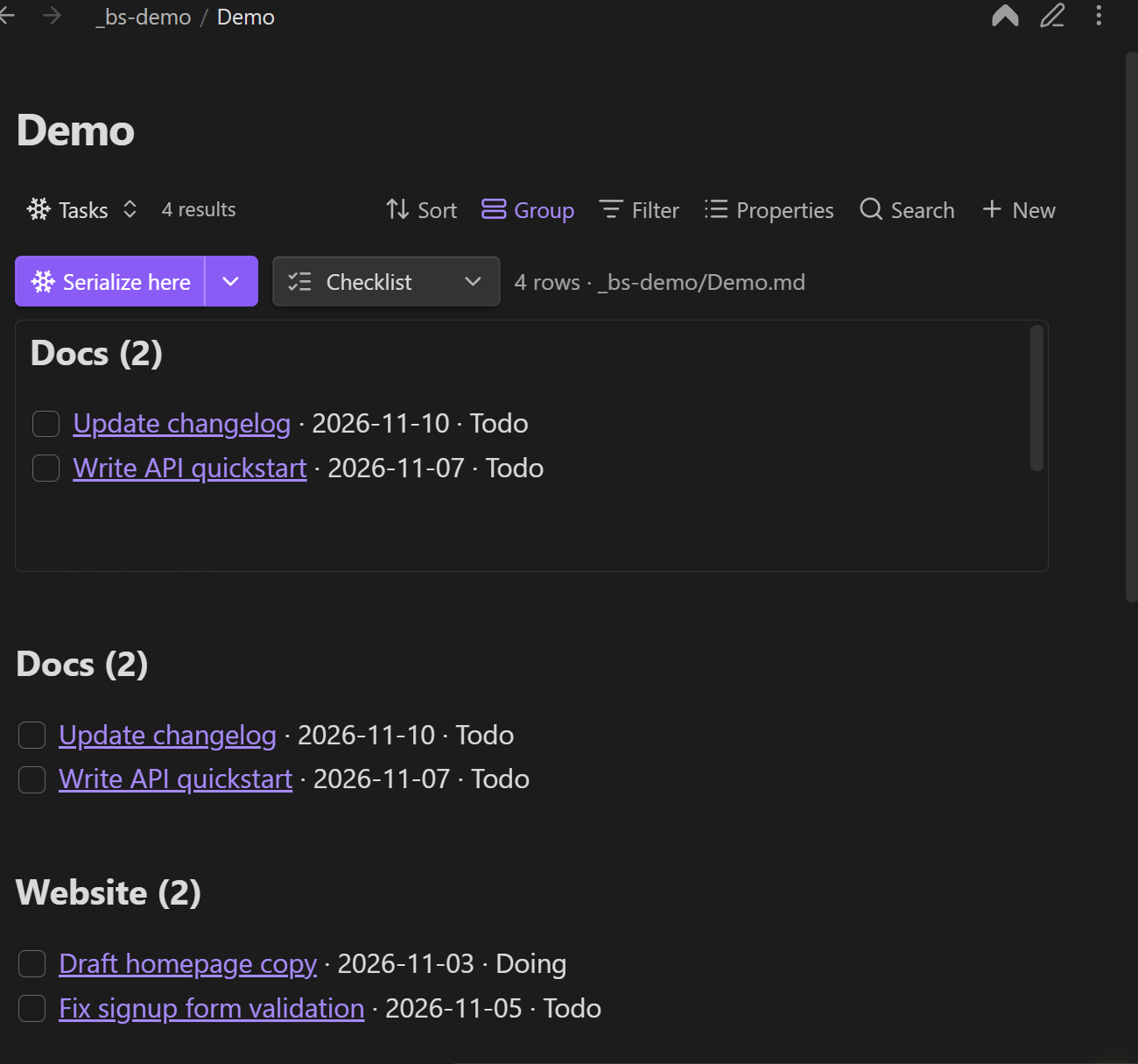 |
| Before — a live base embed | After — frozen Markdown, groups and all |
Install
BRAT (recommended while unreleased)
- Install BRAT and add
pedroilidio/obsidian-bases-serializer.
Manual
- Download
main.js,manifest.json, andstyles.cssfrom the latest release. - Copy them into
<vault>/.obsidian/plugins/bases-serializer/. - Enable Bases Serializer in Settings → Community plugins.
Requires Obsidian 1.10.0+ with Bases enabled.
Quick start
Embedded (recommended)
- Add a Serializer view to your base (the view picker → Serializer ❄).
- Embed that base in a note:
![[tasks.base#Today]]. - Click ❄ Serialize here. The frozen Markdown is inserted directly below the embed, inside a sentinel block keyed to the view.
Keeping the snapshot next to the query it came from means the base is the source of truth: change the base, re-serialize, the note updates.
Standalone
- Open the base as its own tab.
- Set a Target note in the view options (and optionally a Section heading).
- Click ❄ Serialize now. The block is written to that note — under the heading if you set one, otherwise appended at the end.
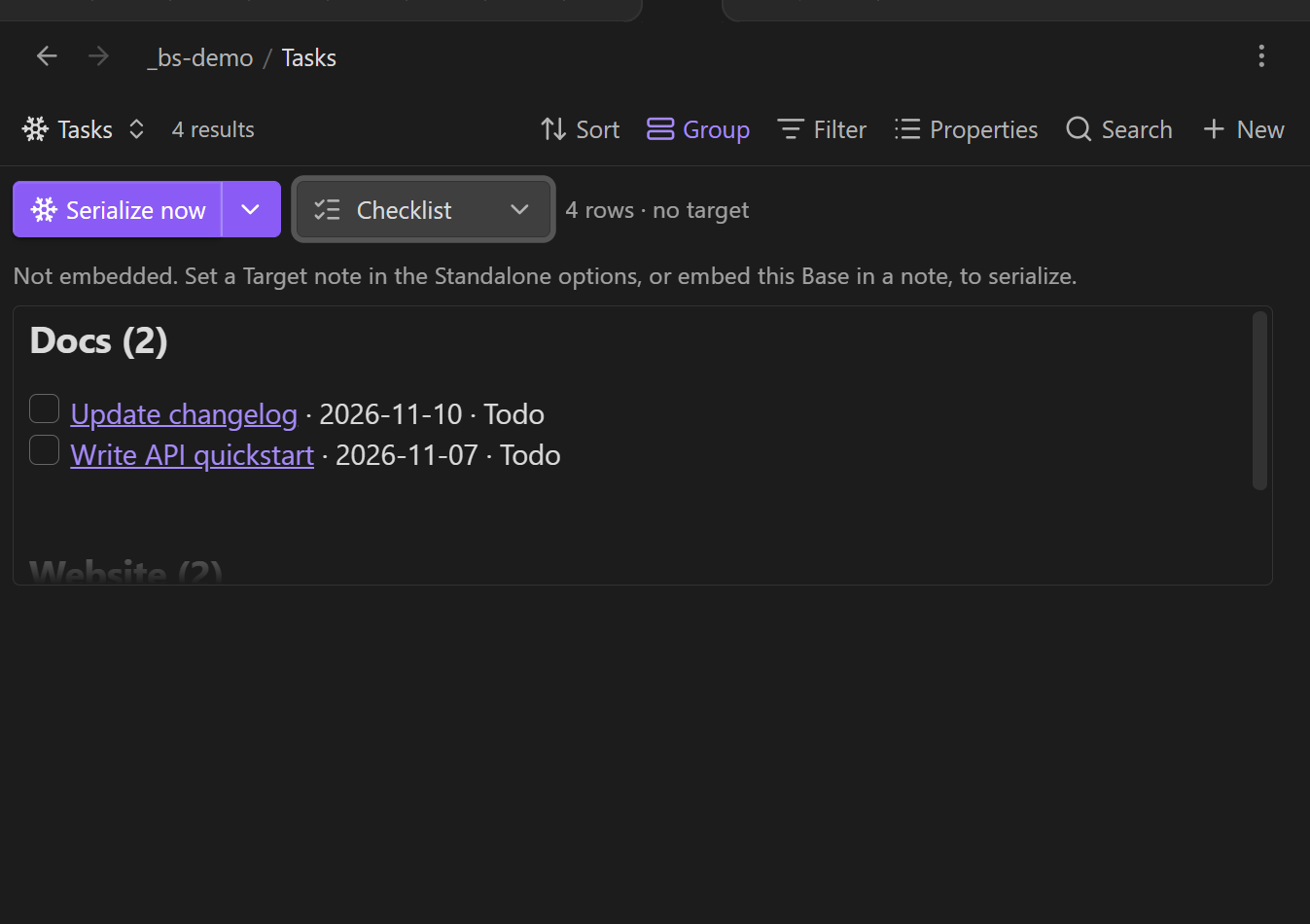
The toolbar
| Control | What it does |
|---|---|
| ❄ Serialize now / Serialize here | Writes the block. The label reflects the mode (standalone vs. embedded). |
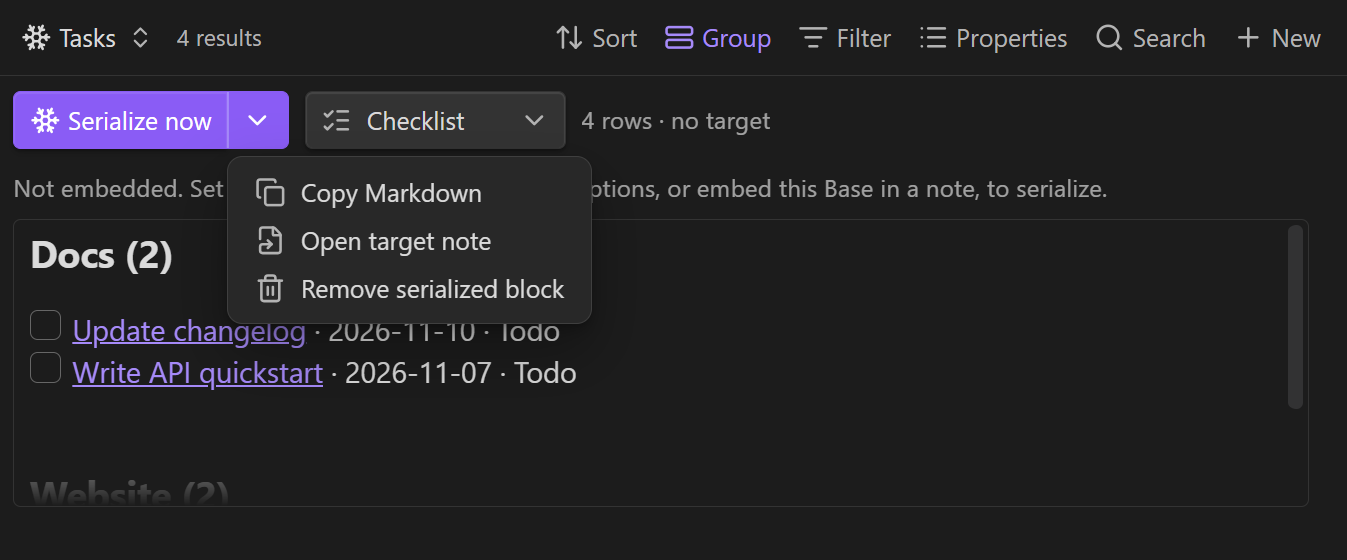
| ▾ | One-off actions: Keep live view, Freeze · replace embed with text (embedded only), Copy Markdown, Open target note, Remove serialized block. |
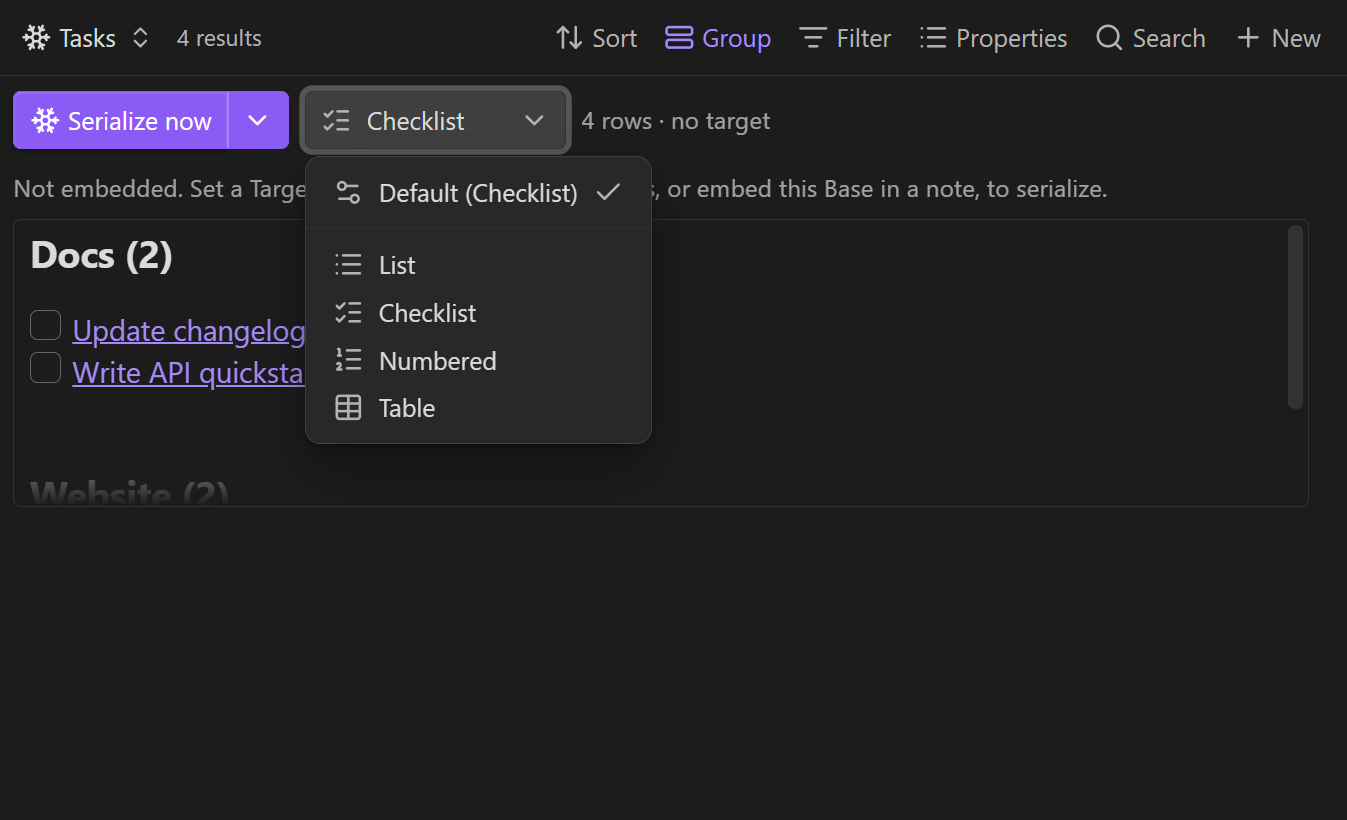
| Format | The format picker (icon + label). Opens a menu with Default (…) plus List, Checklist, Numbered, Table. |
- Format vs. Default format. The in-view Format picker is a per-view override; Default (…) clears it and follows the Default format set in the view options. The button always shows the effective format.
- Narrow panes. When the view is squeezed, the button labels collapse to icons (matching the native Bases toolbar), and the status text ellipsizes.
- Copy Markdown confirms with a toast.
- Command. Serialize the base in the active note does the same as the button, for whichever Serializer base is in the current note — handy as a hotkey or for automation.
View options
Standalone
- Target note — where to write when the view isn't embedded.
- Section heading — write the block under this heading in the target note (creates it if missing).
Output
- Default format —
List,Checklist,Numbered, orTable(the fallback for the in-view picker). - Link style —
Wikilink [[Note]](default),Markdown [title](path), orPlain text. - Row template — one template per row; overrides the format (see placeholders below).
- Heading / preamble — a line emitted above the block (e.g.
## Tasks). - Sentinel key — key for the block (defaults to the view name).
Item details
- Item details —
Hide(default),Inline(same line), orSub-items(nested bullets). - Detail properties — comma-separated ids/display names to show (empty = all columns).
- Details separator — used by
Inline(default·; verbatim, include your own spaces). - Show property names —
Due: 2026-10-13instead of bare values (default off). - Trailing property — appended to each checklist/numbered item as
— value.
Behaviour
- Group headings — emit a header per group from Bases' grouped results (default on).
- Group template — header template with
{group}and{count}(default### {group}). - No-results text — shown when there are no rows (default: the preview shows
(no rows)). - Preview max height — cap on the in-view preview (default
50vh). - Auto-serialize (embedded) — re-write (debounced) whenever the data updates.
- Freeze (replace embed with text) — swap the live
![[base#view]]for plain Markdown (no embed, no sentinels).
Row template placeholders
{link}, {title}, {path}, {index}, {group}, and any property by id
({note.due}) or display name ({Due}) — case-insensitive.
- {link} — {note.due} ({note.status})
Output format
Everything is wrapped in HTML-comment sentinels:
%% bases-serializer key="Today" format="checklist" %%
- [ ] [[Notes/Foo]] — 2026-10-13
- [ ] [[Notes/Bar]]
%% /bases-serializer %%
Only the block whose sentinel key= matches is replaced on re-serialize;
everything else in the note is left untouched, and multiple blocks per note are
supported. Set a custom Sentinel key to keep several independent snapshots.
Freeze takes it further: instead of a sentinel block it drops the plain
Markdown in place of the embed line itself — no %% markers, no ![[…]] left.
That's ideal for a final, "baked" note.
Development
npm install
npm run dev      # esbuild watch -> main.js
npm run build    # typecheck + bundle
npm test         # unit tests (sentinels, rendering)
Pure logic lives in src/sentinels.ts (block upsert/strip/freeze) and
src/render.ts (formats, templates, groups) with no Obsidian imports, so it
is unit-tested without the app. The Bases view wrapper lives in src/main.ts.
See ARCHITECTURE.md for a guided tour — the file map, the data flow, how to add a format or an option, and the traps worth knowing about.
Notes & limitations
- Requires Obsidian 1.10.0+ (the public Bases API).
QueryControlleris opaque, so this must be a view type — it can't serialize the built-in Table/Cards view directly. - Read-only with respect to the queried notes: it only ever writes the target note (or, on freeze, the note containing the embed).
Listrenders bare bullets; useChecklistfor- [ ]tasks.
Support
If Bases Serializer saves you time, you can buy me a coffee — it keeps the ❄️ in shape.
Acknowledgements
The code was written in pair-programming sessions with an AI assistant —
OpenCode driving DeepSeek V4.1 Flash — under my direction. The design, scope,
trade-offs and every product decision are mine; the implementation was largely the
assistant's. ARCHITECTURE.md is the map I use to maintain it, and changes authored
by the assistant carry an Assisted-by: trailer in git.