Bases Content Cards
 Marcel Schwarz1 downloads
Show notes as cards in Bases, using each note's own content as the cover instead of an image.
- Overview
- Scorecard
- Updates2
An Obsidian Bases view that shows notes as cards — using the note's own content as the cover, where the built-in Cards view puts an image.
Bases can tell you a note's name, tags and dates. It cannot show you a single sentence of
what the note actually says: there is no file.content, and no way for a plugin to add a
column to the built-in table. This view reads the body itself and puts it where you can
see it.
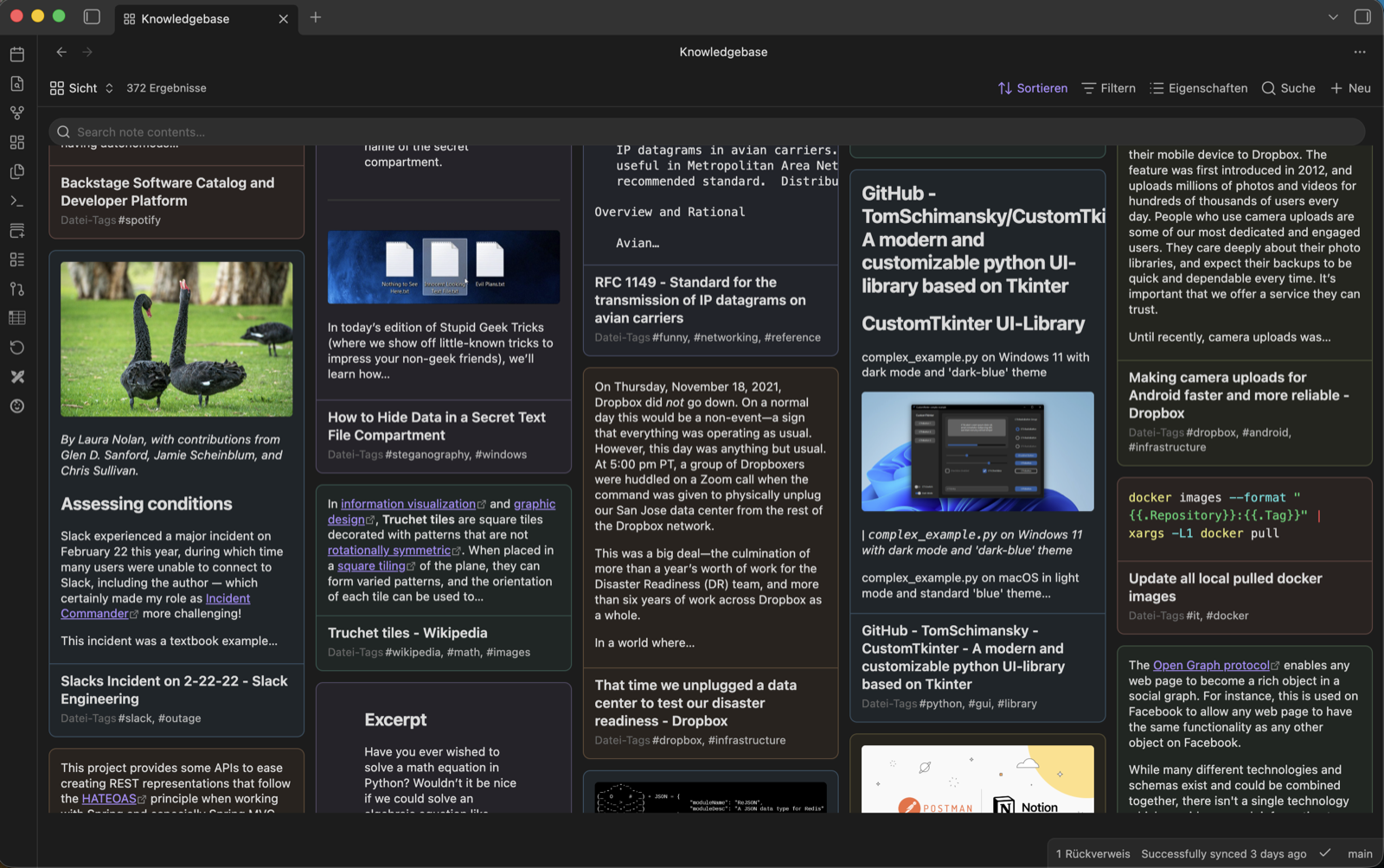
A .base of saved articles, with markdown rendering and the subtle tint on. Each card is as
tall as the note it shows, and the box at the top searches the text on the cards, not their
titles.
Requires Obsidian 1.10.0 or later (the Bases view API).
Install
From a release. Download main.js, manifest.json and styles.css from the
latest release and
put all three in <vault>/.obsidian/plugins/bases-content-cards/. Or point
BRAT at
iCaotix/obsidian-bases-content-cards and let it handle updates.
From source.
npm install
npm run build
npm run install-to-vault -- "/path/to/your/vault"
That copies the same three files into place. To update, run the three commands again.
Either way: enable Bases Content Cards under Settings → Community plugins, then add a
Content cards view to any .base.
What it does
- Content as cover. Whole body, a named section (
#Summary), or a block (^abc123). - Cards sized to their content. Height comes from the note's file size before anything is read, so cards claim the right space up front and the grid does not jump as text arrives. Once the text is there the card is measured and fitted to it — and measured again whenever the columns change width.
- Everything else stays Bases. Filters, sorting, grouping and which properties appear under the cover all come from the normal Bases toolbar.
- Click anywhere on a card to open its note; Cmd-click or middle click opens a new tab. Links inside a markdown-rendered cover still go where they point.
- Your place in the grid is kept. Open a note, come back, and the grid is where you left it — as it also is after an edit elsewhere in the vault rebuilds the view, and after a search has emptied the grid down to a handful of cards and given it back. It is the note at the top edge that is put back, not a pixel offset, and the tab remembers the heights it had fitted, so a card a thousand cards down lands where it was. Kept per tab, so two tabs on the same base do not drag each other around.
- Search inside the notes. The box above the grid matches the note body, not just its name. Cards that miss are hidden, hits are highlighted, and a card whose hit lies past the excerpt re-points its cover at the passage that matched. Open a result and come back and the search is still there, still where you left it.
Search
Bases has a search of its own, in the toolbar, and it works on these cards already — but it can only see the properties the view is showing, because that is all Bases can see. The box in this view is the other half: it reads the body.
The two compose. The toolbar narrows by name and properties, this one narrows further by content, and either works alone.
Worth knowing:
- It searches the cover's text — the whole body with the default
:selector, or just the section when the cover is#Heading. What the card is about is what you search. - It can only narrow what the base already returned. A note excluded by the base's filters cannot be searched back in.
- The first search reads every note in the base rather than only the visible ones. That is a one-time cost per note, shared with the covers.
- While searching, covers are plain text even with markdown rendering on: a highlight has to go around a range of characters, and rendering scatters those across a tree.
- Results start at the top, and emptying the box puts you back where you were before you searched — the detour costs you your place in the base no more than opening a note does.
- The search survives opening a result. Click a card, read the note, come back: the query
is still in the box and you are still where you were in the results. Kept per tab and only
while the tab is open — a query is a question you are asking now, not a setting, so it is
never written to the
.base.
Options
Set per view, in the Bases view config:
| Option | Meaning |
|---|---|
| Cover | : whole body · #Heading a section · ^block-id a block · 12:20 line range |
| Cover override property | A note property whose value replaces the cover selector for that note |
| Cover length | Characters before truncation (default 300) |
| Render markdown | Off by default — plain text is faster and reads fine at excerpt size |
| Wrap long titles | Off by default — a title too long for its card is cut with an ellipsis. On, it wraps in full and the cover gives up the room |
| Open notes in a new tab | Off by default — a click opens the note in the base's own tab. A modifier still wins over this |
| Card tint | None, subtle or strong — each note gets a hue from its path, so the colour is stable across sorts and reopens but means nothing in itself |
| Card height | Fit to content, or uniform |
| Maximum card height | Small…extra large, or unlimited — a card then grows to fit its whole cover |
Line ranges are supported but discouraged: they silently point somewhere else as soon as a note is edited above them. Headings and block IDs survive editing.
Quote the value in frontmatter. Selectors collide with YAML syntax — a bare : is
invalid, and a bare # starts a comment, so the property ends up empty and the view falls
back to its own setting:
---
cover: ":"        # not  cover: :
---
---
cover: "#Summary"   # not  cover: #Summary
---
Development
npm install
npm run dev     # esbuild watch → main.js
npm test        # the pure logic, runs in Node without Obsidian
npm run build   # typecheck + production bundle
npm run lint
src/selector.ts and src/search.ts have no Obsidian imports, and everything else that only
needs its types — the option coercions, the span arithmetic, the per-tab memory — is tested in
plain Node too. Edge cases in tests, appearance in the dev vault.
See docs/dev-workflow.md for the full setup (separate dev vault, symlink, hot reload, releasing).
Docs
| Document | Contents |
|---|---|
| docs/decisions.md | The choices that shaped the plugin, newest first |
| docs/bases-api.md | What the Bases plugin API does and does not offer, with sources |
| docs/dev-workflow.md | Building, running and releasing it |
| docs/roadmap.md | What could come next, and what deliberately will not |
Status
In daily use. The view is read-only: it never writes to your vault. It makes no network requests, collects no telemetry, needs no account, and reads nothing outside the vault you opened it in — everything it shows comes from notes the base already returned.
Known limits:
- Non-markdown files in a base (attachments) show as cards with no cover. There is nothing to read from them.
- Cards do not slide up into the gap at the end of a row. That is the price of laying them out with grid spans rather than JS — see docs/decisions.md.
- No image covers. A note's first embed as the cover is on the roadmap, not in this release.
- Properties under the cover are shown, not editable. Also on the roadmap, and the largest thing missing.
License
0BSD — use it, change it, ship it, no attribution asked for.