Basecamp Sync
 fodoj25 downloads
Sync selected notes and folders to formatted Basecamp documents.
- Overview
- Scorecard
- Updates8
Publish selected Obsidian notes as formatted documents in Basecamp Docs & Files. Edit a note and push it again to update the same document.
Built by mkdev. MIT licensed. Uses the official Basecamp TypeScript SDK.
Works on desktop and iOS with Obsidian 1.11.4 or later. Connect once on each device, choose a Basecamp destination, and preview the notes you want to publish.
Accounts, network access and privacy
The plugin is free and MIT licensed. You need a Basecamp account with permission to write to the destination project; Basecamp's own account and plan terms apply. The shared mkdev integration needs no separate app registration or plugin subscription.
- Basecamp API (
3.basecampapi.com): receives selected note titles, rendered text and optional embedded attachments, and supplies accounts, projects and existing documents for sync. - 37signals Launchpad (
launchpad.37signals.com): handles Basecamp sign-in and authorization. - mkdev login service (
basecamp-obsidian-sync.fodoj.com): exchanges authorization codes and renews tokens for the shared integration. It is hosted on Cloudflare and processes credentials during these requests; note text and attachments go directly to Basecamp. Its implementation is maintained in mkdev's private infrastructure repository and is not included in this open-source plugin. You can use My own integration to connect directly instead, or configure an organization-operated compatible login service.
There is no client telemetry or analytics. The plugin does not read files outside your vault; credentials are stored through Obsidian's device-local Secret storage. It makes no network requests on load. See Privacy for data handling and Authentication for login options.
What it does
- Select folders, individual Markdown files or glob patterns; exclusions take precedence.
- Create Basecamp documents and update their title and content in place.
- Optionally create matching Basecamp folders for new documents.
- Map a source folder in your vault into the chosen Basecamp destination, preserving only its subfolders.
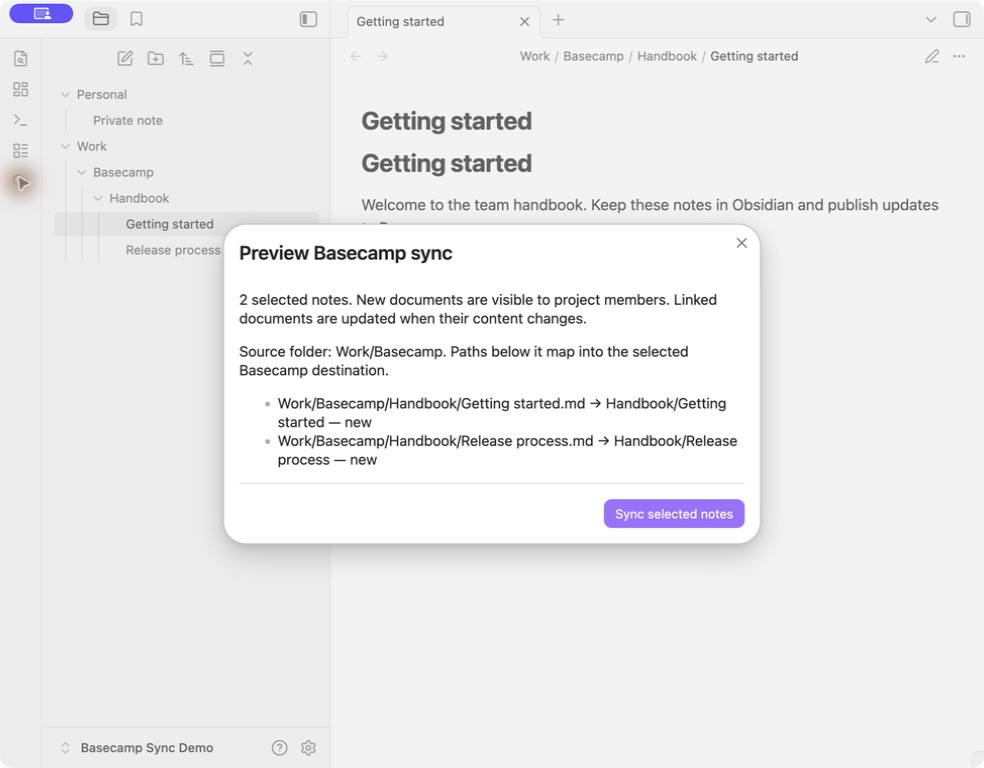
- Preview your selection and the converted formatting before sending anything.
- Sync manually, or after a configurable delay following edits on a particular device.
- Preserve headings, emphasis, lists, checkboxes, quotes and code blocks. Convert tables to readable labeled rows.
- Upload local embedded images and files, and connect links between synced notes.
- Check for edits in Basecamp before replacing a document. Pause after an uncertain first upload to prevent duplicate documents.
The plugin uses Obsidian APIs and browser APIs only. Desktop and iOS have been exercised; Android is supported by the same mobile-compatible build but has not been tested on a physical device. There is no background process, periodic polling, framework or AI dependency. The production bundle is approximately 364 KiB uncompressed, including third-party license notices.
Install
Community directory
The Basecamp Sync Community listing is public. In Obsidian, open Settings → Community plugins → Browse, search for Basecamp Sync, then choose Install and Enable.
The initial automated review completed on 2026-09-08 with no blocking errors. New entries can take up to 24 hours to appear in the app. If it is not listed yet, use BRAT or the release files below.
BRAT (desktop and mobile, available now)
- Install and enable BRAT from Obsidian's community plugins. Use BRAT 2.2.0 or newer and Obsidian 1.11.4 or newer.
- Run BRAT: Add a beta plugin for testing, or use Add beta plugin in BRAT's settings.
- Enter
https://github.com/mkdev-me/obsidian-basecamp-sync(the short formmkdev-me/obsidian-basecamp-syncalso works). Use this HTTPS address, rather than the SSH clone address. - Select Latest version, enable Enable after installing the plugin, then add the plugin. Select a specific version instead if you want to pin it.
- Open Settings → Basecamp Sync and connect to Basecamp.
BRAT installs the files and can check for future releases. The same process works on desktop and mobile, without building the plugin or copying files manually. The public repository does not require a GitHub token. A token can still help with GitHub's API rate limits.
Already using BRAT? If you pinned an earlier version, switch it to Latest version to receive updates. Basecamp authentication is separate from any GitHub token used for downloading releases.
Manual installation or local development
- Run
npm ci && npm run package, or obtain the three plugin files from a release. - Copy
main.js,manifest.jsonandstyles.cssfromdist/basecamp-sync/into<vault>/<config-folder>/plugins/basecamp-sync/. The default config folder is.obsidian. - Enable community plugins, then enable Basecamp Sync.
On mobile, transfer the same files into the vault's plugin folder with your vault/file sync tool. Ensure custom plugin files actually reach the device; syncing note text alone is insufficient. Restart Obsidian if the plugin does not appear. No computer or Node.js runtime is needed to run the installed plugin.
Connect
Open Settings → Basecamp Sync and choose a login method:
| Method | Who registers an integration? | Notes |
|---|---|---|
| Shared mkdev integration | mkdev, once (registered) | The service URL is filled in automatically. Click Connect to Basecamp, then sign in and approve access. No app credentials are needed. You can override the URL for your own hosted service. |
| My own integration | The user or their organization | Enter the client ID, select the client secret in Obsidian Secret storage, and set the registered redirect URI. |
| Existing access token | No new registration if you already have a valid bearer token | Advanced option. Replace the token yourself when it expires. |
See authentication and integration setup for the complete instructions. Connect once on each device, even if your vault and plugin settings have already synced there. The plugin refreshes OAuth tokens automatically after that initial sign-in. Tokens and private client secrets are stored in Obsidian's device-local Secret storage, outside plugin data.json and note properties. This storage is shared with other plugins in the vault; it is not a separate password-manager security boundary.
Choose what to sync
Connect, then Load accounts and choose an account.
Load projects and choose a project. Its Docs & Files root is selected automatically. To use a specific Basecamp subfolder, replace the destination ID with that folder's ID.
Add one selection per line under Include, for example:
Work/Handbook
Projects/Launch.md
Meeting notes/**/*.md
Add exclusions, if needed:
Work/Handbook/Private
**/Drafts/**
Use Preview selection, then Sync selected notes.
An empty include list syncs nothing. Paths are case-sensitive and relative to the vault. A folder includes all its descendants. Globs support * for a single path segment, ** across folders and ? for one character. **/*.md selects all Markdown notes except hidden paths and exclusions. The current-note command also respects these selection rules.
To keep a note private regardless of folder selection, add this property:
basecamp_sync: false
Set Source folder to the vault folder that should map directly into your Basecamp destination. With Preserve folders enabled, only the folders below this root are recreated. Your local folders and notes stay where they are. For example:
| Setting or path | Value |
|---|---|
| Source folder | Work/Basecamp |
| Include | Work/Basecamp/Handbook |
| Local note | Work/Basecamp/Handbook/Getting started.md |
| Basecamp location | Handbook/Getting started below the chosen destination |
Include and exclude patterns remain relative to the vault root, including the source folder prefix. Notes outside the source folder cannot sync. Leave Source folder empty to preserve paths from the vault root, as earlier versions did. Turn Preserve folders off to put every new document directly in the destination.
Existing Basecamp folders with exactly matching names are reused; ambiguous duplicates stop that note's sync. Preview selection shows where each new document will go. Changing Source folder affects new documents; already linked documents keep their current Basecamp location. Move those in Basecamp and link the note to the resulting document URL if its ID changes. The plugin never moves or deletes existing remote documents automatically.
New documents are published as active documents visible to project members, with client visibility off and an empty subscriber list. Basecamp still controls its own activity feeds, permissions and notification behavior. Existing documents retain their visibility and subscriptions.
Update and link existing pages
The plugin writes a small basecamp_sync object to each published note's properties. It stores the destination, document identity and sync fingerprints. Keep those properties with the note when syncing your vault between devices. They contain no login credentials and are omitted from the published body.
Published documents contain the rendered note content, without an added source link, folder link or hidden sync marker. After upgrading from a version that added a footer, the next sync removes it from selected linked documents, including unchanged notes. Existing conflict checks still protect edits made in Basecamp.
- Edit a note and run Sync current note or Sync selected notes. Unchanged notes make no network requests.
- Renaming or moving a linked note updates the same document. It does not relocate Basecamp folders or documents.
- To take over an existing page, run Link current note to existing document and supply its document URL or ID. The next sync replaces its title and content with the note.
- If Basecamp has changed, review those edits and copy anything you want to keep into Obsidian. Link the note again to explicitly accept Basecamp's current version as the new baseline, then sync.
- A sync report shows each error and formatting limitation; failures are isolated to individual notes.
Copying a note also copies its identity. Remove basecamp_sync from the copy before syncing it as a new document. To intentionally publish a linked note to a different destination, remove its sync properties after reviewing its original Basecamp page. That creates a new document and leaves the old one intact.
Formatting
| Obsidian content | Basecamp result |
|---|---|
| Paragraphs and line breaks | Blank lines between paragraphs; single newlines remain line breaks |
| Headings | Basecamp heading style; heading levels flatten because its documented HTML subset only includes h1 |
| Bold, italic, strike, lists, quotes | Native rich text |
| Task lists | Readable checked/unchecked symbols; not Basecamp to-dos |
| Fenced code | Escaped, preformatted text; no execution or syntax highlighting |
| Inline code | Emphasized text because Basecamp strips code |
| Tables | Labeled rows with cell formatting and links preserved |
| Wiki links and Markdown note links | Basecamp links when the target is synced to the same destination; otherwise Obsidian links |
| Local embedded images/files | Native Basecamp attachments, up to 20 MB per file |
| Remote images | Clickable external links; the plugin does not download them |
| Embedded notes | Links, without publishing the embedded note's contents |
| Callouts | Blockquotes with their callout label |
Properties and %%comments%% |
Omitted |
| Raw HTML | Escaped text |
| Math, diagrams and third-party renderers | Source text or code blocks; no third-party execution |
Attachments referenced by a selected note may live outside your include folders. Turn off attachment uploads if you only want to publish text. Ordinary local file links remain Obsidian links; embed a file to upload it. Basecamp may sanitize custom Obsidian URI links; links between synced documents use ordinary HTTPS URLs. Heading/block links point to the document because Basecamp does not preserve Obsidian anchors. A full sync makes one additional pass after creating documents so links between newly published notes can resolve.
The local formatting preview never uploads anything. Final rendering in Basecamp may differ slightly because Basecamp sanitizes and normalizes HTML.
Scope and limits
- One-way publication. Obsidian supplies the text. The plugin does not import edits from Basecamp or delete remote content when a note is deleted, moved or excluded.
- One destination per vault configuration. Select as many note sets as you need within it. Use another vault for an independent destination.
- One active writer at a time. Basecamp's document API has no atomic conditional update or create idempotency key. Checks reduce accidental overwrites, but cannot prevent two simultaneous clients from racing. Enable automatic sync on one device and wait for vault synchronization before switching devices.
- Foreground operation. iOS and Android may suspend Obsidian. Sync runs while the app is open. Credentials and pending login state survive restarts, but an interrupted operation may require a manual retry.
- Unknown create outcomes. A pending flag is saved in the local note's properties before creating a document. If the response is lost before its document ID is saved, sync stops rather than retrying the upload or guessing which document was created. Inspect Basecamp and use Link current note to existing document, or remove the note's sync properties only after confirming that no page was created.
- Attachments. Per-document attachment references are cached in plugin data, content hashes avoid re-uploading unchanged files on the same device, and the HTTP cache is bounded and kept in memory. Another device may upload an attachment again if that cache did not sync.
- API support. This uses the current Basecamp API, not Basecamp Classic or Basecamp 2.
Development
Requires Node.js 22.12+ for development.
npm ci
npm run check    # Obsidian lint rules, behavior tests, typecheck, mobile bundle audit
npm run dev      # Watch and rebuild main.js
npm run package  # Validate and prepare dist/basecamp-sync/ plus a ZIP
See CONTRIBUTING.md, architecture, privacy and the release checklist. No credentials are needed for automated tests, and the test suite does not contact live Basecamp.