Auto Tag Graph Colors
 Tristan Cassius729 downloads
Automatically assign distinct, stable colors to every tag in the graph view. Includes smart tag blending, monochrome mode, and heat coloring by connection count.
- Overview
- Scorecard
- Updates3
🎨 Auto Tag Graph Colors
Automatic, intelligent color groups for the Obsidian graph view. Zero configuration. Instant results. Beautifully organised.
A side project by Meetzy Corp FZCO — powered & built by the Meetzy team.
✨ What it does
Obsidian's built-in graph view lets you assign color groups to your tags — one at a time, by hand, forever. That's fine for 3 tags. It's unusable for 89.
Auto Tag Graph Colors solves this in one click:
- Scans every tag in your vault
- Assigns each tag a stable, distinct color from the palette of your choice
- Paints the graph view — in real time as you edit notes
- Keeps everything in sync as tags come and go
Your knowledge graph becomes a color-coded map of your thinking, automatically.
📸 See it in action
Normal mode — one color per tag
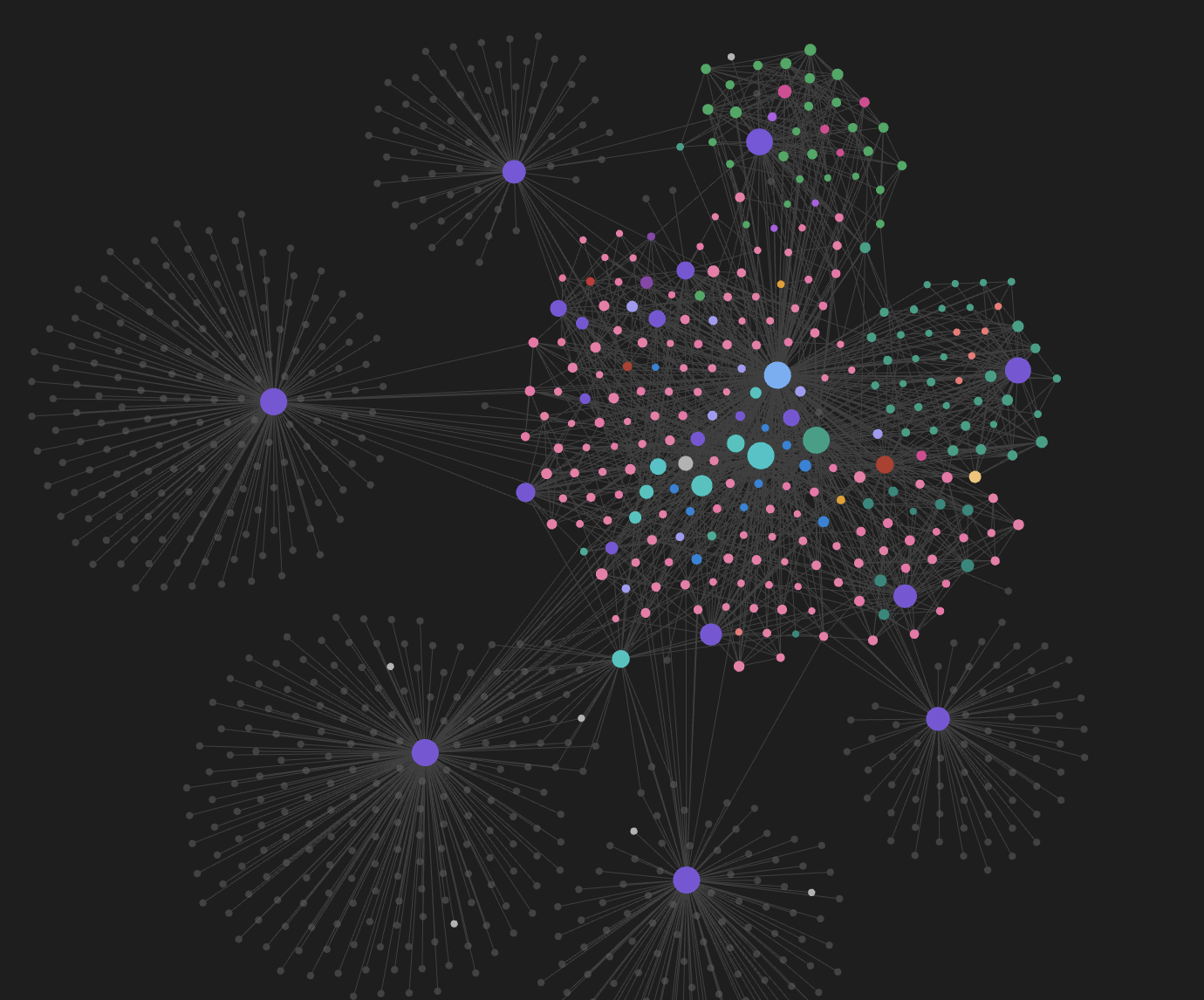
Every tag is assigned a distinct, stable color from the selected palette. A rainbow map of your entire knowledge base at a glance.
🔥 Heat mode — color by connections
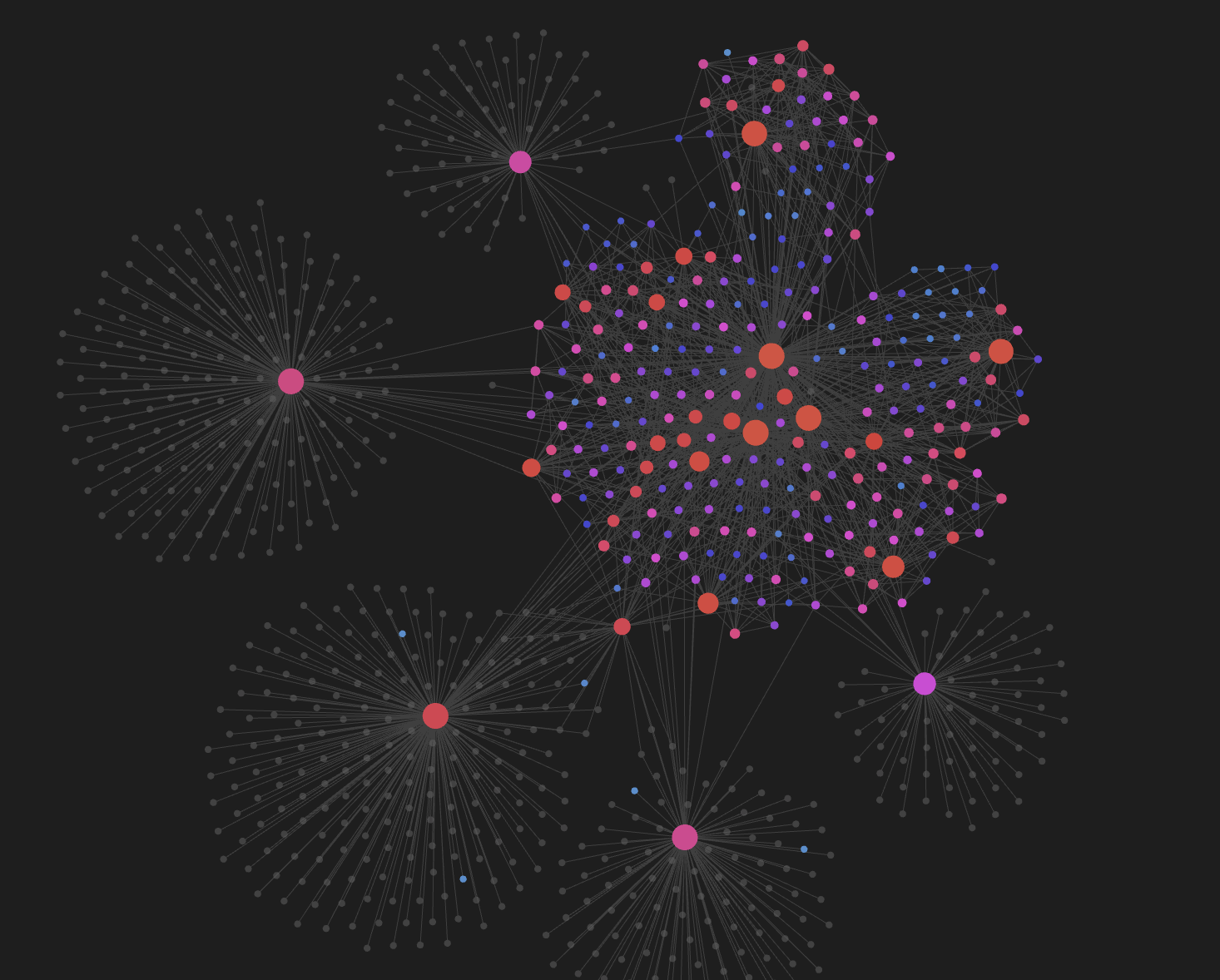
Nodes fade from cold (few links) to hot (many links) through a smooth blue → purple → red HSL gradient — never through muddy green. Percentile ranking means outliers don't crush the scale: your hubs pop, your peripheral notes stay legible.
🎨 Monochrome mode — one aesthetic, endless nuance
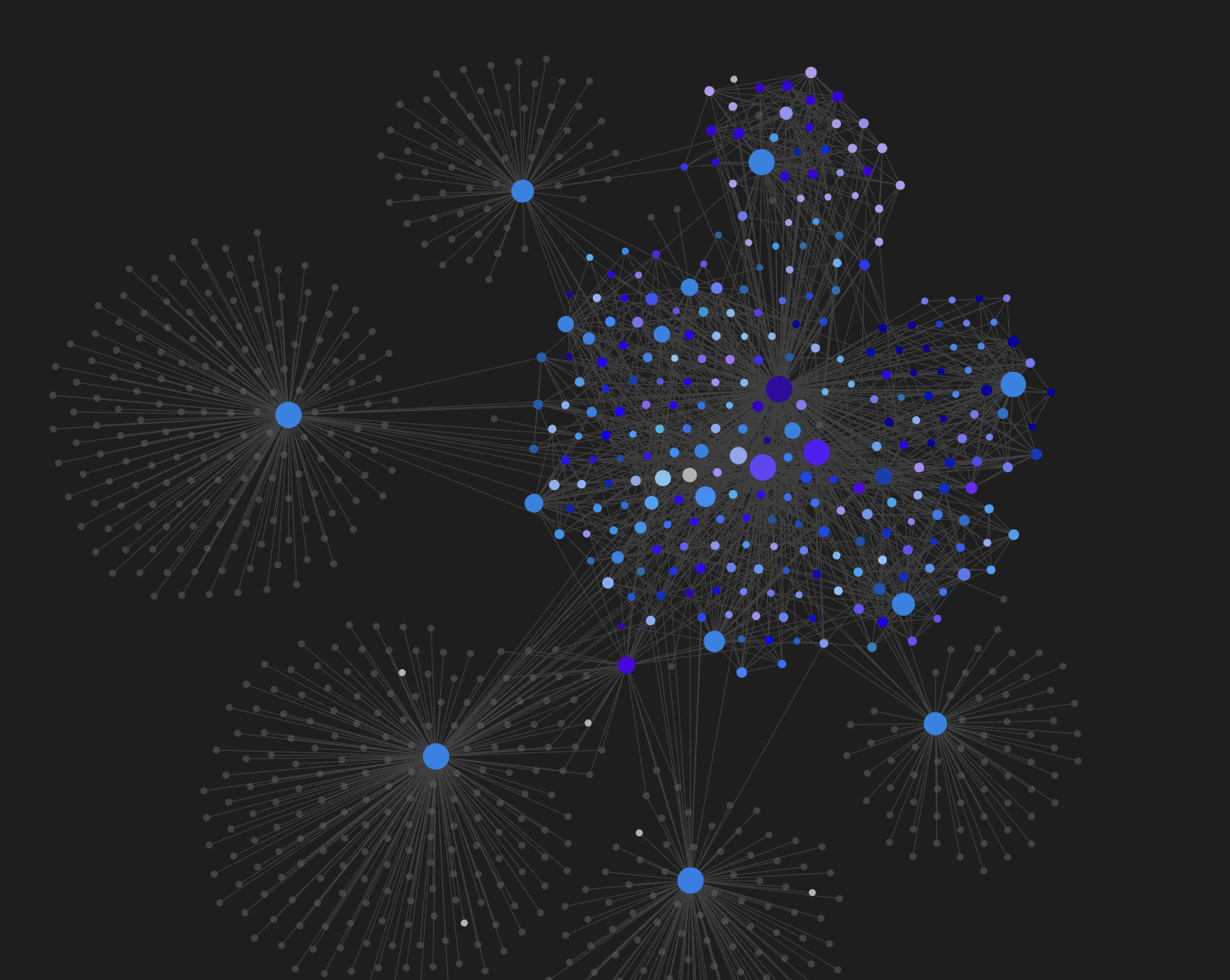
Pick a base color and every note becomes a shade of it. Different tag combinations still get distinct, deterministic variations (lightness · saturation · subtle ±30° hue drift), so nothing looks flat — but everything looks yours.
🎯 Key features
🎨 Six color palettes
Modern · Pastel · High Contrast · Dark Mode Optimised · Colorblind-Friendly (Wong 2011) · HSL Generated (golden-angle)
🧠 Three color modes
| Mode | Behaviour |
|---|---|
| Primary | The first tag in the note wins the color |
| Priority | You define an ordered list; first match wins |
| Multi | Falls back to Primary (Obsidian graph limitation) |
🌈 Smart Tag Blending
Each note gets its own color, blended from its full tag set:
- Base = primary tag color
- Subtly shifted toward the average hue of secondary tags
- Deterministic lightness/saturation variation per unique tag combo
- Notes sharing identical tag sets get identical colors
🎨 Monochrome sub-mode
Force every note to a variation of a single chosen color. Different tag combos still get distinct shades — perfect for a clean, cohesive aesthetic (e.g. an all-blue vault).
🔥 Heat coloring by connections
Percentile-ranked, HSL-interpolated, and outlier-resistant. See screenshot above.
🏷️ Legend overlay
A collapsible legend in every graph view pane, sorted by tag frequency, with a native color picker per tag. Fully mode-aware — the swatches show exactly what the graph shows.
🔒 Locks, priorities, exclusions
- Lock a color so it's never auto-regenerated
- Prioritise tags for the "Priority" mode
- Exclude tags that appear everywhere (
#meetzy,#daily,#template…)
⚡ Real-time everything
Add a tag, remove a tag, rename a note — the graph updates itself. Change a palette in settings, the graph repaints instantly. No "Apply" button anywhere.
🧹 Clean uninstall
Disable the plugin and every color group it created is automatically removed. Your manually-added groups are preserved.
⌨️ Commands
| Command | What it does |
|---|---|
| Scan vault and apply tag colors | Rescans the vault and re-applies all colors |
| Regenerate all tag colors | Wipes and regenerates every unlocked color |
| Toggle tag color legend | Shows or hides the floating legend |
| Log graph info to console | Prints internal state to DevTools (for support) |
All commands are available from the command palette. You can bind any of them to a hotkey in Settings → Hotkeys (search for "Auto Tag Graph Colors").
📦 Installation
From source
git clone https://github.com/Trisko06/auto-tag-graph-colors.git
cd auto-tag-graph-colors
npm install
npm run build
Then copy main.js, manifest.json and styles.css into:
<your-vault>/.obsidian/plugins/auto-tag-graph-colors/
Reload Obsidian → Community Plugins → enable Auto Tag Graph Colors.
Community Plugin store
(Pending review — see the GitHub releases page in the meantime.)
🚀 Quick start
- Enable the plugin
- Open Settings → Auto Tag Graph Colors
- Pick a palette you like
- Click "Scan vault now" — done ✨
- Open the graph view — every tag is colored
That's the whole workflow. The rest is fine-tuning.
🛠️ Troubleshooting
Nodes stay grey after enabling. Open the graph view while running "Scan vault now" — the plugin needs a live graph view to inject colors into.
A tag colors everything the same. That tag is probably present in almost every note. Add it to Excluded tags in the settings.
Heat coloring looks flat. Percentile mode is on by default. If one node is way more connected than the rest, that's expected — percentile spread is proportional to the number of distinct connection counts.
The color picker in the legend closes when I click it. Fixed in v1.0.x — make sure you're on the latest build.
Still stuck? Run "Log graph info to console" from the command palette, open DevTools (⌘⌥I), and share the output.
🏢 About Meetzy
Turn leads into clients. Powered by AI.
Meetzy is the AI-native operating system for small businesses that want their marketing to actually turn into revenue.
We built it because founders and small teams don't need another disconnected tool — they need one clear flow from first touch to closed deal:
| 🎯 Marketing OS | AI-powered social media, email campaigns, audience targeting — content that attracts qualified leads on autopilot |
| 💼 Sales OS & CRM | Unified pipeline, deal tracking, AI-guided follow-ups, forecasting — every lead moves toward closing |
| 🎨 AI Content Studio | Generate images, videos, webpages, presentations — instantly, on-brand |
| ⚙️ Workflow Automation | One logic layer connecting marketing, content, and sales. Everything talks to everything |
| 🤖 John — Your AI Sales Employee | Autonomous prospecting, qualification, follow-up, and closing — with messages that actually feel human |
Save up to 92% vs. traditional stacks. Starting at €29/month.
"Meetzy helped me finally connect content, social media, and follow-ups in one place. Instead of juggling tools, I now have a clear flow from posting to conversations." — Amine B.
"Before, some leads just slipped through. Now it's clearer who we should reach out to and when. It gives structure without feeling like a complicated CRM." — Cyril C.
We build tools for teams who want to move fast, stay lean, and grow without adding chaos. This Obsidian plugin is a small gift back to the knowledge-worker community that inspires everything we do.
Curious? → meetzy.ai
🤝 Contributing
Issues, feature requests, and PRs are welcome. Please open an issue first for larger changes so we can discuss the approach.
📄 License
MIT © Meetzy Corp FZCO
Made with ❤️ by the Meetzy team · Dubai, UAE